
Recommended Free Tools
The Sigma Unicorn was a steel ATX mid-tower with a side window, four factory fans and room for several optical drives—but its front door hides the USB and audio ports, making routine access awkward. Hardware Secrets published its review on June 9, 2008; the page shows an update dated February 24, 2023. Today, the Unicorn makes the most sense as a restoration or retro-PC project, not as a straightforward modern gaming-case choice.
What is the Sigma Unicorn?
The Sigma Unicorn is a computer case, not the unrelated Sigma-branded products or uses of “unicorn.” Hardware Secrets reviewed it under the Sigma Unicorn name, while Newegg’s archived listing identifies the model as SIGMA UNICORN-WB. That listing describes an ATX mid-tower with a 1.0 mm SECC steel chassis. (Hardware Secrets review; Newegg product listing)
Sigma Unicorn specifications
| Feature | Reported specification |
|---|---|
| Model name | Sigma Unicorn; retailer model SIGMA UNICORN-WB |
| Case type | ATX mid-tower |
| Chassis | 1.0 mm SECC steel, according to Newegg’s listing |
| Dimensions | 20.50 in deep × 8.00 in wide × 17.80 in high, according to Newegg’s listing |
| Motherboard support | ATX |
| Power-supply position | Top-mounted |
| Expansion slots | Seven |
| External bays | Four 5.25-inch and two 3.5-inch |
| Internal 3.5-inch positions | Hardware Secrets reports five; Newegg lists four. The sources disagree, so check the actual case. |
| Factory fans | Two 80 mm and two 120 mm, as reported in the review |
| Front connections | Two USB ports and audio connections; accessible with the door open |
| Side panel | Dark transparent window |
Exterior design and construction
The Unicorn’s look combines a dark side window with a front door styled to resemble brushed aluminum. The review describes the door as aluminum at the front and plastic at the rear; the chassis itself is steel. Calling the entire case “aluminum” would therefore be inaccurate. The front also carries power and hard-drive activity LEDs, while the power and reset switches sit at the top of the door. Newegg’s listing describes a pull-down “butterfly” side-panel design. (Hardware Secrets review; Newegg product listing)
Newegg also lists a foldout motherboard tray, tool-less installation features and a roomy interior. Those are retailer-listed attributes, not independent measurements of rigidity, fit, or ease of assembly. The surviving specifications do not establish the condition of a used unit’s hinges, panel fit, or interior hardware.
#1 Best Overall

- MUSETEX offers a standout Y6 ATX PC case that comes with 7 pre-installed 120mm Infinity Mirror ARGB Fans—the 9th generation of MUSETEX’s upgraded prism fan series, also the market’s most popular and cutting-edge version of its kind; these fans generate continuous gradient rainbow light bands with seamless, silky-smooth color transitions, and they look far cooler than traditional ARGB fans; the case features 270° fully transparent dual tempered glass panels that offer a wider field of view than most comparable ATX cases on the market, perfect for showcasing your high-end PC hardware and beloved collectible figures, and sure to earn cool admiration from your friends
- PC Case Optimized Space Layout: The internal of Y6 computer case is divided in an orderly manner, skillfully laid out. The pc case offers full compatibility with ATX, Micro-ATX, and Mini-ITX motherboards. Support GPU up to 410mm (16.14"), CPU cooling height up to 160mm (6.3"), support top mounting up to 360mm liquid cooler, support PSU up to 230mm (9.05")
- ATX Case I/O Port Configuration: 1 x Type-C, 1 x USB 3.0, 1 x USB 2.0, Microphone & Audio, Power Button, Restart Button
- Gaming PC Case with Powerful Cooling & ARGB Lighting: The Y6 gaming pc case comes pre-installed with 7 speed-adjustable Infinity Mirror ARGB fans. which can be controlled by motherboard software, customized with various light modes for cool and colorful lighting!This fans use anti-vortex blades to ensure proper airflow; use software to control fans's speed with the stable air intake performance of side fans,fully regulate cooling effect,achieve better cooling performance than ordinary computer case, extend the service life of the hardware
- Computer Case Packing Contents: Y6 Case *1, PWM ARGB Fans *7 (3 reverse fans on the side, 3 reverse fans on the bottom, 1 forward fan on the back), Manual *1, Screw accessory*1. (NOT including motherboard, graphics card, power supply, radiator)
Drive bays and interior layout
Four 5.25-inch bays and two external 3.5-inch bays suited a 2008 build with a DVD drive, fan controller, card reader, or other front-bay accessories. Multiple internal 3.5-inch positions provided space for mechanical hard drives, and Hardware Secrets describes four of those positions as part of a removable cage. The review counts five internal positions overall, while Newegg’s table lists four; inspect the specific chassis rather than assuming a count. (Hardware Secrets review; Newegg product listing)
The removable cage could ease drive installation or maintenance, but the bay-heavy layout is less useful for most modern SSD-focused builds. Seven expansion slots and ATX support establish the basic motherboard and slot format; they do not establish clearance for a current oversized graphics card, a large tower cooler, or a radiator. Measure the individual case before buying components.
Rank #2

- Ample Interior: Explore ample interior space for Micro-ATX or Mini-ITX motherboards, ensuring easy and future expansion
- Components Clearance: Accommodates CPU coolers with a max height of 159mm, GPU cards up to 360mm, and PSU up to 160mm in length.
- Versatile Cooling: Maximize cooling performance with a 240mm liquid cooler and 5 fans.
- Modular I/O Panel: You have the flexibility to adjust its position at the front, top, or bottom on both sides
- Edge-To-Edge Panel: Show off your meticulous build through the transparent side panel with pride.
Cooling: four fans, but no modern performance evidence
The review reports two 80 mm fans and two 120 mm fans. Its description places a 120 mm fan near the hard-drive cage/front intake area and another at the rear as an exhaust. Newegg also lists 80 mm fans for CPU and graphics-card airflow. That mix was a respectable fan complement for an inexpensive enthusiast-oriented case in 2008. (Hardware Secrets review; Newegg product listing)
Fan count alone does not show how well a case cools. The Unicorn uses smaller 80 mm fans alongside 120 mm models, and its front door and front structure raise a reasonable question about intake restriction. The available reports provide no current temperature or noise measurements, so neither strong airflow nor quiet operation is established. If replacing fans, measure the mounts and check the connector type on the actual unit before ordering.
The Tool Desk
Outbyte Driver Updater FREEScan for outdated or missing drivers - takes under a minuteDriver Scan →Outbyte PC Repair FREERepair Windows errors before they cause bigger problemsFix Now →Rank #3

- FRAME Modular Case System - The revolutionary FRAME system gives new meaning to the word customization. Want to upgrade the motherboard tray to billet aluminum? Want to swap out your front I/O panel for more USB ports? Now you can. A case that can change and grow with your needs (or just your mood). The options are nearly limitless
- 3x CORSAIR RS ARGB PWM Fans - High-performance fans pre-installed in the front of case. Support daisy-chainable 4-pin PWM connections and Zero RPM mode for near-silent operation at low loads. Each Fan has eight LEDs and easily controllable with your motherboard’s +5V ARGB connector
- CORSAIR InfiniRail Fan Mounting System - This steel multi-point mounting system offers unmatched flexibility in front and roof fan configuration. Simply slide the rail to mount fans up to 200mm (140mm in the roof) wherever you like, ensuring targeted airflow
- Clean Lines or Turbo Cooled - The internal side panel near the motherboard tray can be used as a cable cover for clean cable management, or you can remove it and mount fans to the side for increased cooling potential
- 3D Y-Pattern Airflow Panel - Optimized for high airflow and minimal restriction, the steel front panel is perforated in three dimensions with a Y-pattern that provides a low-obstruction path for cool air
The main usability flaw: front I/O behind the door
The front USB and audio connections are usable only when the door is open. That turns an everyday convenience into a repeated interruption: USB devices require opening the door, while headset and microphone cables can catch or press against it. Leaving the door open during gaming or voice chat defeats the clean, closed-front look. Hardware Secrets notes one small plus: the two USB ports are spaced far enough apart for two bulky devices to fit without one blocking the other. (Hardware Secrets review)
A rear USB extension or an internal USB hub can reduce the inconvenience, but it is a workaround. The review also calls out the lack of eSATA and FireWire. Those interfaces are now legacy connections; the more lasting limitation is that this case predates front USB-C and the high-speed front-panel connections common in newer systems.
Rank #4
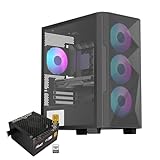
- Elegant Tempered Glass Side Panel: Showcase your build's internals with a sleek, modern aesthetic through the premium tempered glass window.
- Enhanced Cooling & Customizable RGB: Features a high-airflow design with 4x PWM ARGB fans, delivering superior thermal performance and vibrant, customizable lighting effects for a stunning visual display.
- Dedicated Back Panel Cable Management: Equipped with specialized cable routing clips on the rear panel for effortless organization, ensuring a clean and tidy build.
- Pre-Installed 80+ Gold 650W PSU: Includes a reliable, energy-efficient 80+ Gold certified 650W power supply, saving time and cost on separate purchases.
- Compact Micro ATX Design: Combines a space-saving black mid-tower footprint with elegant glass paneling, perfect for smaller spaces while highlighting your components.
What has aged well—and what has not
- Still useful: steel construction, ATX format, a side window, seven expansion slots, several fan positions, and numerous legacy drive bays.
- Showing its age: a 5.25-inch-heavy layout, mixed 80 mm and 120 mm fan sizes, front I/O hidden behind a door, and a top-mounted power supply.
A top-mounted PSU was common in older cases, but it puts the supply in the upper part of the chassis. The available specifications do not document modern cable-management provisions or clearances, so do not assume it will suit a build with long modular-power cables or large, heat-producing components. The retailer lists the case as sold without a power supply; select a replacement for the installed hardware, and do not reuse an unknown old PSU simply because it fits. (Hardware Secrets review; Newegg product listing)
Independent reader supportYour contribution helps us test, update, and keep practical guides available for everyone.What to check before buying or restoring one
Newegg’s archived listing currently marks the model out of stock; that does not establish whether used units are available elsewhere. No current market price is established here, so judge a listing by condition and completeness rather than treating an old retail specification as proof of value. (Newegg product listing)
Quick wins for a faster PC:
Repair Windows errors before they cause bigger problemsFix Now →Scan for outdated or missing drivers - takes under a minuteDriver Scan →Clear out junk files and repair common Windows errorsFree Scan →Quick Recap
Best Value

- After view MUSETEX item description,you will be pleasantly surprised by our configuration.Reasons:①Has 6 auto-adjustable speed PWM ARGB fans;②Computer cases Bestselers top10 are all old designs,none of which are as popular as our cases that have side opening door.No need to remove screws,can super easily open inner case to clean radiator and graphics card dust,also easy to put in different dolls.Friends will think your case is cool!
- 6 Highly Configurable PWM ARGB Fans Pre-installed- (1) Ensure your motherboard has a 3PIN rgb interface and use the motherboard lighting software to control the fans, each addressable ARGB fan can offer 16.8 million colors of special customizable lighting. (2) Adjustable speed PWM fans allow pc case for better silence and better cooling depending on demand. Also the fan with new upgraded bearings greatly extends the service life. Easy disassembly operation facilitates PC hardware assembly.
- Expensive Glass Side Door - Not only is it more stylish than other brands of gaming cases, but it also solves cooling problems much better. Tempered glass side panel with metal pull ring and magnets that can be opened at any time for 76% better cooling than non-side-opening mid-tower pc cases. Easily install internal PC components and place any hand puppet you like. Add to the fun!
- Large-space ATX mid-tower case - Meets the installation needs of over 95% of customers. Plenty of room to easily install the top 280 water drain without touching the memory sticks. Plenty of space for cable management in case, provides multiple HDD mounting slots, large storage capacity, maximum capacity 5*SSD+1*HDD/4*SSD+2*HDD.
- Meet the installation needs - the chassis provides a variety of graphics card installation methods. When the graphics card is inserted vertically, the design of the high-transparency glass door can show off your GPU very well. Compared with other chassis of the same type, the door can also be opened to increase the heat dissipation of the gaming cases. ability to protect the pc case hardware.
- Confirm the model, especially whether it is marked UNICORN-WB.
- Open and close the front door; inspect its hinges and latch for damage.
- Check that all four fans are present and spin freely, and verify their sizes and connectors.
- Inspect the removable hard-drive cage and its mounting hardware; count the actual internal drive positions.
- Look for missing 5.25-inch bay covers, rear expansion-slot covers, rust, dents, warped panels, and sharp internal edges.
- Confirm the motherboard tray and side panel are included and fit correctly.
- Inspect the front USB and audio cables for damage, and check whether their connectors suit your motherboard or require adapters.
- Measure graphics-card length, CPU-cooler height, PSU space, and any intended radiator location against the actual case. The published dimensions do not provide component-clearance figures.
- Check the PSU mounting area and plan for a known-good power supply appropriate to the build.
- Before installing high-heat components, verify that the front intake and fans can provide adequate airflow; the old fan count is not a thermal test.
Verdict by use case
- Retro PC or restoration: A plausible project if the case is complete, the period styling appeals to you, and the door and drive hardware work.
- Legacy optical-drive or storage build: The many bays may help, but verify the disputed internal-drive count and the condition of the cage.
- Modern gaming PC: Generally a poor fit. Current GPU and cooler clearance, airflow, and front-panel connectivity are not established, while the door makes routine I/O inconvenient.
- Collector purchase: Consider it only at a price that reflects an old, used enclosure, and inspect it in person or obtain clear condition evidence before paying a premium.
Product prices and availability are accurate as of the date/time indicated and are subject to change. Any price and availability information displayed on Amazon at the time of purchase will apply.

