
Recommended Free Tools
Yes, you can make a USB device connected to one computer available to another over Wi-Fi. The usual method is USB over IP: the device stays plugged into a server, and client software presents it to the other computer as a virtual USB device. Ordinary Bluetooth does not provide a universal way to carry arbitrary USB connections; use a device’s native Bluetooth support when available.
What “emulate a USB connection” can mean
There are three different goals that are easy to confuse:
- Use an existing USB device from another computer: USB-over-network software or a USB device server shares the device across a network.
- Make a wireless product act like a USB peripheral: This requires hardware and firmware designed to translate between USB and a particular wireless protocol. Pairing two ordinary Bluetooth adapters does not create this bridge.
- Replace the USB device with a wireless one: A Bluetooth keyboard, Wi-Fi printer, or network storage share is often simpler than forwarding USB.
How USB over Wi-Fi works
The device remains physically connected to a server-side computer or appliance. The server sends USB traffic over a network to client software, which presents a virtual USB connection to the client operating system. The client usually needs the device’s ordinary driver. Linux’s USB/IP documentation describes this server-export and client-import model, with the device driver running on the client: Linux USB/IP protocol documentation.
USB device → USB server (PC, Raspberry Pi, NAS, or device server)
           → Wi-Fi or Ethernet network
           → client computer with virtual USB connection and device driver
“Wireless USB” in this context generally means that the server and client communicate over Wi-Fi; the USB device itself is still cabled to the server. Some products use “wireless USB hub” to describe a hub that connects to a computer over Wi-Fi, not a way to eliminate the cable between the peripheral and hub. FlexiHub explains this distinction in its USB-over-Wi-Fi guide.
#1 Best Overall

- Cable-Free Convenience: Say goodbye to tangled cables and reduce visual clutter in your video conferencing, streaming, or broadcasting setup with this wireless extender for USB cameras.
- Wireless Freedom: Transform your wired USB camera into a wireless one, extending its range up to 82 ft. (25m) without the limitations of cables.
- Seamless Audio and Video Transmission: Experience low-latency audio and video transmission via USB, ensuring synchronized and high-quality performance for your camera setup.
- Versatile Compatibility: This compact and lightweight camera extender is compatible with Windows, macOS, and Chrome OS computers, making it suitable for a wide range of meeting rooms, streaming setups, and similar environments.
- Stable Connection and Enhanced Performance: With its 5 GHz frequency, the extender ensures a stable and reliable wireless connection, delivering consistent video streaming and supporting popular video formats like H.264 and MJPEG. [Please use this wireless extender set in the same space to avoid having the signal obstructed by walls. If you experience unstable transmission or poor image quality, please check for any other wireless signals that may be causing interference.
Choose the right approach
| What you need | Usually the better fit | Important qualification |
|---|---|---|
| Access an existing USB device from a computer on the same Wi-Fi network | USB-over-IP software or a USB device server | Compatibility depends on the device, driver, application, and network. |
| Use a keyboard, mouse, or gamepad that supports Bluetooth | Pair it directly with the target computer | It uses a Bluetooth profile; Bluetooth is not forwarding its original USB transactions. |
| Use a Bluetooth peripheral with a computer that lacks Bluetooth | Attach a compatible Bluetooth adapter directly to that computer | Sharing an adapter over USB-over-IP is a possible workaround, not a universal bridge. |
| Share files from a USB drive | Network storage such as a NAS or an SMB/NFS share | Storage forwarding can be less convenient and more vulnerable to interruptions. |
| Share a printer, scanner, camera, or audio device | Its native network connection, if supported | For video or audio, a dedicated network solution may be more reliable than USB forwarding. |
| Connect a timing-sensitive device over a short distance | An active USB extension or suitable wired extender | A wired extender is not necessarily equivalent to ordinary routed Ethernet. |
| Pass USB into a virtual machine on the same host | The hypervisor’s USB passthrough or redirection | This avoids adding a wireless network hop. |
Set up a USB device over Wi-Fi
For a straightforward example, VirtualHere uses server software on the computer hosting the device and client software on the computer that needs it. Its client workflow discovers servers, lists their USB devices, and lets the user choose Use: VirtualHere client instructions.
- Choose the server. Use a supported PC, Raspberry Pi, NAS, or other host with a USB port. Confirm that the product supports its operating system and processor architecture.
- Connect the device. Plug the USB peripheral into the server and ensure it has adequate power.
- Install the server software. Install and start the USB server on the host. VirtualHere lists server options for Raspberry Pi, NAS systems, Linux, Windows, macOS, Android, and other platforms; check its current product information for supported configurations.
- Install the client. Install the client on the computer that will use the device. VirtualHere lists Windows, macOS, and Linux clients.
- Connect both systems to the network. Start with the same local network. Discovery is often simplest there; make sure client isolation or firewall rules are not blocking communication.
- Claim the device. Open the client, find the server and USB device, then right-click the device and choose Use.
- Check the client operating system. Confirm that it detects the device and loads its normal driver. Install that driver on the client if needed.
- Release it when finished. Disconnect or stop using the device in the client before another user tries to claim it.
Other products use a similar server/client arrangement. FlexiHub’s documented flow is to install it on both systems, sign in, select the shared device, and click Connect; its product information lists Windows, macOS, GNU/Linux, Android, and Raspberry Pi OS support: FlexiHub USB-over-network overview and FlexiHub features.
Rank #2

- Multi-Function Device: Serves as both a USB server and print server, enabling multiple computers on the same network to share USB devices, such as printers, scanners, or storage devices, eliminates direct computer-to-device cabling
- Compatible with Printers: Converts USB printers into wireless printers. Added printers via using an IP address or hostname, supports RAW and IPP printing protocols. Compatible with printers from HP, Canon, Epson, and others. Can also connect printers using virtual USB connect software. Note: Mobile printing and AirPrint are not supported.
- Compatible with USB Devices: Integrates software and hardware to wirelessly connect USB devices like printers, scanners, and dongles; our virtual USB software simulates a direct USB connection, just like physically plugging the device into the computer.
- Network Connection Options: Flexible deployment via 2.4GHz Wi-Fi or Ethernet port; maintains stable connectivity for devices located anywhere within Local network coverage areas, whether at home or in a small office.
- Multi-system compatibility: Works with Windows, Linux, and macOS through lightweight client software; Please refer to user guide before use, and our dedicated tech support team is available to assist you with any setup or usage queries.
Can Bluetooth emulate any USB device?
No. Bluetooth is organized around profiles and services that define particular kinds of interoperability. HID over GATT, for example, supports human-interface devices and their reports; it does not transport arbitrary USB descriptors, endpoints, control transfers, bulk transfers, and isochronous traffic. See the Bluetooth SIG’s HID over GATT specification, HID profile, and HID service specification. The Bluetooth Core specification describes profile-based interoperability for specific use cases: Bluetooth Core 6.0, Generic Access Profile.
A Bluetooth keyboard works because it implements a Bluetooth HID transport, not because Bluetooth transparently relays the USB connection it might otherwise use. Linux’s HID documentation illustrates that HID can use different transports—including USB, Bluetooth, I²C, and userspace—when the device and software support the relevant transport: Linux HID transport documentation.
Rank #3
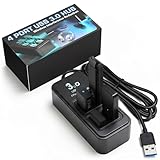
- AVOID WIRELESS LAG & STUTTER: Don’t lose matches to frustrating dropouts. This performance hub is engineered with upright, wide-spaced ports that shield gaming peripherals and vive dongle connections from disruptive USB 3.0 noise and cross-anti-interference, ensuring rock-solid stability for your mouse, keyboard, and headset.
- GAMERS, STREAMERS & POWER USER ESSENTIALS: Whether you’re into esports, streaming, or cockpit sims, this performance hub provides a stable foundation for demanding setups. It keeps audio, video,VR trackers and peripherals running smoothly, delivering lag-free performance essential for competitive gaming.
- WIDELY USED BY THE VR COMMUNITY: Built for full-body VR tracking, this performance hub has earned praise for handling multiple high-bandwidth devices without issue. With proven reliability, it manages Tundra trackers, wireless dongles, and peripherals, making it ideal for both VR and streaming builds.
- HIGH-SPEED USB 3.0 & OPTIMIZED POWER: Four USB 3.0 ports deliver up to 5Gbps for external drives while maintaining signal integrity for wireless dongles. Includes a robust power adapter so even demanding devices like VRchat rigs stay consistently powered for smooth and uninterrupted performance.
- COMPACT, DURABLE & READY TO GO: Designed with a weighted non-slip base and rugged build, this USB 3.0 hub stays put during heavy use. Completely plug-and-play, it works with Windows and Mac setups, keeping your desk organized while ensuring seamless connectivity for all your devices and accessories.
A custom wireless USB bridge would need a USB host on one side, a wireless transport, a USB device controller on the other, and software that handles enumeration, endpoints, timing, resets, power states, and errors. That is a hardware and firmware design, not a setting enabled by pairing two adapters.
What about sharing a USB Bluetooth dongle?
You can sometimes export a USB Bluetooth adapter through USB-over-IP, so the client computer sees a virtual adapter. The arrangement is indirect: the peripheral connects by Bluetooth to the dongle, the dongle connects by USB to the server, and the client receives the dongle over the network. The client’s operating system must support the adapter, and its Bluetooth stack must work reliably with the virtualized USB connection. Pairing and reconnects may be awkward, and timing-sensitive uses—especially audio or real-time controllers—may fail. Prefer an adapter plugged directly into the target computer when possible.
Rank #4

- [7-Port USB 3.0 Hub] ONFINIO USB hub turns one USB port into Seven, support for USB Flash drive, Mouse, Keyboard, Printer, or any other USB Peripherals. And it's backward compatible with your older USB 2.0 / 1.0 devices.
- [5Gbps Data Transfer Speed] This USB hub splitter 3.0 syncs data at blazing speeds up to 5Gbps, which is more than 10 times faster than USB 2.0, fast enough to transfer an HD movie in seconds.
- [Easy to Use] This USB port hub has a built-in high-performance chip to keep your devices and data safe, and supports hot swapping. No need for installation of any software, drivers, plug and play. Please offer extra power supply when the power-hungry devices are connected.
- [Compact & Portable] The USB extension cable multiple port has been intelligently designed to be as slim and light as possible, ideal for your working and traveling with ultrabook. Exquisite gift box packaging, easy to store and use.
- [Wide Compatibility] ONFINIO usb hub for laptop is compatible with Windows 10/8/8.1/7 / Vista / XP and Mac OS X, Linux, and Chrome OS. USB expander applies to various devices: laptop, pc , XBOX, PS4, flash drive, printer, mouse, card reader, HDD, keyboard, camera, console, USB fan.
Device compatibility and performance
Network sharing does not make every peripheral behave as if it were on a short physical cable. Compatibility depends on its USB class, driver, application, transfer pattern, power needs, and tolerance for delay or interruptions.
Often reasonable candidates
- USB-to-serial adapters, microcontroller programmers, and debug probes.
- Some license keys, security tokens, and low-bandwidth measurement devices, subject to vendor restrictions.
- Some printers and scanners, if their software supports the arrangement.
- Some simple controllers and input devices.
Test carefully
- Storage devices, card readers, MIDI equipment, 3D printers, SDR receivers, touchscreens, and USB network adapters.
- Webcams and other devices with sustained or isochronous traffic.
- Firmware tools, bootloader transitions, or applications that expect exclusive or direct physical access.
Usually poor candidates
- USB audio interfaces, video capture devices, VR peripherals, and high-refresh or latency-sensitive equipment.
- Devices that need continuous high-rate traffic or may be damaged by interruption during an update.
Vendors describe broad compatibility, but that is not a guarantee that every application and workload will work. VirtualHere and Silex describe USB networking for a range of devices; Silex also discusses virtualization use cases. Check their information against the exact device and software: VirtualHere, Silex USB device networking, and Silex virtual-environment expertise.
What’s actually slowing this PC down?
Pick the symptom - the matching free tool is one click away.
Best Value

- Smart Charging Ports: 2 Extra 5V/2.4A charging ports supporting 2.4A output specially designed for smart charging. Charges most USB charging equipment, regardless of large batteries such as smartphones or tablets, or mini-battery equipment such as smart portable devices, at full speed.
- Faster Speed with USB 3.0: USB 3.0 ports offer transfer speeds of up to 5Gbps, 10 times faster than USB 2.0. This 7-port USB 3.0 data hub can instantly expand 1 USB 3.0 port to 7 USB 3.0 data ports for keyboard, mouse, printer, hard drivers and other USB devices.
- TP-Link Charging technology intelligently identifies connected devices, automatically delivering the smart charge to your smartphones, tablets or devices with a USB charging connector, minimizing charging time.
- Protect Both Your Equipment and Your Data: UH720 has a sophisticated circuit design with multiple overheat, overload, overvoltage and short circuit protections. A built-in surge protector keeps both your devices and your data safe in the data transfer process.
- UH720 supports hot-swap USB ports that can be safely connected and disconnected while the computer is on and running.
Wi-Fi adds variable delay from access-point contention, signal quality, buffering, retransmissions, and network load. A strong speed-test result alone does not establish that a USB device will work. For a more stable path, connect the server to the access point by Ethernet if practical, use a strong Wi-Fi signal for the client, reduce mesh or repeater hops, and test the real application. A vendor application note recommends below 20 ms as a target for a particular VirtualHere router deployment; that is vendor-specific guidance, not a universal USB requirement: Advantech VirtualHere router application note.
Independent reader supportYour contribution helps us test, update, and keep practical guides available for everyone.Using the connection across the internet
A local network is usually easier to configure and offers more predictable delay. Internet access can add NAT and firewall configuration, higher latency, packet loss, and reconnect problems. Do not expose a USB-sharing service directly to the public internet unless its authentication and network protections are properly configured. Use account or device access controls, firewall rules, a private VPN or overlay network where appropriate, and disconnect devices when they are not needed.
Security features vary by product and implementation. VirtualHere documents API access and SSL support on its client page; FlexiHub lists access-control and network features on its features page; Silex describes IP filtering for its device-server use case in its virtual-environment USB device-server information. These are product-specific capabilities, not properties of every USB-over-IP tool. Treat a remotely shared USB drive as remote writable storage, and do not share sensitive devices with untrusted clients.
Pick software or a dedicated device server
| Option | Best suited to | Licensing or deployment detail |
|---|---|---|
| VirtualHere | Local-network sharing, Raspberry Pi or NAS hosts, and users comfortable with a server/client setup. | The vendor describes a perpetual license tied to server hardware, with no recurring client fee. Its purchase page does not establish a dependable numeric price here; check current purchase terms. |
| FlexiHub | Cross-platform and account-based sharing, including remote teams and network access features. | The vendor’s current feature page lists pricing starting at $39 per month billed annually and a 30-day demo period. This is a starting price signal, not a quote for every plan or configuration: FlexiHub features and pricing information. |
| Silex USB device servers | Business, industrial, laboratory, or managed-network deployments where dedicated hardware is appropriate. | The manufacturer describes USB device-server products and wireless-LAN use, but the cited product material does not state current public pricing. See Silex USB device networking and its virtual-environment device-server information. |
| Linux USB/IP | Linux administrators, homelabs, Raspberry Pi projects, and developers able to configure the system themselves. | The Linux subsystem is open source, but setup and administration still take time; the cited technical documentation describes the protocol, not a polished Windows or macOS client workflow: Linux USB/IP documentation. |
Troubleshoot common problems
The client cannot find the server
- Confirm both machines are on the same network or have a routable path between them, and that the server process is running.
- Check local firewalls and Wi-Fi client isolation. If discovery is blocked, add the server by IP address if the product supports it.
- Check that the server address or name resolves correctly and that a VPN is not routing traffic away from the local network.
The device appears, but the application cannot use it
- Install the device’s normal driver on the client and close any server-side application that has the device open.
- Check whether another client has claimed the device; many setups allow only one active user at a time.
- Reconnect after installing the driver, then test with a simpler application. A device may enumerate but fail under real workload or because it needs transfer types or timing the connection does not handle reliably.
The device disconnects or behaves inconsistently
- Try Ethernet for the server, move the client closer to the access point, and remove repeater or mesh hops if possible.
- Reduce competing network traffic and check power saving on the server’s USB port or network adapter.
- Check the physical USB cable and the server’s power supply, especially for bus-powered devices.
A firmware update fails
Do not infer that a successful ordinary connection means flashing will work. Use a direct USB connection unless the device vendor explicitly supports remote flashing.
Crashes, No Sound, or Screen Glitches?
Random freezes, missing sound and display glitches usually trace back to one bad driver. Find and replace yours safely.Free scan · under a minuteWindows Errors? Fix Them Before They Spread
Repair common Windows errors and clear accumulated junk for a smoother, more stable PC - no reinstall needed.Free scan · no reinstallQuick Recap
When another option is better
- Bluetooth input device: Pair the keyboard, mouse, or controller directly with the target computer.
- Storage: Share files through a NAS or network protocol rather than forwarding a removable drive.
- Printer, scanner, or camera: Prefer its native network interface when available.
- Short, timing-sensitive connection: Use an active USB extension or a suitable wired USB extender.
- Virtual machine: Use hypervisor USB passthrough when the device and hypervisor support it.
- Selected peripheral types: Remote-desktop redirection can suit some printers, serial devices, smart cards, or storage, but it is not a universal USB substitute.
Product prices and availability are accurate as of the date/time indicated and are subject to change. Any price and availability information displayed on Amazon at the time of purchase will apply.

