
For a soldered through-hole 100-pin connector, use a temperature-controlled heated vacuum desoldering gun, fresh flux, and a correctly sized nozzle. Remove the solder one joint at a time, and do not pull, twist, or lever the connector until every signal pin, mounting tab, shield, and anchor is free. If the connector is press-fit, compliant-pin, or surface-mount, use a different method.
Identify how the connector is attached
“100-pin” describes the contact count, not the construction. Photograph both sides of the board, record the connector’s orientation and pin-1 marking, and find the part number if possible.
Through-hole soldered
Pin tails pass through plated holes and have solder fillets on the opposite side. You may see solder around each lead, plated barrels, and larger soldered mounting tabs.
Surface-mount
Contacts terminate on pads rather than passing through the board. A broad spatula tip or controlled hot air is normally more appropriate than a through-hole desoldering gun.
Recommended Free Tools
#1 Best Overall

- This is a plug-n-play desoldering iron; This product regulates temperature automatically, and the temperature value is fixed (non-adjustable); Preheat the desoldering iron for approximately 3 to 5 minutes to ensure normal heating for soldering
- This 929D-V desoldering iron integrates soldering iron and desoldering pump, you can enjoy the single-handed and continuous desoldering with its short charging handle to rid the hassle of changing grip positions. If you are looking to purchase a desoldering tool that can handle the desoldering jobs of through-hole components and removing excess solder (solder bridges) without jamming up, this is a great choice.
- Different from the traditional use-and-throw desoldering irons, the 929D-V can be used, easily cleaned, and reused. You can lift and pull out the scrap solder storage tube and clean the solder out like a breeze. Meanwhile, we also included 2 different and interchangeable diameters (φ1.0mm & φ1.2mm) desoldering nozzles for different sizes of through-hole components. NOTE: change the nozzle after the desoldering iron has cooled completely.
- This desoldering iron comes with a heat deflector at the end of the heating element, and this prevents the excess heat from transferring onto the hand when desoldering continuously. You can desolder joints after joints without your hands feeling uncomfortably hot.
- Choose YIHUA with Confidence – Enjoy our 12-month US- exclusive manufacturer technical coverage and 24/7 professional assistance on Amazon. Note: This model is designed to operate on 110-127V with a US-standard power plug.
Press-fit or compliant-pin
Rectangular, forked, eye-of-the-needle, or other compliant sections mechanically grip the plated holes and may have little or no solder. Follow the connector manufacturer’s extraction procedure; heating alone will not release these contacts.
Mixed construction and mechanical retention
Signal pins may be soldered while shield tabs, staking posts, screws, clips, glue, or large anchor tabs provide additional retention. A connector can remain firmly attached after all visible signal solder has been removed.
Choose the removal method
| Situation | Best first choice | Trade-off |
|---|---|---|
| Reusable 100-pin through-hole connector | Heated vacuum desoldering gun | Controlled and consistent, but needs the right nozzle and technique |
| Connector is disposable | Cut the housing and remove contacts individually | Usually reduces PCB stress, but destroys the connector |
| Large ground-plane or shield joints | Vacuum gun plus PCB preheater | More equipment and heat exposure |
| Surface-mount connector | Broad spatula tip or controlled hot air | Heat can spread to nearby parts and plastic |
| Occasional repair | Iron, flux, braid, and manual sucker | Low cost but slow and unreliable across 100 plated holes |
| Fine-pitch, fragile, or irreplaceable board | Professional rework station or service | Highest cost, lowest avoidable damage risk |
| Press-fit connector | Mechanical extraction specified for the part | Requires correct tooling and access |
A spring-loaded manual solder sucker can remove a few large joints, and braid is useful for cleanup, but neither provides the simultaneous heat and suction that makes a 100-pin job manageable. Low-melt alloy can lower the remelting temperature, yet it still requires careful cleanup and adds alloy to every joint. A household heat gun is not a controlled PCB rework tool.
Rank #2

- ➤ The adjustable circuit board is ideal for clamping PCB for soldering, desoldering or rework.
- ➤ Its base is made of high quality metal, which guarantees its greater stability; 4 anti-slippery bumper feet on the bottom brings you perfect user experience by keeping the item firmly in position.
- ➤ Compatible with PCBs in different sizes with max holding size : 20*14 cm.
- ➤ The helping hands can be turned around 360° and allows you to work easily on both sides of the PCB.
- ➤ To choose Noah is to choose one year of excellent after-sales and quality assurance, we cherish every customer's trust and choice, our customer service team will provide professional assistance timely.
Equipment and preparation
- Temperature-controlled heated vacuum desoldering gun with a nozzle that fits over the lead and pad.
- Electronics-grade flux, compatible fresh solder, and a soldering iron for stubborn joints.
- Brass wool or a damp sponge, replacement filters, and nozzle-cleaning pins.
- PCB support or a soft-jaw vise, magnification, bright lighting, ESD-safe tweezers, and a probe.
- Fume extraction or good ventilation, eye protection, isopropyl alcohol, and lint-free swabs.
- Kapton tape or aluminum shielding for nearby heat-sensitive parts.
- Disconnect power, remove batteries, discharge capacitors safely, and unplug cables.
- Photograph the connector from both sides. Mark orientation, pin 1, brackets, latches, and cable routing.
- Remove screws, clips, adhesive, strain relief, and other mechanical restraints.
- Confirm whether the board is multilayer and identify ground, power, shield, and mounting connections.
- Support the PCB close to the connector so it cannot flex while joints are heated.
- Shield displays, flex cables, plastic parts, sockets, and nearby components.
- Apply a small amount of flux. Start with a controlled temperature appropriate to the solder and board; temperature is not universal. Lead-free solder, oxidized joints, thick boards, and ground planes need more thermal input, not unlimited temperature.
For reference, the Hakko FR-301 specification is 350–500 °C, with 11 L/min suction and a standard 1.0 mm nozzle. That is the tool’s operating range, not a recommendation to use 500 °C on every PCB. Its U.S. manufacturer page showed a $339.07 list price and availability when checked August 18, 2026; regional voltage, stock, and price can differ: Hakko FR-301.
The Tool Desk
Outbyte Driver Updater FREEScan for outdated or missing drivers - takes under a minuteDriver Scan →Outbyte PC Repair FREEClear out junk files and repair common Windows errorsFree Scan →JBC’s DR560 is a station-mounted option. Its manual recommends a tip opening larger than the pad and gentle rotation before suction: DR560 manual. The iron generally requires compatible JBC station infrastructure; JBC’s USD price list showed $505 for the DR560-A iron, not necessarily a complete station: DR560 product page and JBC USD price list.
Pin-by-pin through-hole removal
- Heat and clean the nozzle. Ensure the bore is open and the tool has reached temperature.
- Flux the joint. Use enough to wet the solder without flooding nearby parts.
- Refresh difficult solder. Add a small amount of fresh solder to dry, oxidized, or thermally massive joints. It improves heat transfer and blends with old solder.
- Center the nozzle. Cover the solder joint and lead. Keep the nozzle from scraping or pressing hard against the PCB.
- Melt completely. Wait until the solder is fluid. A gentle nudge with the heated nozzle can confirm that the lead moves freely. Never force it.
- Trigger suction only after melting. Keep the nozzle sealed over the joint while the solder is drawn out.
- Move gently. A small circular or back-and-forth motion helps clear solder between the lead and plated barrel. JBC specifically describes gentle rotation; Hakko instructs users to move the lead without force while absorbing solder.
- Pause and inspect. Let the joint cool briefly, then check the pad, lead, and hole under magnification.
- Repeat instead of pulling. If solder remains, add flux and fresh solder and vacuum again. Visible solder on the surface does not prove the barrel is clear.
- Track progress. Mark rows or pins so none are skipped. Clear signal pins, then separately clear mounting tabs, shields, and anchor posts.
- Test before lifting. The connector should release with minimal, even force. If one corner or row resists, stop and locate the remaining attachment.
Hakko’s instructions emphasize fully melting solder, never forcing a lead, and resoldering and repeating when solder remains: Hakko desoldering instructions. Keep the central rule in mind: no mechanical force while any attachment may still be solid.
Rank #3
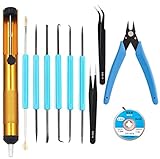
- Tool Kit:Suitable for electronic repair and DIY, any circuit board with small parts, such as mobile phone motherboards, cables, TVs, VCRs, radios, headphones, stereos, motors, toys and other electronic equipment. Correct the error of the small board on the PCB.
- Tool Kit:includes 6 welding aids and desoldering pump, desoldering core, Wire cutters, anti-static ESD tweezers
- Welding auxiliary tools: widely used in electronic repair, soldering, desoldering, etc. Can use cutting, scraping, hooks, brushes and other welding work requirements. Cutting pliers: Made of high-quality steel, it can accurately cut flexible cords within 1mm. Anti-static ESD tweezers: Made of high-quality stainless steel, anti-static, non-sticky.
- Desoldering pump: very sturdy, can remove excess solder on the circuit board, easy to operate with one hand, desoldering core:width 2.5mm / 0.098 in,length 1.5m / 59 in length, made of pure oxygen-free copper It has a strong ability to absorb tin. No cleaning is required and less residue.
- Tool Kit: Contains 11 necessary welding tools to save you multiple purchases.
Handling difficult joints
Ground planes and thick multilayer boards
Large copper areas draw heat away. Add flux and fresh solder, use the largest nozzle that still seals over the pad, and increase contact area rather than simply raising temperature. If the joint still will not flow, preheat the PCB, use a higher-power station, or heat a large anchor tab with a separate iron. JBC identifies a PCB preheater as an option when ground-plane-connected leads overwhelm the desoldering tip: JBC station manual.
Lead-free or oxidized solder
Use flux and fresh compatible solder, allow the tool to recover thermally, and make short controlled passes. Poor nozzle contact, a bore that is too small, or a clogged intake often causes more trouble than the nominal temperature.
Free tools Windows power users keep installed
One-click scans. No signup required.
Large mounting tabs and shields
These joints may have far more metal than signal pins. Treat each as a separate thermal problem; do not twist the connector to break the last attachment.
Rank #4

- 【6-Piece Double-Sided Soldering Tool Set】Includes 6 electronics repair tools, each with two functional tips. This soldering assist kit covers operations including pressing, drilling, prying, cutting, scraping, hooking, pulling, and brushing for PCB assembly and desoldering tasks.
- 【Carbon Steel Construction】Tools are made from carbon steel with a black coated finish. The material provides hardness for repeated use in PCB soldering and desoldering applications.
- 【Applications for PCB Work】Suitable for printed circuit board assembly, component dismounting, PCB cleaning, hole processing, and component positioning of small parts during soldering or repair.
- 【Dual-Tip Design per Tool】Each tool features different tip shapes on each end. This design allows switching between functions without changing tools during soldering, cleaning, or shaping tasks.
- 【Compact Kit for Electronics Work】The 6-piece set is sized for electronic maintenance, DIY assembly, and PCB rework. Tools can be stored together for organized access during repair projects.
When sacrificing the connector is safer
Destructive removal is reasonable when the connector is defective, a replacement is available, the housing blocks access, or the PCB is more valuable than the part. It is not automatically safer, and careless cutting can transmit lateral force into pads and plated barrels.
- Protect the PCB with shielding and support it close to the work area.
- Cut or mill away the plastic housing without contacting the board.
- Remove individual contacts or short pin sections one at a time.
- Heat each remaining pin and extract it vertically with tweezers or fine pliers.
- Clear and inspect every empty hole before installing the replacement.
SMD and press-fit alternatives
Surface-mount connectors
For an SMD connector, apply flux and heat all contacts with a broad spatula tip or controlled hot air, using shielding and a light, even lifting force only after the solder is molten. Hakko recommends choosing an SMD tip by package size rather than pin count: Hakko connector soldering guide and Hakko tip guidance.
Press-fit connectors
Do not keep heating a connector whose contacts are mechanically compliant. Verify the pin geometry and datasheet, release latches or retainers, and use the specified extraction direction and tool.
Outdated Drivers Are Slowing You Down
One free scan finds every outdated or missing driver and matches the right update for your exact hardware.Free scan · exact hardware matchWindows Errors? Fix Them Before They Spread
Repair common Windows errors and clear accumulated junk for a smoother, more stable PC - no reinstall needed.Free scan · no reinstallBest Value
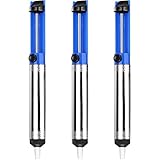
- UNPARALLELED SUCTION POWER - Good little solder sucker, have a good bit of suction,you can just hang onto it and use your thumb to reset and suck. The ideal tool for intricate soldering jobs
- ONE-HANDED OPERATION - Simple design allows easy one-handed use,lightweight and compact,suck the solder away easily. Say goodbye to tedious two-handed solder extraction and .quickly and easily removing solder
- DURABILITY AND LONGEVITY - Very sturdy,will worke good to remove existing solder from a circuit board. Made with high-quality materials and designed to withstand heavy usage, our Solder Sucker ensures longevity and performance, saving you time and money in the long run
- ERGONOMIC DESIGN - Heated up the solder pushed the button and bam,all solder sucked up,super easy to use for desoldering. The comfortable, non-slip handle and lightweight body make our Solder Sucker easy to handle, ensuring maximum control and precision
- VERSATILE APPLICATIONS - A must have excellent solder sucker which fits nicely in your tool box. Our solder sucker desoldering pump is not just limited to soldering. It can also be used for desoldering, removing hair, lint, and dust, and even for cleaning delicate electronics. The ultimate multi-purpose tool for any DIY enthusiast
Clearing blocked holes and inspecting the board
- Add flux and fresh solder, remelt, and vacuum again with a centered, correctly sized nozzle.
- Use a manual sucker or fluxed braid only for residual solder after the main pass.
- If the connector is removed, use a heated desoldering tip to clear each empty hole.
- Never drill a plated-through hole or force a steel pick through cold solder.
- Inspect pads, annular rings, plated barrels, inner-layer connections, and nearby traces under magnification.
- Clean flux with isopropyl alcohol and lint-free swabs, then check continuity and shorts before fitting the replacement.
- Confirm the replacement’s orientation, pin 1, keying, mounting tabs, and mechanical fit.
Troubleshooting
The connector will not move
Stop pulling. Check for one soldered pin, an anchor tab, shield, adhesive, staking compound, latch, press-fit contact, or solder that flowed back into a barrel. Reflux, add fresh solder, vacuum again, and inspect both sides.
Solder will not melt
Suspect lead-free solder, a ground plane, oxidation, a small nozzle, poor contact, or inadequate thermal recovery. Add flux and fresh solder, fit a larger nozzle, preheat the board, raise temperature modestly, or use a higher-power tool. Do not dwell indefinitely at maximum temperature.
A pad lifts
Stop heating and let the board cool. Photograph the damage, identify the net, and determine whether the barrel and inner-layer connection remain intact before repairing with a pad reconstruction or jumper. Do not continue pulling.
The vacuum gun clogs
Keep the nozzle hot while cleaning, use the cleaning pin and drill matched to its diameter, empty the solder chamber, and replace filters when airflow drops. Hakko describes nozzle-matched cleaning and hot cleaning; JBC also specifies intake and filter maintenance: Hakko maintenance guidance and JBC DR560 manual.
Quick wins for a faster PC:
Fix the driver behind crashes, sound loss and screen glitchesFind Drivers →Clear out junk files and repair common Windows errorsFree Scan →Safety and when to use a professional
- Disconnect power and beware of charged capacitors.
- Use eye protection, fume extraction, ESD precautions, and a stable tool stand.
- Keep heat away from batteries, displays, flex cables, plastics, and unknown-temperature connectors.
- Never pry against pads or traces, and never substitute a household heat gun for controlled rework equipment.
Use professional rework for irreplaceable or expensive multilayer boards, fine-pitch or mechanically complex connectors, dense nearby components, internal-layer damage, unavailable replacement parts, or a connector that must be preserved. Search locally for electronics rework, PCB repair, or connector replacement services; cost depends on region, board value, connector availability, inspection, and any trace repair.
Manufacturer process guidance also stresses protecting adjacent components and limiting thermal exposure: JBC repairing process and Hakko rework guidance.
Quick Recap
Product prices and availability are accurate as of the date/time indicated and are subject to change. Any price and availability information displayed on Amazon at the time of purchase will apply.

