
Free tools Windows power users keep installed
One-click scans. No signup required.
For Linux Mint today, install Flameshot if you want fast region selection and built-in annotation. Choose Shutter if you need delayed, window, full-screen, clipboard, session, printing, upload, and drawing-editor workflows. Cinnamon’s own screenshot utility is planned for the next release (scheduled at the time of the May 23, 2026 announcement for Christmas 2026), so treat it as a future option rather than software you can rely on now.
The right choice depends on whether you capture a precise region, an application window, one monitor or every display, and whether you copy, save, or edit the image afterward.
Quick comparison
| Tool | Best fit | Capture and workflow features | Availability note |
|---|---|---|---|
| Flameshot | Region capture with markup in one pass | Arrows, text, highlighting, blur or pixelation, shapes, numbered markers, solid color boxes, clipboard/save actions, command-line interface and key-binding support | Installable now through Mint’s package tools when available; AppImage and Flatpak are also documented |
| Shutter | Broader capture-and-edit workflow | Area, window, full-screen and delayed captures; saving, session management, clipboard copy, printing, image-hosting uploads and an embedded drawing editor | Check the current Linux Mint Software Manager listing; repository availability and upload behavior can change |
| Cinnamon screenshot tool | Integrated desktop workflow in a future release | Announced window captures with or without shadows, all monitors or one monitor, and cropping before copying or saving; the announcement also discusses client-side and server-side decorations | Planned, not confirmed as shipped; the May 23, 2026 post targeted the next release, then scheduled for Christmas 2026 |
These are not equivalent stages of the same product. Flameshot and Shutter are current applications; Cinnamon’s utility is a dated plan. Package versions in a particular Mint edition are not established here, so verify the version shown by your own Software Manager before depending on a feature.
Choose by the job you need to do
Grab a precise region and paste it
Flameshot is the closest match for a LightShot-style workflow: invoke the capture shortcut, drag a rectangle, then copy the result or save it. Its on-canvas controls let you finish common edits before leaving the selection. If you only need an unedited rectangle, Mint’s existing desktop screenshot shortcut may be sufficient; use Flameshot when the selection and markup need to happen together.
What’s actually slowing this PC down?
Pick the symptom - the matching free tool is one click away.
#1 Best Overall

- 【1080P HD High Quality】Capture resolution up to 1080p for video source and it is ideal for all HDMI devices such as PS4, PS3, Xbox One, Xbox 360, Wii U, DVDs, DSLR, Camera, Security Camera and set top box. Note: Video input supports 4K30/60Hz and 1080p120/144Hz. Does not support 4K120Hz/144Hz. Output supports up to 2K30Hz.
- 【Plug and Play】No driver or external power supply required, true PnP. Once plugged in, the device is identified automatically as a webcam. Detect input and adjust output automatically. Won't occupy CPU, optional audio capture. No freeze with correct setting.
- 【Compatible with Multiple Systems】suitable for Windows and Mac OS. High speed USB 3.0 technology and superior low latency technology makes it easier for you to transmit live streaming to Twitch, Youtube, Facebook, Twitter, OBS, Potplayer and VLC.
- 【HDMI LOOP-OUT】Based on the high-speed USB 3.0 technology, it can capture one single channel HD HDMI video signal. There is no delay when you are playing game live.
- 【Support Mic-in for Commentary】Rybozen capture card has microphone input and you can use it to add external commentary when playing a game. Please note: it only accepts 3.5mm TRS standard microphone headset.
Capture a window or the whole display
Both Flameshot and Shutter cover the usual window and full-screen cases. Shutter also exposes delayed capture, useful when a menu or tooltip appears only after you move the pointer away. If you run multiple displays, check the current behavior in your installed build; the forthcoming Cinnamon design specifically calls out capturing all monitors or only one monitor, but that capability is not yet a current-release promise.
Annotate, hide secrets, or explain a UI
Flameshot’s arrows, text, highlighter, shapes and numbered markers are suited to bug reports and tutorials. Its blur or pixelation tools can obscure an email address or token; inspect the result at its final size before sharing because a weak blur can leave text readable. Shutter’s embedded drawing editor is a better fit when you want to capture first and perform a wider editing pass afterward.
Copy, save, delay, or keep a capture session
Use Flameshot when keyboard shortcuts, a command-line invocation or a quick clipboard result matter most. Choose Shutter when delayed shots, session management, printing, image-hosting upload or a capture history are part of your routine. Upload destinations and repository builds can vary, so confirm the options displayed by your installation rather than assuming every catalog feature is enabled.
Rank #2

- 【4K60Hz, 1440P@120HZ & 1080P@240HZ PASSTHROUGH】: Supports HDMI input and loop-out at 4K60Hz, 1440P@120Hz, or 1080p@240Hz for smooth, high-frame-rate gameplay on your monitor or TV while streaming or recording at the same time.
- 【1080P60 VIDEO CAPTURE WITH LOW-LATENCY PERFORMANCE】: Captures video up to 1080p at 60fps through USB-C 3.0, delivering smooth, stable, and low-latency performance for live streaming, gameplay recording, video capture, and content creation.
- 【PLUG AND PLAY ON WINDOWS, MAC, AND LINUX】: Works with Windows, macOS, and Linux for quick setup with compatible apps and devices, making it easy to start streaming, recording, or broadcasting right away.
- 【Dual 3.5mm Audio Ports】: Use the 3-pole TRS mic input for an external mic or the 4-pole TRRS headset jack for headset mic input and headphone output. When both ports are connected, the headset jack provides headphone output only.
- 【COMPATIBLE WITH CONSOLES, CAMERAS, AND PCS】: Works with PS5, PS4, Xbox, Switch, cameras, DSLRs, and computers. Package includes the CCD10 capture card, HDMI cable, USB cable, user manual, and quick start guide.
Install Flameshot on Linux Mint
- Open Software Manager, search for Flameshot, inspect the package details and install it if the listing is available.
- Alternatively, open a terminal and run
sudo apt update, followed bysudo apt install flameshot. The upstream guide documents this APT route for Debian 10+ and Ubuntu 18.04+; Mint derives from Ubuntu or Debian bases, but the exact package version depends on your release. - If the repository build lacks a feature you need, use the upstream AppImage or Flatpak route documented by Flameshot. Distribution-maintained packages can lag upstream releases, so compare the installed version with the feature documentation.
- Launch Flameshot from the application menu. In its configuration, assign a keyboard shortcut to the interactive capture command if Mint has not already assigned one.
For a one-off terminal capture, run flameshot gui and drag over the area. Select an annotation tool, then choose the on-screen copy or save action. The command-line interface can also be scripted or bound to a custom key, which is useful for repeatable support procedures.
Recommended Free Tools
Install and use Shutter
- Open Software Manager and search for Shutter. Read the package description and maintenance information for your Mint edition before installing.
- After launch, choose an area, window, full screen or delayed capture. A delay gives you time to open menus or position a pointer.
- Use Shutter’s session controls when you need several related captures, then copy, save or print from the application.
- Open the embedded drawing editor for arrows, labels and other finishing work. If you use image-hosting uploads, review the destination and privacy settings for the current build before sending sensitive material.
The Linux Mint community catalog describes this broad workflow, but it does not establish that every repository version or upload service behaves identically today. The Software Manager listing is the practical availability check.
A repeatable screenshot workflow
- Define the target: region, window, one monitor, all monitors or full desktop.
- Prepare the scene: close private tabs, wait for dynamic content, and open any menu that must appear. Use a delay when pointer movement would otherwise dismiss it.
- Capture: invoke Flameshot’s region interface or Shutter’s capture mode.
- Edit before sharing: add arrows or text, and cover credentials or personal data with blur, pixelation or a solid box.
- Choose the output: copy to the clipboard for a ticket or chat, or save a file when you need an archive. Use a descriptive filename with the application and date.
- Verify: open the saved image, check that the entire window or monitor is present, and zoom in on redactions.
What Cinnamon’s planned tool may change
On May 23, 2026, Linux Mint author Clem wrote that “Cinnamon is getting its own screenshot tool.” The announcement describes window screenshots with or without shadows, selection of all monitors or a single monitor, and cropping before copying or saving. It also addresses the difference between client-side and server-side window decorations.
Rank #3

- 【4K Clarity, 1080P Performance】Enjoy stunning clarity with our USB 3.0 Video Capture Card—featuring 4K input and smooth 1080P@60Hz output. Featuring YUY2 technology, it delivers richer colors than MJPEG for lifelike live streaming and recording. Plus, it delivers high-quality video with minimal latency, making it perfect for gamers and content creators.
- 【Mic-in for Easy Commentary】Plug in a headset or mic directly to stream/record voice easily—no extra adapters. Great for real-time gaming commentary, online classes, or vlog dubbing. Paired with its low-latency tech, it keeps voice synced perfectly with video, eliminating post-editing hassle from mismatched audio-visuals. Fits most 3.5mm devices—ideal for gamers, teachers, creators.
- 【Plug and Play, no Extra-Drivers】No extra drivers or external power—just plug in and start capturing instantly. Small and lightweight, it fits easily in your bag for outdoor live streams, on-the-go recordings, or emergencies. Ideal for game capture, video conferences, and online teaching, it saves hassle while delivering smooth results.
- 【Wide Compatibility: Apps & Devices】No extra adapters—works flawlessly with your go-to platforms and gear. It pairs with streaming/recording apps like Twitter, YouTube, Facebook, OBS, XSplit, and VLC, plus devices including Switch/Switch2, PS5/PS4, Xbox, DSLR cameras, PC, macOS, and Android. Whether gaming, streaming, or hosting video calls, it keeps HD quality intact, eliminating "compatibility headaches".
- 【Worry-Free After-Sales Support】We are committed to delivering exceptional quality products that combine sophisticated design with affordable pricing, offering you the best solutions for seamlessly connecting your work and life. Whether you're a newcomer or a seasoned user, feel free to reach out anytime with any questions—your satisfaction is our top priority.
That is a roadmap statement, not a current Mint feature. Until the next release actually ships, keep Flameshot or Shutter installed. Re-evaluate after release notes and your Software Manager show the utility; do not remove a working tool based only on the announced schedule.
Troubleshooting
The shortcut does nothing
Another screenshot utility may already own the key combination. Open Mint’s System Settings → Keyboard → Shortcuts, find the screenshot bindings, and assign a unique shortcut to Flameshot. Test flameshot gui directly to separate a shortcut problem from an installation problem.
Flameshot is installed but an option is missing
Check the installed package version. Distribution repositories can lag upstream, and the evidence here does not identify a universal Flameshot version for every Mint edition. Try the documented AppImage or Flatpak build only after checking integration and update expectations.
Rank #4
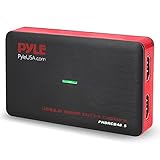
- Record and convert: a capture card that has the ability to record videos or Audio files. Records full HD 1080p video quality with an HDMI pass through support. After recording, It also converts the file into digital format
- Stream live: This video game capture device has the ability to instantly stream live on social media and YouTube while playing. It can play and record simultaneously for a hassle free media file creation
- Hot button recording: manage recorded media easily and post to social media like YouTube. It has an on-board hot button for One-Click recording and Screenshot capture ability
- Plug and play: no installation needed, simply plug and play This device to start recording, It also has a built-in software that supports voice commentary and multi language support
- Compatible Devices: This capture card can record videos from any devices with HDMI output like Xbox 360, Xbox one, PS4, PS3, Wii U, PC computers, PS3, PS4, Blu-ray DVD player, set-top box, and DVR
The capture contains a popup or menu I did not want
Use a delayed Shutter capture, or close transient UI before invoking Flameshot. For repeatable documentation, capture a clean state first and add explanatory labels afterward.
Multiple monitors produce the wrong area
Confirm which display your desktop shortcut targets and test each tool’s monitor behavior in your installed build. Cinnamon’s announced one-monitor/all-monitor controls are planned, not evidence of current behavior.
A redaction can still be read
Replace small blur strokes with a sufficiently large opaque box, then reopen the exported file at 100% zoom. Never share the original alongside a redacted copy.
Quick wins for a faster PC:
Fix the driver behind crashes, sound loss and screen glitchesFind Drivers →Repair Windows errors before they cause bigger problemsFix Now →Scan for outdated or missing drivers - takes under a minuteDriver Scan →Best Value
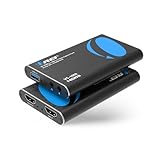
- FULL HD 1080P @ 60hz VIDEO CAPTURE – Capture crystal-clear video in 1080p recording through USB-A from HDMI sources including PS5, PS4, Xbox One, Xbox 360, Wii U, Nintendo Switch, DSLR cameras, security cameras, set-top boxes, and DVD players with 4K 60Hz (4:2:0) or 4K@30hz. Ideal for live streaming, recording gameplay, video conferencing, and content creation.
- EASY SETUP WITH OBS SOFTWARE – Works instantly with user-friendly OBS software available online and requires no external power. The device is automatically recognized as a webcam—simply connect and approve the source for quick setup. Supports optional audio capture, automatic input detection, CPU-efficient operation, and smooth, freeze-free streaming when properly configured.
- WIDE SYSTEM & SOFTWARE COMPATIBILITY – Fully compatible with Windows and macOS and supports popular streaming and recording platforms including OBS, Twitch, YouTube Live, Facebook Live, Twitter, PotPlayer, and VLC. High-speed USB 3.0 interface delivers low-latency transmission for professional-quality live broadcasts.
- HDMI LOOP-OUT FOR ZERO-DELAY GAMING – Built-in HDMI loop-out lets you view your gameplay in real time on a TV or monitor with no lag, while simultaneously capturing the video on your computer, perfect for competitive gaming, walkthroughs, tutorials, and esports streaming. Also Headphone 3.5 Stereo Out.
- MIC-IN FOR LIVE COMMENTARY – Includes a 3.5mm TRS microphone input for adding voice commentary during gameplay or live sessions. Easily mix your voice with game audio for professional streaming, podcasts, online classes, and video presentations.
Or skip the browser setup
If your requirement is to obtain a clean image of a public webpage rather than interactively capture your Mint desktop, ScreenshotNeo returns a PNG, JPEG, WebP or PDF from one request. Before capture it accepts cookie/consent banners and removes more than 60 known consent platforms, newsletter popups and chat widgets; each step can be disabled. Bot checks or CAPTCHAs, blank pages, timeouts, failed loads and cache hits are not billed, and response headers identify the page verdict and billing status. Its MCP server provides take_screenshot, get_page_info and capture_pdf tools for Claude, Cursor and other MCP clients.
See the complete parameter reference in the ScreenshotNeo documentation. A direct cURL request is:
curl -G "https://api.screenshotneo.com/v1/shot" -d access_key=YOUR_API_KEY --data-urlencode url=https://stripe.com -o shot.webpPython:
import requests
r = requests.get("https://api.screenshotneo.com/v1/shot", params={"access_key": "YOUR_API_KEY", "url": "https://stripe.com"}, timeout=90)
open("shot.webp", "wb").write(r.content)
Node.js:
const q = new URLSearchParams({ access_key: 'YOUR_API_KEY', url: 'https://stripe.com' });
const res = await fetch(`https://api.screenshotneo.com/v1/shot?${q}`);
It also supports full-page and element captures, device and viewport settings, retina scale, custom CSS and JavaScript, clicks, waits, blocked requests, headers, cookies, user agents, timezone and geolocation, transparent backgrounds, resizing, chosen cache TTLs, signed links, asynchronous webhooks, bulk calls for 100 URLs, usage reporting and an OpenAPI specification. Every feature is on every plan: 1,000 shots per month free with no card, then $5 for 3,000, $15 for 15,000, $39 for 60,000, $99 for 250,000, or $249 for 1,000,000; yearly billing gives two months free. Create a free ScreenshotNeo account to start.
Frequently Asked Questions
Can I use Flameshot and Shutter together?
Yes. Install both if their workflows differ for you, but assign distinct keyboard shortcuts so they do not compete for the same capture key.
Which tool is officially built into Cinnamon right now?
The dedicated Cinnamon utility described in the May 23, 2026 announcement was planned for the next release; it should not be treated as shipped until your Mint release includes it.
Should I use a desktop tool for webpage screenshots?
Use Flameshot or Shutter for what is visible on your Mint desktop. Use ScreenshotNeo when you need an automated webpage capture, clean-page processing or an API/MCP workflow.
Quick Recap
Product prices and availability are accurate as of the date/time indicated and are subject to change. Any price and availability information displayed on Amazon at the time of purchase will apply.

