
The best background image is not simply your most beautiful photograph. Choose one that identifies your specialty, keeps text readable, survives desktop and mobile crops, and arrives at a sensible file size. Start by testing candidate images in the real hero component—not in an image viewer—then assign a focal position, responsive source, and accessible text treatment.
Start with the job the image must do
Write the purpose of the section before opening your archive. A home-page hero may introduce your style and direct visitors to a portfolio. A wedding photographer might need an emotional, human scene; an architectural photographer may need geometry and space. A background that looks impressive but suggests the wrong specialty weakens the first impression.
Decide whether the image is informative or decorative:
- Informative: the photograph itself communicates something visitors need to know—for example, a featured project, location, or distinctive service. Put it in the document as an image and provide alternative text that conveys its relevant purpose.
- Decorative: it supplies atmosphere behind navigation, a heading, or a call to action. A CSS background is appropriate, provided assistive technology can skip it.
Do not put essential words in the photograph. Keep the headline, body copy, and buttons as real HTML so they remain selectable, translatable, responsive, and available to screen readers.
The Tool Desk
Outbyte PC Repair FREEClear out junk files and repair common Windows errorsFree Scan →Outbyte Driver Updater FREEScan for outdated or missing drivers - takes under a minuteDriver Scan →#1 Best Overall

- Lightweight Physical board - Not a roll up or rollout - Moisture & Stain Resistant
- Measures 19.5 x 19.5 Inches - this is a small square backdrop
- Rounded corners for easy storage and protection.
- These backdrops are shipped with the printed side down. Remove from the cardboard and flip over to reveal the printed side.
- Your white balance settings in your camera or editing process will help achieve a natural color hue
How to compare candidate photographs
Use the same hero container, text, and device previews for every candidate. Score each photo against these practical questions rather than choosing on full-resolution beauty alone.
| Criterion | What to check | Warning sign |
|---|---|---|
| Brand and specialty | Does the subject, color, and mood match the work you sell? | A generic landscape on a portrait or commercial portfolio |
| Text space | Is there a calm area behind the exact headline and button? | Faces, bright highlights, or fine detail directly under letters |
| Crop resilience | Does the key subject remain visible at every planned aspect ratio? | The subject is cut off on a narrow phone or short desktop hero |
| Rendered quality | Is it sharp at the largest displayed size without shipping the original? | Soft pixels at desktop width or an unnecessarily huge source |
| Transfer cost | Can the image be encoded and sized for the actual slot? | A multi-megabyte desktop file sent to every phone |
This is an editorial decision framework, not a published scoring standard. Keep two or three finalists and test them with the real overlay, typography, and controls.
Leave quiet space for words
Negative space does not have to be empty; it only needs low visual competition. A smooth wall, sky, out-of-focus foreground, or darker side of a scene can support text better than a blank white area filled with high-frequency detail. Place the copy where the photograph is naturally quiet, then use a controlled focal position rather than hoping center center works everywhere.
Rank #2

- Pliable & Bendable, but store flat - Moisture & Stain Resistant
- Measures 2 feet x 3 feet or 24 inches x 36 inches
- Great for food & product photography, videos, social media images, and website photos
- Be sure to match up the natural shadows in the backdrop with your lighting set-up for a more realistic look in your photos.
- Rounded corners for easy storage and protection
Check the pixels directly behind each line of text. Accessibility guidance uses a minimum contrast ratio of 4.5:1 for normal text and 3:1 for large text under its cited criterion. The photograph as a whole can look dark while a bright patch behind one word fails. A translucent overlay, gradient, or solid text panel can create a consistent reading zone; test the final colors and font sizes with a contrast checker.
Overlay patterns that preserve the photograph
.hero {
  position: relative;
  color: #fff;
  background: center / cover no-repeat var(--hero-image);
}
.hero::before {
  content: "";
  position: absolute;
  inset: 0;
  background: linear-gradient(90deg, rgba(0,0,0,.68), rgba(0,0,0,.12));
}
.hero-content {
  position: relative;
  max-width: 38rem;
  padding: clamp(4rem, 12vw, 9rem) 1.25rem;
}
Use a gradient when the text occupies one side and a more even veil when it spans the image. If an overlay still cannot deliver reliable contrast, put the copy in a solid or semi-opaque panel.
Protect the focal point on every viewport
A background using cover fills its box by cropping whichever dimension does not fit. Because a phone hero and a desktop hero have different shapes, the same source can show entirely different content. Identify the subject’s safe area and inspect at least a wide desktop, a tablet, and a narrow phone width.
Rank #3
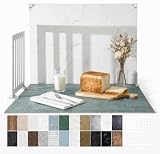
- 23x17.5 Inch Product Photography Backdrop Kit: Includes 11 double-sided laminated photography paper backdrop sheets with 22 realistic background patterns, 4 product photography props for shadow effects, a foldable 2.6mm photo backdrop board, L-brackets and a carry bag. Helps create clean product photos, flat lays and styled tabletop shots.
- For Small and Medium Product Photography: Made for Amazon, Etsy and Shopify sellers, UGC creators, handmade brands and small businesses. Use this backdrop kit for food photography, jewelry and beauty product photos, toys, figurines, handmade items, UGC videos, product videos, Reels and social media content.
- More Room for Styling and Videos: This 23x17.5 inch tabletop backdrop kit gives more room for styling props, packaging, flat lays and video shots than mini backdrop kits, while staying easier to use than bulky XL backdrops. Ideal for daily product photos, food shots, jewelry photos, tabletop videos and styled product shoots.
- Laminated, Wipe-Clean Food Photography Backdrops: The 0.25mm / 230G laminated photography paper backdrop sheets feature marble, concrete, wood grain and other realistic textures for food, jewelry, cosmetics and product photos. The laminated surface helps reduce glare and wipes clean after light spills, crumbs and sauce marks from food shoots.
- Quick 1-Min Setup & Easy Storage: The foldable photo backdrop board and L-brackets create a stable 90° tabletop background with no bulky stand needed. Use it as a quick product photo setup for desks, home studios and small workspaces, then fold it flat and store it in the carry bag after shooting.
- Set the production hero height and width constraints.
- Preview the candidate with the exact heading, button, logo, and overlay.
- Change the viewport to each responsive breakpoint and rotate a phone preview if your design supports both orientations.
- Adjust
background-position(for example,65% center) so the subject stays visible without moving text onto busy detail. - If no position works, choose a different photograph or supply a tailored mobile asset rather than accepting a compromised crop.
.hero { background-position: 65% 40%; }
@media (max-width:  Fortyrem) {
  .hero { background-image: url("hero-mobile.webp"); background-position: 58% center; }
}
Replace the illustrative breakpoint value with the one used by your site; the important decision is to request a source composed for the smaller crop.
CSS background or an image element?
Use a CSS background for decoration
CSS backgrounds are a good fit for atmosphere behind a section. They are not normally announced by screen readers, which prevents decorative scenery from becoming distracting spoken content. Ensure the section still makes sense when the image is unavailable.
Outdated Drivers Are Slowing You Down
One free scan finds every outdated or missing driver and matches the right update for your exact hardware.Free scan · exact hardware matchPC Slower Than It Used to Be?
A free scan shows the junk files, broken settings and background clutter dragging Windows down - then fixes them in one click.Free scan · Windows 10 & 11Use an image element for meaningful content
If visitors need information from the photograph, place an <img> in the document flow and write alternative text describing its purpose—not every visible detail. For a purely decorative <img>, use an empty alt="" so assistive technology skips it. Do not hide meaningful information solely in a CSS background.
Rank #4

- 【XL Photo Backdrop Board for Product Photography】This 22.5 x 34.5 in / 57 x 87 cm photo backdrop board gives you more room for product placement, props and lighting than small backdrops. Ideal for product photography backdrops, food photography backdrops, jewelry, cosmetics, skincare, kitchen items and video shooting.
- 【10Pcs 20Patterns Double-Sided Backdrops】The product photography kit includes 10 high-definition double-sided backdrop papers with 20 different patterns, helping you quickly switch photo backgrounds for different product styles. Great for food photography, flat lay props, photoshoot props, product display images and content creation.
- 【Foldable Black White Background Board】Comes with one 22.5 x 34.5 in / 57 x 87 cm foldable backdrop board, black on one side and white on the other side. It can be used as a clean white photography backdrop, black photo backdrop, flat lay surface, or vertical background for tabletop photo backdrop setups.
- 【Stable Setup with Clamps & L Brackets】Includes 6 clamps and 2 dedicated L brackets to help secure the background paper and board during shooting. The simple setup makes it easier for still life photographers, bloggers, Instagram users, online sellers and UGC content creators to build a neat photo studio scene.
- 【For Photos, Videos & Online Selling】Designed for product photography, food photography, jewelry photography props, cosmetics, skincare, hardware tools, clothing, bags and video backdrops. A practical backdrop set for Amazon listings, online shop photos, social media posts, reels, ads and product videos.
Consider discovery for a critical hero
A CSS background can be discovered later than an image element. When the hero is the largest content visible at initial load, an image element with responsive sources may give the browser a clearer path to the critical asset. Measure the actual page rather than assuming one implementation is always faster.
Deliver the right bytes
Export to the dimensions the slot can display, then encode an appropriately sized WebP, JPEG, or other format supported by your delivery stack. The highest-resolution original is not automatically the best web asset. Right-sizing reduces transfer work while preserving the quality visitors can see.
Responsive image example
<picture>
  <source media="(max-width: 600px)" srcset="hero-mobile.webp">
  <source media="(max-width: 1200px)" srcset="hero-tablet.webp">
  <img src="hero-desktop.webp"
       alt="Bride and groom walking through a sunlit garden"
       width="1920" height="900">
</picture>
For a CSS background, media queries can request corresponding assets. Avoid sending the desktop file to every device. If the image is below the fold, lazy loading can defer it; do not delay a hero that is genuinely part of the initial viewport without checking the effect on loading.
Best Value

- About the Material - EOAJAFOU backdrop paper is made of upgraded and thickened polyester fiber fabric,which makes it wear-resistant, durable, wrinkle resistant, non reflective, waterproof and dustproof.
- Double sided - 5pcs double sided backdrop papers with 10 different patterns, makes them practical and affordable, ideal for professional photographers,the Morandi color scheme can help you take high-quality photos, you can freely match colors according to your own needs.
- Widely applicable - With its various pattern design, it's perfect for capturing beauty, skincare, jewelry, food, cosmetics products, and any other type of small product in stunning detail.
- Size & Package - This package includes 5 x backdroppapers (34 x 22 inch), which will be rolled up before being shipped, and simply roll them up when not in use. Please note, your backdrop will vary slightly depending on your screen calibration, please allow for slight color variances.
- Customer Service - If you have any questions about the product, please feel free to contact us. We will help you solve them at first time.
Build the background yourself: a repeatable workflow
- Define the message. Note the specialty, audience, action, and mood the hero should communicate.
- Shortlist candidates. Remove images whose subject conflicts with the brand or whose composition leaves no usable text zone.
- Prepare variants. Create desktop and mobile crops when the focal subject cannot survive one crop. Export dimensions close to the rendered slots.
- Implement the semantic choice. Use a CSS background for decorative atmosphere; use an image element and purposeful alternative text for meaningful imagery.
- Add readable text treatment. Use real HTML text, then add an overlay or backing and verify 4.5:1 normal-text or 3:1 large-text contrast.
- Set and test the focal position. Inspect every responsive state with the final copy, controls, and navigation.
- Check loading and failure states. Confirm the background still leaves a readable color fallback if the request fails, and verify that the delivered file is not oversized for its slot.
- Review with people and tools. Keyboard through the controls, zoom text, use a screen reader for meaningful images, and test on a real phone connection as well as a fast desktop connection.
Common problems and fixes
| Symptom | Likely cause | Fix |
|---|---|---|
| Headline disappears into detail | Contrast was judged from the whole image | Measure behind the actual letters; darken that area with a gradient or panel, or move the text. |
| Subject is missing on mobile | cover cropped a different dimension |
Change focal position, reduce hero height, or supply a mobile-specific crop. |
| Page feels slow | Original-resolution asset is being downloaded | Right-size and compress; serve responsive sources or media-specific background files. |
| Screen reader announces nothing important | Meaningful photo was implemented only as CSS | Use an image element with concise, purposeful alternative text. |
| Decorative photo is read aloud | Decorative image has non-empty alternative text | Use a CSS background or an image with alt="". |
| Text changes but image does not | Essential copy was baked into the artwork | Rebuild the copy as HTML and keep the file purely visual. |
| Hero looks different after a redesign | The container’s aspect ratio or breakpoint changed | Re-run crop, contrast, and performance checks whenever layout dimensions change. |
Or skip the browser setup
When you need screenshots of your finished pages for a portfolio review, regression check, or client handoff, ScreenshotNeo provides a one-call website screenshot API and MCP server. It accepts consent banners before capture and removes more than 60 known consent platforms, newsletter popups, and chat widgets; each step can be disabled. Bot checks or CAPTCHAs, blank pages, timeouts, failed loads, and cache hits are not billed, and response headers identify the page verdict and billing status.
Use the API documentation at https://screenshotneo.com/docs/ for the full option set. This cURL request returns a WebP file:
curl -G "https://api.screenshotneo.com/v1/shot" -d access_key=YOUR_API_KEY --data-urlencode url=https://stripe.com -o shot.webpPython:
import requests
r = requests.get("https://api.screenshotneo.com/v1/shot", params={"access_key": "YOUR_API_KEY", "url": "https://stripe.com"}, timeout=90)
r.raise_for_status()
open("shot.webp", "wb").write(r.content)
Node.js:
const q = new URLSearchParams({ access_key: 'YOUR_API_KEY', url: 'https://stripe.com' });
const res = await fetch(`https://api.screenshotneo.com/v1/shot?${q}`);
if (!res.ok) throw new Error(`${res.status} ${res.statusText}`);
const fs = await import('node:fs/promises');
await fs.writeFile('shot.webp', Buffer.from(await res.arrayBuffer()));
You can also capture full pages with lazy images, a CSS-selected element, dark mode, device presets or custom viewports, retina scale, PDFs, HTML/CSS, custom JavaScript and clicks; wait for a selector, delay, or network idle; block ads, trackers, requests, or resource types; send headers, cookies, user agents, Authorization, timezone, and geolocation; use transparent backgrounds, resizing, chosen cache TTLs, signed links, asynchronous webhooks, bulk calls of up to 100 URLs, a usage API, and an OpenAPI specification. Common screenshot-API parameter names are accepted to ease migration. An MCP server exposes take_screenshot, get_page_info, and capture_pdf to Claude, Cursor, and other MCP clients.
The Free plan includes 1,000 shots per month with no card. Paid plans are Starter $5 for 3,000, Growth $15 for 15,000, Pro $39 for 60,000, Scale $99 for 250,000, and Business $249 for 1,000,000; yearly billing gives two months free, and every feature is on every plan. Create a free ScreenshotNeo account to try it without a card.
Recommended Free Tools
A practical decision checklist
- Does the image immediately support the photographer’s specialty?
- Is there a deliberate, quiet text zone at every crop?
- Does the subject remain recognizable on the narrowest viewport?
- Have you verified contrast behind the actual words?
- Is the image decorative or meaningful, and is the markup appropriate?
- Are dimensions and bytes matched to the rendered slot?
- Have you tested fallback behavior, keyboard use, zoom, and a screen reader where relevant?
Frequently Asked Questions
Should every photography portfolio use a full-screen background?
No. A full-screen treatment is justified only when the image, copy, and navigation remain usable together at every viewport. A contained hero or ordinary gallery can communicate the work more clearly when cropping or contrast becomes difficult.
Can I use the same background image for desktop and mobile?
Yes, if the focal subject and text zone survive both crops. Otherwise provide a mobile-specific source or select a composition with a safer central subject.
What should the fallback look like if the image fails?
Choose a solid color that preserves the text contrast and layout, and keep all essential information in HTML so the section remains understandable without the photograph.
Quick Recap
Product prices and availability are accurate as of the date/time indicated and are subject to change. Any price and availability information displayed on Amazon at the time of purchase will apply.
What’s actually slowing this PC down?
Pick the symptom - the matching free tool is one click away.

