Quick wins for a faster PC:
Repair Windows errors before they cause bigger problemsFix Now →Scan for outdated or missing drivers - takes under a minuteDriver Scan →Clear out junk files and repair common Windows errorsFree Scan →Are you still paying subscriptions to manage your credit score? Learn how to use ClearScore to achieve the same results for free
What is ClearScore and Who is ClearScore?
ClearScore (Some call it Clear Score!) is a London-based financial services company that gives you access to your credit file (report) completely FREE! I know, right – too good to be true, but it is true.
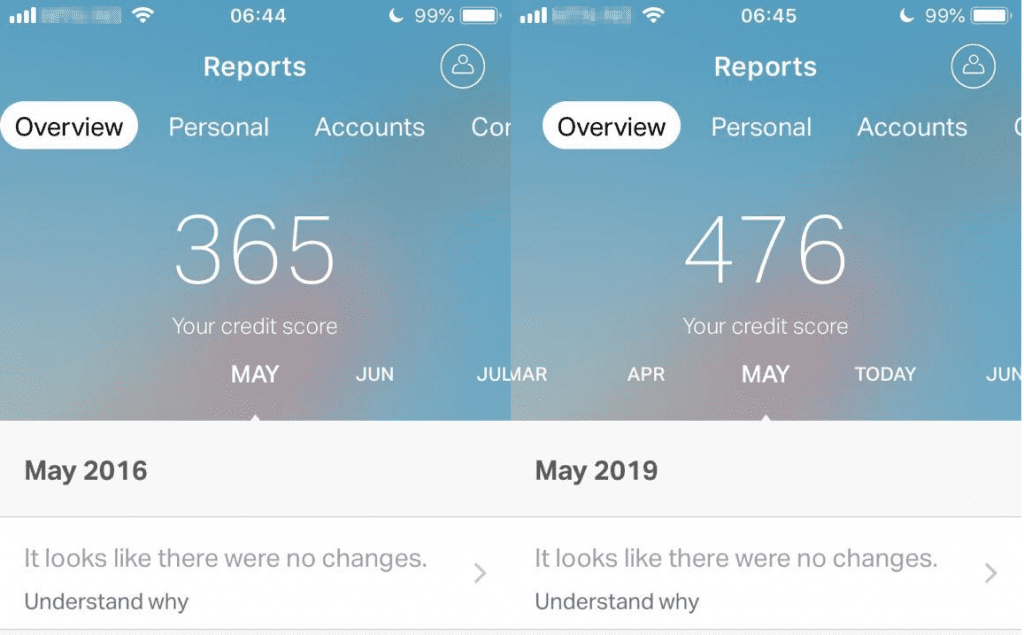
I have been using ClearScore since May 2016 and it has been a very helpful tool. When I stared using Clear Score, my Clear Score credit score was 365. Today (June, 2019), it is 476! And I got this all for free.
Before I found ClearScore, I was paying Equifax £10 monthly. Now I am saving £120 per year but I still have full control over my credit core.
What’s actually slowing this PC down?
Pick the symptom - the matching free tool is one click away.
#1 Best Overall

- COMPARTMENT CAPACITY & POCKETS:Separate laptop compartment fits 17/15/14/13 Inch Macbook/Laptop.Separate compartment Fits Maximum 9.7” iPad.Main compartment roomy for tech electronics accessories,3-5 days clothing,5 A4 Books.Front compartment with 2 Pockets for power Bank and Shaver,2 Pen pockets and key fob hook.Pocket for socks and gloves.Front hidden zipper pocket fits papers.2 mesh pockets for water bottle and compact umbrella.Strap pocket fits bus card and Metro Card,One glasses hold strip.
- COMFY&STURDY: Comfortable airflow back design with thick but soft multi-panel ventilated paddingand Lightweight material, gives you maximum back support. Breathable and adjustable shoulder straps relieve the stress of shoulder. Foam padded top handle for a long time carry on.
- FUNCTIONAL&SAFE: A luggage strap allows backpack fit on luggage/suitcase, slide over the luggage upright handle tube for easier carrying. With a hidden anti theft pocket on the back protect your valuable items from thieves. Well made for international airplane travel and day trip as a travel gift for men .
- BUILD-IN USB PORT : The backpack comes with built in USB charger outside , built in charging cable inside, offers you a convenient way to charge your phone when you are walking, riding.
- DURABLE MATERIAL&SOLID: Made of Water Resistant and Durable Polyester Fabric with metal zippers. Ensure a secure & long-lasting usage everyday & weekend.Serve you well as professional office work bag,slim USB charging bagpack,college backpacks for men women.THIS ITEM IS NOT INTENDED FOR USE BY CHILDREN 12 AND UNDER.
Here are my reports in May 2016 compared to May 2019.
In this guide I will show you how I used ClearScore to achieve this, 100% FREE. You will also learn how to use this FREE tool to take control of your own credit report/history and improve your score.
Before I proceed, I want to confirm that neither my self or iTechGuides.com has any form of affiliation with ClearScore. I DO NOT receive any fee or commission from ClearScore.
Create a ClearScore Account (Sign Up)
You can either create an account using the App or via the website.
How to Sign Up From the ClearScore App
- On your iOS (iPhone or Apple devices) open App Store and search for ClearScore. If you use an Android phone search via Google Play. Then, Install the App. (The image below is from an Android phone).

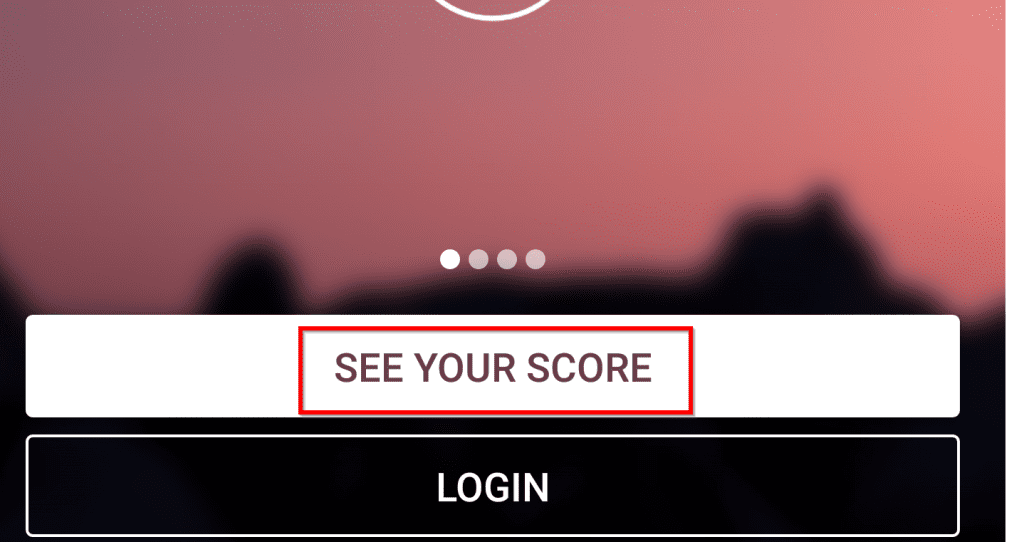
- Next, Open the App and select See Your Score.
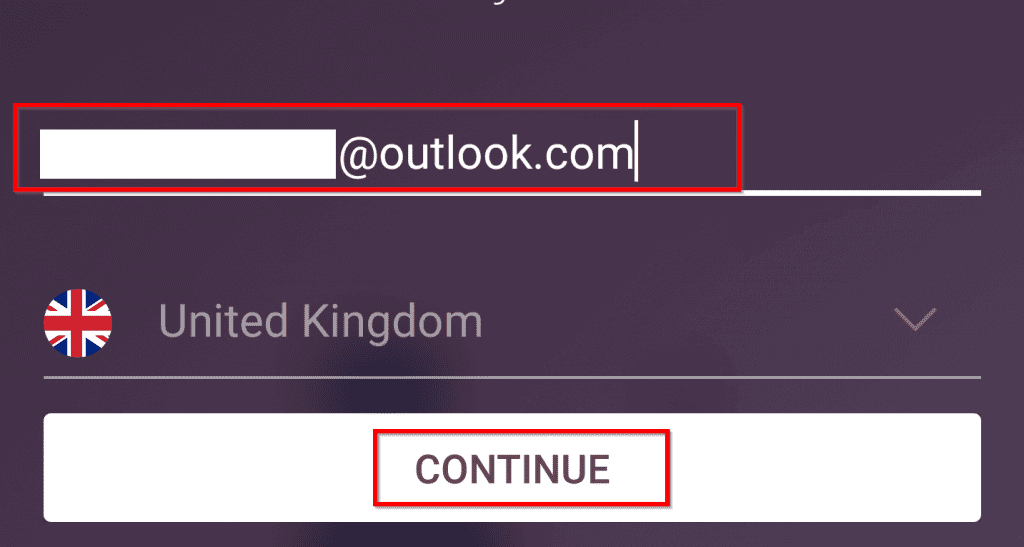
- On the next page, enter the email address you wish to sign up with. Then click CONTINUE.
- On the first screen (see below) [1], click Let’s go. Then, on the next screen [2], enter your full name, chose a password and agree to the terms. Finally, click Create new account.

On the screens that follow, you will be asked to enter your current UK address and previous addresses. Follow the steps to complete your account creation.
Do these 3 things before closing this tab:
1Fix the driver behind crashes, sound loss and screen glitches2Clear out junk files and repair common Windows errors3Scan for outdated or missing drivers - takes under a minuteHow to Sign Up From ClearScore.com (The Website)
- Open https://www.clearscore.com/ on your browser
- On the home page, you could click Sign up (top right) or, on the second part of the image highlighted below, enter your email and click Get started.
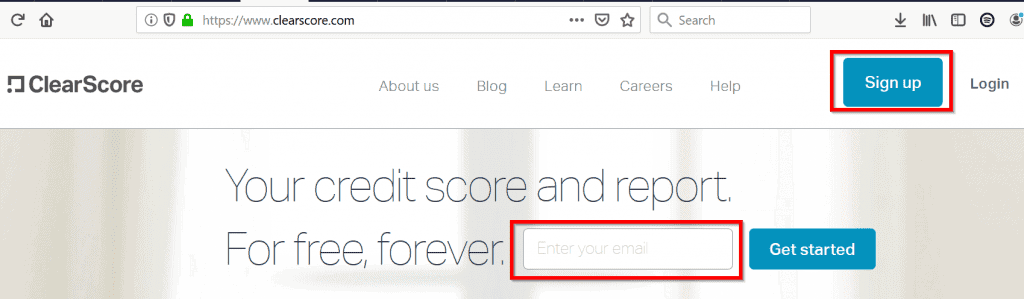
- The steps that follow are fairly similar to the steps described in the App above.
How to Use Clearscore to Manage and Improve Your Credit Report and Score
This section is the main focus of this guide. Here, I will show you how to actually use Clearscore to manage your credit file. Note that the screenshots in this guide are from the Clear Score App on iPhone. Your may be slightly different.
This section will be sub-sectioned in line with ClearScore’s App sections: Dashboard, Report, Offers, Timeline and Coaching.
To begin, login to the App.
How to Use the Apps Dashboard
- The Dashboard shows your Credit Score. The score ranges from 0 to 700. A higher number means a better score. In the ClearScore FAQs section, I will answer the question “What is a good ClearScore credit score?”
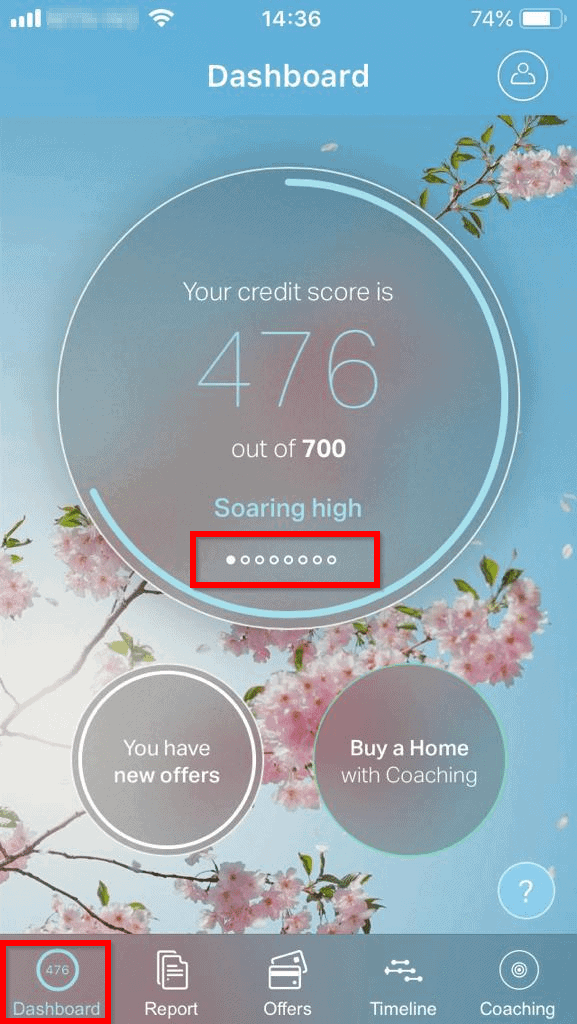
- On the Dashboard, below your score, you can swipe through for additional information. To see the next information on the circle, swipe right.
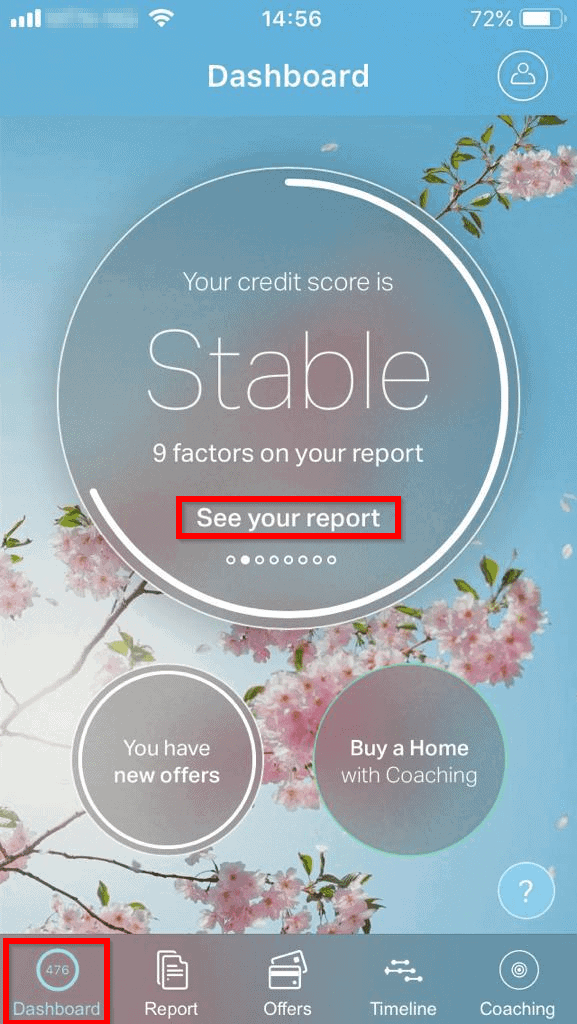
From this screen, ClearScore says my score is “Stable”. If your score is below average, you will be told here. This is a very useful information. If your score is in red, then you need to do something about it. More on this later.
- Swipe again for the next information. This shows you your offers. If you click “Save Money”, the app will show you offers selected for you by Clear Score.
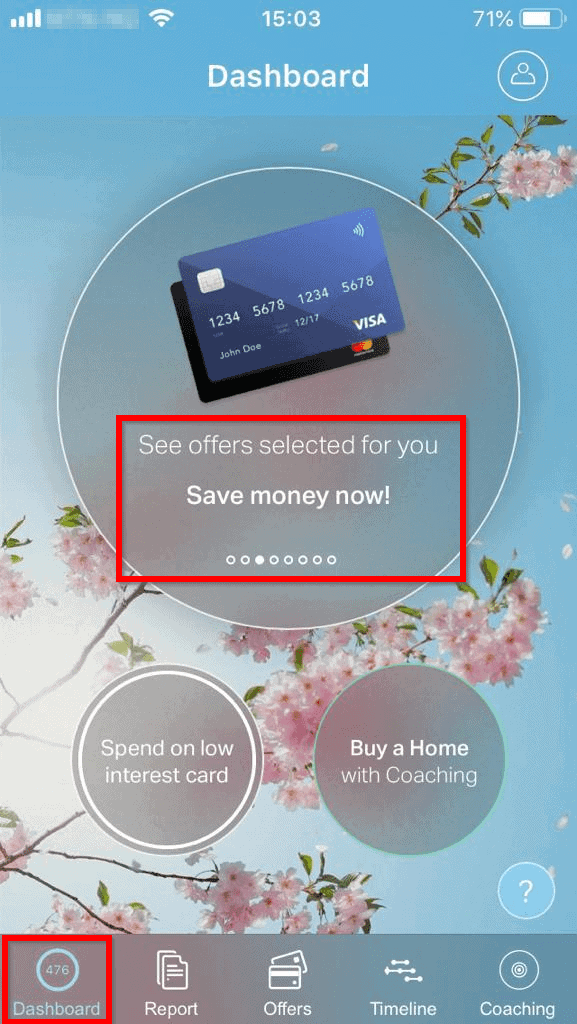
- Swiping next will show you a very important information in your credit file – Your short term debt total.
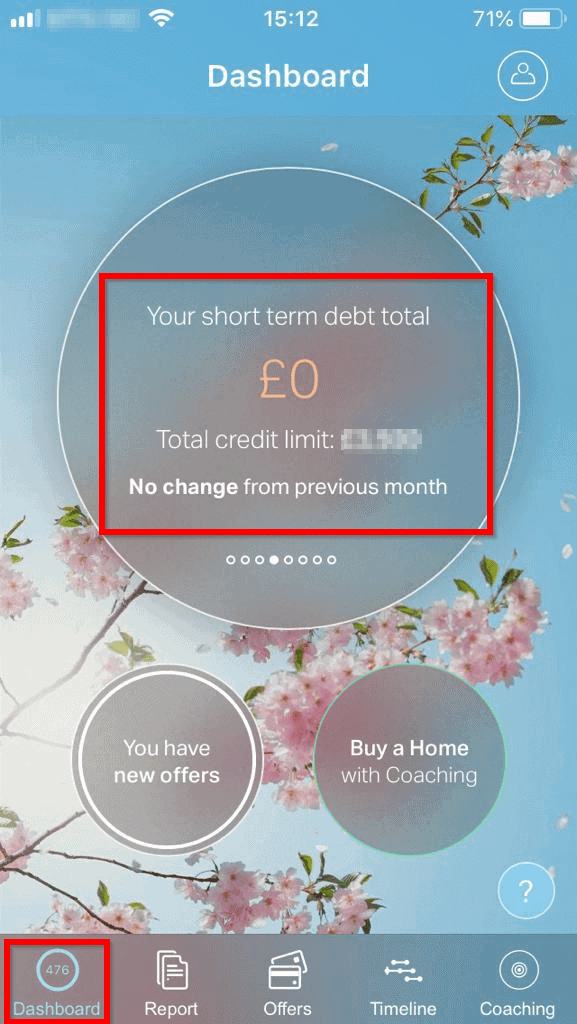
This is clearly a very important information. Short-term debts are debts you must pay off within 1 year. If this information is incorrect, you need to do something about it.
- Next swipe reveals your loan offers. These are offers ClearScore partners are offering you.
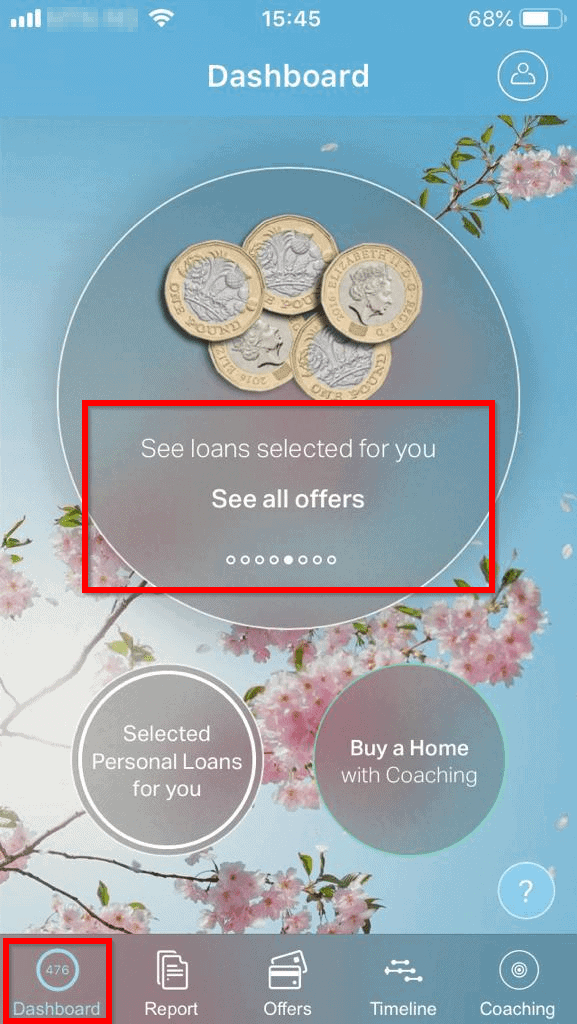
- When you swipe again, you will see your car purchase. Then swipe again to see Your long term debt total. These are debts that are due for payment over 1 year.
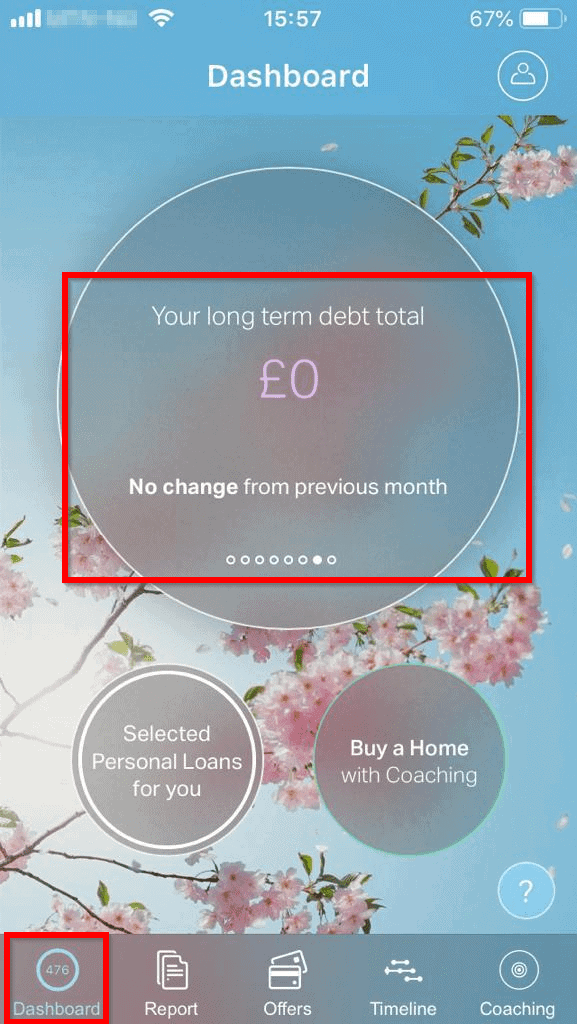
Again, if the information here is incorrect, you can take care of it and correct it. I will be discussing how you can do this later in this section.
Rank #2

- LOTS OF STORAGE SPACE&POCKETS: One separate laptop compartment hold 15.6 Inch Laptop as well as 15 Inch,14 Inch and 13 Inch Laptop. One spacious packing compartment roomy for daily necessities,tech electronics accessories. Front compartment with many pockets, pen pockets and key fob hook, makes your item organized and easier to find
- COMPANY WITH YOU ANYWHERE: This backpack is Personal Item Backpack Size for frontier: 18 * 12 * 7.8 inch, meets most airlines. Made for flight travel and daily commutes, with organized pockets for clothes, a bottle, an umbrella, and tech accessories. Under seat backpack size easy to carry on and keeps your hands free—helping you feel prepared, calm, and accompanied from departure to arrival and enjoy your trip
- FUNCTIONAL & SAFE: A luggage strap allows backpack fit on luggage/suitcase, slide over the luggage upright handle tube for easier carrying. With a hidden anti theft pocket on the back protect your valuable items from thieves. Well made for international airplane travel and day trip as a travel gift for men
- COMFORTABLE USING: Designed for all-day comfort using, this laptop backpack for men features a soft padded back panel with thick yet breathable multi-layer ventilated cushioning that provides excellent support and helps reduce pressure on your back. The adjustable shoulder straps are breathable and ergonomically padded to ease shoulder strain, while the foam-padded top handle ensures a comfortable grip for extended carrying
- STURDY MATERIALS & SOLID: Made of Water Resistant and Sturdy Polyester Fabric with metal zippers. Ensure a secure & long-lasting usage everyday & weekend.Serve you well as professional office work bag,slim bagpack, back to college backpacks. 15.6 inch travel laptop backpack for daily using and organize
- Next swipe tells you when your next credit report update is due.

How to Use ClearScore App Report Tab
To view the Report tab, click on it. This tab is one of the most important in ClearScore. It contains your credit report, your history and everything that affects it.
Reports, Overview Sub-tab
When you click the Report tab, the first sub-tab is called Overview. Below are ways you can use this sub-tab to manage your score:
- In the Overview sub-tab, your score as at date of viewing, is right on top.
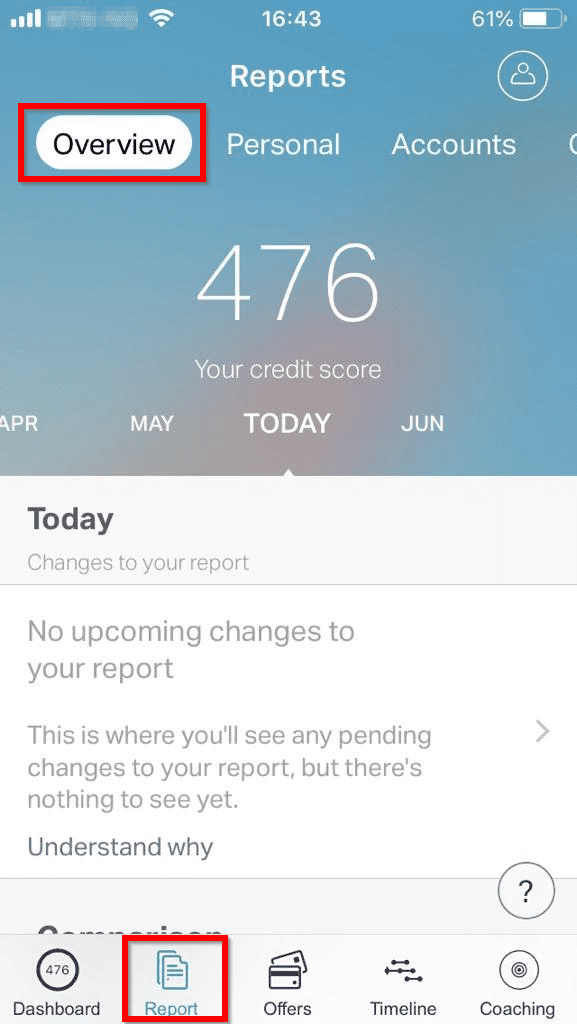
If you look below the score, you can review factors that affect your report. The first important information here is upcoming changes to your report. If you took a credit card or a loan recently, it will be displayed here.
Any financial information here that is not familiar, can be taken up with ClearScore.
- To get more information about upcoming updates, click the Understand why link. The link will give you more information about changes to your report that are coming soon. Again, if the information here is incorrect you can request for it to be changed.
- Next, scroll down to Comparison section. This section gives you an idea how you are doing compared to your area and the whole of the UK.
Using my credit score as an example. The average in my area is 433 while the UK average is 414. Comparatively, I am doing well. If your ClearScore is below the average in your area and/or the UK, it is an indication that you need to do something about it. The next section will tell you with what to do.
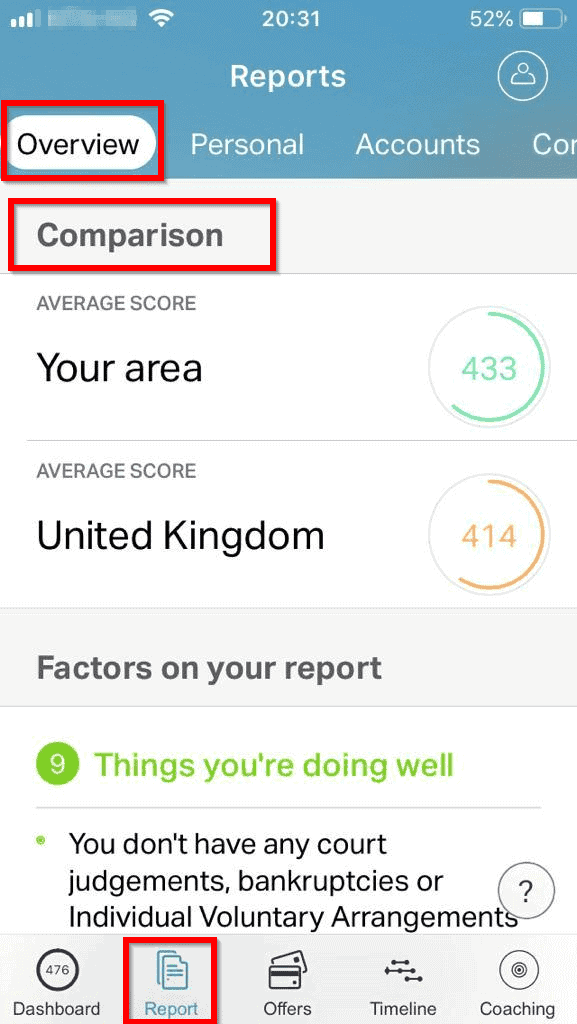
- While the comparison section gives you a top level information about your performance, the next section gives you more details. The Factors on your report section lists the Things you’re doing well and Things to work on. You should focus on the things that needs improvement.
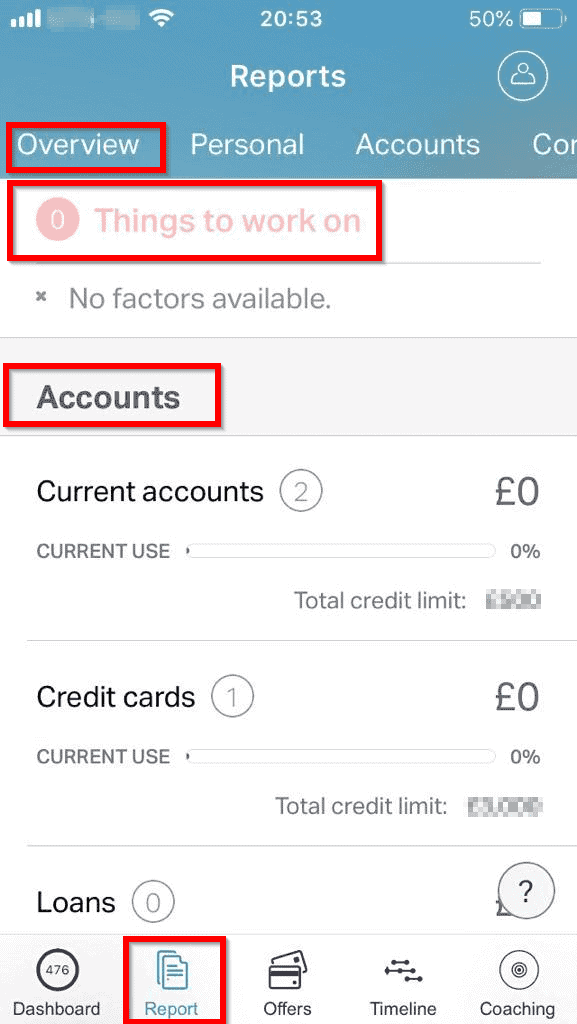
Anything you need to work on will be listed here. Fixing problems in your credit file gives you control!
- The next important part of your report are your Accounts. The accounts section will list all your Credit Cards, Current Accounts, Loans and your mortgage. This section will also list your Telecom’s (mainly mobile phone contracts), Utilities (Power, Water, etc).
Later in this guide, I will cover your accounts in detail.
I don’t know what you think so far but I think that these information, organized the way they are gives you the data you need to take control your credit report. This, in my opinion is what makes ClearScore a great tool but it gets even better!
Reports, Personal Sub-tab
The Personal sub-section lists your Personal Information (Name, Date of Birth and Current address).
- The next part of the Personal sub-tab list any court & Insolvent information. It also lists your Financial Connections and any other names you may have used in the past. If you scroll down, you will see your Electoral Roll registration information.
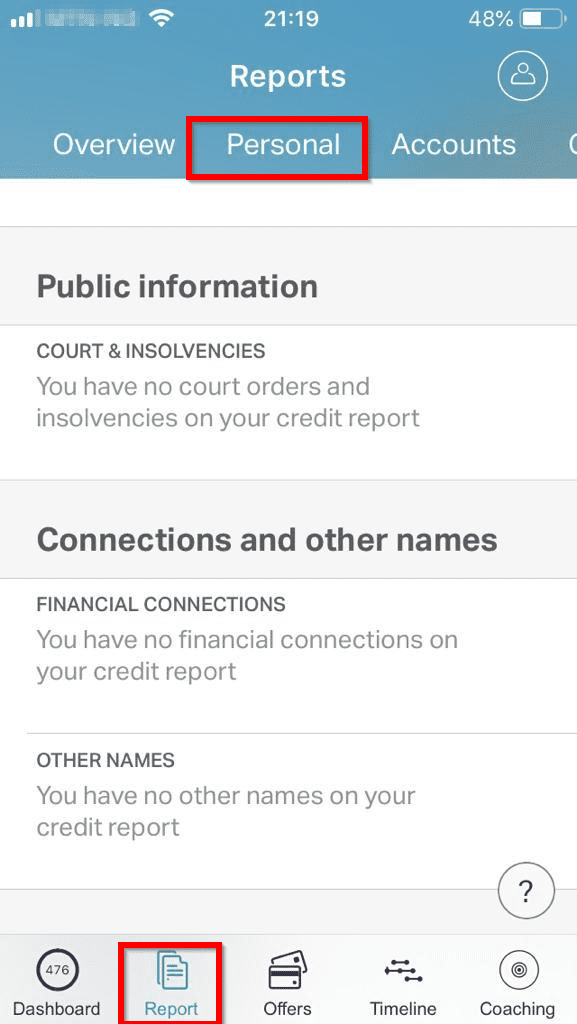
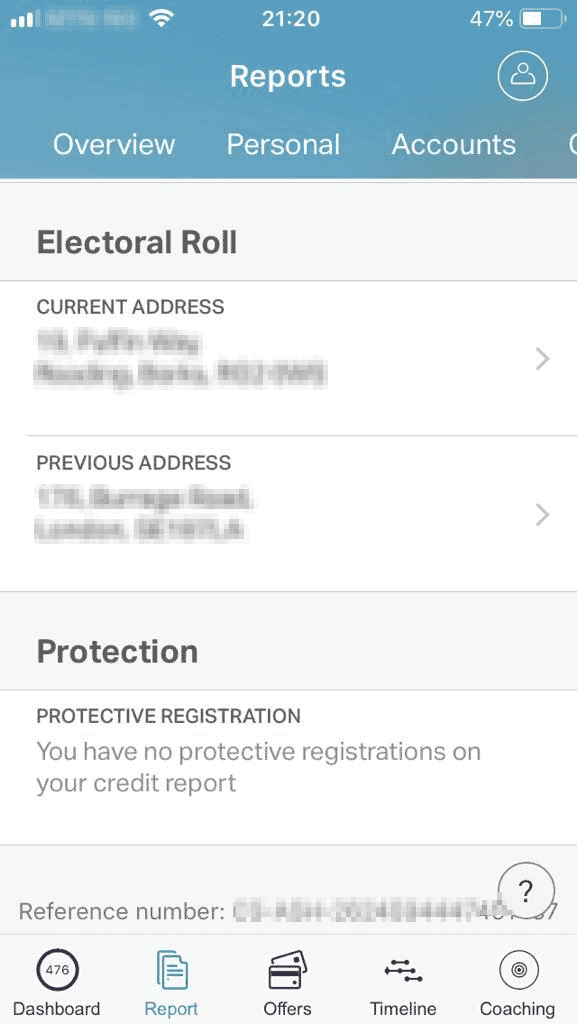
If any information provided by Clear Score is incorrect, you need to alert them to update your report.
Rank #3

- Durable design: Laptop backpack features a durable, water-repellent snow yarn polyester fabric and streamlined design with a padded interior to protect your laptop, notebook and other important stuff
- Comfortable fit: This compact backpack has a quilted back panel and fully adjustable shoulder straps making it comfortable for all day use, plus a quick access front zippered pocket for extra storage
- Laptop backpack: Perfect for daily commuters, college students and all types of travelers; accommodates laptops up to 15.6 inches
- Convenient storage: In addition to the laptop compartment, there are separate pockets for mobile devices, business cards, and other daily tools in quick-access compartments. The main compartment offers extra space for magazines, notepad and other laptop accessories
Reports, Accounts Sub-tab
I already discussed your Accounts earlier. This sub-tab allows you to drill down into your accounts.
The first thing to note is that there are two tabs in this sub-tab – Open and Closed. Open accounts are accounts that are still active. Closed accounts are accounts you have closed.
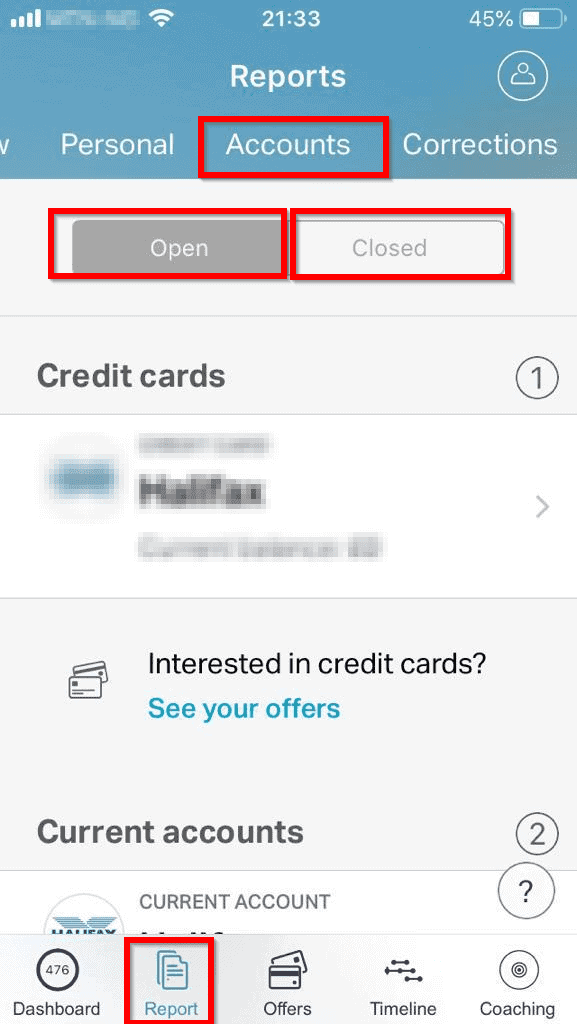
To drill down into any of your accounts, click on it. This will provide you more details. This is arguably the most important tool provided by Clear Score.
Reports, Corrections and Searches Sub-tabs
The last two sub-tabs in the Reports tab are the Corrections and the Searches sub-tabs.
Any Notice of Correction will be listed in the Corrections section. The Searches tab is very important. There are two types of searches – Credit Application searches (hard searches) and Quotation & personal searches (soft searches).
Hard credit searches (searches recorded when you apply for credit) are the ones that affect your ClearScore credit score. The soft searches (non-credit application searches) do not affect you but it is equally important to review the information in this area.
Recommended Free Tools
Information in the Searches section could help you detect and prevent Identity theft on time. One way you can prevent people stealing and using your identify is to regularly check your credit file and report.
How to Use ClearScore App Coaching Tab
I am jumping to the Coaching tab as the other two tabs – Offers and Timeline are not relevant to this guide.
The Coaching section of ClearScore, in my opinion is one of the most important offering of the ClearScore App. ClearScore Coaching will teach you:
Rank #4

- Fits Most Standard 17" Laptops: This 17 inch laptop backpack has a separate laptop compartment for 15.6, 16, and most standard 17 inch laptops and tablets. Please note: it may not fit oversized or extra-thick gaming laptops. The main compartment is roomy for work files, school books and travel clothes. Designed for men, it works well as an office backpack, school bookbag, and laptop backpack for daily use
- TSA Approved Backpack: The TSA-friendly laptop compartment opens from 90 to 180 degrees, helping speed up airport security checks and making this backpack school for men convenient for airplane travel. Sized at 18.5" x 13" x 7.9" with a 30L capacity, it fits in overhead bins for carry-on use. The travel-ready design helps keep your laptop and essentials organized for smoother travel, work, and college use
- Multiple Pockets for Organized Storage: The front of the laptop backpack 17 inch features a large zippered pocket for daily essentials and a quick-access pocket for smaller items like cards. Side mesh pockets hold a water bottle or umbrella. A back anti-theft pocket helps store wallets and passports. This 17.3 inch computer backpack keeps your belongings organized and easy to access
- Travel Friendly and Comfortable Design: This 17 laptop backpack features a trolley sleeve on the back, allowing it to fit over a luggage handle and free your hands during travel. A breathable back panel helps keep you comfortable while walking and commuting. Adjustable padded shoulder straps and a comfortable handle provide added comfort for daily carry. Recommended age range: 5 years old and up
- Water Resistant and Multipurpose: This 30L work backpack for men is made of water-resistant 600D polyester fabric with organized storage for work, college, and travel. It is suitable for office work, school use and short business trips as a tsa large laptop backpack. It is also practical gifts choice for adults men, college graduations, and thoughtful gifts for Thanksgiving Day, Christmas Day, and other speical days, like birthdays and holidays
How to Build a Better Score
How to Buy a Home (for first time buyers)
Things to do to improve the overall health of your credit
and more…
The CleaScore Coaching app is interactive. It is designed to appear to “talk” to you. It will ask you a question. Then when you respond, it gives you a response.
Independent reader supportYour contribution helps us test, update, and keep practical guides available for everyone.How to Change Information on Your ClearScore Report
One benefit of using the ClearScore App is that it allows you to keep a tab on what is going on in your credit file. Moreover, if you find something strange in your report, you can open a dispute with ClearScore. Since ClearScore data is provided by Equifax, your disputes are handled by Equifax.
There are two ways you can open a dispute:
One, from the Accounts sub-section of the Reports tab.
To raise a dispute directly from the Clear Score app, follow the steps below:
The Tool Desk
Outbyte PC Repair FREERepair Windows errors before they cause bigger problemsFix Now →Outbyte Driver Updater FREEScan for outdated or missing drivers - takes under a minuteDriver Scan →- On the Reports tab, click Accounts.
- Then click on the account you wish to review. Scroll to the bottom of the page and click the Something not right? link.
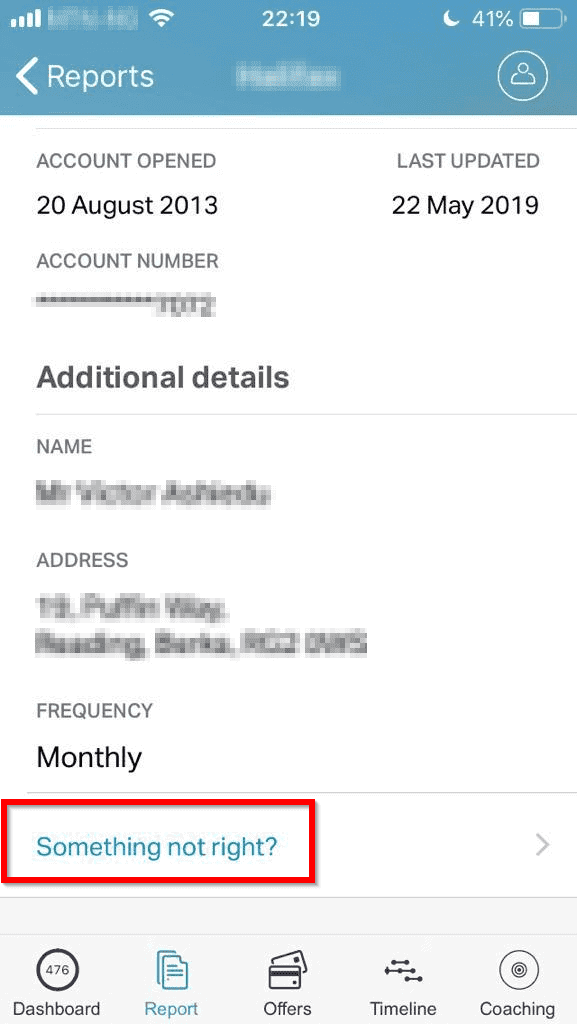
- Next, read the information regarding opening disputes. Then click Raise a dispute.

- When you clicked Raise a dispute, Equifax Dispute Form opens in your browser. Answer the questions in the form. Then open your dispute.
Two, Raise a Dispute Via the CleaScore dispute link.
You can also open a dispute by clicking the dispute form link directly. Then follow the steps provided to complete the form and open the dispute.
7 Tips to Improve Your Credit Score Fast
The following tips will help you improve your credit score fast:
- Avoid defaulting on your repayments. Set up direct debit or standing orders to make sure you repay your debts when due.
- Register in the electoral role in any new address immediately you move in. Being on the electoral role for a long time improves your score.
- Avoid making too many credit applications simultaneously and within short periods of time. Making credit applications will leave hard searches in your report. When creditors check your report and find too many loan applications, they will interpret it as being desperate. Always give at least 6 months between credit or loan applications.
- Keep your bank accounts for long. Avoid closing your existing bank accounts for new accounts.
- Stay within your credit card limit.
- Use less than 50% of your credit limit. In essence, try to spend more of your money instead of borrowing.
- Pay all your other bills (broadband, mobile phone, electricity, water, etc) on time.
How to Change Address on ClearScore
Here is how you can change your current ClearScore address:
Outdated Drivers Are Slowing You Down
One free scan finds every outdated or missing driver and matches the right update for your exact hardware.Free scan · exact hardware matchWindows Errors? Fix Them Before They Spread
Repair common Windows errors and clear accumulated junk for a smoother, more stable PC - no reinstall needed.Free scan · no reinstallBest Value

- Tech Backpack: Pack all your essentials in the 1900 ScanSmart 17-inch laptop backpack specifically designed to speed you through airport security by allowing laptop-in-case scanning
- Secure Storage: This laptop backpack for men and women features an enhanced laptop compartment with zippered access for a 17-inch laptop and a padded TabletSafe tablet pocket
- Effortless Organization: Computer bag includes a main compartment with an accordion file holder and a RFID-protected organizer compartment with a removable key/fob clip and multiple divider pockets
- Multiple Pockets: Add-a-bag trolley strap slides over telescopic handles, 1 front and 2 side quick-access pocket secure essentials, and 2 mesh side pockets accommodate water bottles and umbrellas
- Comfortable To Carry: Lay-flat laptop bag includes ergonomically contoured, padded shoulder straps, adjustable compression straps, airflow back padding, and a reinforced, molded top handle
- On the App, click Report. Then click Personal. Finally click the CURRENT ADDRESS section.
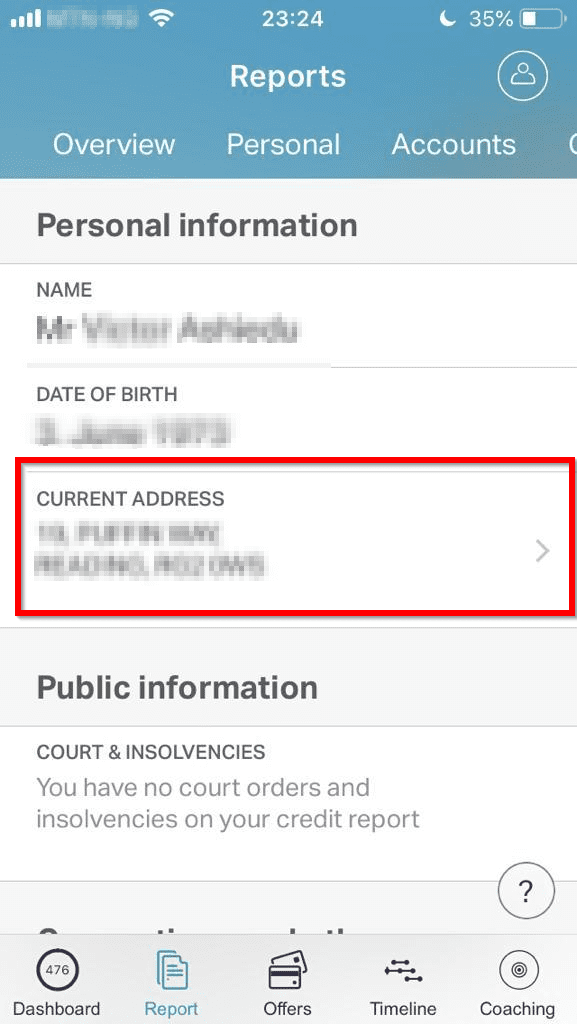
- When the change address section loads, from your list of available address, click your new address. Then click Done.
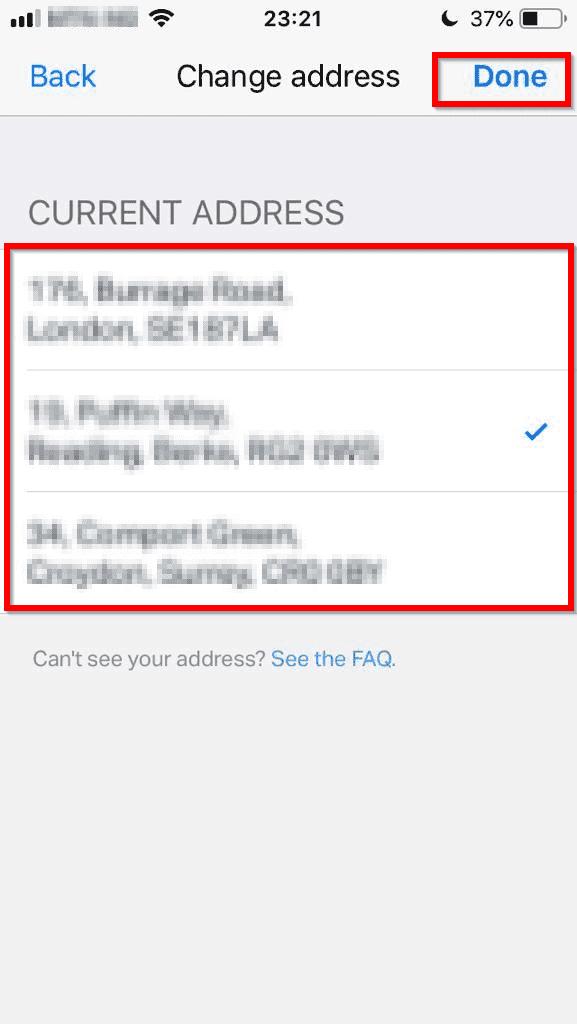
If your new address is not listed, the easiest way to update your ClearScore address is to update your address with your bank, credit card providers and utilities providers. Your new address should be updated the next time you receive your ClearScore update.
Alternatively, you can contact Equifax using the Equifax Dispute Form. From my experience, this takes more effort as you may be required to provide proof of your new address.
Frequently Asked Questions
I touched on this earlier in the guide. To help me answer this question, first I need to clarify that Clearscore Credit Score ranges from 0 to 700. A good score is determined by the average in your area as well as the UK average.
As at the time of writing this guide, the average Clearscore for the UK is 414. It is safe to assume that if yours is over 414, you are doing well.
Since ClearScore receives their data from Equifax (one of the largest credit agencies in the UK), I can say with confidence that ClearScore is accurate.
I can also confirm that my ClearScore report is accurate.
Free tools Windows power users keep installed
One-click scans. No signup required.
Both Experian and ClearScore provide you access to view and manage your credit score. However, while ClearScore is free Experian is not.
So, if you need access to your credit score for free, you’re better off with ClearScore. I have been using ClearScore for over 7 years and it’s been great!
No, although in 2018, Experian wanted to acquire ClearScore but they backed out.
Yes and No. Yes, because the ClearScore system pulls its data from Equifax. No, because they’re two different companies and platforms.
Conclusion
One last thing to note: improving your Clear Score credit score is not some quick-fix stuff. It takes time, patience, and consistency.
Quick wins for a faster PC:
Scan for outdated or missing drivers - takes under a minuteDriver Scan →Clear out junk files and repair common Windows errorsFree Scan →One benefit of improved score is lower interest rate. You are also able to access credits easily. Hopefully, these will motivate you to keep working on your credit report until it gets better.
I hope you found this Itechguide helpful.
Finally, if you still have any questions or comments, use “Leave a Reply” form at the end of this guide. You could also share your ClearScore personal experience to help other readers.
Alternatively, you can respond to the “Was this page helpful?” question below.
Good luck as you strive to better your ClearScore credit report!
Windows Errors? Fix Them Before They Spread
Repair common Windows errors and clear accumulated junk for a smoother, more stable PC - no reinstall needed.Free scan · no reinstallCrashes, No Sound, or Screen Glitches?
Random freezes, missing sound and display glitches usually trace back to one bad driver. Find and replace yours safely.Free scan · under a minuteQuick Recap
Product prices and availability are accurate as of the date/time indicated and are subject to change. Any price and availability information displayed on Amazon at the time of purchase will apply.