
What’s actually slowing this PC down?
Pick the symptom - the matching free tool is one click away.
The best Icarus server hosting providers in 2026 are PingPerfect for features, Nitrado for low-cost entry, Host Havoc for administration, GTXGaming for world migration, and a Windows VPS for technical users. Most current documentation points to an eight-player limit, and Windows remains the least risky self-managed platform.
A dedicated ICARUS server runs separately from the players’ game clients, so the world can remain available when the usual host is offline. Managed game hosting is simpler than a VPS because the provider handles installation, updates, panels, and often backups; a VPS offers more control but requires you to administer Windows, SteamCMD, firewalls, monitoring, and recovery.
Key takeaways
- PingPerfect is the strongest feature-rich managed option, with advertised 21 locations, multiple RAM tiers, nightly off-site backups, file access, configuration tools, and a trial.
- Nitrado is the lowest-cost straightforward entry among the clearly documented options, with an observed US price of $12.99 for 30 days of eight-slot hosting on August 16, 2026.
- ICARUS dedicated-server documentation and community implementations commonly identify eight simultaneous players as the practical maximum, even though some host panels display 12- or 16-slot selections.
- Persistent open-world servers should be judged by RAM, CPU allocation, restore capability, scheduled restarts, and save portability—not just slot price.
- Windows is the least risky self-hosted platform because the documented RocketWerkz setup uses Windows-oriented SteamCMD commands, paths, and configuration locations.
Which Icarus server hosting provider is best in 2026?
PingPerfect is the best overall managed ICARUS host when backups, locations, configuration access, and higher-resource plans matter. Nitrado is the best budget choice for a small group that wants quick setup. Host Havoc is the best fit for hands-on administration, while GTXGaming is a strong migration candidate. Experienced administrators can use a Windows VPS such as IONOS for maximum control.
These are research-based recommendations, not hands-on uptime or performance-test results. Prices, locations, hardware allocation, promotions, taxes, and supported configurations can change, so verify the final checkout page before paying.
The Tool Desk
Outbyte Driver Updater FREEScan for outdated or missing drivers - takes under a minuteDriver Scan →Outbyte PC Repair FREERepair Windows errors before they cause bigger problemsFix Now →#1 Best Overall

- PLEASE SEE PICTURE for wall outlet requirement** Requires NEMA 5-20 wall outlet. If 20 amp wall outlet is unavailable, please purchase optional (NEMA 5-15P to 5-15/20R adaptor plug)
- OPTI UPS TS2000E 2000VA / 1200W (110v / 115v / 120v) Battery backup system, 50 / 60 Hz frequency auto sensing and selection, simulated sine wave design. Protection for your computers, network devices, gaming systems, home entertainment, and internet connections
- Auto Voltage Regulator (AVR), adjusts voltage up (boost) or down (buck) to a safe rage without using the 2 rechargeable internal battery power (user replaceable). This line interactive design saves battery power to be available when you needed it the most, during a power outage
- 6 NEMA 5-15R outlets in the back of UPS for all of your devices. Quiet design, perfect for home or work office. Worry free operation to automatically shutdown your PC with included software. Light weight and smaller form factor design for 2000 voltage amp UPS
- Uninterruptible power supply (UPS) provides surge, short circuit and overload protection to prevent data loss. Connect your data / phone lines to UPS for total protection against outside environments / 3 Year manufacturer warranty / TUV Certification / Made in Taiwan. This is the updated version of OPTI UPS TS2250B TS1700B.
Quick comparison of the nine providers
| Provider | Best for | Price observed | Resource information | Backups and file access | Confidence |
|---|---|---|---|---|---|
| PingPerfect | Feature depth and open-world hosting | $8.17 for 4 slots; $26.63 for 8 slots; $49.90 for extreme 8-slot hardware | Advertised 9 GB, 12 GB, and 15 GB tiers | Nightly off-site backups; FTP/SFTP and configuration tools | High |
| Nitrado | Budget and easy setup | $3.29 for 3 days; $12.99 for 30 days; $43.59 for 90 days, eight slots | Fixed eight-slot offer; detailed allocation less transparent | Daily backups, control panel, DDoS protection | High |
| Host Havoc | Administration and documentation | £8.82/month displayed | Slot selector includes ambiguous 8-, 12-, and 16-slot choices | Off-site backups, restores, FTP, logs, scheduled restarts | High |
| GTXGaming | World import/export and provider experience | Verify in current configurator | Check exact RAM and CPU tier at checkout | Advertises hosted-world downloads and imports | Medium |
| IONOS VPS | Self-managed Windows hosting | Verify current VPS pricing | Choose Windows Server, CPU, RAM, storage, and bandwidth | Customer designs the backup and file-access system | High for VPS context |
| GameTeam.io | Specialist alternative | Verify current checkout | Verify RAM, CPU, regions, and allocation | Verify backups and prospect workflow | Medium |
| NoBull Networks | Dedicated-resource positioning | Verify current plan | Clarify what “dedicated resources” guarantees | Verify panel, backups, and restore terms | Medium |
| GPORTAL | Mainstream alternative | Verify active ICARUS product | Verify RAM, slots, and regions | Verify backups and file access | Low |
| Game Host Bros | Specialist alternative | Verify active ICARUS product | Do not rely on community hardware descriptions | Verify backups, SFTP, and migration | Low |
Prices in this table are not directly comparable: Nitrado’s figures use short prepaid terms, Host Havoc displays GBP, and PingPerfect’s figures represent different plans. Taxes, billing periods, regions, add-ons, and renewal pricing can change the total.
How were these ICARUS hosts selected?
The comparison weighs active ICARUS compatibility, resource transparency, location choice, backups, prospect migration, file and configuration access, support documentation, price clarity, and portability. A host that advertises a low slot price but gives no meaningful information about CPU, RAM, restore points, or save downloads is not automatically a good value.
Slot count is treated cautiously. The RocketWerkz dedicated-server setup documentation and community implementations describe the server software, while current provider menus do not always use the same limits. Buying a larger slot selection does not prove that the current ICARUS build supports more simultaneous players.
1. PingPerfect: best overall for feature depth
PingPerfect is the best overall managed ICARUS option for groups that need more than a basic server process. The provider advertises 21 locations, AMD Ryzen and EPYC hardware, 4-slot and 8-slot plans, higher-performance eight-slot hardware, nightly off-site backups, DDoS mitigation, live console access, configuration editors, command-line management, and FTP/SFTP access.
Do these 3 things before closing this tab:
1Clear out junk files and repair common Windows errors2Fix the driver behind crashes, sound loss and screen glitches3Repair Windows errors before they cause bigger problemsOn August 16, 2026, the listed prices were $8.17 per month for four slots, $26.63 per month for eight slots, and $49.90 per month for extreme eight-slot hardware. The page also showed 9 GB, 12 GB, and 15 GB RAM tiers, plus a 48-hour free-trial and money-back-guarantee claim. Check the PingPerfect ICARUS hosting page for the current location and billing configuration.
Choose PingPerfect if: you want open-world persistence, off-site backups, file access, several locations, and a path to higher resources.
Watch for: the standard eight-slot plan costs substantially more than Nitrado’s entry plan, and labels such as “normal” and “extreme” hardware do not by themselves explain CPU contention or guaranteed allocation.
2. Nitrado: best budget and easiest entry
Nitrado is the best budget choice for a small group that wants a mainstream panel and a low initial commitment. The official offer shows eight-slot plans, subscription and prepaid choices, locations including Frankfurt, New York, Miami, and Los Angeles, daily backups, DDoS protection, 24/7 support claims, mod/plugin installation claims, and the ability to switch the active game on some plans.
Quick wins for a faster PC:
Fix the driver behind crashes, sound loss and screen glitchesFind Drivers →Repair Windows errors before they cause bigger problemsFix Now →The US storefront displayed $3.29 for three days, $12.99 for 30 days, and $43.59 for 90 days of eight-slot hosting on August 16, 2026. The Nitrado ICARUS offer page also says some servers can have up to five games installed from a catalog of more than 130 games.
Choose Nitrado if: the group wants an inexpensive, low-friction server for ordinary play and does not need detailed CPU/RAM guarantees.
Watch for: the low price is tied to a fixed eight-slot configuration and selected prepaid term. Hardware allocation is less transparent than PingPerfect’s published RAM tiers, and anecdotal community reports are mixed rather than controlled performance evidence.
3. Host Havoc: best for administrator controls
Host Havoc is the strongest fit for administrators who want practical tools rather than a bare start/stop panel. Its ICARUS offering advertises FTP and file-manager access, a configuration editor, web console, log viewer, scheduled automatic restarts, off-site backups, restores, multiple North American and European locations, and ICARUS-specific guides for direct connection, admin commands, passwords, prospect imports, and restarts.
The UK page displayed £8.82 per month when researched. Currency, location, billing term, slot selection, add-ons, and taxes can alter the final price; consult the Host Havoc ICARUS page before comparing it with USD plans.
Choose Host Havoc if: you need scheduled restarts, logs, file access, configuration editing, and documented prospect-management procedures.
Watch for: the selector displays 8-, 12-, and 16-slot choices even though current technical references commonly cap ICARUS at eight players. Ask support what the larger selections mean before purchasing one.
4. GTXGaming: best candidate for world migration
GTXGaming is a strong candidate for players moving an existing world from a local PC or another host. The provider advertises a control panel, location and ping-testing information, importing a world from another provider or local computer, and downloading hosted worlds. The provider also advertises more than 350 hosted ICARUS servers, but that is a vendor claim rather than an independent performance measurement.
Rank #2

- 【AMD Ryzen 3 5300U CPU: Outperforms N150 & 3500U】 BOSGAME E5 mini PC is powered by the TSMC 7nm FinFET architecture AMD Ryzen 3 5300U processor (4 Cores, 8 Threads, up to 3.8GHz boost, 6MB total cache). Compared to low-end Intel N150 or 3500U chips which only have 4 single threads and throttle under load, the 5300U delivers over 30% faster multi-core speed. Run 30+ browser tabs, large Excel sheets, and Zoom meetings simultaneously without system lag.
- 【8GB DDR4 RAM & 256GB NVMe SSD Storage】 Installed with high-speed 8GB DDR4 dual-channel memory and a fast 256GB M.2 2280 SSD, eliminating slow boot times and application loading delays. To accommodate growing data requirements, the upgradeable hardware design features dual SODIMM slots that allow you to expand memory up to 64GB RAM, ensuring smooth operation during heavy multitasking.
- 【High-Capacity Dual M.2 SSD Storage Expansion】 Never worry about running out of space for your business files. In addition to the pre-installed 256GB system drive, the motherboard houses an extra empty internal M.2 2280 NVMe PCIe 3.0 slot. This allows you to easily add a second solid-state drive for up to an additional 2TB of storage capacity (upgrades not included) without needing to remove or reinstall the original operating system.
- 【Radeon 6-Core Graphics & Triple 4K Displays】 Integrated with official AMD Radeon Graphics (6 Graphics Cores, 1500 MHz frequency) for casual gaming, photo editing, and crisp 4K media decoding. Featuring 1x HDMI 2.0 port, 1x DisplayPort, and 1x Full-Function Type-C port, the E5 outputs true 4K@60Hz resolution to three monitors at once. This multi-screen setup eliminates constant window-switching for traders, programmers, and office workers.
- 【Dual 2.5GbE LAN Ports for Advanced Networking】 Experience fast wired network transmission speeds up to 2500Mbps without lagging or buffering. The integration of dual 2.5 Gigabit Ethernet ports (powered by Realtek RTL8125 controller) makes this compact computer an exceptional hardware choice for tech enthusiasts. Easily configure it into software routers, hardware firewalls (pfSense, OpnSense), home NAS servers, or local homelabs.
GTXGaming’s current product page should be used to verify price, available regions, exact RAM, CPU priority, and any paid resource upgrades because the supplied research does not expose a dependable current plan table. See the GTXGaming ICARUS hosting page.
Choose GTXGaming if: save portability and migration are more important than selecting the cheapest headline plan.
Watch for: do not assume the provider is faster or more stable than competitors without independent testing. Confirm whether backups include all prospect and player data.
5. IONOS VPS: best self-managed Windows option
IONOS is the best self-managed option for an experienced administrator who wants full Windows Server access rather than a game-specific panel. An IONOS ICARUS deployment guide discusses using rented hardware, Windows Server, and SteamCMD; the IONOS VPS range supplies the infrastructure to evaluate.
Free tools Windows power users keep installed
One-click scans. No signup required.
A VPS lets the buyer select CPU, RAM, storage, and other infrastructure characteristics, but the buyer must install SteamCMD, update the server after game patches, configure firewall rules, schedule restarts, monitor logs, and design reliable backups. Windows licensing, storage, bandwidth, backup products, and the selected VPS tier can materially change total cost.
Choose IONOS or another verified Windows VPS if: you can administer Windows Server and want to host additional services or control the whole machine.
Avoid a VPS if: the group wants “buy, click, play” hosting or has no recovery plan for corrupted saves and failed updates.
6. GameTeam.io: specialist alternative to verify
GameTeam.io advertises ICARUS hosting and positions the product around modern hardware and game-server management. The service is worth checking as a specialist alternative, but the supplied evidence does not establish a current price, exact CPU/RAM allocation, backup retention, locations, refund terms, or prospect-import workflow.
Outdated Drivers Are Slowing You Down
One free scan finds every outdated or missing driver and matches the right update for your exact hardware.Free scan · exact hardware matchWindows Errors? Fix Them Before They Spread
Repair common Windows errors and clear accumulated junk for a smoother, more stable PC - no reinstall needed.Free scan · no reinstallBefore buying through the GameTeam.io ICARUS page, confirm whether the product is managed ICARUS hosting, what eight-player resources are included, whether upgrades are available, and whether saved worlds can be downloaded.
7. NoBull Networks: dedicated-resource alternative to verify
NoBull Networks markets ICARUS hosting with dedicated-resource and no-oversubscription positioning. That positioning may appeal to buyers who prefer an explicit resource-allocation promise over the lowest slot price, but “dedicated resources” is not sufficiently precise unless the selected plan defines CPU and RAM guarantees.
Check the current NoBull Networks ICARUS product page for plan specifications, locations, backups, panel features, restore policy, and refund terms. Ask whether resources are reserved per server or merely described as a general platform policy.
8. GPORTAL: mainstream option requiring current verification
GPORTAL belongs on a verification shortlist rather than a confident performance ranking. Community discussions show that ICARUS players consider GPORTAL, but the supplied research does not provide a current official ICARUS product page, price, hardware table, or service terms that can be independently cited.
Recommended Free Tools
Only choose GPORTAL after confirming an active ICARUS product at GPORTAL’s official site. Verify the current player limit, RAM, regions, backups, file access, mod workflow, cancellation terms, and whether the advertised plan is available in the desired location. Community comments are anecdotal and should not substitute for product documentation.
9. Game Host Bros: specialist option requiring current verification
Game Host Bros is another specialist alternative mentioned in ICARUS community discussions. The supplied evidence is not enough to verify current ICARUS pricing, locations, resource allocation, automatic backups, SFTP, or migration support, so it should not receive a performance-based ranking without a fresh product check.
Before considering Game Host Bros, confirm that an official ICARUS product is active and ask how the service handles prospect JSON files, open-world saves, restores, server updates, and client-side mod requirements.
What should you check before buying an ICARUS server?
The right ICARUS server depends on the group’s location, play mode, resources, and tolerance for administration. Use the following checklist before paying:
Rank #3
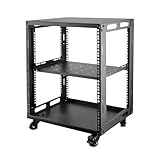
- SIZE: Width 15.75" (400 mm), Depth 19.49" (495 mm), Height 25.79" (655 mm). Additional heights of 6U and 9U are also available. The portable rolling network rack series is designed for versatility.
- STURDY: Featuring a robust 4-post construction, this 12U rack is manufactured using stringent sheet metal processes and high-quality spray treatments, making it resistant to scratches and rust.
- VERSATILE: This exceptional rack series is perfect for housing various electronics and equipment such as AV systems, TVs, NAS devices, data servers, internet routers, amplifiers, hard recorders, computers, and gaming consoles like the Xbox.
- INSTALLATION: Assembly is straightforward with clear instructions provided. The universal wheels equipped with brakes offer enhanced stability to ensure an uninterrupted online gaming experience and enjoyable entertainment moments.
- ACCESSORIES: The product will be delivered in a single box containing the 6U network rack along with essential accessories including screws & cage nuts and casters.
- Confirm the actual ICARUS product. Make sure the host supports the current dedicated-server build and updates promptly after patches.
- Compare real resources. Look for RAM, CPU model or generation, CPU sharing policy, SSD/NVMe storage, and upgrade options. A larger RAM number does not automatically compensate for heavily contended CPU resources.
- Choose a nearby data center. Check that the desired location is available for ICARUS rather than merely listed among the provider’s global regions.
- Inspect backups. Ask whether backups are daily or nightly, off-site, retained for multiple restore points, manually restorable, and inclusive of prospect and player data.
- Check file access. SFTP, FTP, a browser file manager, a
ServerSettings.inieditor, logs, live console, and scheduled restarts make troubleshooting and migration much easier. - Confirm portability. Download the world and prospect files periodically, and verify that cancellation does not immediately remove access to your data.
- Normalize the price. Compare eight slots for 30 days where possible, while labeling currencies, taxes, promotions, add-ons, and renewal prices.
How much RAM does an ICARUS server need?
There is no supplied official RAM figure that guarantees a player count or server performance. A community container project recommends at least two CPU cores, strong single-core performance, more than 8 GB of RAM, 16 GB as a recommendation, and approximately 20 GB of disk space; these are practical community guidelines, not RocketWerkz minimum specifications. See the community ICARUS server documentation.
| Workload | Practical starting point | What to prioritize | Important qualification |
|---|---|---|---|
| Small, mostly session-based group | 8–9 GB RAM class | Upgradeable plan and modern CPU | Suitable only if the workload is light; not a guarantee |
| Persistent open-world map or several players | At least 12 GB RAM class | Backups, restore tools, CPU performance, scheduled restarts | Open-world saves and large bases can be more demanding |
| Heavy, modded, or unusually demanding world | 15–16 GB RAM class or higher tier | Strong CPU allocation and troubleshooting access | Crashes can also result from updates, mods, settings, or corrupted saves |
These ranges are buying guidance, not guarantees. Monitor RAM and CPU usage, inspect logs, and upgrade only after identifying the bottleneck where possible.
Does ICARUS support more than eight players?
Current technical references commonly describe an eight-player maximum. Community implementations expose MAX_PLAYERS with a maximum of eight, and PingPerfect describes ICARUS as supporting up to eight players per session. Some provider panels nevertheless show 12- or 16-slot selections, so confirm with the host and current game build before paying for a higher slot count.
The safest interpretation is that a host’s slot selector may describe a billing or configuration option rather than a supported simultaneous ICARUS session. Do not advertise or assume 12- or 16-player support solely because a checkout menu displays those numbers.
Is ICARUS dedicated-server hosting Windows-only?
For the least risky self-hosted setup, choose Windows. The RocketWerkz documentation identifies the dedicated-server Steam application as app ID 2089300 and uses Windows-oriented installation paths, executable names, commands, and configuration directories.
Linux and Docker deployments exist through community projects, but those solutions may rely on Wine or another compatibility layer and require additional maintenance. A community Docker project can be useful for experienced administrators, but community compatibility is not equivalent to a clearly supported native Linux deployment.
How do you install an ICARUS dedicated server on Windows?
The official SteamCMD pattern installs the dedicated server without requiring a second purchased ICARUS license through SteamCMD’s anonymous login flow:
force_install_dir C:IcarusServer
login anonymous
app_update 2089300 validate
A complete command-line example is:
steamcmd.exe +force_install_dir "C:IcarusServer" +login anonymous +app_update 2089300 validate +quitThe RocketWerkz setup reference should be checked for current executable names, launch paths, and generated directories because guides and server layouts can change between updates.
Which ports does an ICARUS server use?
The commonly documented defaults are UDP game port 17777 and UDP Steam query/discovery port 27015. Launch parameters such as -PORT= and -QueryPort= can change those values.
| Purpose | Common default | What to do |
|---|---|---|
| Game connection | 17777/UDP | Use the provider-assigned port when managed hosting supplies one |
| Steam query/discovery | 27015/UDP | Confirm the assigned value and allow it through the firewall when self-hosting |
Managed hosts may configure or expose ports automatically. Do not blindly open the defaults; use the IP address and port shown in the provider panel.
Which configuration files and settings matter?
ServerSettings.ini controls important server behavior, including the server name, join password, admin password, prospect-loading information, ports, saved-data locations, and shutdown behavior. Community implementations commonly expose settings equivalent to SERVERNAME, PORT, QUERYPORT, MAX_PLAYERS, JOIN_PASSWORD, ADMIN_PASSWORD, and empty-server shutdown timers.
Set a non-empty admin password. One community implementation warns that leaving the admin password empty can allow unintended administrative access. Treat provider panel fields as aliases for the underlying configuration and check the generated file after saving.
Some installations generate configuration files only after the first launch or first prospect/lobby. If settings do not apply, launch once, stop the server, locate or create the generated configuration directory, edit ServerSettings.ini, restart, and verify in-game. A commonly documented fallback resembles [ServerInstallDirectory]IcarusSavedConfigWindowsServer, although provider panels and custom save paths can differ.
How do you move an existing prospect to hosted ICARUS?
You can move an existing prospect to a hosted server, but the filename and JSON contents must be preserved. RocketWerkz’s prospect-migration instructions identify local data under a path resembling %UserProfile%AppDataLocalIcarusSavedPlayerData{SteamID}Prospects and warn that changing the filename or JSON data can corrupt the saved prospect.
- Stop the hosted server.
- Make a separate backup of the original local prospect JSON file.
- Upload the correct JSON file through the provider’s file manager, FTP, or SFTP.
- Keep the original filename and do not edit, reformat, or manually rewrite the JSON.
- Place the file in the provider’s expected dedicated-server prospect directory.
- Set the matching prospect name in the server configuration if the host requires it.
- Start the server and verify that the prospect loads correctly.
- Keep the original backup until the hosted copy has been tested successfully.
The RocketWerkz prospect-migration PDF is the authoritative reference for the migration warnings. Host-specific instructions may use different panel labels or directories, so follow the provider’s current guide as well.
Are dedicated servers good for open-world ICARUS?
Dedicated hosting is especially useful for persistent open-world play because the server can remain available independently of one player’s PC. PingPerfect advertises persistent open-world saves, nightly off-site backups, manual restore, and world-wipe tools; Host Havoc advertises 24/7 persistence and support for multiple ICARUS content areas and expansions.
Recommended Free Tools
Rank #4
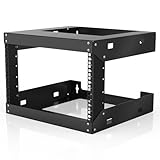
- Specifications - 6U Wall Mount Rack Open Frame Dimensions: 19.7" W x 18" D x 14.2" H
- Heavy Duty - Open rack constructed with heavy-duty steel material, supporting up to 230 lbs of equipment; powder coating ensures effective rust and corrosion protection
- Easy Equipment Configuration - The 6U network rack features an open design that optimizes airflow circulation, facilitating easy access to equipment and cabling
- Application - 6U wall mount rack is suitable for 19-inch-wide electronic equipment and devices, such as audio-visual equipment, data equipment, servers, network routers, switches, computer equipment, and gaming consoles equipped with rack shelves
- Optimize Storage Space - Wall mount rack open frame supports wall-mounted devices, creating a more efficient and convenient operating environment
Provider marketing is not independent verification of save reliability. Before choosing an open-world host, confirm backup frequency, retention, off-site storage, self-service restore, whether prospect and player data are included, and whether migration preserves the complete world. Keep a local download as well as relying on the host’s backup system.
Managed hosting, a VPS, or self-hosting: which is right?
| Option | Setup effort | Control | Backups | Best for | Main risk |
|---|---|---|---|---|---|
| Managed game host | Low | Panel, console, and file access vary by provider | Often automated; verify retention and restore | Most groups and persistent worlds | Less transparent resources and provider lock-in |
| Windows VPS | Medium to high | Full administrator access | Designed and maintained by the buyer | Technical users needing flexibility | Updates, firewall, monitoring, and recovery are your responsibility |
| Home self-hosting | High | Full local control | Designed and maintained by the buyer | Users with suitable hardware and network access | CGNAT, power outages, upload limits, and host-PC availability |
| Linux/Docker community deployment | High | High but compatibility-dependent | Designed and maintained by the buyer | Experienced Linux administrators | Wine, image maintenance, and game-update compatibility |
A dedicated server separates server workload and availability from the host’s gaming PC, but it does not automatically improve every player’s FPS or internet latency. A nearby data center may reduce network distance for a group, while client performance still depends on each player’s computer.
How do you troubleshoot an ICARUS server?
Why does the server not appear in the browser?
First confirm that the server process has finished starting and is running the same compatible build as the clients. Then check the provider-assigned game and query ports, firewall or security-group rules, exact server-name search, and the current host status. If the provider assigned non-default ports, use the displayed IP and port rather than 17777 and 27015.
Why can players not join?
Check the join password, server status, IP address, game port, client version, region availability, and whether the server is configured to shut down when nobody joins or when it becomes empty. Community container implementations expose both “not joined” and “empty” shutdown timers, so an apparently offline server may have stopped intentionally.
What’s actually slowing this PC down?
Pick the symptom - the matching free tool is one click away.
Why does an existing prospect fail to load?
Stop the server and restore the original JSON backup first. Confirm that the filename and JSON contents were not changed, check the dedicated-server prospect directory, match the prospect name in configuration, verify the saved-data path, and try an earlier provider backup if one exists.
Why does the server perform poorly or crash?
Inspect RAM usage, CPU contention, world size, player count, mods, custom content, save-directory permissions, logs, restart schedules, and server-build currency. Insufficient RAM is only one possible cause; updates, configuration errors, corrupted saves, third-party content, and provider-side incidents can also contribute.
Why do server settings not apply?
Launch the server once, stop it, locate the generated configuration directory, edit ServerSettings.ini, restart the server, and confirm the result in-game. Provider panels may write to a custom saved-data path, so use the panel’s file browser or documentation instead of assuming the default Windows path.
Which provider should you choose?
Choose Nitrado when the priority is the lowest simple entry price for a small group. Choose PingPerfect when the group needs multiple locations, published RAM tiers, off-site backups, SFTP, and a higher-performance plan. Choose Host Havoc when administrators value FTP, logs, scheduled restarts, restores, and ICARUS-specific documentation.
Do these 3 things before closing this tab:
1Fix the driver behind crashes, sound loss and screen glitches2Clear out junk files and repair common Windows errors3Scan for outdated or missing drivers - takes under a minuteChoose GTXGaming or another verified specialist when importing and downloading worlds is central to the decision. Choose IONOS or another Windows VPS when you are comfortable administering the operating system and want full control. For any open-world server, prioritize backup restoration and save portability before chasing a cheaper slot price. Finally, verify the current eight-player limit and do not treat a 12- or 16-slot checkout option as proof of supported ICARUS capacity.
Frequently Asked Questions
Does every player need to own ICARUS to join a dedicated server?
The dedicated server can be installed through SteamCMD’s anonymous login flow without an additional ICARUS game license for the server installation. Players still need compatible ICARUS game clients and access to the relevant game content to join and play.
Can an ICARUS server run when nobody is online?
An ICARUS dedicated server can remain available independently of players’ PCs, but a provider or configuration may shut it down after a configurable empty-server or not-joined interval. Check and disable those timers if the world must stay online continuously.
Can I install mods on a managed ICARUS server?
Some providers advertise mod or plugin installation, but the exact workflow varies. Confirm whether the host supports Steam Workshop content, manual .paks or .EXMOD files, client-side requirements, update persistence, and support for third-party content.
The Tool Desk
Outbyte Driver Updater FREEScan for outdated or missing drivers - takes under a minuteDriver Scan →Outbyte PC Repair FREEClear out junk files and repair common Windows errorsFree Scan →Can I move an ICARUS world between hosting providers?
World and prospect migration is possible when the provider allows file upload and download, but filenames, JSON contents, prospect directories, and configuration names must be preserved. Stop the server and create a tested backup before every migration.
What is the safest platform for self-hosting ICARUS?
Windows is the safest self-hosting choice because the documented RocketWerkz setup uses Windows-oriented SteamCMD commands, executable paths, and configuration directories. Linux and Docker deployments are possible through community projects but add compatibility and maintenance requirements.
The Bottom Line
Bottom line: Nitrado is the practical budget starting point, PingPerfect offers the most complete managed feature set, Host Havoc gives administrators the best documented control toolkit, and a Windows VPS is appropriate only for technically confident users. For persistent ICARUS worlds, backups, restore access, resource allocation, and portable saves matter more than the cheapest advertised slot count.
Quick Recap
Product prices and availability are accurate as of the date/time indicated and are subject to change. Any price and availability information displayed on Amazon at the time of purchase will apply.

