
What’s actually slowing this PC down?
Pick the symptom - the matching free tool is one click away.
The BOYA BY-M1 Microphone Review verdict is straightforward: the original BY-M1 is a budget wired lavalier with a 6 m cable, 3.5 mm connection, and broad analog-device compatibility. It is suitable for interviews, lectures, and tutorials when cable management is acceptable, but its omnidirectional capsule does not isolate room noise and modern phones may need a microphone-capable adapter.
The original BY-M1 is easy to misunderstand because its smartphone and camera modes work differently. Smartphone mode does not require the LR44 battery, while camera-path use requires the battery and camera/on mode. Those details, plus the difference between a real microphone adapter and a headphone-only dongle, determine whether the microphone works as expected.
Key takeaways
- The BOYA BY-M1 is a wired electret-condenser lavalier with an omnidirectional capsule, a 6 m cable, and a 3.5 mm connector.
- The microphone uses smartphone/off mode without its LR44 battery, while camera, camcorder, and recorder use require the battery and camera/on mode.
- The omnidirectional pickup is forgiving about capsule orientation but does not isolate the speaker from room noise; close placement matters.
- Phones, cameras, camcorders, recorders, and computers are documented compatibility categories, but USB-C and Lightning devices may need microphone-capable adapters.
- The BY-M1 is a sensible budget choice for stationary interviews, lectures, tutorials, and similar speech recording when managing a long cable is acceptable.
What is the BOYA BY-M1 microphone?
The BOYA BY-M1 is a wired, budget-oriented lavalier microphone for smartphones, cameras, camcorders, audio recorders, PCs, interviews, lectures, and live streaming. The original BY-M1 is an analog 3.5 mm microphone—not a wireless, USB, or digital model. BOYA’s official BY-M1 product page identifies the microphone as a universal lavalier intended for several types of recording equipment.
The central buying decision is compatibility rather than a long list of advanced features. The BY-M1 can be attractive if you need a very long cable and a simple plug-in workflow. The microphone is less suitable if you need wireless movement, strong rejection of surrounding sound, USB-native operation, or guaranteed plug-and-play operation with a modern phone.
Outdated Drivers Are Slowing You Down
One free scan finds every outdated or missing driver and matches the right update for your exact hardware.Free scan · exact hardware matchWindows Errors? Fix Them Before They Spread
Repair common Windows errors and clear accumulated junk for a smoother, more stable PC - no reinstall needed.Free scan · no reinstall#1 Best Overall

- Miniature Lavalier microphone with included tie clip offers low visibility and hands-free use.
- Permanently charged electret condenser element provides clear vocal reproduction.
- Unidirectional cardioid polar pattern rejects unwanted noise for improved sound quality.
- Included windscreen reduces plosives, wind, and breath sounds.
- Tailored frequency response optimized for speaking and presentations.
Disclosure: Product links may be affiliate links, which can help support this site at no extra cost to you. Check the exact model, connector, seller, and regional availability before buying.
BOYA BY-M1 specifications at a glance
| Specification | Published detail | What it means |
|---|---|---|
| Microphone type | Wired electret-condenser lavalier | It connects by cable rather than wireless pairing or USB. |
| Pickup pattern | Omnidirectional | The capsule captures sound from around the microphone rather than strongly favoring one direction. |
| Frequency response | 65 Hz–18 kHz | This is the manufacturer-published response range, not an independent measurement. |
| Signal-to-noise ratio | 74 dB | This is a published specification rather than a laboratory result from this review. |
| Sensitivity | Approximately −30 dB ±3 dB | Input levels can still vary depending on the recording device. |
| Connector | 3.5 mm; dealer listing identifies a TRRS male plug | Device wiring and adapter compatibility matter. |
| Cable length | 6 m, approximately 20 ft | The cable supports distance from a camera or recorder but requires management. |
| Power | One LR44 button battery for the powered camera path | Smartphone mode does not require the battery according to the manual. |
| Published weight | Microphone approximately 2.5 g; control module approximately 18 g | The capsule is light, but the complete cable-and-module system weighs more. |
The core specifications above are listed by BOYA and by B&H Photo’s BY-M1 technical specification page. Published specifications should not be confused with independent sound-quality testing; this review dossier contains no laboratory measurements or hands-on recording test.
How do you set up the BOYA BY-M1?
Choose the operating mode before recording. The BY-M1’s control module has a smartphone/off position and a camera/on position, and using the wrong position is one of the easiest ways to mistake a setup problem for a defective microphone.
| Recording device | Mode | Battery | Basic setup |
|---|---|---|---|
| Phone or TRRS headset-style input | Smartphone/off | Not required | Plug the microphone into a compatible headset/microphone input and select the external microphone in the recording app if necessary. |
| Camera or camcorder | Camera/on | Install one LR44 | Insert the battery, connect the microphone to the camera’s microphone input, and select the external input if the camera provides that option. |
| Audio recorder | Usually camera/on when using the powered camera path | Install one LR44 | Confirm the recorder’s input and wiring requirements before recording. |
| PC or Mac | Depends on the computer’s analog input | Confirm the input arrangement | Use a microphone-capable headset input or a suitable audio interface/adapter; computers do not all handle 3.5 mm connections identically. |
For the original BY-M1, the BY-M1 user manual directs smartphone users to the smartphone/off position without the battery. The manual directs camera users to install the LR44 battery and select camera/on. Switch the module back to smartphone/off after camera use because leaving the module in camera mode can drain the battery.
Rank #2
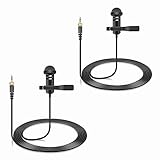
- Specially compatible with Sennheiser Wireless Transmitter EW100 EW300 EW500 SK100 SK300 SK500 EK100 EK300 EK500 EK2000 G1 G2 G3, EWD1, SK D1, ME2, ME3, ME4, XS wireless microphone system with 3.5mm locking jack plug input; Also compatible with Tascam DR-10L, TM-10LB and Zoom F2, F2-BT, F1-LP audio devices with 1/8 inch screw plug interface
- Conveniently using for stage, houses of worship, presenters, broadcasters, TV presenters, lecturers, musicians, actors, singers, fitness instructor and any other applications requiring minimum microphone visibility with maximum comfortability and hands-free operation
- Omnidirectional Condenser microphone, less noise, voice clarity, high sensitivity, more flexible, better for picking up voice
- Black, 1.5 meters / 5 feet. With metal durable lavalier mic clip on clothing lapel. High quality windscreen foam cover, keeps your microphone safe from harmful, dust, moisture, corrosion
- 3.5mm male plug, 3 poles TRS Gold-plated tip, better surface and less impedance. Female screw lock ensures plug into fixed, no more worried about connection breaking
Camera-mode battery checklist
- Open the control module and install one LR44 button battery with the correct polarity.
- Move the switch to camera/on before connecting or starting the camera recording.
- Check the camera’s input meter or make a short test recording.
- After recording, switch the module to smartphone/off to reduce battery drain.
BOYA’s manual identifies LR44, 357, and SR44 as compatible replacement designations. A BOYA BY-M1 lavalier microphone listing may include an LR44 battery, but included items and availability can vary by seller and region.
What devices work with the BOYA BY-M1?
The BY-M1 is documented for smartphones, cameras, camcorders, audio recorders, PCs, and similar analog recording equipment. A device must still have an appropriate microphone input, and a 3.5 mm socket alone does not prove that the device accepts the BY-M1’s headset-style wiring.
Phones with a 3.5 mm headset jack
A phone with a compatible 3.5 mm headset/microphone jack is the simplest phone setup: select smartphone/off, connect the microphone, and verify that the recording app is using the external input. Some phone cases can prevent the plug from seating fully, so remove the case temporarily if the microphone is not detected.
USB-C and Lightning phones
Phones without a 3.5 mm headset jack need an adapter that supports external analog microphone input. A passive headphone-only dongle may play audio while failing to carry the BY-M1’s microphone signal. BOYA’s adapter catalog lists the BY-K3 for compatible Lightning devices and the BY-K4 for USB-C devices; the BOYA audio-adapter catalog should be checked for the current model and device path.
Rank #3

- LIGHTWEIGHT MATERIALS: Lavalier lapel microphone is made of lightweight materials that ensure we hardly notice the microphone, allowing for comfort and sensitivity at the same time.
- OMNIDIRECTIONAL MICROPHONE: Omnidirectional microphone records clean and clear sound, designed for recording sound from multiple directions, large rooms and even outdoors.
- MINI METAL CLIP: Omnidirectional clip on lapel mic features a mini metal clip that allows you to easily clip it to your collar, tie or pocket, freeing up your hands.
- REMOTE RECORDING: Omnidirectional lavalier mic features a 6.35mm jack for connecting amplifiers, consoles and sound cards. 5m sound cable for your distance recording requirements.
- SCOPE OF APPLICATION: Professional lavalier microphone helps record powerful, crisp sounds when using guitars, saxophones, trumpets, violins, pianos and more.
Exact compatibility depends on the phone, operating system, app, adapter wiring, and whether the adapter includes the required analog-to-digital conversion. Do not assume that every USB-C phone, Lightning device, or USB-C dongle will work with the BY-M1.
Cameras, camcorders, and recorders
Use camera/on mode and an LR44 battery for the powered camera path. Confirm that the camera or recorder accepts the microphone’s 3.5 mm connection and make a short test recording before an interview or event. A camera’s 3.5 mm socket may be intended for a different input arrangement, so the device manual remains the final compatibility check.
How does the BY-M1’s omnidirectional pickup behave?
The BY-M1’s omnidirectional capsule captures sound from around the capsule, so the clip does not need to face the speaker with the precision required by a strongly directional microphone. The trade-off is that omnidirectional pickup is not noise cancellation or noise isolation: the microphone can also capture nearby room sound.
BOYA’s manual warns that some ambient noise is unavoidable in loud environments and recommends placing the microphone as close to the subject as possible. That advice is especially important in rooms with conversation, traffic, air-conditioning noise, echo, or other competing sound. The documented pickup pattern and manual guidance support realistic expectations, but they do not establish an independent audio-quality result.
Rank #4

- [Professional Audio Quality] Powerful, High sensitivity lavalier microphone amplifies your voice, stable signal, zero delay & crisp, vibrant audio transmission for indoor & outdoor activities. unidirectional condenser microphone can reduce unwanted background noise.
- [Lightweight & Invisible Design] Miniature lavalier lapel design, light, cozy, stable, suitable for long time adorn, it can be conveniently clipped to the tie or collar, an ideal replacement for the original wireless system microphone.
- [Widely Compatibility] 3.9ft/1.2 meters cable, Mini XLR TA4F plug compatible with Shure GLXD1, PGX1, SC1, SLX, U1, ULX1, ULXD1, UR1, UR1M, UT1, QLXD1 / TOA WM4300 / Line 6 XD-V70L wireless microphone system.
- [Solid Case & Durable Cable] Solid metal microphone case, easy to use, convenient and durable. The configuration cable, lightweight, soft, stretch-resistant, has good shielding effect and balanced output function, can effectively reduce friction between the sound and the outer.
- [Widely Applications] Designed for use on stage, houses of worship, presenters, broadcasters, lecturers, musicians, actors, singers, fitness instructor and any other applications requiring minimum microphone visibility with maximum comfortability and hands-free operation.
Practical placement checklist
- Clip the capsule securely near the speaker’s upper chest, while avoiding direct rubbing against clothing.
- Keep the capsule close to the speaker rather than relying on the 6 m cable to compensate for distant placement.
- Use the foam windscreen where appropriate, but do not describe the windscreen or capsule as a noise-cancelling system.
- Route and secure excess cable so movement does not create tugging or clothing noise.
- Record a short sample and listen for clothing contact, distortion, low input level, or room noise before the main recording.
What are the BY-M1’s main strengths?
- Broad documented device coverage: BOYA and B&H list smartphones, cameras, camcorders, audio recorders, and computers among the supported categories.
- A genuinely long cable: The 6 m cable can place a speaker well away from a static camera or recorder, which is useful for interviews, demonstrations, lectures, and fixed-camera shoots.
- No pairing process: The analog connection and physical mode switch avoid wireless pairing and charging routines.
- Low capsule weight: BOYA lists the microphone itself at approximately 2.5 g, although the control module and cable remain part of the system.
- Clear use-case fit: Interviews, lectures, tutorials, and single-speaker recordings are natural applications when a wired connection is acceptable.
What are the BY-M1’s limitations?
| Limitation | Why it matters | Best response |
|---|---|---|
| Wired design | The 6 m cable provides reach but can snag, tangle, or restrict movement. | Use cable clips or tape and choose a wireless microphone when unrestricted movement is essential. |
| Omnidirectional pickup | Surrounding sound can enter the recording, particularly in loud rooms. | Place the capsule close to the speaker and improve the recording environment. |
| Mode-dependent operation | Smartphone and camera paths use different power and wiring assumptions. | Use smartphone/off for phones and camera/on with an LR44 for the powered camera path. |
| Modern phone adapters | Many USB-C and Lightning dongles support headphones but not an external analog microphone. | Choose a microphone-capable adapter and verify the specific host device. |
| Variant confusion | The BY-M1S and BY-M1 Pro II are different products with different published specifications. | Confirm that a listing says original BY-M1 before comparing specifications or accessories. |
What should you do if the BY-M1 is not detected?
Start with the physical setup before changing drivers or buying replacement software. A wrong mode, incompatible adapter, incompletely inserted plug, disabled permission, or damaged cable is more directly connected to this microphone than a generic computer repair tool.
- Confirm the switch: smartphone/off for a phone or TRRS headset input; camera/on for the powered camera path.
- For camera mode, install a fresh LR44, 357, or SR44-compatible battery and check polarity.
- Push the 3.5 mm plug fully into the device or adapter and test without a thick phone case.
- Confirm that the adapter supports microphone input, not only headphone output.
- Give the recording app permission to use the microphone and select the external input when the app exposes that setting.
- Try a short recording on another compatible device to separate a microphone problem from a host-device problem.
- On Windows, check the selected input device, privacy permissions, input level, and sound driver before considering third-party troubleshooting software.
After those checks, Windows users with a broader audio-device or driver problem can investigate Outbyte Driver Updater or Outbyte PC Repair. These tools are optional troubleshooting aids for Windows software issues; they cannot repair a damaged BY-M1 cable, replace an incompatible adapter, correct the wrong mode, or make unsupported hardware compatible.
Independent reader supportYour contribution helps us test, update, and keep practical guides available for everyone.Is the BOYA BY-M1 worth buying?
The BOYA BY-M1 is worth considering for a budget-conscious buyer who wants a simple wired lavalier, needs a 6 m cable, and will record with a compatible 3.5 mm input. The microphone is a reasonable match for stationary interviews, lectures, demonstrations, tutorials, and single-speaker content where cable management is acceptable.
Choose a different type of microphone if your priority is wireless mobility, substantial rejection of room noise, USB-native connection, or effortless compatibility with a modern phone. The BY-M1’s value depends on correct setup: smartphone/off mode for phones, camera/on with an LR44 for the powered camera path, and a microphone-capable adapter for devices without a 3.5 mm jack.
Quick wins for a faster PC:
Fix the driver behind crashes, sound loss and screen glitchesFind Drivers →Repair Windows errors before they cause bigger problemsFix Now →Scan for outdated or missing drivers - takes under a minuteDriver Scan →Using the BY-M1 in a creator workflow
The BY-M1 can serve as the recording microphone for an interview, lecture, tutorial, or spoken-video production. After editing the finished recording, a creator may also want to reuse that video in a continuous livestream workflow. StreamNeo describes cloud-based streaming that loops prerecorded video as a continuous YouTube livestream, but the service should not be understood as directly integrating with or controlling the BY-M1.
Best Value

- 【Universal Compatibility】 Compatible with smartphones, cameras, camcorders, and audio recorders featuring a 3.5mm TRS jack. Also compatible with Rode Wireless GO II; compatible with DJI Wireless Mic Transmitter and NEEWER CM28/CM31 wireless microphone systems. Note: not compatible with Sony microphone systems
- 【Convenient for Multipurpose】 No need for batteries or moving one mic from speaker to speaker, this 2 pack microphone set is user friendly for stage performances, presentations, broadcasting, TV hosting, lecturing, fitness lessons, vlogging, and various other applications. The compact size of the mic ensures minimal visibility to cater to professional needs across different fields
- 【Omnidirectional Condenser for High Fidelity】 These omnidirectional condenser mics are highly sensitive to pick up voices 360° for HD uncompressed audio quality and deliver clear and crisp voice recordings
- 【Lapel Clip On Design】 Designed with a 3.9ft (1.2m) cord and a high quality metal mic clip, the mini mic can be clipped onto a clothing lapel while the other end is plugged into your device for maximum comfort and hands free operation
- 【Plug & Play Convenience】 Equipped with a gold plated 3.5mm TRS connector, the wired mic can connect to your smartphone or camera and record your voice right away. No sound drives and software are necessary. For devices with the 3.5mm jack, please separately purchase an adapter from 3.5mm female to USB Type C or other connectors
Frequently Asked Questions
Is the BOYA BY-M1 wireless or USB?
The BOYA BY-M1 is a wired electret-condenser lavalier microphone with an omnidirectional pickup pattern and a 3.5 mm connector. The original model is not wireless, USB, or digital.
Does the BOYA BY-M1 need a battery?
The BOYA BY-M1 does not require its LR44 battery in smartphone/off mode according to the manual. Camera, camcorder, and other powered camera-path use requires one LR44-compatible battery and camera/on mode.
Does the BOYA BY-M1 work with USB-C or Lightning phones?
The BOYA BY-M1 can work with USB-C and Lightning devices only through a compatible microphone-capable adapter. A headphone-only dongle may not carry the microphone signal, so exact phone and adapter compatibility must be checked.
Recommended Free Tools
Who should buy the BOYA BY-M1?
The BOYA BY-M1 is best for budget-conscious users recording interviews, lectures, tutorials, and other mostly stationary speech content with a compatible analog input. The microphone is less suitable for users who need wireless movement or strong rejection of surrounding sound.
The Bottom Line
Bottom line: The original BOYA BY-M1 is a practical wired lavalier when a long cable and analog compatibility matter more than wireless freedom or environmental isolation. Buy it for the documented use cases, but verify the connector path, select the correct operating mode, and remember that camera use requires an LR44 battery while smartphone mode does not.
Quick Recap
Product prices and availability are accurate as of the date/time indicated and are subject to change. Any price and availability information displayed on Amazon at the time of purchase will apply.

