iTechGuides is reader-supported. When you buy through links on our site, we may earn an affiliate commission. As an Amazon Associate I earn from qualifying purchases. Learn more
Ever encountered the word RAID before – maybe you think it is a game/movie title, right? There are different RAID levels but this article focuses on explaining RAID 4 or RAID level 4.
Overview
Before I get to RAID level 4, I feel it is necessary to give you a crash course on RAID technology. As I already hinted in my introduction, RAID is an acronym that means “Redundant Arrays of Independent Disks”.
RAID is a storage technology for storing data across multiple hard drives. The main purpose of RAID is to avoid the risk of losing data.
Outdated Drivers Are Slowing You Down
One free scan finds every outdated or missing driver and matches the right update for your exact hardware.Free scan · exact hardware matchPC Slower Than It Used to Be?
A free scan shows the junk files, broken settings and background clutter dragging Windows down - then fixes them in one click.Free scan · Windows 10 & 11In addition to avoidance of data loss, RAID also aims to improve speed and performance.
#1 Best Overall

- Compatible with: LSI 9300-8i & 9211-8i; Controller: Broadcom/LSI SAS3008 (12Gb/s SAS3, 8-port)
- Firmware (FW): HBA IT Mode (Non-RAID); Data Transfer Rate: up to 12Gbps SAS, SATA 6Gbps
- Host Interface: PCIe 3.0 x8; Internal Connectors: 2× Mini-SAS HD SFF-8643. --Direct attach up to 8 drives, and expand via external SAS Expander for large arrays
- PERFECT FOR: ZFS, FreeNAS/TrueNAS, unRAID, Proxmox, ESXi home-lab & NAS storage
- Packing List: HBA Card: 1; SFF-8643 to 4× SATA Cables: 2. Cables in box are for SATA drives. --They are not compatible with SAS drives. To connect SAS drives, use SFF-8643 to SFF-8482 cables (sold separately) or our matched HBA + cable kit
There are so many RAID levels which include RAID levels 0,1, 2, 3, 4, 5, 6, and 10. In this article, I will focus on the RAID level 4 (RAID 4).
Hence, RAID 4 is a RAID configuration that uses block-level striping across two or more independent disks with a dedicated parity disk. This storage technology is similar to RAID 5 in that both use block-level striping with parity.
The difference though is that RAID 4 uses block-level striping across multiple disks with a dedicated parity disk. On the other hand, RAID 5 also uses block-level striping across multiple disks but writes parity data across all disks.
The Tool Desk
Outbyte Driver Updater FREEFix the driver behind crashes, sound loss and screen glitchesFind Drivers →Outbyte PC Repair FREERepair Windows errors before they cause bigger problemsFix Now →How Does RAID 4 Work?
If you read the article from the beginning, you may have deduced that RAID 5 offers improvements to RAID 4. For this reason, Redundant Array of Independent Disks level 4 is rarely implemented today.
Then, how does Redundant Array of Independent Disks level 4 technology work?
As I already hinted earlier, Redundant Array of Independent Disks 4 uses block-level striping across two or more independent disks with a dedicated parity disk. For clarity, block-level striping means that it writes data to each disk in a group of bytes.
To make this more practical and easy to understand, let us consider the below example:
Rank #2

- Compatible with: LSI 9300-8i; Controller: LSI/Broadcom SAS3008 (12Gb/s SAS)
- Firmware (FW): HBA IT Mode (Non-RAID); Data Transfer Rate: up to 12Gbps SAS, SATA 6Gbps
- Host Interface: PCIe 3.0 x8; Internal Connectors: 2× Mini-SAS HD SFF-8643. --Direct attach up to 8 drives, and expand via external SAS Expander for large arrays
- PERFECT FOR: ZFS, FreeNAS/TrueNAS, unRAID, Proxmox, ESXi home-lab & NAS storage
- Packing List: HBA Card ×1; 2× SFF-8643 to 4× SATA cables (8× SATA ends). --Cables in box are for SATA drives. They are not compatible with SAS drives. To connect SAS drives, use SFF-8643 to 8482 SAS cables (sold separately) or our matched HBA + cable kit.
For instance, let us say we have four disks (0, 1, 2, and 3). Taking disk 3 as our parity disk and disks (0, 1, and 2) as the independent disks for the block-level striping – striping is a technique of splitting data across multiple disks.
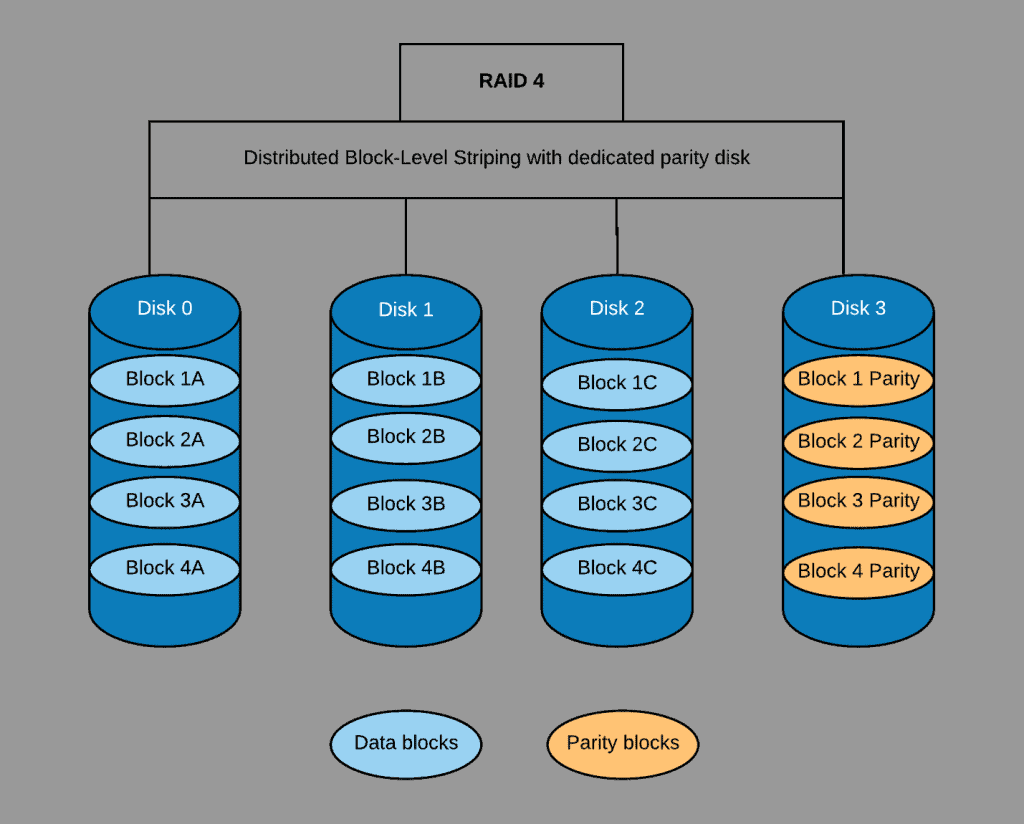
Let’s say that data is striped across the first blocks – 1A, 1 B, and 1C – the parity information for data stripped across these blocks will be stored in Block 1 parity.
This same logic applies to all other data blocks.
For more clarity, RAID 4 uses the parity disk to reconstruct data if any of the disks (say disk 0) becomes faulty. This is possible by obtaining the difference between the parity disk and the sum of disks 1 and 2.
Features of RAID 4
I have discussed a little about this storage technology in the overview and how it works sections above. Now, let us see some of the features of the RAID 4 in the following sub-sections
Fault Tolerance
RAID 4 is fault tolerance which means that if you replace a failed disk, the RAID can be rebuilt with the parity information.
This parity disk helps restore/rebuild the data in a failed disk.
Good Random/Sequential Reads Performance
Because RAID 4 splits its data into segments of blocks across multiple disks, it provides good performance of random/sequential reads.
Rank #3

- Compatible with: LSI 9300-8i; Controller: LSI/Broadcom SAS3008 12Gb/s SAS HBA controller for server, NAS, workstation and home-lab storage builds.
- Firmware (FW): HBA IT Mode (Non-RAID); Data Transfer Rate: up to 12Gbps SAS and SATA 6Gbps, designed for direct disk passthrough and software-defined storage.
- Host Interface: PCIe 3.0 x8; Internal Connectors: 2× Mini-SAS HD SFF-8643. Direct attach up to 8 drives, and expand via external SAS Expander for large arrays.
- PERFECT FOR: ZFS, FreeNAS/TrueNAS, unRAID, Proxmox, ESXi home-lab and NAS storage builds that need stable HBA passthrough for SAS or SATA drives.
- Packing List: HBA Card: 1; SFF-8643 to 4× SFF-8482 SAS Cables: 2. Cables in box are for SAS drives. They are not compatible with SATA drives. To connect SATA drives, use SFF-8643 to 4× SATA cables sold separately or our matched HBA + cable kit.
Poor Random Writes Performance
RAID 4 offers poor random writes performance due to its need to write all parity data to a single disk. For instance, consider the example in the “how it works section”, say the data in disks 0, 1, and 2 need to be written at the same time.
Do these 3 things before closing this tab:
1Clear out junk files and repair common Windows errors2Fix the driver behind crashes, sound loss and screen glitches3Repair Windows errors before they cause bigger problemsBecause the parity information needs to be updated by a single disk, disk 1 Write will wait for disk 0 write to complete, and so on. This is why Write is slower.
Dedicated Parity Disk
RAID 4 uses a single disk for its parity information. Hence, there will be a bottleneck in high I/O cases.
Also, in a situation where the parity disk fails, recovering disk data is not possible. Unlike the RAID 5 that distributes its parity data across all disks.
So, should it be that a disk fails, its data will still be accessible from the other disks.
Low Storage Overhead
Storage overhead in RAID 4 is low unlike in RAID 5. For instance, assuming a RAID 5 is to spread its data across 3 disks of 1 TB each, which when put together amount to 3 TB of space.
The total space it (RAID 5) can make use of out of the 3 TB will be just 2 TB of space.
Recommended Free Tools
Pros of RAID 4
Read Operations are Fast
RAID 4 spreads its data into segments of blocks across multiple disks. Hence, it provides good performance of random/sequential reads.
Low Storage Overhead
RAID 4 reduces storage excesses. In fact, it needs only a single disk to store parity information.
For instance, if you have 3 disks, only 1 disk will serve for the parity information. Hence, overhead is only 33% in terms of storage.
Rank #4

- Compatible with: LSI 9300-8i & 9211-8i 9207-8i; Controller: SAS3008.
- Firmware (FW): HBA IT Mode (Non-RAID); Data Transfer Rate: 12Gb/s SAS or SATA 6Gb/s.
- Host Interface: PCIe 3.0 x8; Internal Connectors: 2x SFF-8643. Direct attach up to 8 drives, expandable via compatible SAS expander.
- PERFECT FOR: ZFS, FreeNAS/TrueNAS, unRAID, Proxmox, ESXi home-lab & NAS storage.
- Packing List: HBA Card: 1; SFF-8643 to SATA Cables: 2. Cables in box are for SATA drives. They are not compatible with SAS drives. To connect SAS drives, use SFF-8643 to SFF-8482 SAS cables (sold separately) or our matched HBA + cable kit.
Simultaneous Input/Output Request Performance
Redundant Array of Independent Disks 4 facilitates multiple I/O requests at the same time.
This is due to the fact that its drives operate independently.
There is no Need for Disk Spindles Synchronization
Unlike RAID 3, RAID 4 does not need to synchronize disk spindles.
Hence, decrease in disk latency.
What’s actually slowing this PC down?
Pick the symptom - the matching free tool is one click away.
Fault Tolerance
In Redundant Array of Independent Disks 4, if any of the independent disks fails, the RAID can be rebuilt by replacing the failed disk.
This is because this storage technology makes use of a parity disk. The parity disk helps restore/rebuild the data in a failed disk.
Cons of RAID 4
Only a Single Parity Disk
Unlike RAID 5 which writes its parity data across all disks, Raid 4 uses just a single disk to write its parity data.
Unfortunately, if the parity disk fails, all data may be lost.
Poor Random Writes Performance
Since this storage technology uses a single disk for its parity information, random write speed will be slow.
For example, to write the information in the independent disks to the parity disk at the same time. Because the parity disk is just one, one independent disk write needs to wait for the other disk write to complete.
Rarely Used in Production Today
This storage technology is not readily in use nowadays.
This is due to the fact that RAID 5 performs better. As I have mentioned several times, while RAID 4 uses a single disk for its parity information, RAID 5 distributes its parity information across all disks.
RAID 4 Causes System Delays and Wastes Time
The use of RAID 4 for a small amount of data would not be a good idea.
This is because of the need to carry out modifications of parity blocks for each I/O session. As a result of this continuous process, it wastes a lot of time and may delay the whole system operation.
Best Value
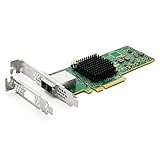
- 12G External PCI-E SAS/SATA HBA Controller Card
- Controller: Broadcom's SAS 3008
- PCIE 3.0 , X8 Lane; 2x Mini SAS SFF-8644 Ports
- What You Get: 10Gtek LSI-3008-8E HBA Card x1, Driver CD x1, Low-profile Bracket x1. Backed by 10Gtek 30 Days Free-returned, 1 Year Free Warranty and Lifetime Technology Support.
Conclusion
RAID 4 is a RAID level that uses block-level striping across two or more independent disks. However, this storage technology is not readily in use these days.
This is because RAID 5 can perform better. Besides, RAID 5 also uses block-level striping across multiple disks.
Meanwhile, while RAID 4 uses a single disk for its parity information, RAID 5 distributes its parity information across all disks.
Quick wins for a faster PC:
Scan for outdated or missing drivers - takes under a minuteDriver Scan →Repair Windows errors before they cause bigger problemsFix Now →Fix the driver behind crashes, sound loss and screen glitchesFind Drivers →As a result, if the parity disk in RAID 4 fails, it would be difficult to recover lost data. However, in RAID 5, if one disk fails, restoration of the lost information is very easy.
Hence, RAID 5 is a better choice than RAID 4.
I hope I was able to explain RAID 4 and how it compares to other types of storage. I also hope that you found the article helpful and easy to understand.
If you did, kindly share your thoughts by responding to the “Was this page helpful?” question below.
Finally, you may find other helpful articles on our Storage & Disk Technology Explained page
Quick Recap
Product prices and availability are accurate as of the date/time indicated and are subject to change. Any price and availability information displayed on Amazon at the time of purchase will apply.