
If Call of Duty says “connection failed,” first check Activision’s online-services status and your platform’s network status. If they’re available, confirm you’re signed in, then test your home connection with simple, reversible steps before changing router settings. A service outage cannot be fixed from your home network, and the right fix may depend on the Call of Duty title, platform, and exact error message.
1. Check Call of Duty and platform service status
When the error occurs, check Activision’s Online Services page. Select the relevant Call of Duty title and check the network status for your platform. Activision’s Black Ops 6 connection guide says a status indicator that is not green, or an alert on the page, may mean connection problems will continue until service is restored.
Also check your platform network’s service status. If either service is experiencing problems, wait for it to recover and try again; changing your router settings will not restore an unavailable service.
2. Confirm you’re signed in to your platform account
Make sure you are signed in to the system account used to play, such as your PlayStation, Xbox, Steam, or Battle.net account. Activision’s Black Ops connection guide includes platform sign-in as a basic check. Once signed in, try connecting again.
#1 Best Overall

- We Proudly Customize in USA Original Micro-Soft X-box One/Series X/S Controller using Hydro-dip Painting- it brings life to your regular boring controller. The colors never fade, even if you use it for long hours frequently, all thanks to its most Advanced hydro-dip printing technology.
- These Custom X-box Series X Controllers will add a Cherry to your Gaming Room Decor. These Controllers come with all Original Accessories and their normal working is not affected by the custom printing on them. Since these are not skins, you need not worry about them peeling off after some time or any wrinkles or bubbles on the surface.
- We believe that one shouldn't settle for a normal, plain boring controller when they can have a controller that is colorful, has great artwork on it, have a soft touch feel, and is so much fun! Stand out among all your gamer friends/streamers with these Unique Designed X-box One Controllers.
- Feel confident purchasing your New Wireless Custom X-box Series X/S controller because all controllers are manually Checked for quality by our in-house technicians in the USA and Tested before shipping out. All Controllers are compatible with X-box One, X-box One S/X, X-box Series S/X, and, PC Windows 10 devices.
- High quality and wear-resistant and with your favorite character design on both sides, these controllers include a brand new wireless connection that lets you rid yourself of cable lines to enjoy a great wireless range!
3. Test your home connection with basic steps
If services are available and you’re signed in, work through these checks one at a time. After each change, launch the game and test the connection so you can tell whether that step helped.
- Restart your router. Follow the router maker’s restart procedure, wait for the connection to return, and try the game again.
- Try a wired connection. If your platform and router have compatible Ethernet ports, connect them with an Ethernet cable and test again. Activision Support says, “We strongly recommend using a wired Ethernet connection during online gameplay.” A cable is only a test for a local connection problem; it will not fix an Activision or platform outage.
- Check your internet connection. Test whether other devices or online services in your home can connect. If they cannot, troubleshoot the internet connection with your provider rather than changing Call of Duty settings.
- Reduce competing network use. Pause large downloads and limit bandwidth-heavy activities such as streaming while testing the game.
4. Change router settings only when the basic checks fail
Activision’s router instructions are in a Black Ops connection guide, so do not assume every setting applies to every Call of Duty title or network. Router menus also vary by model. If you use the guide, follow its instructions for your specific platform and router rather than guessing at settings.
Rank #2

- Iconic Monkeybomb Design: This officially licensed Call of Duty collectible features the legendary Monkey Bomb character rendered as a detailed 8.5 in tall gaming accessory that expresses your passion for the franchise
- Dual-Purpose Controller Holder: Heavy-duty PVC construction with a sturdy base securely holds gaming controllers, smartphones, and devices without tipping, combining functional organization with display appeal
- Universal Device Compatibility: Grips most gaming controllers including PlayStation 5 DualSense and Xbox Series S/X, plus iPhones, Android phones, TV remotes, and eBook readers for complete desk organization
- Authentic Licensed Collectible: Officially licensed by Activision, this Cable Guys figure delivers genuine Call of Duty authenticity that counterfeit alternatives cannot match for true COD gamers
- Premium Gaming Desk Accessory: Transforms any gaming setup into a professional space while keeping your devices within reach, perfect for streamers, competitive players, and collectors who value quality
Test UPnP before port forwarding
The Black Ops guide discusses testing UPnP and then port forwarding if needed. Make one change at a time and test the game before continuing. Port forwarding in the guide involves assigning a static IP address to the device; follow the guide’s steps for the relevant platform rather than applying generic port numbers.
Use DMZ only for a console and only as a test
The same guide discusses DMZ for consoles only. It instructs players to remove the console’s static IP address from DMZ after testing. Do not leave a console in DMZ as a permanent troubleshooting shortcut, and do not apply this instruction to a PC.
Outdated Drivers Are Slowing You Down
One free scan finds every outdated or missing driver and matches the right update for your exact hardware.Free scan · exact hardware matchPC Slower Than It Used to Be?
A free scan shows the junk files, broken settings and background clutter dragging Windows down - then fixes them in one click.Free scan · Windows 10 & 11Rank #3

- ✅【4 Fingers-Operation】 Just use your index and middle fingers to press the L1R1 triggers, that shooting, aiming, left/ right tilted head, moving, jumping, squatting and and lying operations can be performed at the same time, It will be a breeze to defeat the thumb-hold players, also a massive advantage in close range combat because difference in milliseconds can be life or death. No disconnection, response delay, root request or system incompatibility issues.
- ✅【Ergonomic Grip Controller】People may get hands cramps after playing hours of battle royal games with cellphone. DELAM gamepad is specially designed for mobile shooting games, it extends your phone into a traditional Xbox or PS controller, more comfortable for big hands. Phone body and controller are firmly fixed through three contact points covered of rubber pads to prevent the phone sliding, and won't press your on off button and volume keys, or scratch your phone.
- ✅ 【Wide Range Applicable for 4.7-6.5" iPhones & Android Phones (Max Phone Length: 16.8cm include Phone case) 】 Work for PUBG Mobile/ Call Of Duty Mobile/ Free Fire/ Critical Ops/ Rules of Survival/ Knives Out/ Cross Fire/ Terminator 2 Judgment Day/ Survivor Royale as long as the game allows customize and drag the touch points. Please feel free to contact us at the first time.
- ✅【High Sensitive Finger Sleeves】100% brand new. With copper fiber covered, finger sleeves for gaming ensures your every touch is accurate and effective. More sensitive than silver fiber.
- ✅【Sweat-Absorbent & Breathable】High-quality copper fiber mobile gaming sleeves is lightweight, breathable and has good sweat absorbing ability. They allow you to separate your thumb with the touch screen, fast sweat kick-away and fast dry.
5. Contact the right support if you still cannot connect
If the listed network tests do not resolve the issue, Activision’s Black Ops guidance recommends contacting your internet service provider. If you’re using a school, workplace, or shared network, ask its network administrator for help; you may not have permission to change the settings needed for online play.
For more targeted troubleshooting, note the exact Call of Duty title, platform, and full error message. Instructions for Black Ops do not establish that the same router steps are appropriate for every game. Check Activision’s service and support pages again when the failure happens, since service status and guidance can change.
Quick Recap
Best Value
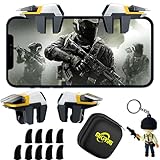
- ✅【Using Tips】These Mobile Game controllers are using the sensitive real mouse micro switch inside. So there are several phones which have the electromagnetic problems. This will cause the triggers touch the screen automatically. Please do not worry about this and you just need to turn off the screen for 5 seconds and turn on the screen again. This issue will solved right away.
- ✅【Perfect Compatibility】These Mobile Game controllers are compatible with iPhone, iPad and most Android Phones, without even remove your case.(The thickness of the compatible mobile phone should be not more than 13mm.) These 6-fingers-operation mobile game controllers are suitable for a variety of shooting games, including PUBG, Call of Duty, Fortnite, Knives Out, Rules of Survival, Survivor Royale, Critical Ops etc. As long as the game allows customizing and draging the keys.
- ✅【Super Gaming Experience】This PUBG game triggers is made of ABS and alloy, durable and ergonomic. 6 trigger PUBG mobile controller electroplated alloy materials, mouse buttons, smooth touch, six-finger linkage, auxiliary pressure grab, one-second burst, dominate the game battlefield, and enjoy the ultimate gaming experience. Call of Duty mobile controller are sensitive to shoot and aim, no Power supply and driver needed, easy to use and high precision, increase your game score!
- ✅【Mechanical Touch】4 triggers PUBG mobile controller designed for longevity with greater durability and responsiveness, more than 2 million click. Fast mechanical keys with medium resistance, precise actuation, audible click sound, and tactile bump feedback. Easy To Use, High Sensitive, Physical Button Feedback. Using this PUBG mobile game controller, you can move, angle adjust, aim and shoot at the same time with the thumbs and index fingers of the left and right hand.
- ✅【Small and Lightweight】The PUBG game triggers are portable and tiny for you to put them into your pocket, and have them for gaming when in office, school, trip, camping and play games anywhere and anytime. With the 6 trigger PUBG mobile controller, you can simultaneously move, turn, aim and shoot by using the index fingers to press the buttons, which can eliminate the trouble that use thumbs only to make all operations.
Rank #4
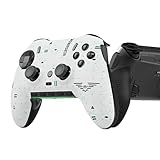
- Four rear, remappable paddles keep your thumbs on the sticks for faster reactions.
- Five fully remappable G-Keys for advanced macros and Corsair iCUE integration.
- Two unique side-mounted SAX buttons are designed to provide additional configurability and fit the natural placement of your fingers.
- OMRON mechanical button switches operate like a mouse click for instant activations.
- Corsair SlipStream ultra-fast wireless-connectivity.
Product prices and availability are accurate as of the date/time indicated and are subject to change. Any price and availability information displayed on Amazon at the time of purchase will apply.

