
iTechGuides is reader-supported. When you buy through links on our site, we may earn an affiliate commission. As an Amazon Associate I earn from qualifying purchases. Learn more
The 10 Best Free & Paid Piano Learning Apps In 2025 depend on your goal: Skoove is the strongest all-round structured beginner course, Hoffman Academy and Piano Marvel are the best free-first starting points, flowkey is best for songs, Piano Marvel is best for sight-reading and MIDI, and Simply Piano is the easiest motivational choice. No app replaces individualized technique feedback.
Editorial note: This is the 2025 edition of this guide. Subscription prices, trial terms, song catalogs, supported devices, and app features can change by country, platform, plan, and promotion. Price figures below are dated signals from the cited sources, not universal prices. Confirm the current offer in the app or on the provider’s website before subscribing.
Key takeaways
- Skoove is the best overall choice for a beginner who wants one structured path covering lessons, theory, technique, sight-reading, chords, and songs.
- Hoffman Academy and Piano Marvel are the strongest free-first choices, but their free access works differently: Hoffman emphasizes teacher-led videos, while Piano Marvel offers a limited interactive tier.
- flowkey is the best fit for learning particular songs, while Piano Marvel is the better fit for systematic sight-reading and MIDI-connected digital pianos.
- Microphone detection can work with an acoustic piano, but MIDI usually supplies more exact note and timing data from a compatible digital piano or keyboard.
- A piano app can help with consistency, beginner orientation, and repetition, but apps generally cannot judge posture, wrist tension, tone, voicing, pedaling, or expressive technique as a teacher can.
Which piano learning app is best in 2025?
Skoove is the best overall piano-learning app for most beginners because its course structure combines progressive lessons, theory, technique, sight-reading, chords, improvisation, and songs. Skoove is not automatically the best choice for every pianist: Simply Piano is more immediately motivating, flowkey is better for song-focused learning, Piano Marvel is stronger for notation and MIDI, and Hoffman Academy is the best free-first option for many children and families.
The most useful way to compare these apps is by learning problem rather than by song-library size. A song catalog does not tell you whether an app teaches reading, provides a sensible progression, or helps you develop relaxed and controlled technique.
Popular on Amazon

- The Ultimate Practice Keyboard for Beginners - Portable, lightweight, and easy-to-use music keyboard with built-in speakers delivering rich sound for an authentic and inspiring playing experience
- 88 Keys to Success - The electric piano's 88 full-size, touch-sensitive, piano-style keys simulate an acoustic piano sound, ideal for all ages to build finger strength and dexterity
- Massive Sound Library - Enjoy 480 realistic sounds, easily adjustable reverb FX, one-touch song mode with 160 rhythms to create and record songs in many genres, and 140 built-in demo songs
- Educational Features - Including innovative Split, Lesson and Record Modes, so student and teacher can play together and record performances, a built-in metronome, and an easy transpose feature
- USB-MIDI Connection - Simply plug the Recital Play into a Mac or PC to utilize most recording and educational piano software, like the included premium lessons from Skoove and Melodics
Quick comparison of the 10 best piano-learning apps
| App | Best for | Permanent free access | Feedback method | Notation approach | Main limitation |
|---|---|---|---|---|---|
| Skoove | Structured beginners | Free basic lessons; seven-day trial advertised | Microphone-based real-time feedback | Notation-supportive | Observed monthly price is high for casual learners |
| Simply Piano | Motivation and fast onboarding | Piano Basics and Touch Intro | Device microphone | Mixed notation and visual guidance | Visual note flow may become a crutch |
| flowkey | Learning specific songs | Free account with limited songs and lessons | Primarily guided practice and video; verify current detection features | Mixed video and notation | Song-first learning may leave technical gaps |
| Yousician Piano | Gamification and daily practice | Limited free access | Real-time note feedback | Mixed visual and notation guidance | Game mechanics can overshadow musicianship |
| Piano Marvel | Sight-reading and MIDI | 150+ songs and 200+ exercises in listed free plan | Performance feedback, especially useful with MIDI | Notation-first/supportive | Best experience may require a MIDI-capable keyboard |
| Playground Sessions | Course-like interactive learning | 14-day trial reported by comparison source | Interactive play-along; MIDI important for full feedback | Notation-supportive | Less suitable for acoustic-piano-only users |
| Hoffman Academy | Children and families | More than 300 free video lessons reported | Teacher-led video; no equivalent automatic real-time grading | Video-led with theory and reading | Parents may need to supervise practice |
| Piano Academy | Absolute beginners who prefer visuals | Free starter lessons and trial access reported | Play-along guidance; no real-time accuracy feedback reported | Primarily visual | Limited long-term depth |
| Pianote / Musora | Human-led video instruction | Trial terms vary | Teacher-led video, not automatic note grading | Lesson-dependent | Can be excessive for basic instruction |
| Online Pianist | Song practice and repertoire | Limited free songs | Visual keyboard, tempo, and looping tools | Primarily playback-focused | Not a complete curriculum |
The broad category distinctions and several of the comparative judgments above are supported by Skoove’s piano-app comparison. That comparison describes its own hands-on testing; the judgments here are recommendations by use case, not an objective laboratory ranking.
How were these piano apps compared?
The comparison gives more weight to educational usefulness than to the number of songs advertised. The practical framework is:
| Criterion | Weight | What matters |
|---|---|---|
| Curriculum quality | 20% | Sequencing, progression, review, and theory |
| Feedback quality | 15% | Note, rhythm, timing, and MIDI accuracy |
| Technique and musicianship | 15% | Fingering, posture concepts, listening, tone, and expression |
| Notation and sight-reading | 15% | Transferable ability to read conventional music |
| Song and repertoire quality | 10% | Variety, arrangements, difficulty, and catalog relevance |
| Free access and value | 10% | Permanent free material versus a temporary trial |
| Ease of use | 5% | Setup, navigation, and practice workflow |
| Compatibility | 5% | Acoustic piano, digital piano, MIDI, and platforms |
| Motivation | 5% | Progress tracking and sustainable practice design |
This is a decision framework, not a claim that every app received a verified numerical score. The supplied research contains comparative reporting and product documentation, but not a fresh hands-on test of every current version.
1. Skoove: best overall for structured beginners
Skoove is the best overall pick for a beginner who wants a guided course rather than a collection of isolated songs. Skoove combines progressive lessons with theory, technique, sight-reading, chords, improvisation, and repertoire, making it a more balanced starting point than a purely song-focused app.
What Skoove teaches
Skoove is designed to take a learner from basic orientation toward beginner and intermediate skills. Real-time feedback can help a player notice incorrect notes and rhythm, while the broader course structure supplies exercises and explanations that a song-only service may lack.
Free access and observed price
Skoove advertises free basic lessons and a seven-day trial. A U.S.-price table in the cited comparison reported $29.99 per month, $59.99 for three months, or $149.99 per year; verify the current regional offer before purchase because subscription pricing changes.
Choose Skoove if: you want one balanced beginner path and are willing to pay for structure. Skip Skoove if: your only goal is learning one song quickly, or you need a teacher to correct posture, hand shape, tone, or pedaling.
Visit Skoove’s official site for the current plan and device information.
2. Simply Piano: best for fast, motivating progress
Simply Piano is the easiest recommendation for an absolute beginner who needs a polished, motivating interface and short, immediately playable steps. Simply Piano says it listens to notes played on “any piano or keyboard” and provides immediate feedback through the device microphone, so a MIDI keyboard is not required for its basic use.
What Simply Piano teaches
The app uses step-by-step tutorials, songs, and visual guidance to reduce the initial barrier to playing. Simply Piano’s free Piano Basics course and Touch Intro provide a way to sample the learning experience without immediately buying a subscription, according to Simply Piano’s free-access documentation.
The trade-off is that successful note detection does not prove that a learner used relaxed fingers, a healthy wrist position, good tone, or musical phrasing. Falling-note and visual note-flow displays can also become a dependency if the learner never practices from conventional notation.
How much does Simply Piano cost?
Simply Piano does not provide one universal price that applies to every reader. Simply Piano says pricing varies by country, platform, plan, and limited-time offer, and directs users to Menu → Join Simply in the app for the current offer. A secondary comparison reported $24.95 per month and $224.99 per year in 2026, but those figures should not be treated as guaranteed current prices.
The vendor lists mobile, tablet, and Chromebook availability rather than a Windows desktop version in the cited support documentation. The free-trial offer may apply only to certain plans, including some annual plans, so check the checkout screen before confirming.
Choose Simply Piano if: motivation and ease of use matter more than academic depth. Skip it if: you want a notation-first course, detailed technique correction, or a Windows desktop app.
See the official Simply Piano product page and subscription and platform information before subscribing.
What’s actually slowing this PC down?
Pick the symptom - the matching free tool is one click away.
3. flowkey: best for learning specific songs
flowkey is the strongest choice for adults and returning pianists who want to learn recognizable songs with video demonstrations, sheet music, and guided practice. The catalog spans classical, pop, rock, jazz, film, television, and game music, although song availability and plan access can change.
How flowkey’s plans and trial work
flowkey offers a free account with a limited selection of songs and course lessons. Its U.S. help page lists Classic, Premium, and Family plans, with example prices of $16.49 per month or $99.99 per year for Classic; $24.99 per month or $149.99 per year for Premium; and $37.49 per month or $224.99 per year for Family. These are the provider’s listed U.S. examples, not necessarily the price shown in every country or app store.
Yearly plans include a seven-day Premium trial and a 14-day money-back guarantee according to flowkey’s current subscription information. flowkey states that yearly trials convert to paid annual subscriptions unless canceled at least 24 hours before expiration, and subscriptions renew automatically.
Also popular on Amazon
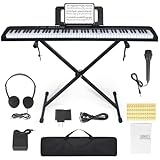
- 🎹【Weighted Digital Piano】- The digital piano with 88 SEMI-Weighted Keys simulates the real touch of playing the piano. Half-weighted keys reduce the sense of strength than full-weighted keys, for more sensitive touch response to suit different playing styles, suitable for beginners.
- 🎹【Excellent Playing Experience】The 88 keys music keyboard piano with 1000 kinds of timbres, 1000 rhythms, 150 demo songs and dual keyboard function, satisfying various styles of performance, nice for teaching and practice.
- 🎹【Multiple Usage Scenarios】This piano keyboard is equipped with a sustain pedal, a music rest, and a power adapter. With recording and playback function, suitable for beginners. Microphone, headphone jack for immersive learning without disturbing parents and neighbors.
- 🎹【Strong Fuction】This electric piano supports the MIDI function It can be connected to a mobile phone APP, which can connect to the computer or other external devices for music editing or recording. It also support connect to sustain pedal, and a Stand, Carrying Case, microphone, headphone and USB-MP3 playback/Dual-mode Bluetooth interface.
- 🎹【Perfect Kit for Beginners】The 88 set is the perfect starter package, including everything a beginner needs to get started. It features a sturdy double-X stand that provides extra stability, along with a complete set of key stickers that help beginners simplify and accelerate their piano mastery. Additionally, the kit comes with a music rest, headphones, a USB power adapter, sustain pedal and a keyboard bag.
Choose flowkey if: you have songs you genuinely want to play and appreciate video plus notation. Skip flowkey if: you need a tightly sequenced technical curriculum or want to rely on a permanently extensive free catalog.
PC Slower Than It Used to Be?
A free scan shows the junk files, broken settings and background clutter dragging Windows down - then fixes them in one click.Free scan · Windows 10 & 11Outdated Drivers Are Slowing You Down
One free scan finds every outdated or missing driver and matches the right update for your exact hardware.Free scan · exact hardware match4. Yousician Piano: best for gamification and daily motivation
Yousician Piano is best for learners who practice more consistently when lessons feel like a game. The app uses missions, progress tracking, real-time note feedback, and short practice activities to encourage frequent sessions.
The game structure can be useful for a learner who struggles to establish a routine. The same design can become a weakness when points and accuracy scores matter more than tone, phrasing, relaxed movement, or independent musicianship. The cited comparison describes Yousician as highly gamified and notes that some educators may find the game layer excessive.
Yousician offers Piano-focused and broader multi-instrument subscription possibilities, depending on the plan. The comparison reported price signals of $67.99 per year for Premium and $94.15 per year for Premium+; verify current names, prices, and included instruments on the provider’s site.
Choose Yousician if: streaks, missions, and immediate scores keep you practicing. Skip it if: you want traditional notation first or dislike game mechanics.
The Tool Desk
Outbyte PC Repair FREEClear out junk files and repair common Windows errorsFree Scan →Outbyte Driver Updater FREEFix the driver behind crashes, sound loss and screen glitchesFind Drivers →Check Yousician’s current plans before assuming a multi-instrument subscription is better value than a Piano-only plan.
5. Piano Marvel: best for sight-reading and MIDI keyboards
Piano Marvel is the best choice on this list for systematic sight-reading practice, measurable exercises, and a digital piano connected through MIDI. Piano Marvel is more academically structured than many song-first apps and also supports user-uploaded music on Premium.
What is free in Piano Marvel?
Piano Marvel’s pricing page lists a free plan with 150-plus songs, 200-plus lesson exercises, 25 video lessons, and performance feedback. Premium is listed at $17.99 per month or $129.99 per year and includes 25,000-plus songs, user uploads, 1,200-plus exercises, and 200-plus video lessons. These figures and prices come from Piano Marvel’s pricing page; catalogs and offers can change.
MIDI is especially valuable because a compatible digital piano or keyboard sends exact note and timing information to the app. An acoustic-piano player can be less well served if the best feedback depends on a MIDI connection. A USB MIDI cable, Bluetooth MIDI adapter, or device adapter may also be needed depending on the keyboard and tablet.
Do these 3 things before closing this tab:
1Clear out junk files and repair common Windows errors2Scan for outdated or missing drivers - takes under a minute3Repair Windows errors before they cause bigger problemsChoose Piano Marvel if: reading music, exercises, measurable progress, or MIDI accuracy is your priority. Skip it if: you play only an acoustic piano and want the simplest microphone-based song experience.
6. Playground Sessions: best course-like interactive play-along
Playground Sessions suits self-motivated learners who want instructor videos, a formal progression, interactive play-along lessons, and a large song catalog. The course-oriented design gives learners more structure than a pure repertoire app.
Full interactive feedback is more dependent on a digital piano or MIDI keyboard. The cited comparison reported a 14-day trial, $14.99 per month, $89.99 per year, and a lifetime option at $217.49, but those are secondary-source price signals and should be checked before publication or purchase.
Choose Playground Sessions if: you own a compatible digital piano and want a course with interactive practice. Skip it if: you use only an acoustic piano, want a very simple interface, or are buying primarily for occasional song practice.
Quick wins for a faster PC:
Repair Windows errors before they cause bigger problemsFix Now →Fix the driver behind crashes, sound loss and screen glitchesFind Drivers →See Playground Sessions’ official site for current compatibility, trial, and plan details.
7. Hoffman Academy: best free-first option for children
Hoffman Academy is the strongest free-first option for children and families who prefer a friendly teacher-led curriculum over automatic scoring. The service provides a large body of video instruction covering rhythm, theory, ear training, and practical playing.
The cited comparison reports more than 300 free video lessons. Video lessons can explain musical ideas more naturally than a game interface, but Hoffman Academy does not provide the same automatic real-time note grading as an interactive app. A parent may need to help a young learner follow the sequence, maintain practice habits, and notice technical problems.
Choose Hoffman Academy if: you want to begin with substantial free instruction and can supervise practice. Skip it if: your child needs instant note scoring, automated accountability, or a highly game-like experience.
Free tools Windows power users keep installed
One-click scans. No signup required.
Review Hoffman Academy’s current free and Premium offerings before deciding whether its video-led format fits your family.
Also popular on Amazon

- 【Weighted Digital Piano】- The digital piano with 88 SEMI-Weighted Keys simulates the real touch of playing the piano. Half-weighted keys reduce the sense of strength than full-weighted keys, for more sensitive touch response to suit different playing styles, suitable for beginners.6a
- 【Excellent Playing Experience】200 rhythms, 200 sounds, 70 demo songs, which is convenient for you to practice chords and songs, create your own music. You can also use Bluetooth to connect smart phone for more lessons.
- 【Strong Fuction】This electric piano supports the MIDI function, which can connect to the computer or other external devices for music editing or recording. It also support connect to sustain pedal, MP3, microphone, headphone and USB.
- 【Multiple Usage Scenarios】This piano keyboard is equipped with a sustain pedal, a music rest, and a power adapter. With recording and playback function, suitable for beginners. Microphone, headphone jack for immersive learning without disturbing parents and neighbors.
- 【Perfect Kit for Beginners】The 88 set is the perfect starter package, including everything a beginner needs to get started. It features a sturdy double-X stand that provides extra stability, along with a complete set of key stickers that help beginners simplify and accelerate their piano mastery. Additionally, the kit comes with a music rest, headphones, a USB power adapter, sustain pedal and a keyboard bag, . Start your musical journey today with the Bfgxuoo 88 set.
8. Piano Academy: best visual starting point for absolute beginners
Piano Academy is a useful visual starting point for someone who finds sheet music intimidating and wants keyboard highlighting, videos, and simple play-along guidance. The app lowers the barrier to playing the first melodies through a visual keyboard interface.
The comparison reports free starter lessons, trial access, and observed prices of $19.99 per month, $41.99 for three months, or $119.99 per year. The same review reports no real-time accuracy or timing feedback and describes the theory coverage as light, so Piano Academy is better viewed as an introductory tool than a complete long-term curriculum.
Choose Piano Academy if: you are starting from zero and need visual guidance. Skip it if: you want rigorous sight-reading, advanced technique, or detailed performance feedback.
Recommended Free Tools
Check Piano Academy’s current app and subscription details before relying on the reported comparison prices.
9. Pianote and Musora: best for teacher-led video instruction
Pianote and Musora are best for learners who prefer human teachers explaining concepts, demonstrating music, and discussing musical context instead of following an app’s note-detection game. Video instruction can offer more explanation about style, repertoire, and musical decisions than a score alone.
Video instruction still is not individualized live correction: a prerecorded lesson cannot hear every note, inspect every angle of the player’s hands, or respond to a learner’s specific tension. Musora may include broader instrument courses, which can be valuable for multi-instrument households but unnecessary for a piano-only learner.
The comparison lists Musora at $40 per month or $240 per year with a 30-day trial. Treat those as observed comparison prices and verify the current offer. Choose Pianote or Musora if: you dislike gamification and want teacher-led explanations. Skip them if: you mainly want automatic note accuracy or the cheapest beginner course.
Crashes, No Sound, or Screen Glitches?
Random freezes, missing sound and display glitches usually trace back to one bad driver. Find and replace yours safely.Free scan · under a minutePC Slower Than It Used to Be?
A free scan shows the junk files, broken settings and background clutter dragging Windows down - then fixes them in one click.Free scan · Windows 10 & 11Compare the current offerings at Pianote and Musora.
10. Online Pianist: best song-learning companion
Online Pianist is best used as a song-learning and practice companion, not as a complete piano curriculum. The service focuses on popular songs with animated keyboard guidance, tempo controls, looping, and simplified arrangements for different ability levels.
The comparison reports limited free songs, a one-day Premium trial, and observed prices of $29.99 for three months or $59.99 per year. Song availability and licensing can change, so confirm that the songs you want remain available.
Choose Online Pianist if: you already understand basic technique and mainly want repertoire practice. Skip it if: you need a sequenced course in theory, notation, scales, and technique.
Browse Online Pianist’s current catalog before subscribing.
Which piano app is best for your learning goal?
| Your priority | Best starting choice | Why | Important caveat |
|---|---|---|---|
| One balanced beginner course | Skoove | Combines curriculum, feedback, theory, technique, reading, and songs | Microphone feedback is not teacher-level technique assessment |
| Free-first learning | Hoffman Academy or Piano Marvel | Both offer meaningful free access in different formats | Hoffman is video-led; Piano Marvel is limited and benefits from MIDI |
| Learning popular songs | flowkey | Video, notation, and song-focused practice | Premium access and catalogs vary |
| Fast motivation | Simply Piano | Polished onboarding, visual guidance, and microphone feedback | Do not let visual note flow replace notation practice |
| Daily gamified practice | Yousician Piano | Missions, scores, paths, and streak-oriented practice | Game mechanics may distract from musicality |
| Sight-reading | Piano Marvel | Structured exercises and performance feedback | MIDI makes the workflow more accurate |
| Digital piano or MIDI keyboard | Piano Marvel or Playground Sessions | Both are particularly suited to connected-keyboard workflows | Check cable, adapter, and device compatibility first |
| Children and families | Hoffman Academy, Simply Piano, Skoove, or Piano Academy | Choose based on supervision, teaching style, and motivation | A colorful interface alone does not guarantee educational depth |
| Human teacher-style instruction | Pianote / Musora | Teacher-led explanations and demonstrations | Video is not individualized correction |
| Repertoire supplement | Online Pianist | Visual song practice, tempo adjustment, and looping | Not a replacement for a curriculum |
What does “free” mean in piano-learning apps?
“Free” can mean permanently available lessons, a restricted freemium tier, or only a temporary trial. Those options are not interchangeable.
| Access type | What it means | Examples from this comparison | Subscription risk |
|---|---|---|---|
| Permanently free content | Lessons or exercises remain available without paying, subject to provider limits | Hoffman Academy free videos; Piano Marvel free tier; Simply Piano Piano Basics; limited flowkey free account | Usually no trial deadline, but Premium material remains locked |
| Freemium | The app works without payment but restricts songs, lessons, time, or features | Piano Marvel, flowkey, Simply Piano, and Yousician in limited forms | Do not assume the free catalog is a complete course |
| Free trial | Premium access lasts for a stated period before billing begins | Seven-day or 14-day offers reported for several apps | May auto-renew; payment details may be required |
| Free download | The app costs nothing to install | Many subscription apps | Downloading is not the same as receiving free instruction |
flowkey explicitly states that yearly trials convert to annual subscriptions unless canceled at least 24 hours before expiration, and that subscriptions renew automatically. Simply Piano likewise says trial eligibility and pricing depend on the plan and platform; read the checkout language rather than assuming every seven-day offer works the same way.
Can a piano app hear an acoustic piano?
Many apps can listen to an acoustic piano through a device microphone, but microphone detection is more vulnerable to environmental problems than MIDI detection. Room noise, sustain, speaker volume, overlapping notes, device placement, and microphone latency can affect recognition.
| Connection method | Works with | Strength | Limitation |
|---|---|---|---|
| Device microphone | Acoustic piano and many keyboards | No MIDI cable required; convenient for beginners | Noise, reverberation, sustain, and placement can cause missed or incorrect detection |
| USB or Bluetooth MIDI | Compatible digital piano or keyboard | Sends exact note and timing data and usually gives more dependable feedback | Requires compatible hardware, cable, adapter, and app support |
| On-screen keyboard | Any supported touchscreen device | Lets a learner try an app without an instrument | Does not replace practicing on a real piano or keyboard |
Simply Piano specifically says it listens to notes on “any piano or keyboard,” but that statement describes audio-based access, not identical accuracy in every room or instrument setup. Piano Marvel and Playground Sessions deserve special attention from digital-piano owners because MIDI is particularly important to their strongest feedback workflows.
Independent reader supportYour contribution helps us test, update, and keep practical guides available for everyone.Do piano apps teach sheet music and sight-reading?
Some piano apps actively develop conventional notation, while others mainly show visual note streams, highlighted keys, or videos. Piano Marvel and Skoove are the strongest choices here for a learner who wants systematic reading practice; flowkey and Simply Piano mix notation with visual guidance; Piano Academy, some video-led courses, and Online Pianist lean more heavily toward visual or playback-based learning.
Falling notes and highlighted keyboards are not inherently bad. They can help a complete beginner coordinate the first notes and understand where pitches sit. The risk is using visual timing cues forever without learning to recognize rhythm, pitch, intervals, key signatures, fingering, and notation independently.
Also popular on Amazon

- Acoustic Piano Feel - Touch-sensitive keys allow for true expression and dynamic performance. The weighted action replicates the acoustic piano experience
- Elevated Sound - Choose from 10 unique Voices, including the richness and resonance of a Yamaha grand piano, with full dynamic sound and deep bass
- Effortless Control - Simple one-button operation and streamlined functionality designed to keep you focused on your music
- Layered Sound - Dual Mode lets you blend two Voices, like piano and strings, creating a rich, layered sound for an inspiring new playing experience
- Included sustain pedal allows for subtle variations and greater expression in your performances
A useful practice balance is one app lesson, a short notation-reading exercise, scales or chords, and repertoire played from a score rather than only from a scrolling display.
What’s actually slowing this PC down?
Pick the symptom - the matching free tool is one click away.
Can a piano app teach proper technique?
Piano apps can introduce basic fingering, posture concepts, rhythm, scales, chords, and exercises, but an app cannot reliably certify that a player’s physical technique is healthy or musically effective. Microphone feedback generally detects sound, not the movement that produced the sound.
Apps generally cannot observe posture, finger curvature, wrist tension, relaxed movement, tone production, pedal technique, voicing, or expressive timing from all the angles needed for individualized correction. A learner who has pain, numbness, or persistent tension should stop playing and seek qualified instruction rather than treating an app’s successful note score as a safety assessment.
Existing students can use an app for repetition, sight-reading, and practice accountability while allowing a teacher to control technique and repertoire decisions. Learners without a teacher can use occasional lessons, video review, or careful self-recording to fill part of the feedback gap.
Which piano apps are suitable for children?
Hoffman Academy, Simply Piano, Skoove, and Piano Academy should be compared by supervision needs, teaching style, and curriculum—not simply by colorful design or price.
| App | Family fit | Teaching style | What parents should consider |
|---|---|---|---|
| Hoffman Academy | Strong for families starting free | Teacher-led videos, theory, rhythm, and ear training | Adult supervision may be needed to keep practice sequential and consistent |
| Simply Piano | Strong for children motivated by immediate interaction | Visual, song-based, microphone feedback | Check trial billing, platform, family access, and whether notation is being reinforced |
| Skoove | Good for children ready for a broader structured course | Interactive lessons with theory and technique | Subscription cost and microphone limitations still apply |
| Piano Academy | Good for a very low-friction start | Visual play-along and keyboard highlighting | Limited depth and reportedly no real-time accuracy feedback |
Also check the child’s reading ability, the tablet’s screen size, family profiles, advertising and in-app purchase exposure, and whether an adult can monitor practice. A family should not assume that an app is fully educational or suitable for unsupervised use simply because the interface is playful.
What device and keyboard does each app need?
The safest compatibility decision is to verify the app’s current support page or app-store listing for your exact device before paying. The dossier provides firm platform information only for some products, so unsupported platform assumptions should not be turned into promises.
| App | Acoustic piano through microphone | Digital keyboard / MIDI | Platform information supported by the dossier |
|---|---|---|---|
| Skoove | Microphone feedback is described | Check current device and MIDI support | Verify current platform list |
| Simply Piano | Yes, vendor says any piano or keyboard through listening | Check exact connection and device support | Mobile, tablet, and Chromebook listed; no Windows desktop version listed in cited support information |
| flowkey | Check current app setup | Check current MIDI support | Verify current platform list |
| Yousician Piano | Real-time feedback is described; verify setup | Check current MIDI support | Verify current platform list |
| Piano Marvel | Possible but less central to its strongest workflow | Strong fit; MIDI especially useful | Verify current platform list |
| Playground Sessions | Less suitable for full feedback | MIDI important for full interactive feedback | Verify current platform list |
| Hoffman Academy | Video lessons do not depend on note detection | Any instrument suitable for lesson practice | Verify current platform list |
| Piano Academy | Check current audio requirements | Check current MIDI support | Verify current platform list |
| Pianote / Musora | Video learning does not require detection | Any suitable instrument for practice | Verify current platform list |
| Online Pianist | Primarily visual song guidance | Check current support | Verify current platform list |
For a digital piano, useful accessories may include a USB MIDI cable, Bluetooth MIDI adapter, tablet stand, headphones, and—depending on the device—a USB adapter. Headphones can prevent a digital piano’s speaker sound from interfering with microphone detection. For an acoustic piano, place the phone or tablet near the instrument without blocking the player’s view or placing the microphone directly where loud bass resonance overwhelms the sound.
How far can a piano-learning app take you?
A piano app can provide a credible beginner pathway, but its usefulness usually decreases as the learner needs finer technical and musical judgment.
| Stage | What an app can reasonably help with | What increasingly needs human feedback |
|---|---|---|
| First weeks | Keyboard orientation, basic notes, rhythm, simple melodies | Healthy setup, relaxed movement, and correcting confusion early |
| First months | Beginner repertoire, basic chords, hands-together coordination, routine | Fingering choices, tone, tension, phrasing, and efficient practice |
| Intermediate | Notation drills, scales, repertoire repetition, and some theory | Pedaling, voicing, interpretation, technique refinement, and repertoire selection |
| Advanced | Supplemental practice or reference material | Specialist repertoire, detailed correction, independent musical judgment, and performance preparation |
“Learn piano” can mean learning simple songs, reading notation, accompanying chords, or developing full piano technique. Choose an app according to the outcome you mean, and do not describe a beginner-to-intermediate app as a complete replacement for a teacher.
Is a paid piano app worth it?
A paid piano app is worth the cost when the subscription supplies a coherent curriculum, better feedback, useful repertoire, progress tracking, family access, structured practice, or MIDI integration that you will actually use. Payment is less worthwhile when the learner wants only one or two songs already available through free lessons or when the learner expects the app to diagnose physical technique.
Before paying, use permanent free material to test whether the teaching style fits. A trial is useful only when you know the exact renewal date, billing period, cancellation method, and price that will apply after the trial.
Buying and cancellation checklist
- Identify the goal: structured beginner course, songs, sight-reading, motivation, MIDI practice, or teacher-led video.
- Confirm the exact plan: Piano-only, multi-instrument, individual, Family, monthly, annual, or lifetime.
- Separate free from trial: determine which lessons remain available indefinitely and which Premium features expire.
- Read the renewal language: note whether the trial automatically becomes a paid subscription and whether annual billing is charged at once.
- Record the cancellation deadline: flowkey says annual trials must be canceled at least 24 hours before expiration to avoid conversion.
- Check where cancellation occurs: the website, Apple App Store, Google Play, or another billing provider may handle the subscription.
- Test the instrument connection: confirm microphone performance for an acoustic piano or MIDI compatibility for a digital piano.
- Check the device: verify iOS, Android, iPad, Chromebook, Windows, Mac, or browser support for your exact model.
- Check family access: compare profile limits and household terms rather than only the headline individual price.
- Plan for feedback: add a teacher, video review, or self-recording if technique, tension, pain, or musical expression becomes a concern.
Frequently Asked Questions
Can you learn piano using only a piano app?
You can use a piano app to learn basic notes, rhythm, simple songs, chords, and beginner notation, but an app is not a complete substitute for individualized instruction. Apps generally cannot reliably assess posture, hand tension, tone, pedaling, voicing, or expressive technique.
Free tools Windows power users keep installed
One-click scans. No signup required.
Do I need a MIDI keyboard for a piano-learning app?
You do not need a MIDI keyboard for microphone-based apps such as Simply Piano’s basic listening workflow, and microphone detection can work with an acoustic piano. MIDI is especially useful for Piano Marvel and Playground Sessions because a compatible digital piano or keyboard sends more exact note and timing data.
Which piano-learning app has the best free content?
Hoffman Academy is the strongest free-first choice for teacher-led video lessons, while Piano Marvel has a more interactive free tier with 150-plus songs, 200-plus exercises, 25 video lessons, and performance feedback listed on its pricing page. Simply Piano and flowkey also provide limited free content rather than complete unrestricted courses.
Are piano app free trials automatically renewed?
Some piano app trials automatically convert into paid subscriptions, so the exact offer must be checked before enrollment. flowkey states that yearly trials convert to annual subscriptions unless canceled at least 24 hours before expiration, while Simply Piano says trial eligibility varies by plan and platform.
Which piano app is best for sight-reading?
Piano Marvel is the strongest choice in this comparison for systematic sight-reading and measurable exercises, with Skoove also a good structured option. A learner should still practice conventional notation rather than relying exclusively on falling notes or highlighted-key displays.
The Tool Desk
Outbyte Driver Updater FREEScan for outdated or missing drivers - takes under a minuteDriver Scan →Outbyte PC Repair FREEClear out junk files and repair common Windows errorsFree Scan →The Bottom Line
Bottom line: Choose Skoove for the most balanced structured beginner course, Simply Piano for the easiest motivational start, flowkey for learning specific songs, Piano Marvel for sight-reading and MIDI, Hoffman Academy for free-first family learning, and Yousician for gamified daily practice. Use any app as a practice tool—not as proof that technique is correct—and verify the current price, platform support, free access, and renewal terms before paying.

