
First identify the furthest point Windows 98 reaches: the boot menu, Safe mode, Command Prompt Only, or normal Windows. Restart while holding CTRL to open the Windows 98 boot menu. Try Safe mode to load a minimal driver set; if Windows cannot reach it, choose Command Prompt Only for DOS-level checks. This sequence separates startup-file and driver problems from disk or hardware faults without immediately reinstalling Windows.
Choose the recovery path that matches what you can still boot
| What you can reach | Best first action | What it tells you |
|---|---|---|
| Windows 98 boot menu | Select Safe mode | Tests whether basic Windows drivers and services can load. |
| Safe mode | Use Msconfig and selective startup | Points toward a normal-mode driver, startup item, or configuration file. |
| Command Prompt Only | Run ScanDisk and inspect startup files | Provides DOS access when the graphical shell cannot start. |
| Startup Disk prompt | Check the hard disk or access the Windows 98 CD-ROM | Useful when the installed copy cannot load at all. |
| No usable boot path | Check disk, memory, cooling, and other hardware | Raises the likelihood of a physical or firmware problem rather than a Windows setting. |
Open the Windows 98 boot menu
- Restart the computer.
- Immediately hold CTRL until the Windows 98 boot menu appears. On some keyboards, tapping CTRL repeatedly during early startup is more reliable than holding it continuously.
- Select Safe mode. If that fails or is unavailable, restart and select Command Prompt Only.
Safe mode uses a minimal driver environment. Command Prompt Only bypasses the graphical Windows startup and leaves you at a DOS prompt, where you can check the disk and work with startup files.
If Safe mode starts
A successful Safe mode boot means the core system can load. The failure is more likely to be something added during normal startup: a device driver, resident utility, or configuration entry.
Use Msconfig to isolate startup components
- In Safe mode, select Start → Run.
- Type
msconfigand press Enter. - Choose Selective startup.
- Clear startup items or configuration-file processing in stages rather than disabling everything permanently.
- Restart after each change and note whether normal Windows starts.
Restore the last change if it does not help. Once normal startup works, re-enable items one at a time until the failing component is identified.
Recommended Free Tools
#1 Best Overall

- WindowTint Kit: The package includes 9 pcs of window tint tools, 1 metal utility knife, 10 snap blades, 1 metal handle squeegee, 1 blue felt squeegee, 1 medium yellow squeegee, 1 small yellow triangle squeegee, 1 mini pink squeegee, 1 white block squeegee, 1 black squeegee.
- Durable Material: This car tinting kit is made of premium plastic and sturdy metal for long use: soft plastic squeegees fit car window curvature to avoid scratches; high-hardness metal keeps the knife and blades sharp for precise cutting even with frequent use.
- Versatile Squeegees: The whole wrap kit is equipped with well-designed squeegees that easily scrape away air bubbles between the film and window glass, making the film fit flatter and tighter and significantly boosting film application efficiency. These squeegees are suitable for car window areas with large concave and convex curvature, such as window edges and large-curvature front/rear windshields, ensuring a perfect fit for the film in these hard-to-treat areas.
- Easy to Use: The metal utility knife in this car tinting kit is sharp and durable, cutting window film easily without damaging the glass. First, use the knife to cut the film to match the window's shape and size. Next, use the metal-handled squeegee to scrape away moisture and air bubbles from the glass for a snug film fit. Finally, use the triangular squeegee to smooth and press the film into place perfectly.
- Wide Application: The whole wrap kit is lightweight and easy to carry, widely applicable for auto glass tinting, vinyl film, paint protection film, solar film and wrap film installation. It’s also perfect for cutting window film, wallpaper and vinyl sheet, and can easily cut out any custom shape you need. This versatile kit is ideal for use at home, garage, office or warehouse.
Use Boot A and Boot B as a diagnostic split
Windows 98 startup troubleshooting distinguishes two useful tests:
- Boot A: If Windows starts normally with Boot A, the problem is in
System.iniorWin.ini. - Boot B: If Windows starts normally with Boot B, the problem is a driver or terminate-and-stay-resident (TSR) program loaded from
Config.sysorAutoexec.bat.
Back up these files before editing them. Change one line or section at a time so the successful and unsuccessful configurations remain identifiable.
Check the hard disk before replacing system files
File corruption can cause hangs, repeated restarts, or a failure immediately after the Windows 98 logo. Check the disk before making broad configuration changes.
Rank #2

- 【Best External CD/DVD Drive for Windows 11/10 Laptop】If your Windows laptop or desktop has no internal CD/DVD drive, this ROOFULL USB 3.0 & USB-C external CD/DVD drive is the best solution for reading and burning your CDs and DVDs. Just plug this external CD/DVD RW drive into your Windows laptop or desktop PC, it will be recognized automatically (you can see a DVD RW icon in Windows File Explorer), you can then insert your CDs or DVDs and use a media player (such as VLC), burning, or ripping software to read, write, and rip your CDs and DVDs. No complex settings, as easily as a built-in optical drive, plug and play!
- 【Perfectly for Windows OS】This USB external CD/DVD drive is designed for all brands of Windows 11/ 10/ 8.1/ 8/ 7/ Vista/ XP/ 2000/ 98 laptops, desktops, and all-in-one PCs including HP, LG, Dell, MS, Acer, Thinkpad, Samsung, Microsoft without restrictions as long as the system matches.【Kindly Note】This drive can not work with Chromebook, Android phone/tablet, TV, iPad, iPhone, projectors, trucks, cars, PS4/5, Xbox, or Blu-ray/4K discs, and It's supported but not recommended for use on macOS!
- 【Not Just CD-ROM External Drive】This USB optical disc drive is not just a DVD and CD-ROM (reader) but also a burner (writer) and ripper. You can use it to read movies DVDs/ music CDs, burn music, photos, videos, and files onto blank CDs or DVDs, import music, video, photos, and data from discs to your computer, install software, system, games, and everything else related to CD/DVD. It supports the reading and writing of various types of disks, including CD+/-R, CD+/-RW, CD-ROM, DVD+/-R, DVD+/-RW, DVD-RAM, VCD, and SVCD disks
- 【True USB 3.0 & 2 Types of Connectors】Unlike many budget drives that claim USB 3.0 but are actually USB 2.0 inside (with only 4 internal wires ), this ROOFULL external CD drive is built with a true USB 3.0 solution, with a full 9-wire cable, a genuine USB 3.0 PCB, and a dedicated high-speed controller chip. This allows for data transfer speeds of up to 5 Gbps (625 MB/s), almost 10 times faster than USB 2.0. The data cable under the drive has type-A and type-C 2 kinds of USB connectors, making it easier to connect most laptops or desktop PCs without an adapter required.
- 【Separate Power Supply Cord】Modern ultra-thin laptops may reduce the USB port’s output power to conserve energy and extend battery life, which can prevent high-power external devices from receiving sufficient power. To address this power shortage, we provide an additional power cable, allowing you to supplement power from a USB power adapter or a power bank to ensure the stable operation of the optical disc drive. You can remove the power cord if the USB disk drive can get enough power through a single data cable. (Note: The power cord is not a data cable; avoid using it independently.)
From Windows 98
Open Start → Programs → Accessories → System Tools → ScanDisk. Check the relevant hard disk and allow ScanDisk to repair errors it reports.
From DOS
If Windows will not start, choose Command Prompt Only and run:
scandisk.exe /allIf the initial pass does not resolve the problem, use the deeper surface scan:
Rank #3

- 🔵【Easy Plug & Play CD/DVD Player】No additional drivers are required for this external cd/dvd drive. Simply plug it into your laptop or desktop pc, insert your cds or dvds, and let our drive do the rest. Enjoy using media player, burning, or ripping software to read, write, and rip your discs!
- 🔵【Latest USB 3.0 Tech】Enjoy faster data transfer and more stable performance with advanced USB 3.0 technology. Also backward compatible with USB 2.0, perfect for recording music, videos, installing software or creating CD/DVD backups.
- 🔵【Remarkable Writing & Reading Speed】Each of our external cd/dvd drives is equipped with a brand-new movement for reliable performance. Boasting up to 8x DVD-R Write Speed and 24x CD Write Speed for outstanding performance and quick data accessibility.
- 🔵【Compact & Portable】Our slim, lightweight design is ideal for on-the-go use. Whether you're at home, in the office, or on the move, you can easily carry this portable cd/dvd drive with you. Our high-quality USB 3.0 External CD drive/DVD drive is the ideal solution for all your CD/DVD reading and writing needs - just as convenient as an internal optical disc drive.
- 🔵【Broad Compatibility】This external USB DVD/CD drive is designed to work seamlessly with Windows (98/ SE/ ME/ 2000/ XP/ Vista/ Windows 11/10/8/7), Mac OS, making it suitable for a wide range of PCs, Laptops and Comprehensive Computers.
scandisk.exe /all /surfaceThe surface option takes longer because it checks the disk more thoroughly. Do not skip ScanDisk unless you are confident the disk contains no errors. If the drive is making unusual noises or repeatedly reports new errors, stop using it as the only copy of important data and prioritize imaging or data recovery.
Use a Windows 98 Startup disk when the installed copy is inaccessible
A Windows 98 Startup disk boots to DOS and can provide access to the hard disk and, on compatible systems, the CD-ROM drive.
What’s actually slowing this PC down?
Pick the symptom - the matching free tool is one click away.
- Insert the Windows 98 Startup disk.
- Restart the computer and boot from the floppy drive. The required boot order is controlled by the machine’s BIOS.
- At the DOS prompt, run disk checks such as
scandisk.exe /all. - If you need to extract Windows setup files, use Microsoft’s
extutility to copy files from the Windows 98 CD to a folder on the hard disk.
If the internal floppy drive has failed, an external USB floppy drive may help, but DOS booting and USB access depend on the motherboard and BIOS. A USB drive that works on a modern computer is not guaranteed to boot or expose a floppy disk on a vintage PC.
Rank #4
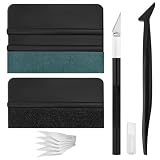
- Premium Material: This squeegee is crafted from high-quality ABS material, featuring smooth, burr-free edges that are durable, sturdy, and resistant to warping. The carbon steel blade is sharp and long-lasting, rust-resistant, and maintains consistent performance even with repeated use
- Practical Function: This large squeegee is designed for removing bubbles over large areas. The small squeegee handles details around edges and corners, the long-handled squeegee reaches deep into crevices, and the craft knife provides precise cutting—effectively meeting most window tinting needs
- Thoughtful Design: The squeegee features a suede-like texture that won't scratch your car's paint or protective film, preventing scratches and damage during use and protecting your vehicle's exterior. The long-handled mini squeegee is designed with an ergonomic grip that fits the hand comfortably, requiring minimal effort to hold
- Package Includes: The set is available in two options. The six-piece set includes 1 large squeegee, 1 small squeegee, 1 long-handled micro squeegee, 1 plastic knife, and 2 plastic blades. The nine-piece set includes 1 large squeegee, 1 small squeegee, 1 long-handled micro squeegee, 1 craft knife, and 5 sharp replacement blades
- Wide Application: This tool set is widely used for automotive window tinting, vehicle wrap installation, and glass film application, as well as for furniture wrapping and advertising sticker installation. It is an essential tool for auto detailing shops and DIY enthusiasts, making it easy to achieve excellent results
When software troubleshooting is not enough
Windows 98 startup failures can persist even after configuration changes when the underlying cause is hardware or firmware.
Disk and media problems
- Hard-disk errors or damaged file-system structures.
- A dirty or defective Windows 98 CD.
- A failing CD-ROM drive that cannot read installation files consistently.
Memory, cache, and timing
- Bad or mismatched RAM or cache memory.
- Overclocking, aggressive BIOS timings, bus-mastering, or Ultra DMA settings that the hardware cannot sustain.
- Overheating caused by inadequate cooling.
Drivers and background software
- Third-party device drivers or memory managers.
- Terminate-and-stay-resident utilities and scheduled tasks.
- Antivirus or other background programs that interfere with startup or setup.
- Viruses.
Return the machine to conservative BIOS settings, remove recently added hardware or drivers, verify cooling, and test memory when the problem appears before the Windows desktop or also occurs while booting from a Startup disk. If the computer cannot remain stable at a DOS prompt, changing Windows startup files is unlikely to solve the root cause.
Quick Recap
Choose the least risky repair first
| Repair | Change and reversibility | When to use it |
|---|---|---|
| Safe mode and Msconfig | Temporary selective-startup changes; easy to undo | Normal mode fails but Safe mode works. |
| Boot A/Boot B isolation | Narrows the affected startup-file group | You need to distinguish System.ini/Win.ini from DOS drivers and TSRs. |
| ScanDisk | Repairs file-system or surface errors; preserve backups first | There are corruption symptoms or unexplained startup hangs. |
Startup disk and ext |
Provides external DOS access; depends on floppy, BIOS, and media | The installed Windows copy cannot load. |
| Reinstall Windows 98 | Largest change and greatest risk to settings and data | Use only after disk and hardware checks and after protecting data. |
What the result means
- Safe mode works, normal mode fails: investigate drivers, startup programs,
System.ini,Win.ini,Config.sys, andAutoexec.batwith Msconfig and Boot A/Boot B testing. - Only Command Prompt Only works: run ScanDisk, inspect the startup files, and use a Startup disk if you need CD-ROM or file-extraction access.
- ScanDisk finds errors: repair and back up data before further experiments.
- Even Startup disk or DOS is unstable: investigate the hard disk, RAM/cache, cooling, BIOS timing, cables, and other hardware.
Product prices and availability are accurate as of the date/time indicated and are subject to change. Any price and availability information displayed on Amazon at the time of purchase will apply.
Quick wins for a faster PC:
Clear out junk files and repair common Windows errorsFree Scan →Scan for outdated or missing drivers - takes under a minuteDriver Scan →
