
iTechGuides is reader-supported. When you buy through links on our site, we may earn an affiliate commission. As an Amazon Associate I earn from qualifying purchases. Learn more
A load test can deliver high request throughput while repeatedly sending requests over one persistent HTTP connection. That result measures the configured workload; it does not, by itself, show how a system handles many simultaneous connections or frequent connection setup.
To interpret the result, check the generator’s reuse and connection-count settings, then compare runs that differ only in the connection behavior you want to test. Requests per second alone cannot tell you how many sockets were open.
What keep-alive does—and what it does not mean
In HTTP/1.1, a client can send successive requests over a persistent connection unless the client or server signals that the connection should close. Reuse depends on correct message framing: the response must have a self-defined length, and the client must consume the complete response body before sending another request over that connection. See RFC 9112.
Quick wins for a faster PC:
Fix the driver behind crashes, sound loss and screen glitchesFind Drivers →Clear out junk files and repair common Windows errorsFree Scan →Keep-alive describes connection persistence; it does not promise that one socket stays open indefinitely. A server may time out an idle connection, and either endpoint or an intermediary can close it. A client may then reconnect, so a test should account for connection establishment, reconnects, and failures rather than assuming a socket remains available for the whole run.
#1 Best Overall
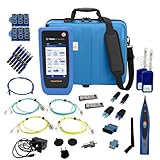
- PREMIUM 3-YEAR ASSURANCE BUNDLE – Get the full power of the SignalTEK QT Pro with the added security of a total of 3-year warranty and a heavy-duty rugged hard carry case. This professional bundle is designed to protect your investment in the harshest field environments.
- EXPANDED COPPER & FIBER TESTING – Includes a full set of 12 remote IDs (Male & Female #1-12) for high-volume copper testing up to 10Gb/s. Qualify fiber links up to 100Gb/s with included High-Stability Single-mode (1310nm) and Multimode (850nm) SFP modules and Cable Tracing Probe.
- ADVANCED WI-FI & NETWORK DIAGNOSTICS – Perform comprehensive Wi-Fi site surveys and troubleshooting using both internal and external antennas. Identify channel conflicts, locate hidden APs, and verify network performance across 2.4GHz and 5GHz bands.
- 90W POE LOAD TESTING & TOOLS – Validate PoE power delivery up to 90W (802.3 af/at/bt) with actual load testing. Built-in network tools include VLAN detection, Device Discovery, Ping, Traceroute, and Switch Port identification for rapid troubleshooting.
- CLOUD MANAGEMENT & REMOTE SUPPORT – Manage projects and share professional PDF reports instantly via TREND AnyWARE Cloud. Features integrated TeamViewer and VNC support, allowing off-site managers to assist technicians in real time.
Why throughput and connection count tell different stories
Requests per second measures completed request activity over time. The number of open TCP connections is a separate property. A generator that reuses a small connection pool can exercise request handling without reproducing the connection setup and churn of a workload that opens more connections. Its throughput can be valid for that persistent-connection pattern, but it does not establish performance for a different pattern.
More connections are not automatically better. Multiple connections can reduce head-of-line blocking, while also consuming server resources and contributing to network congestion. RFC 9112 advises clients to limit simultaneous open connections to a given server. Choose a connection pattern to match the workload you intend to represent, not simply to maximize the connection count.
Rank #2

- Cable Performance testing up to 10GBASE-T via frequency-based measurements
- Network features including: IPv4 and v6 ping, nearest switch diagnostics (IP address, name, port / VLAN number, and advertised data rates).
- Ethernet Alliance certified PoE Verification – Detects the PoE class (1-8) and power, and performs a load test of available PoE from the connected switch
- Displays cable length, wire map, and distance to open or short
- Manage results and print reports from LinkWare PC
Where to check connection behavior
Grafana k6
k6 documents noConnectionReuse as a boolean that disables keep-alive connections; its documented default is false. To test with reuse disabled, set it explicitly in the options:
export const options = { noConnectionReuse: true };k6 also has noVUConnectionReuse, which controls whether TCP connections are reused between iterations of a virtual user (VU). Its documented default is also false. These options address different reuse behavior, so check which one fits the workflow being tested instead of treating them as interchangeable. See the k6 options reference.
Rank #3

- Multifunctional Network Cable Tester: TESMEN TLP-123A Supports RJ45 and RJ11, enabling rapid detection of line connectivity, short circuits, open circuits, miswiring, and cable shielding status. An essential tool for troubleshooting line faults and network maintenance, it effectively boosts your work efficiency
- Convenient and Efficient: Featuring one-button operation and a test speed adjustment gear on the main control unit for enhanced flexibility. Clear LED indicators provide intuitive test result displays, making it easy for both professionals and home users to operate
- Portable and Durable: Compact and lightweight design for easy portability. Constructed with high-quality plastic housing for robust structure, ensuring both durability and stability. Ideal for home wiring, IT equipment setup, electrical maintenance, and LAN DIY projects
- Detachable design: The main control unit and remote unit can be separated and used independently, allowing you to test both ends of long cables. This makes it ideal for wall-mounted ports, long-distance cabling, or structured cabling systems, perfect for homes, offices, or professional IT environments
- What you will get: 1 * TLP-123A Network Cable Tester, 1 * user manual, 2 * AAA batteries
wrk
wrk’s -c or --connections option sets the total number of HTTP connections to keep open; its threads each handle a share of that total. Inspect both the connection count and thread count when interpreting a run. The project README’s example uses 12 threads and 400 connections; that is an example configuration, not a general recommendation. See the wrk README.
wrk also warns that a generator may need enough ephemeral ports and that the server’s listen backlog should exceed the tested concurrent connection count to handle the initial connection burst. These are possible constraints to check, not evidence that either caused a particular test result.
Rank #4
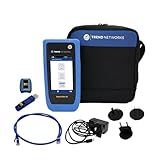
- HIGH-SPEED COPPER QUALIFICATION – Test and verify up to 10Gb/s network performance with live wiremap and TDR fault location. Supports up to 12 remotes for fast troubleshooting across multiple links.
- ADVANCED POE & WI-FI TESTING – Perform PoE load testing up to 90W to confirm power delivery for devices, plus scan Wi-Fi access points to check signal strength, detect conflicts, and monitor performance.
- ESSENTIAL NETWORK DIAGNOSTICS – Built-in tools include ping, traceroute, device discovery, and switch port information, enabling efficient fault finding and network validation.
- CLOUD CONNECTED & REMOTE ACCESS – Upload and share results instantly via TREND AnyWARE Cloud, pre-configure projects remotely, and access devices using TeamViewer & VNC for remote support.
- COMPLETE PROFESSIONAL KIT – Includes SignalTEK QT 10G Copper Qualification Tester, soft carry case, male & female copper remotes (ID #1), Cat6A patch cord, and USB-C charger with changeable plugs.
Other generators and runtimes
Settings vary by tool and version. Record the exact generator and version, and consult documentation for that version before drawing conclusions. Do not infer socket count from throughput, or assume a runtime’s connection-pooling defaults apply to a different tool.
The Tool Desk
Outbyte PC Repair FREERepair Windows errors before they cause bigger problemsFix Now →Outbyte Driver Updater FREEScan for outdated or missing drivers - takes under a minuteDriver Scan →How to investigate the result
- Record the run’s identity. Note the load tool and version, protocol version, script or scenario, number of virtual users or workers, configured connection count, and whether connections are reused between requests or iterations.
- Inspect the generator settings and output. In k6, check the relevant reuse options. In wrk, record
-cand the thread count. Use connection-level output or monitoring where available; requests per second alone does not reveal open socket count. - Run a controlled comparison. Configure the reuse behavior explicitly for each scenario. Keep duration, request mix, payloads, target, concurrency model, and generator resources comparable, and state exactly which settings changed. This isolates the connection-pattern difference; it does not guarantee either pattern matches production.
- Compare more than throughput. Review latency distributions, errors, connection establishment and reconnect behavior, and signs of generator or target saturation. A faster request rate is not enough to identify which resource or connection pattern determined the outcome.
- Check connection limits and closures. For wrk, consider ephemeral-port availability and the server listen backlog during connection bursts. Also account for server-side idle timeouts and connection closures described by RFC 9112.
- Report each result narrowly. Describe the first run as measuring its configured persistent-connection pattern and the comparison run as measuring its different pattern. Neither run alone establishes every production performance characteristic.
What a sound comparison should report
- Connection reuse policy and the number of open connections.
- Virtual users, threads, workers, or the other concurrency model in use.
- Request rate alongside latency distribution and error rate.
- Connection setup, reconnects, and relevant generator or target resource limits.
These details make the scope of each result clear. The useful question is not whether one run is universally more realistic, but whether its settings resemble the production workload the test is meant to approximate.
Quick Recap
Best Value

- Cable Performance testing up to 10GBASE-T via frequency-based measurements
- Network features including: IPv4 and v6 ping, nearest switch diagnostics (IP address, name, port / VLAN number, and advertised data rates)
- Ethernet Alliance certified PoE Verification – Detects the PoE class (1-8) and power, and performs a load test of available PoE from the connected switch
- Displays cable length, wire map, and distance to open or short
- Manage results and print reports from LinkWare PC
Product prices and availability are accurate as of the date/time indicated and are subject to change. Any price and availability information displayed on Amazon at the time of purchase will apply.

