
Free tools Windows power users keep installed
One-click scans. No signup required.
iTechGuides is reader-supported. When you buy through links on our site, we may earn an affiliate commission. As an Amazon Associate I earn from qualifying purchases. Learn more
Sticky Notes in Windows 11 may be stored locally on your PC or synced to your Microsoft account. To find notes, open Sticky Notes from Start; if you signed in and enabled syncing, check the same account on the web at OneNote.com/stickynotes. A frequently cited local folder is based on older community guidance and is not confirmed by current Microsoft support as the location on every Windows 11 PC.
Find notes in the Sticky Notes app
- Open Start, search for Sticky Notes, and launch the app.
- If only one note is visible, open that note’s ellipsis menu and select Notes list.
- Scroll through the list or use its search to find the note.
Microsoft says Sticky Notes opens where you left it, so a single visible note does not necessarily mean the others are gone. See Microsoft’s guidance on finding missing Sticky Notes.
Where notes are stored: local or synced
| Use | Where to look | Access and preservation |
|---|---|---|
| Local notes without signing in | On the PC in Sticky Notes app data. Microsoft’s current support guidance does not identify a guaranteed Windows 11 database path. | Open Sticky Notes on that PC. Microsoft warns that resetting or uninstalling the app while not signed in deletes local notes. [Microsoft Support] |
| Notes synced with a Microsoft account | Microsoft says synced notes are stored in Outlook.com. | Use the same account in Sticky Notes or view notes on OneNote.com/stickynotes. Signed-in users who synced notes can export them from Outlook.com. [Microsoft Support; export instructions] |
You can start using Sticky Notes on Windows 10 and 11 without signing in. Microsoft says signing in to version 3.0 or later enables syncing; synced notes can be accessed across supported Windows, mobile, web, and Outlook experiences using the same account. See Microsoft’s cross-device guidance.
Quick wins for a faster PC:
Clear out junk files and repair common Windows errorsFree Scan →Fix the driver behind crashes, sound loss and screen glitchesFind Drivers →The commonly cited local folder—and its limitations
An older Microsoft Q&A thread about Windows 10 migration cites %LOCALAPPDATA%PackagesMicrosoft.MicrosoftStickyNotes_8wekyb3d8bbweLocalState and a database named Plum.sqlite. This is a community-era reference, not confirmation from current Microsoft support that the exact folder or file applies to every Windows 11 installation. Treat it as a possible legacy location, not a guaranteed backup or a supported recovery method. The thread is available at Microsoft Q&A.
Check synced notes and make an export
- In Sticky Notes, sign in with the Microsoft account you used to sync the notes.
- Open OneNote.com/stickynotes and check that same account.
- If the notes are synced, follow Microsoft’s Outlook.com export instructions to keep a copy.
Microsoft’s export guidance applies to notes that were synced by a signed-in user; it does not establish an export route for unsynced local notes.
Quick Recap
Best Value

- Larger Notes Size --- 4 in x 6 in, 12 pads/pack, 30 sheets/pad, provides plenty of space for writing, suit full-page planning or external use, eco-friendly recyclability, helpful for home users, students, teachers, and office workers
- High stickiness --- Strong adhesive, make sure self-stick notes don't fall off, reliable stickiness for vertical surfaces, and removes cleanly from paper without damage or leaving any residue behind
- Colorful --- 6 bright colors, 2 pads per color, total 12 pads, providing an ample supply for your office, work area, or classroom, work great for doodles, notes, and reminders
- Paper Quality --- Stickies constructed of robust 80gsm paper will not shred, curl, or leak ink. Writing on them is nice, smooth pen and pencil application without bleeding through
- Versatile --- Line Sticky Notes are the perfect solution for shopping lists, reminders, to do lists, color coding, labeling, family chore reminders, brainstorming, storyboarding, and quick notes. And it can be posted on the notebooks and documents, wall, glass, metal, blackboard, whiteboard, computer screens and monitors, fridge, desktop, bathroom mirrors, refrigerator, desks, and almost all other smooth surfaces
Rank #4

- GET ORGANIZED: Each pack includes 5 pads of 3 in. x 3 in. notes, with 90 sheets per pad, great for your office, work area, or classroom
- EXPERIENCE THE POWER OF 2X STICKINESS: Post-it Super Sticky Notes offer twice the sticking power of basic sticky notes, ensuring they stay put and won't fall off
- STICK AND RESTICK ANYWHERE: These notes adhere firmly to walls, windows, doors, and other vertical surfaces, allowing you to move your reminders with ease
- VERSATILE AND ESSENTIAL: Post-it Super Sticky Notes are the perfect solution for shopping lists, reminders, to-do lists, color-coding, labeling, family chore reminders, brainstorming, storyboarding, and quick notes
- VARIOUS SIZES AND SHAPES: Available in different sizes, with or without lines, to cater to your specific needs
Rank #3

- YOU WILL GET:3*3 inch transparent note stickers, 700 sheets, 6 colors, 14 pads (4*Colorless, 2*Sky Blue, 2*Orange, 2*Lemon, 2*Grass Green, 2*Rose), and an extra box of 100 sheets mini transparent onte dispenser stickers with 5 colors.
- FRIENDLY HELPFUL HINTS: In order to get a better user's experience, we recommend you to use pencils, ballpoint pens, oil-based markers, (Not recommended to use pens, water-based pens, gel pens, common markers, unless you can wait for handwriting to dry after using water-based pen. Do not wipe handwriting immediately)
- EXTENSIVE USE: These transparent, new colorful stickey notes are popular and can be used for everything from notes, daily home tips, classification management notes pads, study & reading annotating message reminders, research & business meetings memos, and more.
- FEATURE OF NOTES:Small and lightweight, you can carry it everywhere. Classic color scheme. The transparent material allows you to see the text and information on the bottom when pasted on books, notebooks, computers, notes, etc.
- HIGH QUALITY MATERIALS: Made of high transparency & can write PET material, itself has a transparent, waterproof, anti-aging, thin characteristics. The viscosity of the adhesive is strong and not dense, the adhesive is firm without traces. It's your work, study and scientific research daily life supplies .
Rank #2
![[1000 PCS] Transparent Sticky Notes, 6 Sizes Clear Sticky Notes Pads, Waterproof Self-Adhesive Translucent Sticky Notes for Annotating Books, See Through PET Notes for School & Office](https://m.media-amazon.com/images/I/31S8hptxVBL._SL160_.jpg)
- 6 Sizes 1000 Sheets in Total: Including 20 pads transparent sticky notes in 6 sizes (3'' * 3'' * 6 pads, 3'' * 1'' * 5 pads, 2'' * 3/2'' * 4 pads, 3'' * 2'' * 3 pads, 5'' * 3'' * 1 pads, 4'' * 3'' * 1 pad ) , 50 sheets per pad. The combination of different sizes makes it more convenient for you in different usage scenarios.
- Practical Transparent Design: Compared with traditional sticky notes, the transparent sticky notes will not fade or wrinkle, and the clear and transparent design can avoid blocking the original text, annotate books without spoiling it.
- High-Quality PET Material Selection: The translucent sticky notes are made of non-toxic great-quality PET, which has good transparency and waterproof. The adhesives are easy to apply and remove without leaving any glue marks.
- Multi-Pen Type for Smooth Writing: Transparent sticky notes have a smooth writing experience. Suitable for ballpoint pens, pencils, markers, oil-based pens, but not recommended for fountain pens and gel pens.
- Wide Range of Uses: Transparent sticky notes are ideal for school , office, study or home use. You can stick them on books, notes, bibles, doors, walls, whiteboards, table tops, bathroom mirrors and any other smooth surface. They are also a great gift option for family, children, friends and colleagues.
#1 Best Overall
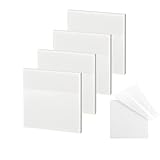
- 【Practical Design】: Transparent sticky notes Compared with traditional sticky notes, a clear sticky notes design can avoid blocking the original files, on the page adds annotations to books or mark important documents without stain book, sticky notes clear making learning easier
- 【Proper Adhesion】: Transparent sticky notes can self-stick well, the waterproof sticky sheet doesn't leave any traces of glue, and these invisible sticky notes can be easily removed and repositioned without tearing book pages, perfect for book lovers
- 【What Will You Get】: 3"x3" 4 pads of square transparent sticky notes, 50 sheets each pad (200 sheets in total), see through sticky notes lightweight and easy to carry
- 【Transparent Sticky Notes Wide Applications】: Great for offices, study rooms, or home use. You can stick the Transparent notes on books, notes, bible, doors, walls, whiteboards, tabletops, bathroom mirrors, and any other smooth surfaces
- 【Perfect Gift】: Transparent sticky notes for making our life and work more pleasant and efficient, all people need these clear sticky notes, please share them with your friends, children, partners, parents, which is a good gift choice
Before resetting or uninstalling Sticky Notes
- Confirm notes appear in the app or, if synced, on the web under the correct account.
- Export synced notes if you want a separate copy.
- Do not reset or uninstall the app as a first troubleshooting step when notes are local-only. Microsoft warns those actions delete local notes when you are not signed in. Microsoft’s missing-notes guidance also states that deleted notes cannot be undone.
Product prices and availability are accurate as of the date/time indicated and are subject to change. Any price and availability information displayed on Amazon at the time of purchase will apply.

