
Do these 3 things before closing this tab:
1Clear out junk files and repair common Windows errors2Fix the driver behind crashes, sound loss and screen glitches3Repair Windows errors before they cause bigger problemsiTechGuides is reader-supported. When you buy through links on our site, we may earn an affiliate commission. As an Amazon Associate I earn from qualifying purchases. Learn more
HDMI Type C is Mini HDMI, a compact HDMI connector used on some portable devices. It is not USB Type-C. To connect a device with a confirmed Mini HDMI port to a TV or monitor with a standard HDMI port, use a Mini HDMI Type C-to-HDMI Type A cable.
What HDMI Type C means
HDMI Type C is the formal connector name for Mini HDMI. Sony identifies three common HDMI connector sizes: standard Type A, Mini Type C, and Micro Type D. Type C is physically smaller than Type A and is used on some portable equipment. The port on a particular camera or other device should be confirmed in its manual or specifications rather than inferred from its size or product category. Sony’s HDMI port guide
How HDMI Type C differs from USB Type-C
The shared letter does not mean the connectors are interchangeable. HDMI Type C is a Mini HDMI connector; USB Type-C is a separate connector standard. Some USB Type-C ports can carry HDMI signals through HDMI Alt Mode, but not every USB Type-C port supports video output or HDMI Alt Mode. Check the specifications for the specific device. HDMI Licensing Administrator’s explanation of HDMI Alt Mode for USB Type-C
Type A, Type C and Type D at a glance
| HDMI type | Common name | Cable end to use when connecting to standard HDMI Type A |
|---|---|---|
| Type A | Standard HDMI | Standard HDMI Type A |
| Type C | Mini HDMI | Mini HDMI Type C |
| Type D | Micro HDMI | Micro HDMI Type D |
Mini HDMI Type C and Micro HDMI Type D are different sizes. A Micro HDMI cable is not the matching cable for a Mini HDMI port. Sony describes the corresponding mini-to-standard and micro-to-standard cable options in its port guide.
#1 Best Overall

- Important Note: Make sure your device is a Mini HDMI port before purchasing (Mini HDMI≠Micro HDMI≠Micro USB). Please refer to the product image and description for more information. ZeniKon offers 24-hour online friendly technical support services
- 4K Mini HDMI to Mini HDMI Cable 3.3FT: Achieve Ultra-HD 4K@60Hz(3840x2160) clarity and 3D action video with Mini HDMI Cable, compatible with 2K@120Hz/60Hz, 1080P Full HD. Enhanced Dolby Atmos and Dolby TrueHD 7.1 technology provide higher levels in audio
- Designd for Camera & Portable Monitor: Enhanced and upgraded Mini HDMI to Mini HDMI support HDR, Audio Return Channel(ARC), ideal for connecting Camera to a Portable Monitor. This cable is also perfectly compatible with Tablet, Raspberry Pi Zero W/2W/WH/2WH and Graphics Card, etc
- Easy to Use: Plug and play. With a universal 3.3-foot length design, this HDMI Mini Cable is widely suitable for travel, home, and work environments, etc. It delivers convenient connectivity while ensuring lifelike, smooth audio and 4K@60Hz video transmission
- Improvement of Signals: Mini to Mini HDMI Cable provide bandwidth up to 18Gbps. The 24K gold-plated connectors, double nylon braid and premium aluminium shell provide triple shielding, ensures stable signal transmission
Size and pin details
ASUS describes the Mini HDMI Type C plug as 19-pin and measuring 10.42 mm × 2.42 mm. Those measurements refer to the plug, not necessarily the opening of a device’s receptacle. They describe the connector’s physical form, not the video features or performance of a particular device or cable. ASUS ROG’s HDMI overview
Independent reader supportYour contribution helps us test, update, and keep practical guides available for everyone.Which cable connects Mini HDMI to a TV or monitor?
If the source device has a Mini HDMI Type C output and the display has a standard HDMI Type A input, use a Mini HDMI Type C male-to-HDMI Type A male cable. Verify both ports before buying. One example of this cable category is Raspberry Pi’s 19-pin Type C male-to-Type A male cable, listed at 1,000 mm long; those details describe that product, not a universal cable requirement. Raspberry Pi cable listing
Quick Recap
Rank #3
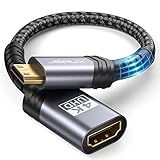
- High Speed: This mini HDMI to HDMI adapter supports 18Gbps 4K@60Hz 4:4:4 HDR, backwards compatible to 4K@30Hz/2K@120Hz/1080P,with Dolby 3D Full HD capabilities, giving you a smooth and clear experience; NOTE: Please make sure your device has mini HDMI port
- Widely Compatible: Compatible with DSLR Camera/Camcorder/Graphics Video Card/Raspberry Pi Zero/Pi Zero W/Laptop/Tablet/HDTV/Pico Projector/NUC barebones desktop/Sony HDR-XR500/Nikon D3200/Nikon D810 and more devices with mini HDMI port
- Extremely Durability: 32AWG copper wire with triple tin shielding reduces the probability of interference with wireless services such as Wi-Fi; High quality nylon braid, tested to be plugged and unplugged 5,000 times; Gold-plated corrosion resistant connectors for guaranteed top tier image and sound
- Compact and Portable: Mini HDMI male to HDMI female adapter cable 8 inch(0.2m), make the adapter close to your output devices; Home, outdoor travel, conference and office can meet your needs
- Brand design: This mini HDMI to HDMI cable adapter is different from other products, adhere to the original design, to achieve a stylish and generous appearance, taking into account the external and practical, to give you a better sense of use experience
Rank #2
![PILOARYL Mini HDMI to HDMI Cable 3.3FT, High Speed 4K 60Hz HDMI 2.0 Cord, Compatible with Camera, Camcorder, Tablet and Graphics/Video Card, Laptop, Raspberry Pi Zero W [Aluminum Shell, Braided]](https://m.media-amazon.com/images/I/41o-S22gSEL._SL160_.jpg)
- High speed mini hdmi to hdmi cable, HDMI 2.0 18Gbps high speed mini hdmi, 4k@60hz hdmi mini 2.0 cord with HDR, smooth mini hdmi transmission to HD output
- Braided mini hdmi cable with aluminum shell, mini hdmi male to hdmi male plugs fit mini hdmi port securely, tough small hdmi cable for portable monitor travel
- Bi-directional mini hdmi transmission, mini hdmi to hdmi or hdmi to mini hdmi, replaces directional mini hdmi setups, quick mini to hdmi connection for displays
- For mini hdmi-enabled devices, use as mini hdmi cable for portable monitor, camera camcorder or tablet, hdmi mini to hdmi for laptop, GPU, projector, HDTV
- Mini hdmi type C to standard full size HDMI A, plug and play hdmi to mini hd adapter cable for audio video, ideal mini hdmi to standard hdmi TV or monitor cable
- Identify the source port: check the device’s manual or specifications for “Mini HDMI” or “HDMI Type C.”
- Identify the display port: confirm whether it is standard HDMI Type A or another connector.
- Match the cable ends: choose a Type C Mini HDMI plug for the device and the appropriate plug for the display.
- Check signal support separately: consult the device specifications for supported resolution, refresh rate and other HDMI features; connector type alone does not establish them.
What the connector name does not tell you
- It does not establish whether a specific device has a Mini HDMI port; manufacturers may use different ports across models.
- It does not establish the resolution, refresh rate or other signal features supported by the device.
- A USB Type-C port does not automatically provide HDMI video output. Verify support for video output or HDMI Alt Mode in that product’s specifications.
- An HDMI connector’s appearance on an approved list or passing connector testing does not by itself guarantee that a complete product will function correctly or interoperate with another product. HDMI Licensing Administrator’s connector information
Product prices and availability are accurate as of the date/time indicated and are subject to change. Any price and availability information displayed on Amazon at the time of purchase will apply.

