
Outdated Drivers Are Slowing You Down
One free scan finds every outdated or missing driver and matches the right update for your exact hardware.Free scan · exact hardware matchPC Slower Than It Used to Be?
A free scan shows the junk files, broken settings and background clutter dragging Windows down - then fixes them in one click.Free scan · Windows 10 & 11iTechGuides is reader-supported. When you buy through links on our site, we may earn an affiliate commission. As an Amazon Associate I earn from qualifying purchases. Learn more
The best website idea is one that serves a real audience need and fits what you can build and maintain. Start by deciding whether your site should attract clients, sell products, share expertise, provide useful information, or connect a community. Then choose a primary format, check for signs of demand, and match the features to your skills and budget.
30+ website ideas to consider
These website examples are starting points, not guarantees of traffic, income, or success. A focused idea usually gives visitors a clearer reason to use the site than a broad subject alone.


Publishing and information
- Niche blog: Publish useful material for a defined interest, such as gardening in small spaces or beginner photography.
- How-to site: Explain processes with tutorials, guides, or practical walkthroughs.
- Recipe site: Organize recipes around a cuisine, dietary approach, cooking method, or audience.
- Product review site: Help a particular audience understand and compare products. Choose a subject you know rather than selecting one solely for possible commissions.
- News or magazine site: Cover a defined subject or community with a clear editorial purpose.
- Entertainment site: Publish material such as stories, humor, or commentary for a specific audience.
- Reference resource: Make specialized information easier to find and use.
- Interactive tool: Help visitors solve a narrow problem, such as organizing information or making a calculation. Confirm the need and technical requirements before committing.
- Personal website: Introduce yourself, explain your interests or work, and provide a way to get in touch.
Work, services, and creative projects
- Creative portfolio: Show selected design, photography, writing, or other work to potential clients or employers.
- Professional portfolio: Present relevant projects, experience, and contact details for a particular field.
- Small-business website: Explain what a business offers, who it serves, and how to make an inquiry.
- Consulting site: Describe areas of expertise, service options, and how to book or request information.
- Freelancer website: Connect examples of work with the services available and a clear contact path.
- Booking site: Let visitors learn about a service and request or schedule an appointment.
- Agency site: Describe the team’s services and show work relevant to prospective clients.
- Event-planning site: Present event services, examples, and inquiry details.
Sales and paid offerings
- Online store: Sell products directly and provide the product information and checkout shoppers need.
- Handmade-goods store: Present original items, product details, and ordering information.
- Digital-products shop: Offer downloadable resources such as templates, guides, or creative files.
- Subscription site: Provide recurring access to content, services, or resources where the audience has an ongoing need.
- Course site: Organize lessons and learning materials around a specific outcome and group of learners.
- Tutoring site: Explain subjects offered, who the lessons are for, and how to arrange them.
- Membership site: Give members access to resources, activities, or discussion connected to a shared interest or goal.
Community, local, and organizational sites
- Discussion forum: Give people with a shared interest a place to ask questions and exchange knowledge.
- Local directory: Organize useful providers, services, or places for a defined location.
- Community resource site: Collect information that helps people in a neighborhood or group.
- Events calendar: List activities for a particular community, organization, or location.
- School site: Share information about the school, programs, events, and ways to contact it.
- Nonprofit site: Explain a mission, describe activities, and show how people can participate or offer support.
- Cause or campaign site: Communicate an issue, share relevant information, and direct visitors to ways to get involved.
- Club site: Help members and prospective members find schedules, resources, and contact information.
- Travel resource: Organize guidance for a specific destination, style of travel, or type of traveler.
- Hobby community: Share resources, projects, or events for people who enjoy the same activity.
These categories can be combined. A photographer might use a portfolio as the main site and add a blog; a local business might pair service information with online booking. Decide which job comes first so secondary features do not obscure the site’s purpose.
How to choose a website idea
- Write the site’s purpose in one sentence. For example: “This site helps first-time home gardeners choose vegetables that grow well in containers.” A specific outcome is easier to evaluate than “a gardening website.”
- Name the audience and its need. Identify who would use the site and what they need to learn, find, buy, book, or do. If the audience or need is unclear, narrow the concept before building.
- Choose the primary format. Match the central job to a blog, portfolio, store, service site, directory, learning resource, or community. Add other formats only where they support that job.
- Look for signs of demand. Examine search results and existing sites, relevant discussions, marketplaces, and whether people already pay for similar offerings. Existing activity can show that interest exists; it cannot prove that your version will succeed.
- List the functions the site needs. A portfolio may need a visual project gallery and contact details; a store may need product discovery and checkout. Other ideas might require booking, forms, course delivery, or community discussion.
- Check your creator fit. Consider whether you have the knowledge, skills, and sustained interest to create the material or service. Also account for work that continues after launch, such as updating information, managing orders, or maintaining a community.
- Compare the work with your budget. Estimate the effort and resources needed for the content, operations, and features. There is no universal cost estimate: requirements depend on the idea and the platform.
- Choose a platform that supports the required features. Options include visual drag-and-drop builders, content management systems (CMSs), ecommerce builders, open-source tools, AI builders, and offline builders. Compare them based on your technical comfort, budget, and the functions the site needs.
- Start with the smallest useful version. Create the core pages and features needed to serve the primary audience need. Expand when you have learned what visitors actually need rather than adding complexity on speculation.
Compare ideas before you commit
Use the same questions for each candidate so an exciting concept does not get a pass on practical concerns.
#1 Best Overall
| Question | What to consider |
|---|---|
| Who is it for? | Can you identify a specific audience and a need the site addresses? |
| Why are you a good fit? | Do you have relevant knowledge, skills, or sustained interest? |
| What is the main outcome? | Is the site primarily for information, visibility, inquiries, sales, subscriptions, learning, or community participation? |
| What evidence of interest exists? | Are people searching, discussing, using, or paying for related offerings? Treat these as clues, not a success forecast. |
| What work will it take? | Consider the content, features, operations, and ongoing maintenance required. |
| What must the platform do? | Check that it can support the required functions within your budget and technical comfort. |
Match the site type to its features
Choose features from the visitor’s task backward: what must someone be able to do for the site to fulfill its purpose?
- Portfolio: Make strong examples easy to view, explain relevant services or experience, and provide a direct contact path.
- Business or consulting site: State what is offered, who it is for, and how to inquire or book.
- Online store: Plan for clear product presentation, product search or discovery, and payment functionality.
- Education site: Organize lessons or resources for a defined audience and learning goal.
- Community or membership site: Decide how people will access resources, participate, or communicate.
- Directory or local resource: Make the information easy to browse and useful for the location or group it serves.
Platform categories include visual drag-and-drop tools, CMS platforms, ecommerce builders, open-source tools, AI builders, and offline builders. Their suitability depends on the site’s format, needed functionality, technical requirements, and available budget; no single category is best for every website. See Wix’s overview of website-builder types and selection considerations.
What website ideas can—and cannot—tell you about income
A format such as a store, subscription site, or course site describes how a website might support a paid offering. It does not establish likely earnings, audience size, or odds of success. The sources cited here provide examples and planning advice, not success rates or income forecasts. Treat demand checks as a way to improve your decision, not a guarantee of results.
Quick wins for a faster PC:
Repair Windows errors before they cause bigger problemsFix Now →Fix the driver behind crashes, sound loss and screen glitchesFind Drivers →Examples and further reading
For examples across content, community, and organization-focused sites, see Wix’s website examples. For a broader breakdown of website types and their uses, see Wix’s guide to common website types. Shopify also describes ecommerce, blog, portfolio, education, nonprofit, and personal websites in its overview of websites and their types. Beginner-oriented examples, including niche, forum, portfolio, personal, and ecommerce concepts, appear in Namecheap’s website ideas guide.
Quick Recap
Best Value
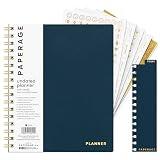
- 12 MONTH UNDATED PLANNER: Start planning when you're ready! This weekly & monthly planner has durable plastic covers with undated yearly, monthly & weekly spreads plus pages for budgeting & goals. A weekly or daily planner to help boost productivity.
- SUPERIOR CONSTRUCTION: Designed with style & utility in mind, this 7.5 in. x 9 in. undated daily planner includes an elastic pen holder, removable bookmark, storage pocket & gold foil stickers. The spiral binding allows for lay flat or fold over use.
- NO MORE INK GHOSTING: Our 100 gsm acid-free paper is thicker than average planners so you can confidently use any pen without fear of bleed-through. Perfect to use at home, school or work.
- ADDITIONAL SPECIALTY PAGES include unique spreads dedicated to budget tracking & note pages with lined, grid & blank sections. Trackers & spaces on each weekly spread is perfect for a to do list planner, scheduling, habit tracking & goals setting.
- PREMIUM PRODUCTS AT AN ACCESSIBLE PRICE: We're committed to bringing you high-quality products at a price you'll love with fresh & colorful takes on notebooks, office supplies, calendars, planners & organizers.
Rank #4

- STAY ORGANIZED WEEKLY: This weekly planning pad helps you map priorities, goals, and to do lists in one place. Designed as a productivity planner with 50 sheets to keep each week clear and actionable.
- SPACIOUS 8.5 X 11 SIZE: This desk weekly planner offers generous writing room for tasks and appointments. The weekly tear off planner format makes updates simple at home, school, or work.
- UNDATED FLEXIBILITY: The weekly planner undated layout lets you start anytime. Ideal as a weekly work planner or summer planner, it adapts to changing schedules without wasting pages.
- SMOOTH QUALITY PAPER: Crafted with thick paper to reduce ink bleed through. This weekly notepad delivers a clean writing surface that keeps plans neat and easy to review throughout the day, week, or month.
- STYLISH DESK ESSENTIAL: A cute weekly planner that complements any desk planner setup. Suitable for adults and students who want a practical week planner to support consistent planning habits.
Rank #3

- Nowadays we do a lot of work online with design software, photo books, and documents stored in the cloud. This intuitive Website Tracker Form helps ensure you never forget a username or password again.
- FIND YOUR SIZE - CLASSIC: Made for our Classic-sized planners with page sizes 5.5" x 8.5".
- PRODUCT FEATURES: The pack includes 15 double-sided forms with space to track essential information for the websites you frequent: login, password, and important comments such as project info or payment reminders.
- FOR FRANKLINCOVEY PLANNERS: These forms are designed to be added to our ring-bound planner refills, they aren't standard sizes for other products. Please make sure you check the sizing information before purchasing.
- MADE IN THE USA WITH PREMIUM MATERIALS: We are here to help you schedule your priorities, keep track of appointments, organize family schedules and events, and keep track of your personal goals. With 25 planner styles, unique binders, and planning accessories, we are bound to have something for you!
Product prices and availability are accurate as of the date/time indicated and are subject to change. Any price and availability information displayed on Amazon at the time of purchase will apply.

