
Sometimes—but not as a universal rule. A regulated DC supply can substitute for solar panels on some MPPT controllers when its voltage, current behavior, power, wiring and battery settings are compatible and the manufacturer permits it. The same approach may damage some PWM controllers; Morningstar specifically warns that the capacitance of many supplies can cause excessive heating and premature failure of its PWM products (Morningstar guidance).
For dependable charging from household AC, a chemistry-specific AC-to-DC battery charger is normally safer and simpler. Treat a general-purpose DC supply as an energy source—not as a battery charger.
First identify which arrangement you mean
DC supply connected to the PV terminals
In this setup, AC mains feeds a regulated DC supply, the supply connects to the controller’s PV input, and the controller charges the battery. You are asking the controller to treat a power supply as an artificial solar array.
AC mains → regulated DC supply → PV input → solar controller → battery
This can work with particular MPPT models, but the controller manual takes precedence over general advice.
#1 Best Overall
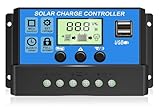
- UPGRADED SOLAR CONTROLLER: With the built-in industrial microcontroller, this PWM solar charge controller automatically helps you manage the working of solar panels and batteries in solar systems. When the battery runs out, it will memorize various parameters you set, so you don't need to reset it, which is easy and safe
- WIDELY COMPATIBILITY IN BATTERY: The 30A solar charge controller is compatible with 12V or 24V systems automatically, only suitable for lead-acid batteries, such as OPEN, AGM, and GEL. Dual USB 5V/3A output ports support mobiles, tablet PCs, or other devices that require 5V voltage. Please refer to the manual for more details. (NOTE: This PWM solar charge controller is NOT suitable for Lithium Battery.)
- EASY TO READ AND ADJUSTABLE: Easily to read the status and data with an LCD display, which is also able to switch modes and parameter configuration, such as adjustment of battery float, reconnect, and stop discharge voltage, which can perfectly protect the battery from over-discharge, suitable for home, industrial, commercial, etc
- SAFE TO USE: Built-in overcurrent protection, short circuit protection, reverse connection protection, open circuit protection, all automatic recovery, no damage to the solar controller, but a reliable protector for your devices and prolong the lifespan
- EASY TO INSTALL AND OPERATE: The charge controller should connect the battery first, then the solar panel, and finally the load. The disassembly sequence is contrary to the wiring order. Please refer to the manual for details. We offer a 12-month guarantee for quality-related issues an technique support, please contact us if any questions
DC supply connected directly to the battery
This bypasses the solar controller. An ordinary fixed-voltage supply may lack bulk, absorption and float stages, lithium charge termination, temperature compensation, timers, reverse-polarity protection or coordination with a battery-management system. Do not connect one directly to a battery unless the supply and charging method are explicitly designed for that chemistry.
AC mains → proper battery charger → battery
MPPT and PWM controllers are electrically different
MPPT
An MPPT controller is a DC-DC converter. It normally accepts a higher PV voltage and converts it to the battery’s charging voltage. Victron describes this operating principle and specifies model limits such as PV voltage and maximum battery current in its MPPT documentation.
A DC supply is plausible only when the supply remains inside the controller’s complete PV range, provides enough headroom above the battery’s instantaneous charging voltage, tolerates startup and tracking behavior, and is not prohibited by the manufacturer. MPPT alone is not a universal approval.
PWM
A PWM controller switches the panel connection toward battery voltage rather than converting a high PV voltage through an MPPT stage. The operating difference is explained in Victron’s PWM-versus-MPPT paper. Morningstar’s documented warning against DC supplies on its PWM controllers is manufacturer-specific but important: a supply’s larger output capacitance can overheat the controller or shorten its life (Morningstar FAQs). Use a PWM controller with a DC supply only when its manufacturer explicitly approves that source.
Do these 3 things before closing this tab:
1Fix the driver behind crashes, sound loss and screen glitches2Repair Windows errors before they cause bigger problems3Scan for outdated or missing drivers - takes under a minuteChoose the voltage from the battery and controller limits
The supply must satisfy two different constraints:
- It must be below the controller’s maximum PV voltage under every condition, including no-load output, tolerance, startup overshoot and transients.
- It must be high enough above the battery’s actual charging voltage for the controller to start and regulate.
A nominal 12 V supply generally will not charge a 12 V battery through an MPPT controller: a lead-acid battery may need roughly 14–15 V while charging, and a 12 V lithium battery commonly needs about 14–14.6 V depending on its settings. Exact startup thresholds are model-specific. A 24 V supply can still be too low for a 24 V battery even when the controller is rated for 100 V PV input.
Measure a variable or wall supply at no load before connecting it. A device marked “24 V” may produce more than 24 V at light load. Never approach the controller’s maximum PV rating merely because the nominal number appears safe.
Why a power supply may not behave like a solar array
Solar controllers search for a maximum-power point; a regulated supply may instead have very low output impedance, large capacitors, constant-voltage regulation, current limiting, foldback, electronic short-circuit protection or hiccup restart. During startup or tracking, the controller can pull the input down sharply. An unsuitable supply may repeatedly shut down, restart, or overheat. Morningstar’s PWM warning is a documented example; a Victron community archive report also illustrates why model-specific input protection matters, but it is not a universal product test.
Calculate supply power and current
Estimate the input requirement from the desired battery output:
The Tool Desk
Outbyte Driver Updater FREEFix the driver behind crashes, sound loss and screen glitchesFind Drivers →Outbyte PC Repair FREERepair Windows errors before they cause bigger problemsFix Now →Rank #2
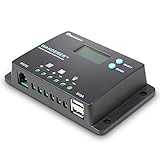
- 𝐒𝐦𝐚𝐫𝐭 𝟒-𝐒𝐭𝐚𝐠𝐞 12V/24V Solar Charge Controller: Renogy charge controller 𝐦𝐚𝐱𝐢𝐦𝐢𝐳𝐞𝐬 𝐁𝐚𝐭𝐭𝐞𝐫𝐲 𝐋𝐢𝐟𝐞 & 𝐒𝐨𝐥𝐚𝐫 𝐄𝐟𝐟𝐢𝐜𝐢𝐞𝐧𝐜𝐲, this advanced pwm solar charge controller utilizes intelligent 4-stage charging (Bulk/Boost/ Float/Equalization) to optimize power delivery for AGM, Gel, Flooded and Lithium batteries. RV solar charge controller prevents overcharging and gas buildup while 𝐚𝐜𝐡𝐢𝐞𝐯𝐢𝐧𝐠 𝟑𝟎% 𝐥𝐨𝐧𝐠𝐞𝐫 𝐛𝐚𝐭𝐭𝐞𝐫𝐲 𝐥𝐢𝐟𝐞𝐬𝐩𝐚𝐧 compared to basic charge controllers.
- 𝐀𝐝𝐯𝐚𝐧𝐜𝐞𝐝 𝐋𝐨𝐚𝐝 𝐌𝐚𝐧𝐚𝐠𝐞𝐦𝐞𝐧𝐭 & 𝐒𝐲𝐬𝐭𝐞𝐦 𝐏𝐫𝐨𝐭𝐞𝐜𝐭𝐢𝐨𝐧:Renogy Wanderer 10A charger controller offers 𝐮𝐧𝐩𝐚𝐫𝐚𝐥𝐥𝐞𝐥𝐞𝐝 𝐟𝐥𝐞𝐱𝐢𝐛𝐢𝐥𝐢𝐭𝐲 with manual/automatic/timed load control modes, allowing direct parameter adjustment for lighting, pumps and other DC loads. Solar panel charge controller has overcharge/over-discharge/ overload/ short-circuit/reverse polarity/temperature compensation) with 𝐋𝐂𝐃 𝐞𝐫𝐫𝐨𝐫 𝐜𝐨𝐝𝐞𝐬 𝐩𝐫𝐨𝐯𝐢𝐝𝐞 complete system security. Negative ground design making solar panel charge controller for RV and Marine 𝟗𝟎% 𝐬𝐚𝐟𝐞𝐫 𝐭𝐡𝐚𝐧 𝐜𝐨𝐦𝐩𝐞𝐭𝐢𝐭𝐨𝐫𝐬.
- 𝐇𝐢𝐠𝐡-𝐄𝐟𝐟𝐢𝐜𝐢𝐞𝐧𝐜𝐲 Renogy Solar Power Controller: 𝐈𝐧𝐝𝐮𝐬𝐭𝐫𝐲-𝐋𝐞𝐚𝐝𝐢𝐧𝐠 <𝟏𝟎𝐦𝐀 𝐒𝐞𝐥𝐟-𝐂𝐨𝐧𝐬𝐮𝐦𝐩𝐭𝐢𝐨𝐧, unlike standard charge controllers that drain your batteries, our Wanderer 10A Controller ultra-low power design maximizes every watt from your solar panels. Renogy Renewable energy controllers compact size (𝟓.𝟐×𝟑.𝟏 𝐢𝐧𝐜𝐡𝐞𝐬) fits perfectly in RV electrical cabinets or marine control panels. With IP32 waterproof rating, this solar controller withstands 𝐡𝐚𝐫𝐬𝐡 𝐨𝐮𝐭𝐝𝐨𝐨𝐫 𝐜𝐨𝐧𝐝𝐢𝐭𝐢𝐨𝐧𝐬 while maintaining optimal performance.
- 𝐕𝐞𝐫𝐬𝐚𝐭𝐢𝐥𝐞 Solar Charge Controller : Universal 12V/24V Battery Compatibility, whether you need a solar controller for lithium batteries (𝐰𝐢𝐭𝐡 𝐦𝐚𝐧𝐮𝐚𝐥 𝐚𝐜𝐭𝐢𝐯𝐚𝐭𝐢𝐨𝐧 𝐬𝐞𝐭𝐭𝐢𝐧𝐠𝐬) or traditional AGM/Gel systems delivers precise charging for all types. Lithium solar charge controller has rugged construction &𝐰𝐢𝐝𝐞 𝐨𝐩𝐞𝐫𝐚𝐭𝐢𝐧𝐠 𝐭𝐞𝐦𝐩𝐞𝐫𝐚𝐭𝐮𝐫𝐞 𝐫𝐚𝐧𝐠𝐞 make the go-to choice for professional solar installations and DIY off-grid projects alike.
- 𝐒𝐦𝐚𝐫𝐭 𝐌𝐨𝐧𝐢𝐭𝐨𝐫𝐢𝐧𝐠 Renogy Charge Controller: 𝐑𝐞𝐚𝐥-𝐓𝐢𝐦𝐞 𝐃𝐚𝐭𝐚 𝐓𝐫𝐚𝐜𝐤𝐢𝐧𝐠 & 𝐔𝐒𝐁 𝐂𝐡𝐚𝐫𝐠𝐢𝐧𝐠, upgrade your solar power controller with our backlit LCD that clearly displays voltage, current, and system status. The integrated RS232 port connects to Renogy's DC Home App via BT-1 Bluetooth module(𝐬𝐨𝐥𝐝 𝐬𝐞𝐩𝐚𝐫𝐚𝐭𝐞𝐥𝐲) for remote monitoring. 𝟓𝐕/𝟐𝐀 𝐔𝐒𝐁 𝐩𝐨𝐫𝐭 lets you charge phones/tablets directly - a must-have feature for 12V solar charge controllers used in off-grid living.
Required input power ≈ battery charging voltage × charging current ÷ efficiency
Input current ≈ output power ÷ supply voltage
For 14.4 V at 5 A, assuming 90% efficiency and a 24 V supply:
14.4 × 5 ÷ 0.90 ≈ 80 W
80 ÷ 24 ≈ 3.3 A
Select more than 80 W and more than 3.3 A of continuous capacity to allow for startup, heat and derating. Check all of these separately: controller PV voltage, PV current and power limits; battery-output current; supply continuous current and wattage; and wire and fuse ratings. Many controllers limit battery output current—for example, Victron states that its MPPT chargers deliver up to the model’s rated current—but that does not guarantee protection for an incompatible source (Victron documentation).
Compatibility checklist
| Check | Why it matters |
|---|---|
| Controller type and model | PWM and MPPT interact with sources differently. |
| Manufacturer approval | Prevents unsupported input behavior. |
| Actual PV voltage range | Too low causes no-charge operation; too high can damage the controller. |
| Battery charging voltage | Determines the required PV-side headroom. |
| Supply current limit and short-circuit behavior | Hiccup or foldback can cause resets; a stiff source can be stressed by input transients. |
| Battery chemistry and settings | Flooded, AGM, gel, LiFePO₄ and other lithium batteries require different profiles. |
| Fuses, disconnects, polarity and wire size | Limits fire, fault and equipment risk. |
| Other PV sources | Parallel supplies can backfeed each other or the supply. |
Supply types: what is and is not sensible
Programmable bench supply
This is the most controllable experimental source because voltage, current limit and readings are adjustable. Set a conservative voltage below the PV maximum, limit current to the intended input power, and watch for hiccup or foldback. A current-limited supply that makes the controller restart may be acceptable for a short test, not a dependable installation.
Laptop adapter
Usually a poor choice. Voltage may be too low, power may be insufficient, current limiting is inaccessible, the barrel connector may be unsuitable, and short-circuit behavior is unknown. A 19.5 V, 4.6 A adapter is about 90 W before losses; it might theoretically support roughly 5–6 A into a 12 V battery under favorable conditions, but that arithmetic is not compatibility approval.
Crashes, No Sound, or Screen Glitches?
Random freezes, missing sound and display glitches usually trace back to one bad driver. Find and replace yours safely.Free scan · under a minutePC Slower Than It Used to Be?
A free scan shows the junk files, broken settings and background clutter dragging Windows down - then fixes them in one click.Free scan · Windows 10 & 11LED power supply
Use only after confirming that it is constant-voltage, not a constant-current LED driver, and that its startup and protection behavior are compatible. LED supplies are not automatically suitable for solar-controller inputs.
Battery chemistry and protection
Configure the controller to the battery manufacturer’s voltage and current limits. Victron’s troubleshooting guidance states that charge voltages must match the battery documentation (Victron troubleshooting).
- Lead-acid: temperature compensation can matter; Victron installation guidance recommends keeping charger and battery within 5°C (9°F) for proper compensated charging in the cited family (installation guidance).
- LiFePO₄ and other lithium: the BMS is not a substitute for correct charger settings. A BMS may disconnect on an over-limit condition, leaving the controller facing a suddenly disconnected battery. Disable equalization unless the battery maker explicitly requires it.
Generic connection and first-test procedure
Use this only as a framework; follow the controller’s manual if it specifies another sequence.
- Record the controller model, PWM/MPPT type, battery voltage and chemistry, and all PV and supply ratings.
- Turn off the supply. Connect the battery first through the required fuse close to the battery; verify polarity and voltage at the controller terminals.
- Configure the chemistry-specific charging profile and confirm the controller’s limits.
- Measure the supply’s no-load voltage and polarity. Set a variable supply to the lowest safe voltage and a conservative current limit.
- Install the required PV-side fuse or disconnect. Connect supply positive and negative to the PV terminals—not load terminals.
- Energize the supply and monitor continuously during the first test.
On the cited Victron family, PV and battery negatives are not isolated and battery-side protection is required (installation manual). Follow your own model’s grounding instructions.
Recommended Free Tools
Rank #3

- 【Superior MPPT Technology】 This 100A MPPT solar controller is equipped with an advanced MPPT maximum power point tracking technology algorithm. It automatically recognizes 12V/24V/36V/48V systems and features dual USB 5V charging ports. The controller can swiftly track the maximum power point of the PV array in any environment, ensuring a tracking efficiency of no less than 99.5%. This significantly enhances the energy utilization in the solar system.
- 【Versatile Design】 The controller features a multi-function LCD with a backlight display and clock. It offers seven operating modes: charging mode, light control mode, light control + time delay control mode, universal control mode, manual control mode, and timing control mode. The upgraded version now supports precise time control, allowing devices to be automatically powered on and off according to the user’s set time. Additionally, it can maintain a continuous bright screen state without entering hibernation or lock mode.
- 【Comprehensive Voltage Protection】 The MPPT solar controller provides extensive voltage protection, including safeguards against battery over-voltage, over-current, power failure, overcharge, deep discharge, reverse connection, and overheating. Moreover, the device can now display the real-time voltage of the solar panel, helping users monitor and optimize energy use, ensure normal operation, and assist in troubleshooting.
- 【User-Centric Design】 The LCD is designed to dynamically display the operational data and working status of the equipment. It shows controller parameters such as working mode, battery voltage, PV charging current, battery discharging current, product working temperature, and delay time. For scenarios requiring configuration resets or restoring default settings, a "reset to factory settings" feature has been added, providing a quick and effective solution.
- 【Diverse Battery Charging Options】 The controller is compatible with various types of batteries, including Seal, GEL, Flooded, and LifePO4.
Watch these measurements
- Supply voltage and current at the controller terminals
- Controller PV voltage/current and battery voltage/current
- Controller, supply, wires and terminals for heat
- Fault indicators, resets, noise, odor and BMS status
Stop immediately if the supply cycles, PV voltage collapses, wiring heats, the battery exceeds its manufacturer’s limit, the BMS disconnects, or either device smells or sounds abnormal.
Common failure modes
No startup
Check that the battery was connected first, its voltage is above the controller threshold, polarity and fuse are correct, and the supply is high enough for PV startup. Measure at the controller, not only at the battery; Victron recommends checking controller battery voltage with the app, display or multimeter (troubleshooting guide).
PV current is zero
The supply may be current-limited or in hiccup mode; voltage may be too low; the controller may be searching, temperature-limiting, protecting itself, or reducing charge because the battery is near target voltage.
Supply repeatedly turns off and on
Likely causes are startup surge, aggressive input loading, foldback or incompatible source impedance. Do not defeat the supply’s protection; use a suitable source or dedicated charger.
Quick wins for a faster PC:
Fix the driver behind crashes, sound loss and screen glitchesFind Drivers →Clear out junk files and repair common Windows errorsFree Scan →Overvoltage or overheating
Disconnect the source. Recheck chemistry, absorption and float settings, temperature sensing, voltage measurement, conductor size, terminal torque, fuse selection and ventilation. Configured charge limits can also interact with DC loads and other sources; Victron documents these interactions in its DVCC guidance.
When a different charger is the better purchase
Household AC: use an AC-to-DC battery charger
Choose chemistry presets, rated current, temperature sensing, lithium/BMS compatibility, float behavior, isolation, environmental rating and certifications. This is the normal choice for reliable wall-powered charging.
Another DC system: use a DC-DC battery charger
For an alternator, vehicle battery, generator DC output or another battery bank, use a charger designed for voltage conversion and current control. Victron’s Orion XS offers configurable voltage/current and battery profiles; Renogy lists dual-input DC-DC/MPPT products for alternator-plus-solar systems (Renogy range, DCC50S product page).
Controlled laboratory testing: use a suitable bench supply or battery simulator
A programmable supply is appropriate for supervised troubleshooting, not unattended high-energy or lithium charging unless the complete system is engineered for it.
What’s actually slowing this PC down?
Pick the symptom - the matching free tool is one click away.
Situations to avoid
- Do not assume a 12 V adapter can charge a 12 V battery through an MPPT input.
- Do not exceed maximum PV voltage, even briefly.
- Do not use a PWM controller with a supply without explicit manufacturer approval.
- Do not connect to load terminals as a charging substitute.
- Do not parallel a supply with solar panels unless source selection and backfeed protection are designed for it.
- Do not rely on the BMS to correct wrong charger settings.
- Do not leave an improvised arrangement unattended before a controlled, monitored test has passed.
Decision rule
Use the DC supply on PV terminals only when the controller is an approved MPPT application (or the PWM maker explicitly allows it), voltage and power remain within every limit, source behavior is compatible, battery settings and protection are correct, and you can monitor the test. Otherwise, use a purpose-built charger: AC-to-DC for mains, DC-DC for another DC source, or a dual-input DC-DC/MPPT unit when alternator and solar charging must share one system.
Quick Recap
Product prices and availability are accurate as of the date/time indicated and are subject to change. Any price and availability information displayed on Amazon at the time of purchase will apply.

