
The Tool Desk
Outbyte Driver Updater FREEFix the driver behind crashes, sound loss and screen glitchesFind Drivers →Outbyte PC Repair FREEClear out junk files and repair common Windows errorsFree Scan →iTechGuides is reader-supported. When you buy through links on our site, we may earn an affiliate commission. As an Amazon Associate I earn from qualifying purchases. Learn more
Intune has no single Android management mode. You pick an Android Enterprise enrollment mode based mainly on who owns the device, whether one person is assigned to it or it is shared, and whether that person may use it for personal purposes. A personal phone used for work takes a personally owned work profile. A company phone that staff may also use personally takes a corporate-owned work profile (COPE). A company phone used only for work takes fully managed (COBO). A kiosk, shared, or userless device takes dedicated (COSU). Personally owned work-profile management is also moving to Google’s Android Management API, so check your tenant’s current state before you roll it out.
Start with three questions
Work through these in order. Each answer narrows the choice to one mode.
- Who owns the device? If the employee owns it, use a personally owned work profile. If the organization owns it, continue to question 2.
- Is the device assigned to one person, or is it shared or userless? Shared, kiosk, inventory, or ticketing devices use dedicated (COSU). A single-user device continues to question 3.
- May the user use the device personally? If yes, use a corporate-owned work profile (COPE). If no, use fully managed (COBO).
The four modes compared
The three axes that separate the modes are ownership, user assignment, and personal use. The table below uses those axes and the management scope Microsoft documents for each mode.
What’s actually slowing this PC down?
Pick the symptom - the matching free tool is one click away.
| Mode | Ownership | User assignment | Personal use | What administrators manage |
|---|---|---|---|---|
| Personally owned work profile (BYOD) | Personal (user-owned) | Single user | Allowed; the personal side stays under the user’s control | Policies apply to the work profile only |
| Corporate-owned work profile (COPE) | Organization | Single user | Allowed | The work profile, plus some whole-device settings |
| Fully managed (COBO) | Organization | Single user | Work only | The whole device, including controls not available with work-profile management |
| Dedicated (COSU) | Organization | Userless or shared | Not a personal-use device | A kiosk or shared-purpose device |
Personally owned work profile (BYOD)
The work profile holds work apps and data apart from the user’s personal apps and data. Intune policies apply to the work profile, and the personal side remains under the user’s control. Enrollment happens either through the Company Portal app or through web-based enrollment, depending on how the tenant is configured. Because this flow is changing, see the transition section below before you enable it.
#1 Best Overall

- 【Multi-function Configuration】Android 15 portable tablet with stylus and foldable protective case. You can enter text directly using a stylus, easy response to various scenarios, making your work and study get twice the result with half the effort.
- 【Android 15 Tablet】10 inch Tablet PC is equipped with the latest Android 15.0 system, built-in powerful Quad-core processor, 32GB ROM 8GB RAM(Including 5GB expansion), 1024GB expansion, support Wi-Fi, Bluetooth, GPS and more, enough memory allows you to store more favorite e-books, movies, music, pictures, videos, games
- 【Broad Vision and Responsiveness】The Android tablet uses a 10.1 inch 1280*800 full HD IPS display, which can present a clearer picture effect and richer colors, bringing you a more realistic viewing experience, bringing you clearer and brighter Image. Equipped with 10.0-inch capacitive touch, five-point capacitive touch G+G, to ensure smoother motion in movies and games
- 【Long Battery Life】 The Android tablets powered by a 6000mAh battery, can stand by 360 hours and continuous use up to 6-8 hours, easily charge via the 5V2A Type-C port. Super power and long battery life, say goodbye to the trouble of insufficient power and give you a full sense of security.
- 【Coexistence of Beauty and Strength】 Our Android tablet equipped with a protective leather case. With a slim design, wear-resistant and resistant to falling, a delicate feel, unique texture, easy to carry, and more comfortable to hold with one hand. It's a good companion for your leisure and entertainment, as well as the best gift for various festivals and birthdays.
Corporate-owned work profile (COPE)
Use COPE when the organization owns a single-user device and allows personal use. The work profile separates work apps and data from personal ones. Microsoft’s work-profile guidance also describes administrator control over some device-wide settings on corporate-owned work-profile devices, including password requirements, Bluetooth, data roaming, and factory-reset protection. Check the current settings catalog in Intune before you promise any one of these controls to a business owner, because the available list can change.
Fully managed (COBO)
Use fully managed for a corporate-owned, single-user device meant for work only. Management applies to the whole device, so it reaches controls that the work-profile modes cannot reach. Choose this mode when personal use is not part of the deal, for example on field-service phones that hold no personal accounts.
Rank #2

- Powerful Hardware Configurations - Comparing with the End-of-life tablet scanner X-927, this 2025Q1 launched upgraded version maintains the appearance & rugged construction, but totally upgraded hardware configuration. It adopts a superior Qualcomm 8 core CPU processor which brings 1.5x faster running speed, & comes with 8GB RAM+128GB ROM large memory. As an essential production tool for enterprise mobile work, you can expect the high reliability to perform mission-critical tasks in field, & run multiple tasks smoothly.
- Professional Barcode Data Capturing — This industrial tablet integrates Zebra SE4750 2D laser scan engine, can read any 1D & 2D QR barcodes in milliseconds. With exceptional motion tolerance for reading moving barcodes, it boosts scanning speed and productivity. And the picklist feature allows user to easily select a single barcode to capture on a field of bar codes, ideal for intensive scan environment in warehouse, logistics, manufacturing etc.
- Android-based Warehouse Management – This enterprise tablet is developed based on Android 14 OS. With certified Google Mobile Service, you can easily utilize Android-based inventory applications or develop customized warehouse management system. It supports mainstream MDM software and 3rd party inventory apps such as Zoho Inventory, Orca Scan etc. The pre-installed Scan Helper App make things simple - you can set different scan mode (trigger on press or continuous scan etc.), barcode output formats, add prefix/ suffix / check digits etc. And you can simply utilize excel or web-based applications.
- 10000mAH High Capacity Battery - With integrated 10000mAh Li-ion battery and extraordinary low power design, the tablet standby time is more than 900hours, allows full day work without worrying about work efficiency & productivity.
- Multiple Functions for Comprehensive Enterprise Applications – Except for barcode scanner, this tablet also comes with 16MP camera, 13.56MHz NFC reader, WiFi, Bluetooth and 4G LTE module etc. With the all-in-one design, it meets versatile enterprise field work.
Dedicated (COSU)
Dedicated is for organization-owned devices that have no single user, are shared between people, or run as kiosks. Inventory scanners and ticketing terminals are typical examples. Do not select dedicated for an ordinary single-user phone, even one that is company-owned. Use fully managed or COPE for that.
Free tools Windows power users keep installed
One-click scans. No signup required.
Prerequisites before you configure anything
- Device and region support. Confirm the device model, Android version, and country or region against Intune’s device requirements for the mode you intend to use. Some options depend on Google Mobile Services (GMS). Microsoft’s documentation does not certify individual phone models, so verify any specific handset yourself before buying in bulk.
- A Managed Google Play connection. Microsoft states that this connection is required for every supported Android Enterprise option, including personally owned work profile, corporate-owned work profile, fully managed, and dedicated devices.
- An enrollment profile and groups. Create the enrollment profile for the chosen mode and assign the device or user groups it applies to.
- User instructions and helpdesk material. Enrollment is a provisioning workflow that people go through themselves, so the instructions must match the route you choose.
- A factory-reset plan for corporate-owned modes. Microsoft’s guide says corporate-owned fully managed, dedicated, and corporate-owned work-profile devices must be factory reset before enrollment. Schedule that work and tell users in advance, because it erases existing data on the device.
Setup sequence
- Confirm that the device model, Android version, and country or region support the mode you plan to use.
- In the Intune admin center, connect the tenant to Managed Google Play by following Microsoft’s connection instructions for Android Enterprise.
- Create the enrollment profile for the chosen mode and assign the relevant device or user groups.
- Select and communicate the enrollment route. For corporate-owned dedicated, fully managed, and COPE devices, Microsoft documents QR code, token, Google Zero Touch, Samsung Knox Mobile Enrollment, and NFC where the device supports it. For personally owned work profiles, users enroll through the Company Portal app or through web-based enrollment, depending on the tenant configuration. Verify the methods supported for your exact device and mode.
- For corporate-owned devices, factory reset each device before enrollment, and confirm that each user knows the reset will erase the device.
What the work profile does and does not reveal to administrators
Microsoft describes the work profile as a separate area for work apps and data. Its policies and settings apply to that area, and apps and data outside it remain personal and under the device user’s control. That is the accurate boundary to explain to employees. Do not describe it as Intune being unable to see anything personal. Microsoft’s documentation covers the scope of policy management, not every data flow during management.
Rank #3

- Basic Introduction - This rugged 8-inch tablet is developed based on a superior Octa-core CPU and the most update Android 13 OS. It integrates multiple function modules incl. 1D/2D barcode scanner, 13MP camera, Bluetooth, WiFi & 4G. Particularly designed for enterprise mobility applications in retail, distribution, field service, manufacturing, shipping, logistics, warehousing etc., tasked with delivering high work efficiency, reducing operational costs.
- Professional Barcode Data Capturing - With integrated Honeywell N6703 2D scan engine, the tablet scanner provides outstanding bar code reading performance. Ideal for scan-intensive environments that require fast & accurate bar code collection throughout the enterprise. The scan wedge function enables excel or web-based warehouse & inventory applications. SDK available for customized development.
- Large Capacity Battery - This warehouse tablet / Android handheld data terminal comes with an 9000mAH/3.8V Li-ion battery. Standby time >500 hours. Allows full day work without worrying about workforce productivity & data losing in the field.
- Compact & Durable Design - With rugged yet lightweight & thin design, the tablet can sustain 1.2 meters drop to concrete. The sturdy hand strap makes it easy to hold for warehouse users. In addition, it is IP66 rated water-proof and dust-proof. Can withstand moisture, water, rain, dirt, mud, sand. Ideal for wild daily use in warehouse, logistics, manufacturing environments.
- The package includes: the rugged tablet with handstrap, rubber protective case (installed on the tablet), glass screen protector, US standard charger & USB cable, quick start guide. Customer service: support@sinicvision.com.
Microsoft also notes that some user and device information is shared with Google when Android Enterprise management is enabled. For the details, read Microsoft’s current Android Enterprise data disclosure, since the list of shared items is the authoritative reference and it can change.
The personally owned work-profile transition to Android Management API
Microsoft is moving personally owned work-profile management onto Google’s Android Management API. Microsoft describes the API as Google’s recommended interface for Android Enterprise management, and the Android Device Policy app enforces policies in this API-based flow. Microsoft already uses the API for corporate-owned work-profile, fully managed, and dedicated management. Personal work-profile management is the last of these to transition.
Rank #4

- 【High Performance】URAO Android tablet features the latest operating system Android 16 and an 1.8 GHz octa-core processor ensure of excellent performance, seamless multitasking, getting rid of annoying ads, emphasizing privacy and security by designing enhanced app permissions, providing you complete management control.
- 【Massive Storage 】Our Android tablet comes with 36GB (6+30GB) RAM 128GB ROM and maximun 1TB TF card ( not included )expandable ensures you of a fast APP launch and smooth gaming experience. URAO tablet also come with pre-installed Google Play Store, you can easily download any needed Apps.
- 【HD Displaywith Low Blue Light】URAO tablet equipped with a high resolution 1280*800 IPS display, which shows a brightly colored wide-screen for a more realistic viewing experience with sharper and brighter images.The front 5MP and rear 8MP cameras can easily satisfy video calls, online learning, etc. The tablet LCD designed with low blue light technology, the screen flicker caused by irritating blue light will be reduced.
- 【Large Capacity Battery with Fast Charge】The built-in large capacity and low consumption CPU enable our URAO 10 inch tablet to stand by for up to 3 days and allows you to enjoy up to 8 hours of mixed reading, watching TV shows, playing games, surfing the web. URAO tablet dopts 18W fast-charging technology which can be fully charged in 1.5 hour and easily charge via the USB Type-C port and rest assured the battery will last. It is a good companion for you to play and study!
- 【Wi-Fi 6+Bluetooth5.4】Adopts the lastest 6th generation WiFi technology & upgraded BT 5.4. Dual band integrated chips make the 5g WiFi more stable,lastest BT 5.4 connection supports all your favorite accessories, highly increased the speed of data transfer.
What changes for users and administrators
The transition introduces web-based enrollment for personal work profiles. In the migrating flow, Company Portal is replaced as the main user-facing management app. Existing personal work-profile devices are moved by a migration policy, and Microsoft’s guidance states that they cannot be rolled back once migrated.
Before you enable web-based enrollment
- Test web-based enrollment in a test tenant first.
- Walk through the user enrollment flow from the employee’s side, on the device types you support.
- Update helpdesk articles and scripts so that support staff describe the new flow, not the old Company Portal steps.
- Enabling web enrollment applies to the whole tenant and affects all new personal work-profile enrollments. Microsoft states that this setting cannot be reversed.
- Check the current Intune Android Enterprise documentation and your tenant’s migration state on the day you deploy, because the rollout is still changing.
Android device administrator is legacy
Microsoft’s platform overview still lists Android device administrator as a supported option. It also states that Android Enterprise has superseded this method and that device administrator is not recommended for new enrollments. Plan new Android deployments around the Android Enterprise modes above. Keep device administrator in a legacy or migration note only for devices that are already enrolled under it.
Quick Recap
Best Value
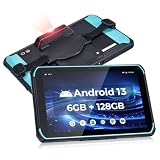
- [Excellent Scanning Capabilities] The MUNBYN Android barcode scanner tablet works with HW N6703 scan head, allowing for the seamless scanning of 1D and 2D barcodes. This includes UPC/EAN, Code128, Code39, PDF417, MicroPDF417, Databar (RSS), and various other barcode types. The impressive scan speed reaches up to 236 inch/s. Furthermore, this barcode tablet effortlessly scans damaged or screen-oriented barcodes, alleviating any concerns regarding barcode quality for users
- [Ultimate Hardware Configuration] The ILT01Pro Android scanning tablet is equipped with the Android 13 system, providing a safe and smooth operating experience and high compatibility with warehouse and logistics software. With 6GB of memory, it ensures efficient multi-tasking and maintains excellent performance even when running multiple applications simultaneously. The 128GB storage space can hold a large number of data files and easily handle frequent data transfer needs
- [Super Battery Life] MUNBYN's rugged tablet with barcode scanner ILT01Pro, is equipped with a high-capacity 9000mAh battery that negates the requirement for frequent recharging. The battery life extends up to approximately 10 hours, fully satisfying your work demands throughout an entire day. Whether you are conducting data collection in outdoor environments or operating within an indoor warehouse facility, optimal working conditions are consistently upheld
- [IP66 Protection Standards] MUNBYN Android tablet scanner is equipped with IP66 protection certification, ensuring effective resistance against warehouse dust. Furthermore, it boasts 6-sided protection, enabling it to withstand a 1.2-meter-high(3.937ft) marble drop without sustaining any damage under extreme operating temperatures. Moreover, the rugged tablet scanner design effectively safeguards the device against raindrops, ensuring optimal performance even in outdoor and rainy conditions
- [4G LTE & WIFI 5] MUNBYN rugged PC features a SIM card slot that is compatible with multiple carriers and supports calling capabilities. Furthermore, it is equipped with WIFI 5 functionality, enabling seamless communication even in challenging environments such as expansive warehouses. By leveraging both 4G LTE and WIFI 5, this Android rugged tablet ensures high-speed network connectivity and reliable communication capabilities, assisting users in maintaining efficiency across various work
Product prices and availability are accurate as of the date/time indicated and are subject to change. Any price and availability information displayed on Amazon at the time of purchase will apply.

