
Recommended Free Tools
UFS compliance testing is not a single pass/fail check. A sound validation plan tests the M-PHY electrical link, captures traffic without disturbing it, checks UniPro and UFS behavior, and maps the results to the exact compliance test specifications (CTS) and test matrix required by the device program. The first step is to identify the UFS, UniPro, and M-PHY revisions—and the host or device role—under test; test coverage and limits depend on those choices.
How the UFS test layers fit together
UFS uses MIPI M-PHY as its physical layer and MIPI UniPro as its transport and link layer. MIPI describes UniPro as an application-agnostic transport and link layer for connecting chipsets and peripheral components; JEDEC UFS adopts it. A failure seen at the UFS transaction level can therefore originate in physical signaling, link behavior, or the UFS-level exchange. Testing each layer separately and then correlating the results makes fault isolation more practical.

Specifications evolve independently. In its February 24, 2026 announcement, MIPI presented UniPro v3.0 and M-PHY v6.0 for next-generation UFS 5.0 solutions. MIPI’s version pages identify UniPro v3.0 and M-PHY v6.0 as the latest releases as of the cited 2025 page updates; that does not establish that a particular device or test product implements them. Confirm the revisions required by the target design and the applicable compliance program before choosing a test plan.
Newer revisions change the test questions
M-PHY v6.0 adds HS-G6 using PAM-4, with a stated maximum bandwidth of 46.694 Gbps per lane (MIPI Alliance, 2025). UniPro v3.0 adds a 1b1b line-encoding mode, equalization and training, and new coding and scrambling behavior. In 1b1b mode it also specifies forward-error correction and a 64-bit CRC. MIPI describes backward compatibility with UniPro v2.0 and an up-to-20% reduction in signaling overhead for 1b1b encoding; those are specification claims, not a guarantee of a measured system-level throughput gain.
#1 Best Overall

- HIGH-SPEED 8-CHANNEL SAMPLING: Capture and analyze up to 8 digital signals simultaneously with a maximum sampling rate of 24MHz. Ideal for general applications around 10MHz, with selectable rates including 24, 16, 12, 8, 4, 2, 1 MHz, and down to 25KHz to match your project's specific needs.
- WIDE SOFTWARE & PROTOCOL COMPATIBILITY: An essential tool for digital debugging, this analyzer works seamlessly with popular open-source software like Sigrok PulseView. Excel at decoding common protocols such as UART, I2C (IIC), and SPI, turning complex signal data into human-readable values for rapid troubleshooting.
- BROAD LOGIC LEVEL SUPPORT: Designed for versatility, this device is compatible with a wide range of logic levels including 5V, 3.3V, 2.5V, and 2.0V systems. The wide input voltage range of -0.5V to 5.25V makes it suitable for most modern microcontroller, FPGA, and digital electronics projects. Please note: operation with 1.8V systems is not recommended.
- PRECISION TIMING & SIGNAL INTEGRITY: Engineered with a high-stability +/-20ppm 24MHz crystal for reliable timing. Achieves a pulse-width measurement accuracy of +/- 42ns at 24MHz. The included USB cable features an EMI ferrite ring to minimize noise and ensure clean data capture during analysis.
- ROBUST INPUT CHARACTERISTICS: Features an input impedance of 1Mohm || 10pF (typical) to minimize loading on your circuit. Input thresholds are defined for clarity, with a low voltage recognized from -0.5V to 0.8V and a high voltage from 2.0V to 5.25V. We provide comprehensive after-sales support: complete digital documentation including user guides and technical references is available through our store customer service, and our support team is ready to assist with installation, programming, and troubleshooting to help you get started quickly.
For comparison, a 2018 JEDEC/MIPI architecture presentation showed UFS 3.0, UFSHCI 3.0, UniPro 1.8, and M-PHY 4.1, including HS-G4 at 11.7 Gb/s. That is a useful historical snapshot, not a current test target. Do not use an older generation’s gear or limits to judge a newer implementation.
What a compliance plan should test
1. M-PHY electrical and receiver behavior
Electrical testing checks whether the physical link meets the applicable M-PHY requirements. The exact limits and test cases must come from the relevant M-PHY revision and CTS; they are not interchangeable across generations. At a high level, plan coverage for:
- Differential waveform quality, amplitude, timing, jitter, and termination.
- Supported gear operation and transitions between gears or power states.
- Equalization and training behavior where the selected revision and mode require them.
- Receiver tolerance under defined stress conditions, with bit-error-rate (BER) measurement where required.
A UFS compliance guide identifies signal-integrity and BER as test challenges, and Keysight’s N5990A material describes receiver testing as part of a UFS/UniPro compliance matrix. A generic eye or waveform inspection is not a substitute for the prescribed receiver-stress procedure and its pass criteria.
2. Interconnect access and signal capture
Analyzers often connect through a probe or interposer between the host and device. The access method must expose the signals while preserving the behavior being measured; added loading or a changed channel can affect the link. Select an interposer that matches the interface generation and physical setup, and document it as part of the test configuration. Teledyne LeCroy documents an M-PHY HS-G5 interposer for tapping signals between host and device. That reference does not establish support for other generations.
Do these 3 things before closing this tab:
1Repair Windows errors before they cause bigger problems2Scan for outdated or missing drivers - takes under a minute3Clear out junk files and repair common Windows errorsRank #3
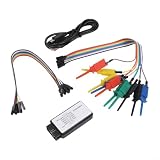
- [MULTI-PROTOCOL INTELLIGENT ANALYSIS FEATURE] The logic analyzer is equipped with an advanced protocol analysis engine that can automatically recognize up to 12 standard protocols like , IIC, and UART. This function streamlines the debugging process by efficiently extracting relevant data from intricate signals.
- [ VOLTAGE ADAPTATION] It operates within a flexible input voltage range of 0-5V, making it for compatible with various level standards. This ensures consistent performance for across different engineering environments while satisfying diverse signal acquisition needs.
- [CROSS-PLATFORM USABILITY] A valuable in fields such as microcontroller and FPGA development, this logic analyzer helps engineers quickly diagnose signal transmission issues. Its versatility significantly expedites project timelines for across various platforms.
- [CUSTOMIZABLE FUNCTIONALITY] the standard protocols offered, this analyzer enables for custom protocol parsing and searching capabilities. Such flexibility gives developers the freedom to tailor their debugging processes according to specific communication scenarios.
3. UniPro and UFS protocol behavior
Protocol analysis looks beyond electrical signaling to the sequence of link and transaction events. Capture and inspect link startup, power-mode changes, gear changes, transactions, retries, CRC or other error handling, and packet sequences. Correlate protocol errors with PHY events and timestamps where the tools permit; a decoded packet alone cannot demonstrate electrical compliance. Teledyne LeCroy says its Eclipse M52 evaluates complete protocol sequences and individual packets for conformance.
4. CTS coverage and evidence
Map every test to the specification and compliance matrix that applies to the program. The named references include JEDEC JESD224, the UniPro CTS, the M-PHY CTS, and the UFS Compliance Test Matrix (CTM) used by the relevant program. Keep the mapping explicit: test case, specification revision, host/device role, operating mode, setup, result, and any deviation. A vendor’s compliance-oriented workflow can help automate tests, but the tool name alone does not prove that a given run covers the required matrix.
Rank #4

- [HIGH-PERFORMANCE TOOL] Employs advanced ARM Cortex M3 controller for enhanced experimentation.
- [MULTIFUNCTIONAL USAGE] Not only sends and receives signals but also monitors traffic live.
- [INNOVATIVE DESIGN] Features 2.4GHz transmit and receive capabilities like a Class 1 device.
- [CONVENIENT CONNECTORS] Equipped with standard Cortex debug connector and ISP serial connector for easy facing.
- [USER-FRIENDLY] Simply install and utilize this analyzer tool for quick protocol analysis.
UFSA reported in a 2016 announcement that Protocol Insight’s UFS Test Executive was certified against UFS CTM v1.0 and JESD224. This is historical evidence of that certification at that time, not proof of current certification, current availability, or coverage of later matrix revisions.
A practical lab workflow
- Freeze the target. Record the required UFS, UniPro, and M-PHY revisions, supported gears and modes, host or device role, and the applicable CTS and CTM revisions. Resolve any mismatch between the device specification and the program’s required test matrix before testing.
- Build the test map. For each required case, identify the layer, test setup, stimulus, measurement or decode, acceptance limit, and report artifact. Separate PHY receiver tests from protocol conformance tests, then note where one result can help explain another.
- Validate the physical setup. Confirm the probe or interposer, cabling, calibration, and DUT configuration are appropriate for the interface and target mode. Capture setup details so results can be reproduced and setup-induced failures can be investigated.
- Run PHY tests and retain raw evidence. Execute the CTS-defined electrical and receiver procedures for the supported configurations. Preserve waveforms, stress settings, BER results, and instrument configuration alongside pass/fail outcomes.
- Capture protocol sequences. Exercise startup, state and gear changes, transactions, and error paths required by the matrix. Save traces and decoded packet or sequence results, not only summary reports.
- Correlate and close gaps. Compare PHY and protocol evidence when a test fails or behaves unexpectedly. Mark untested modes and unsupported cases explicitly rather than treating them as passes.
- Review compliance evidence. Check each required matrix row against its recorded result, revision, DUT role, setup, and report. Obtain confirmation from the relevant program or certification body if formal acceptance depends on a specific test-system qualification or certification status.
How to compare UFS compliance tools
Compare systems by the coverage they can demonstrate for your target revision and role, not by the broad label “UFS compliance.” The cited product materials describe different parts of the workflow:
Best Value
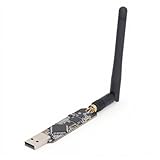
- High Performance: For Ubertooth 1 is an open source 2.4 GHz development suitable for Bluetooth experimentation. Based on the powerful for LPC175x ARM Cortex M3 microcontroller with full speed USB 2.0, for Ubertooth 1 is a great way to develop custom Class 1 comparable Bluetooth devices.
- Multifunctional: The thing that sets for Ubertooth apart from other Bluetooth development platforms is that it's capable of not only sending and receiving 2.4 GHz , but can also operate in monitoring mode, monitoring Bluetooth traffic in real time.
- Unique Design: Bluetooth protocol analysis tool with 2.4 GHz transmit and receive. Transmit power and receive sensitivity comparable to a Class 1 Bluetooth device.
- Connector: Standard for Cortex debug connector (10pin 50mil JTAG). Insystem programming (ISP) serial connector. Expansion connector intended for Inter for Ubertooth communicating or other future uses.
- Usage Note: In order to open the schematic and board design files in the source code package, you will need to download for , an open source electronic design automation software package.
| Tool or category | Evidence described in vendor or program material | What to verify for your program |
|---|---|---|
| Keysight N5990A compliance applications | Compliance-test automation and UFS/UniPro matrix material, including receiver-test capability. | Exact supported UFS, UniPro, and M-PHY revisions; receiver-stress methods; host/device coverage; report mapping to the required CTS and matrix. |
| Teledyne LeCroy Eclipse M52 and QualiPHY | Analyzer/exerciser and CTS-oriented protocol evaluation; Eclipse M52 material describes evaluation of complete protocol sequences and individual packets. A separate HS-G5 interposer is documented for signal access. | Exact analyzer, exerciser, software, and interposer support for your generation, gear, and role; trace depth; automation; and the compliance cases the system actually executes. |
| Protocol Insight UFS Test Executive | UFSA’s 2016 announcement reported certification against UFS CTM v1.0 and JESD224. | Current product availability, current certification status, supported matrix revision, and whether the evidence covers your device and program requirements. |
For any candidate system, ask for a current support statement tied to the exact specification revisions, a sample report showing test-to-matrix mapping, and a clear list of exclusions. Version support, certification status, and commercial availability can change; the cited materials do not establish current coverage for every product and revision combination.
Quick Recap
Common mistakes that weaken a compliance result
- Testing the wrong revision: selecting a tool or limit set by familiar product name without confirming its CTS and specification versions.
- Equating protocol decode with PHY compliance: a clean trace cannot prove receiver tolerance, jitter, amplitude, or other electrical requirements.
- Ignoring test access: an unsuitable interposer or probe can alter the channel and compromise the measurement.
- Reporting only pass/fail: without setup, configuration, revision, and raw evidence, a result is difficult to reproduce or audit.
- Overstating certification: an older certification announcement does not establish certification against a later matrix or a current product release.
Product prices and availability are accurate as of the date/time indicated and are subject to change. Any price and availability information displayed on Amazon at the time of purchase will apply.

