
Recommended Free Tools
The Top 12 Data Migration Tools are AWS Database Migration Service, Azure Database Migration Service, Google Cloud Database Migration Service, Oracle Zero Downtime Migration, Qlik Replicate, Fivetran, Airbyte, Informatica Cloud Data Integration, Azure Data Factory, Apache NiFi, Matillion ETL, and AWS DataSync. The right choice depends on source, target, downtime, transformation, and operational requirements—not a universal ranking.
Data migration covers several different jobs: moving one database to another, converting schemas, keeping systems synchronized during a cloud cutover, loading an analytics warehouse, routing files and APIs, or transferring storage. This guide matches each of the twelve tools to the scenario it handles best and identifies the limitation that should be tested before adoption.
Key takeaways
- AWS Database Migration Service is the strongest fit for database moves into Amazon RDS and other AWS database targets, including homogeneous, heterogeneous, and ongoing-replication projects.
- Azure Database Migration Service and Google Cloud Database Migration Service are the most natural choices when the destination is an Azure or Google Cloud managed database platform.
- Qlik Replicate is designed for enterprise change-data capture, heterogeneous replication, and low-downtime cutovers, while Fivetran is better suited to managed analytics replication than a one-time production migration.
- Airbyte, Apache NiFi, Informatica Cloud Data Integration, Azure Data Factory, and Matillion ETL are data-movement or integration platforms whose suitability depends heavily on transformation, orchestration, and operational requirements.
- AWS DataSync belongs on a file-system and object-storage shortlist, not as a replacement for a relational database migration service.
What counts as a data migration tool?
A data migration tool moves data between computing environments, storage systems, databases, applications, or analytical destinations. A database migration can also involve schema conversion, testing, performance tuning, validation, cutover, rollback planning, and post-migration monitoring, so the best product depends on more than how quickly it copies rows.
AWS’s database migration guidance distinguishes the movement of data from the broader work required to make a migrated system usable. A replication service, ETL platform, file-transfer utility, and database cutover service may all be called migration tools, but they solve different problems.
Free tools Windows power users keep installed
One-click scans. No signup required.
#1 Best Overall

- PERMANENT DATA DESTRUCTION: Factory resetting is a flawed process that isn’t enough to keep deleted data from being recovered. When you reformat your computer's hard drive, the drive is formatted to make the old data rewritable. For the average user this may be enough, but in order to destroy all secure data a deep reformatting of the local and external drive needs to be completed. Destruct is the true master reset you need to completely and permanently erase documents and files.
- FRESH START: Whether you are selling your computer, disposing of it, or want to return it to its factory settings, Destruct will give your computer the clean start it needs. Destruct is a military-grade data eraser that allows you to completely get rid of confidential files and data stored on your computer. They will never be able to be recovered by other users. Enjoy peace of mind when you release your computer, knowing your private information is out of reach forever!
- REVOLUTIONARY USB DEVICE: This compact USB device packs a big punch when it comes to its destructive abilities! Conventional computer reformatting simply isn’t enough when you want to completely erase your computer’s data. Destruct is the revolutionary master key that gets the job done without leaving a trace of old data to be recovered. Wipe it, clear it, erase it, delete it, how you say it doesn’t make a difference; Destruct will DESTROY it!
- EASY-TO-USE: Erasing your hard disk is simple with Destruct. Simply plug it into a USB port, boot up your computer, select the hard disc you want to wipe clean, then let Destruct work it’s magic! Only one use of this device is needed to thoroughly overwrite your disk. Note: once the data on your hard disk has been erased, it is completely non-recoverable.
- DESTRUCTION GUARANTEED: Factory resets and similar hard drive erasing products leave your important files, documents, and data vulnerable to recovery. Devices such as SISCO can be used to retrieve the information you thought was gone forever, allowing it to be accessed by other users. Destruct guarantees that no device, program, or software can recover what you have instructed Destruct to erase!
This is a scenario-based shortlist rather than an absolute ranking. The numbered order groups similar products; it does not claim that tool number one is universally better than tool number twelve.
How should you choose among data migration tools?
Start with five questions: what are the source and target systems, whether the migration is homogeneous or heterogeneous, how much downtime is acceptable, how much schema or data transformation is required, and who will deploy, secure, monitor, and operate the migration.
- Source and target: Confirm the exact database engines, versions, file systems, cloud services, applications, and network locations. A product that supports MySQL in general may still have limitations for a particular version, endpoint, data type, or target configuration.
- Homogeneous or heterogeneous: A homogeneous move keeps the same database engine, while a heterogeneous move changes engines or platforms. Heterogeneous projects usually need more schema conversion, code review, functional testing, and reconciliation.
- Offline or online: An offline migration stops writes during the copy or cutover. An online migration uses replication or CDC to keep the target current while the source remains available, but online operation adds monitoring and cutover complexity.
- Transformation: Decide whether the project only copies data or must rename columns, convert schemas, filter records, reshape data, translate file formats, or combine multiple sources.
- Operations: Evaluate deployment location, private connectivity, encryption, credentials, logging, alerting, restart behavior, CDC-lag monitoring, staffing, and ownership after the migration finishes.
Which migration scenario matches your project?
| Project scenario | Strong candidates | Why they fit | Main limitation to verify |
|---|---|---|---|
| AWS database migration or replication | AWS Database Migration Service | Supports movement into AWS database services and ongoing replication. | Engine compatibility and the exact scope of schema conversion. |
| SQL Server modernization into Azure | Azure Database Migration Service | Supports Azure-oriented database migrations with online and offline workflows. | Use the current service and supported path rather than retired classic SQL scenarios. |
| Migration into Cloud SQL or AlloyDB | Google Cloud Database Migration Service | Provides initial migration, continuous replication, validation, and conversion assistance. | Supported paths and pricing vary between homogeneous and heterogeneous migrations. |
| Oracle database move to Oracle Cloud or Exadata | Oracle Zero Downtime Migration | Specializes in Oracle-to-Oracle Cloud and Exadata moves with minimal downtime. | It is Oracle-centric, not a neutral multi-engine platform. |
| Heterogeneous enterprise CDC | Qlik Replicate | Combines full load, log-based CDC, broad endpoint categories, and centralized monitoring. | Check endpoint support and release-specific limitations. |
| Managed analytics ingestion | Fivetran | Replicates historical and incremental data into analytics destinations. | Fivetran does not support one-time production data migrations. |
| Connector-rich or self-hosted movement | Airbyte | Offers a broad connector catalog, refresh modes, incremental sync, and selected CDC options. | Complex conversion, application cutover, and validation may need companion tools. |
| Enterprise ETL, ELT, and transformation | Informatica Cloud Data Integration | Handles broad integration programs, ETL, ELT, and serverless Spark processing. | Implementation can be broader and heavier than a focused replication utility. |
| Batch pipelines and file-to-lake movement | Azure Data Factory | Copy Activity supports broad source-to-sink pipelines, mapping, filtering, scheduling, and metadata-driven copying. | It usually requires more pipeline engineering than a turnkey database cutover service. |
| Custom self-hosted dataflows | Apache NiFi | Supports files, APIs, events, routing, transformation, provenance, and back pressure. | The team owns more architecture, operations, testing, and migration logic. |
| Cloud warehouse ETL and transfer | Matillion ETL | Supports database unload/load workflows and file or cloud-storage transfer patterns. | Matillion instance migration is separate from general-purpose database migration. |
| File-system or object-storage transfer | AWS DataSync | Targets large data transfers between file and storage environments. | It is not a relational database migration replacement. |
Which tools fit database-to-database moves?
1. AWS Database Migration Service
AWS Database Migration Service, also called AWS DMS, is the best starting point for teams moving databases into Amazon RDS and other AWS database services. AWS documents both homogeneous and heterogeneous migrations, ongoing replication, and schema-conversion support through its AWS DMS documentation.
Use AWS DMS when the destination is already in AWS and the project needs an initial load followed by replication during a controlled cutover. The service is especially attractive when a team wants a cloud-provider-native workflow rather than a separately operated replication platform.
AWS DMS is not a reason to skip compatibility analysis. Check the exact source and target engines, versions, unsupported objects, data types, stored code, indexes, permissions, large objects, and conversion requirements. A successful row transfer does not automatically prove that an application will behave correctly on the target.
2. Azure Database Migration Service
Azure Database Migration Service is the natural choice for Microsoft-centric migrations into Azure, particularly SQL Server modernization and online migrations where reducing downtime is important. Microsoft documents portal-based workflows as well as automation through PowerShell and CLI.
Azure DMS supports online and offline migration modes. Online migration can keep the destination synchronized while the source continues serving workloads, but a low-downtime plan still needs a write-free cutover window, application coordination, lag monitoring, validation, and a rollback decision.
Do not confuse the current Azure Database Migration Service with the retired classic SQL migration scenarios. Microsoft’s Azure DMS automation documentation is a better starting point than an old tutorial, and the exact supported workflow should be checked before a production commitment.
Quick wins for a faster PC:
Repair Windows errors before they cause bigger problemsFix Now →Scan for outdated or missing drivers - takes under a minuteDriver Scan →Clear out junk files and repair common Windows errorsFree Scan →3. Google Cloud Database Migration Service
Google Cloud Database Migration Service is best for managed migrations into Cloud SQL and AlloyDB for PostgreSQL. Google documents MySQL, PostgreSQL, SQL Server, and Oracle source workloads, with initial snapshots, continuous replication, validation, and conversion assistance described in the Google Cloud DMS overview.
Rank #2

- ✔ Permanently Wipe Data – Securely erase your hard drive, ensuring no recovery is possible.
- ✔ Plug & Play – No Installation Needed – Bootable USB drive with preloaded professional erasure software.
- ✔ For IT Professionals & Personal Use – Perfect for selling, recycling, or disposing of old computers.
- ✔ Compatible with Most Devices – Works with Windows, Linux, BIOS & UEFI-based PCs & Laptops.
- ✔ Industry-Standard Data Sanitization – Uses trusted DBAN, ShredOS (Nwipe), and Secure Erase tools.
Choose Google Cloud DMS when a managed Google Cloud destination is central to the project and the team wants a provider-supported path from an existing database into Cloud SQL or AlloyDB. Continuous replication can support a staged migration instead of a single long outage.
Do not describe Google Cloud DMS as universally free. Google’s pricing treatment differs between homogeneous and heterogeneous use cases, so confirm the current price for the selected source, target, region, migration type, and runtime before estimating project cost.
4. Oracle Zero Downtime Migration
Oracle Zero Downtime Migration, or Oracle ZDM, is the specialist choice for moving Oracle databases to Oracle Cloud or Oracle Exadata environments with minimal downtime. Oracle’s own documentation presents ZDM as an Oracle-focused migration utility rather than a general-purpose engine-neutral platform.
Oracle ZDM makes sense when the source is Oracle, the destination is an Oracle Cloud or Exadata environment, and the project prioritizes a repeatable low-downtime Oracle migration. ZDM is a poor fit when the project needs broad cross-engine connectivity, general ETL, file routing, or application-data integration.
Even an Oracle-specific tool does not remove the need to test database features, external dependencies, application connection changes, permissions, performance, backup behavior, and the final cutover and rollback sequence.
Which tools fit CDC and analytics replication?
5. Qlik Replicate
Qlik Replicate is a strong enterprise choice for heterogeneous database replication, hybrid-cloud movement, CDC, and low-downtime cutovers. Qlik documents full-load replication, log-based change-data capture, many source and target categories, centralized monitoring, and deployment on premises or in the cloud.
Qlik Replicate is useful when the migration must keep a target synchronized while teams validate it, or when data must be distributed across multiple platforms. The graphical configuration and monitoring emphasis can be valuable for an enterprise operations team managing several replication tasks.
What’s actually slowing this PC down?
Pick the symptom - the matching free tool is one click away.
Endpoint coverage is not a blanket promise. Before selecting Qlik Replicate, verify the exact source and target endpoints, database versions, supported capture method, data-type behavior, transaction semantics, LOB handling, latency expectations, and limitations for the specific software release.
6. Fivetran
Fivetran database replication is best for managed synchronization from databases and applications into analytics destinations. Fivetran documents initial historical syncs, incremental updates, schema mapping, and multiple change-capture methods in its connector documentation.
Rank #3
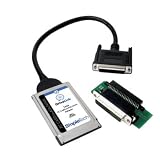
- The perfect solution for transfering everything from your old notebook hard drive to your new notebook hard drive
- Provides notebook users a fast, safe and easy way to transfer data between hard drives
- The DriveLink data transfer kit exactly copies the contents and directory structure of one drive to another drive
- Type II (PCMCIA) interface provides high performance data transfer rate up to 2.5MB/second
- Highest quality assurance rating available - ISO9001 Certified
Fivetran is a practical choice when the real requirement is to populate or continuously refresh a warehouse, lake, or analytics platform without operating a custom replication service. Managed connectors can reduce infrastructure work for recurring ingestion.
Fivetran is not a universal database cutover tool. Fivetran explicitly documents that one-time production data migrations are unsupported, so a team moving an operational database once should shortlist a database migration or replication service instead. A Fivetran destination migration procedure is a different use case from moving a live production system to a replacement database.
7. Airbyte
Airbyte data replication is a good fit for connector-rich, open-source, self-hosted, or cloud-based data movement. Airbyte’s product page lists more than 600 connectors, and Airbyte documents full refresh, incremental append, and CDC for several databases; connector behavior still needs verification for the precise source-target pair.
Airbyte suits teams that value connector breadth, deployment choice, and the ability to create or customize connectors. It is particularly relevant when data must move from many operational applications into an analytical destination.
Airbyte should not automatically be treated as a complete application-modernization or database-conversion platform. Complex schema conversion, stored-procedure translation, coordinated application cutover, business-level reconciliation, and rollback may require companion tools and project-specific engineering.
Which tools fit ETL, pipelines, and custom dataflows?
8. Informatica Cloud Data Integration
Informatica Cloud Data Integration is best for enterprise ETL and ELT, complex transformations, broad integration programs, and large migration projects that involve more than copying one database to another. Informatica describes support for ETL, ELT, and serverless Spark processing.
PC Slower Than It Used to Be?
A free scan shows the junk files, broken settings and background clutter dragging Windows down - then fixes them in one click.Free scan · Windows 10 & 11Crashes, No Sound, or Screen Glitches?
Random freezes, missing sound and display glitches usually trace back to one bad driver. Find and replace yours safely.Free scan · under a minuteChoose Informatica when migration is part of a wider governed integration program involving multiple sources, transformation rules, data-quality work, and recurring workflows. Informatica is better compared with other broad integration platforms than with narrowly focused database replication utilities.
The trade-off is implementation scope. A team should account for connector design, transformation testing, governance, environment promotion, monitoring, operational support, and the skills needed to administer a broad enterprise platform.
9. Azure Data Factory
Azure Data Factory is best for pipeline-based ingestion, batch movement, file-to-lake workloads, and Azure-centered source-to-sink copying. Its Copy Activity can capture schemas, automatically map columns, filter data, schedule movement, and support metadata-driven copying; Microsoft documents the workflow in the Azure Data Factory Copy Data tool documentation.
Rank #4

- Enhanced Data Recovery Synchronization: The comb hard drive head replacement tools ensure optimal synchronization during data recovery manipulations, providing both efficiency and effectiveness in recovering important data from faulty drives.
- Accurate Head Alignment And Safety: Featuring unique designs such as fixed holes, pins, and sockets, this data recovery HDD repair tool set ensures the magnetic heads are securely fixed and accurately aligned, facilitating safe and effortless navigation in and out of the disk platter area. This minimizes the risk of damage during head replacements or adjustments.
- Wide Compatibility And Customized Design: Consideration of various factors such as computer and hard drive types, platter and head counts, and head landing zones (external or internal) make this hard drive replacement head tool set highly versatile and adaptable to a wide range of HDD specifications, particularly suited for head repairs.
- Excellent Shock Proof: The hard drive head replacement comb enhances the shock proof of magnetic heads during movement and repair manipulations, offering maximum guard against vibrations or accidental mishandling that could to further drive damage.
- Rugged And User Friendly Material: Crafted from excellent ABS material, this hard drive repair head tool set is not only rugged but also user friendly, offering a more practical and comprehensive solution compared to previous model on the market. Its broader support range and thoughtful design enhance user experience and repair success rates.
Azure Data Factory is a strong option when the migration is a repeatable pipeline rather than one database cutover. It can coordinate data movement across a broad set of sources and destinations and can incorporate filtering, scheduling, and metadata-driven patterns.
Do these 3 things before closing this tab:
1Clear out junk files and repair common Windows errors2Scan for outdated or missing drivers - takes under a minute3Repair Windows errors before they cause bigger problemsAzure Data Factory is powerful but is not always a turnkey database migration service. Teams may need to build the orchestration, transformations, validation, retries, alerting, dependency management, and cutover logic themselves.
10. Apache NiFi
Apache NiFi is best for self-hosted and highly customizable dataflows involving files, APIs, event streams, routing, transformation, and system mediation. NiFi provides a browser-based interface and features such as data provenance, back pressure, and configurable delivery characteristics, as described in its component documentation.
NiFi is appropriate when migration requires unusual routing rules, protocol mediation, event-driven flows, or a visual way to assemble custom processors. NiFi can move data between systems that do not fit a narrow database-migration workflow.
The flexibility comes with operational responsibility. The team generally owns the NiFi architecture, cluster or host operations, security, flow versioning, failure handling, testing, capacity planning, and migration-specific reconciliation. NiFi is a dataflow platform, not a specialized database schema-conversion product.
11. Matillion ETL
Matillion ETL is best for cloud data warehouse pipelines and practical database or file transfer jobs. Matillion documents unload/load patterns that move database tables through cloud object storage and supports multiple file and cloud-storage protocols.
Matillion fits a migration that is closely connected to warehouse loading, transformation, and analytics workflows. Its visual ETL approach can be useful when a team wants data movement and downstream preparation in the same pipeline environment.
Keep two different meanings of migration separate. Matillion’s instance migration documentation covers moving Matillion resources between instances; that capability is not itself a general-purpose service for migrating an operational database.
Independent reader supportYour contribution helps us test, update, and keep practical guides available for everyone.What should you use for file and storage migration?
12. AWS DataSync
AWS DataSync is best treated as a file and storage migration option for large transfers rather than as a database migration platform. It belongs on the shortlist when the data resides in file systems or object storage and the requirement is to move files or storage contents between supported environments.
Best Value

- DfS can help you recover up to 80% of Seagate HDD data recovery cases (with the aditional usage of data recovery software). Practically all common firmware issues (that not require component replacement) can be repaired with proper use of DfS.If the drive has other issue DfS will help you recognise it and through the head diagnostics feature the technitian can decide if he will try to recover the data with some software or imager or if he should outsource the drive to a more advanced laboratory.
- FW-FXR and DfS are the only complete kits on the market providing not only the USB adapter but also all needed accessories (HDA connector masks and screwdrivers) and dedicated software (works on Windows XP, Vista, 7) and step by step instructions in order to complete the repair of your HDD.
- Considering that Seagate HDDs give a great number of firmware issues practically half of Seagate data recovery cases can be recovered directly with proper use of the toolkits.
- Features:Check Heads Condition. Check Bad/Reallocated Sectors per Head Record and View Boot-up Seagate Terminal Messages Fix 7200.11 Busy Bug Correct Zero Capacity Error Get Drives-Firmware-Temperature Information Test Read Speed per Head
- The Kits include: 1 X DfS and 1 X FW-FXR USB adapters which connect HDD with the computer (color might be different than the one in the photo). 2 X HDA connector masks (100% made out of recycled matterial from laptop LCD panels) 2 X USB FLASH sticks with drivers, software and instructions for Windows XP (sugested), Windows Vista, Windows 7 2 X screwdrivers 2 X container boxes.
Use AWS DataSync for storage-oriented transfers, then use a database-specific service when the workload includes relational tables, transaction consistency, schema conversion, indexes, stored procedures, or CDC. A file copy can move database backup files or exported data, but copying those files is not the same as migrating a live database and validating its application behavior.
What is the difference between migration, replication, ETL, and file transfer?
| Approach | Primary job | Typical requirement | Best matches in this list |
|---|---|---|---|
| Database migration | Move an operational database to a new engine, server, or cloud target. | Schema handling, initial load, CDC or synchronization, validation, cutover, and rollback planning. | AWS DMS, Azure DMS, Google Cloud DMS, Oracle ZDM. |
| Replication or CDC | Keep a second copy current as source data changes. | Change capture, lag monitoring, transaction ordering, and a controlled switchover. | Qlik Replicate, AWS DMS, Fivetran, Airbyte. |
| ETL or ELT | Extract, reshape, enrich, and load data into another system. | Transformation logic, scheduling, data quality, orchestration, and repeatability. | Informatica CDI, Azure Data Factory, Matillion ETL. |
| Custom dataflow | Route and mediate data across files, APIs, events, and systems. | Flexible processors, provenance, back pressure, error handling, and self-managed operations. | Apache NiFi. |
| File or storage transfer | Move files, directories, or object-storage contents. | Network paths, transfer integrity, permissions, restart behavior, and storage compatibility. | AWS DataSync. |
How should you test a data migration tool before production?
Run a controlled proof of concept with representative data and failure conditions before selecting a product. A demo that copies a small table does not establish that a migration can preserve production behavior.
Build a representative test set
- Include ordinary tables and the largest tables, not only small samples.
- Include indexes, constraints, permissions, views, stored procedures, triggers, and other schema objects that the application depends on.
- Include large objects such as LOBs, updates, deletes, long transactions, unusual characters, nulls, and boundary values.
- Exercise the actual network path, encryption settings, identity model, private connectivity, and deployment topology intended for production.
Measure correctness and cutover behavior
- Compare row counts and use checksums or business-level reconciliation where appropriate.
- Measure CDC lag during normal load and peak-like load, then observe what happens when the source produces updates and deletes quickly.
- Test pause, restart, retry, partial failure, lost connectivity, and recovery from an interrupted initial load.
- Perform a rehearsal cutover and record the write freeze, final synchronization, validation checks, connection changes, application smoke tests, and decision point.
- Document rollback conditions and confirm that rollback does not create divergent writes or data loss.
Test the operating model
Confirm who receives alerts, who can restart tasks, how credentials rotate, where logs and audit records are stored, how encryption is enforced, and which team owns the system after migration. Validate monitoring for throughput, errors, source pressure, target pressure, retries, and CDC lag. AWS’s database migration guidance is right to treat testing, performance tuning, and post-migration monitoring as part of the migration rather than optional extras.
Which data migration tool should you choose?
Choose AWS DMS for an AWS database destination, Azure DMS for an Azure database modernization path, Google Cloud DMS for Cloud SQL or AlloyDB, and Oracle ZDM for an Oracle-to-Oracle Cloud or Exadata move. Choose Qlik Replicate when heterogeneous CDC and low-downtime replication are central. Choose Fivetran or Airbyte when the main outcome is managed or connector-rich analytics replication rather than a one-time operational cutover.
The Tool Desk
Outbyte Driver Updater FREEScan for outdated or missing drivers - takes under a minuteDriver Scan →Outbyte PC Repair FREERepair Windows errors before they cause bigger problemsFix Now →Choose Informatica, Azure Data Factory, or Matillion when transformation and repeatable ETL pipelines matter more than a specialized cutover workflow. Choose Apache NiFi when self-hosted, event-driven, and highly customized dataflows justify greater operational ownership. Choose AWS DataSync when the data is files or storage objects, not relational database state.
The final decision should come from a proof of concept using the real source-target pair and real failure modes. Compatibility, data correctness, cutover behavior, security, monitoring, and ownership are more reliable selection criteria than a generic top-ten ranking.
Frequently Asked Questions
Can Fivetran perform a one-time production database migration?
Fivetran is not suitable for a one-time production database migration because Fivetran explicitly documents that one-time production data migrations are unsupported. Fivetran is better suited to managed ongoing replication into analytics destinations.
Is AWS DataSync a database migration tool?
AWS DataSync is a file and storage migration tool, not a relational database migration replacement. Use a database-specific service when the project requires schema conversion, transaction-aware replication, CDC, or database cutover validation.
Can one data migration tool handle every migration project?
No. AWS DMS, Azure DMS, Google Cloud DMS, and Oracle ZDM are provider- or engine-focused, while Qlik Replicate, Fivetran, Airbyte, ETL platforms, NiFi, and DataSync address different migration jobs. The exact source, target, downtime, transformation, and operational requirements determine the right choice.
What should a data migration tool proof of concept test?
A useful proof of concept includes representative large tables, indexes, stored procedures, permissions, LOBs, updates, deletes, row-count or checksum reconciliation, CDC-lag measurement, restart and failure tests, encryption and network validation, cutover rehearsal, and a documented rollback plan.
The Bottom Line
Bottom line: There is no single best data migration tool. Match the product to the migration job: provider-native database services for cloud database moves, CDC platforms for low-downtime replication, ETL tools for transformation-heavy pipelines, NiFi for custom self-hosted flows, and AWS DataSync for files and storage. Prove the exact path with representative data before production.
Quick Recap
Product prices and availability are accurate as of the date/time indicated and are subject to change. Any price and availability information displayed on Amazon at the time of purchase will apply.

