
Quick wins for a faster PC:
Clear out junk files and repair common Windows errorsFree Scan →Fix the driver behind crashes, sound loss and screen glitchesFind Drivers →Repair Windows errors before they cause bigger problemsFix Now →iTechGuides is reader-supported. When you buy through links on our site, we may earn an affiliate commission. As an Amazon Associate I earn from qualifying purchases. Learn more
A logistics business may need a time clock for payroll, an electronic logging device (ELD) for regulated driver duty-status records, or both. They serve different purposes: a payroll timecard records time worked, while a required ELD records a driver’s hours-of-service (HOS) status. Start by sorting workers and operations by role and jurisdiction; do not use an ordinary time clock in place of a required ELD.
Time clock or ELD: which record do you need?
“Time clock” can refer to two distinct systems. Payroll timekeeping captures hours worked so a business can review and process pay. An ELD records a driver’s records of duty status (RODS) for HOS compliance. Some logistics operations need both: for example, warehouse employees may clock shifts for payroll while drivers subject to the ELD rule keep regulated logs in an ELD.
In the United States, the Federal Motor Carrier Safety Administration (FMCSA) says the ELD rule generally applies to drivers and carriers already required to prepare RODS, with limited exceptions. It does not apply to every logistics business or every driver. FMCSA’s ELD rule overview lists exceptions that include qualifying short-haul operations, certain limited paper-log use, drive-away-tow-away operations, and vehicles manufactured before 2000. The overview was last updated April 9, 2018, so check current regulations and the facts of your operation before relying on an exception.
Free tools Windows power users keep installed
One-click scans. No signup required.
A timecard is not a replacement for an ELD log when a driver must maintain RODS. Motive, for example, distinguishes its timecards for workers exempt from RODS from its Logs feature for drivers who must maintain them. That is a vendor product distinction, but the underlying compliance distinction is critical regardless of software.
#1 Best Overall

- Simple one-time purchase; No subscription fees
- Compliance Solution for Hours of Service (HOS) recording complies with FMCSA ELD mandate
- Supports 9-pin J1939 and 6-pin J1708 diagnostic ports; Not compatible with vehicles using OBD-II protocol (SAE J1979);Vehicles with Volvo engine and 16-pin J1962 require separate cable, not included
- Stores ELD records securely on your compatible smartphone, accessible for inspection via the device’s USB port or via FMCSA Web Services over Bluetooth
- Download the free Garmin eLog app to a compatible smartphone to complete your compliance solution
How to choose a time clock for logistics businesses
Map the workers, records and workflows before comparing products. A single platform may support several tasks, but confirm which feature produces each record and whether that record meets the applicable requirement.
- Classify workers and operations. List regulated drivers, HOS-exempt or local drivers, warehouse staff, mechanics and other hourly workers. Determine which drivers must keep RODS in each jurisdiction.
- Separate payroll from compliance. Identify which roles need payroll clock-in/out and which need a compliant ELD. Do not assume a mobile time clock or an ELD’s timecard feature satisfies both needs.
- Choose an entry method for each role. Consider on-site clocks or shared terminals for facility staff, mobile entry for workers away from a facility, and in-cab ELD workflows for regulated driving. Ask how the system handles shared devices and missed punches.
- Define the detail payroll and operations need. Check support for job types, shifts, meal periods, notes, vehicle details and location capture. Collect only the details your processes and applicable rules require.
- Check review, corrections and access. Confirm that managers can review entries, that edits have a history, and that employees can confirm corrected records where your process requires it. Ask who can view or change records and how long they remain available.
- Verify payroll fit and jurisdiction. Confirm that the product integrates with your actual payroll and HR setup, and check requirements for the places where employees drive or work.
What payroll timecards can do for logistics teams
Digital timecards can consolidate timekeeping for workers who need payroll records rather than regulated RODS. Motive’s documentation describes clock-in/out, job types, shift notes, location pins, vehicle information, edit history, manager review and payroll integration. It identifies warehouse staff, mechanics, local drivers and HOS-exempt drivers as potential users. These are vendor-described features; confirm that the current plan and configuration support your workflow.
Rank #2
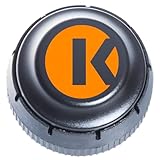
- FMCSA & DOT ELD MANDATE COMPLIANT — Stay road-legal and avoid roadside fines or out-of-service orders. My20 ELD meets 100% of federal Hours-of-Service logging requirements for trucks of every size, from owner-operators to full fleets. **not Canadian certified**
- ONE OF THE MOST AFFORDABLE ELDs ON THE MARKET — $149.99 hardware, no proprietary box. Requires a My20 ELD subscription starting at $25/month, billed annually — see exact pricing in the listing details below before you order.
- SIMPLE PLUG-AND-PLAY INSTALL — Connects to your truck's standard 9-pin (J1939) diagnostic port in minutes; 6-pin (J1708) and OBD-II adapter cables available for other setups. Just add the free My20 ELD app and pair via Bluetooth.
- GPS TRACKING, DVIR, IFTA & MORE — Built by trucking-industry veterans with 100+ years of combined experience, My20 ELD gives owner-operators and small fleets the same tools as a full TMS, right from your phone.
- REAL SUPPORT WHEN YOU NEED IT — New to ELDs? Our support team walks you through account setup and pairing step-by-step, and most setup questions are resolved on the first call.
Motive says its timecard data can integrate with systems such as ADP or UKG. Check availability and compatibility for your specific payroll environment rather than assuming that a named integration covers every plan or configuration. Manager review and approval can help establish an accountable correction process, but software alone does not determine whether a record is accurate.
Do these 3 things before closing this tab:
1Repair Windows errors before they cause bigger problems2Fix the driver behind crashes, sound loss and screen glitches3Clear out junk files and repair common Windows errorsFor a facility-based approach, Buchheit Logistics’ handbook describes nonexempt employees recording start and end times and meal periods, clocking in on site, and having changes approved by both worker and supervisor. That handbook is one employer’s policy, not a universal legal standard; its timekeeping section was revised September 1, 2016.
Rank #3

- Easy Installation — Designed for straightforward installation in compatible commercial vehicles.
- Bluetooth Connectivity – Communicates with compatible mobile devices and ELD applications through Bluetooth.
- Engine Data Connection – Connects to the vehicle to provide engine and vehicle data to compatible ELD software.
What an ELD does—and what to verify before buying
An ELD records and presents duty-status records and supports functions such as driver certification, annotations, secure data transfer, and a backup display or printout. FMCSA says, “An ELD can be on a smartphone or other wireless device if the device meets the ELD rule’s technical specifications.” A smartphone app is not automatically an ELD; the device and system must meet the applicable technical requirements.
Before purchasing a U.S. ELD, check FMCSA’s current listing. The agency advises carriers to select a manufacturer-self-certified device that is registered and listed by FMCSA. Registration can change, so verify the particular device at purchase time using the FMCSA ELD FAQs. FMCSA’s FAQ describes recorded data including date, time, location, engine hours, vehicle miles, and driver, vehicle and carrier identification.
Rank #4
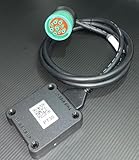
- US based, Miami, FL, we keep stock
- Bluetooth Low Energy (BLE) wireless interface
- Large capacity storage for offline operations
- Integrated engine diagnostics and antenna
- J1939, J1708/J1587 and OBD-II connections and more
Also check vehicle compatibility, the driver’s operating jurisdiction, how data is transferred during an inspection, backup access, support, and record retention. FMCSA’s overview says carriers must retain ELD RODS and backup data for six months; verify current rules and that your own retention process meets them. Motive describes its Vehicle Gateway as an in-cab device serving as its FMCSA-registered ELD for regulated U.S. and Canadian fleets. That is vendor product information, not a substitute for checking the current FMCSA listing or comparing options.
U.S. and Canadian rules are not interchangeable
ELD applicability and exceptions depend on jurisdiction, vehicle and operation. A U.S. exception should not be applied to a Canadian operation, or vice versa. Canada’s cited regulation includes a short-haul condition based on operating within a 160 km radius of the home terminal, along with returning daily for at least eight consecutive hours off duty and maintaining accurate records for at least six months. These conditions are part of the cited Canadian rule, not a general time-clock standard; review the full current requirements for your operation in section 77 of Canada’s Commercial Vehicle Drivers Hours of Service Regulations.
Best Value

- PT30 ELD + 16-Pin Cable Complete package includes one PT30 ELD and a heavy-duty 16-pin diagnostic cable for compatible vehicles.
- Easy Installation Connect the included cable to the truck's compatible diagnostic port and the PT30 ELD for a straightforward installation.
- Verify Compatibility Before Ordering This package is intended for 16-pin applications. Connector configurations can vary by truck model and year. Please verify your truck has the required 16-pin diagnostic port before purchase.
FMCSA’s 2018 overview also lists limited paper RODS use not exceeding eight days in every 30-day period among exceptions. Treat that as a specific regulatory exception, not a general allowance for any driver or fleet, and confirm current regulatory text before relying on it.
Quick Recap
Questions to ask a timekeeping vendor
- Coverage: Which roles can use the system, and which require a separate ELD or payroll workflow?
- Record purpose: Does each feature create payroll hours, duty-status records, or both? What compliance claim is supported by documentation?
- Entry and job detail: Can workers clock in on site, on mobile or in-cab? Can they capture job types, meal periods, notes, vehicles or location as needed?
- Corrections: Are edits logged with who made them and when? Can managers review and approve them, and can workers see or confirm changes?
- Payroll connection: Does the integration work with your exact payroll system, plan and configuration?
- Records and access: What is retained, for how long, and who can access or change it?
- ELD standing and fit: If an ELD is required, is the device currently registered and listed by FMCSA, and does it fit your vehicles and jurisdictions?
Common mistakes to avoid
- Using a payroll timecard instead of required driver RODS.
- Assuming every driver is subject to the same ELD rules, or that every logistics company needs an ELD.
- Assuming a smartphone time clock qualifies as an ELD without confirming technical compliance and device listing.
- Buying on the basis of a listed payroll integration without checking whether it works with your actual plan and setup.
- Applying a U.S. or Canadian exception without checking its conditions and current rules.
Product prices and availability are accurate as of the date/time indicated and are subject to change. Any price and availability information displayed on Amazon at the time of purchase will apply.

