
iTechGuides is reader-supported. When you buy through links on our site, we may earn an affiliate commission. As an Amazon Associate I earn from qualifying purchases. Learn more
If your TCL soundbar has no TV audio, a silent or unpaired subwoofer, or unreliable TV-remote control, first check the selected input, connection settings, and model-specific instructions. These are prominent troubleshooting categories in TCL’s support materials, not a statistically ranked list of the three most frequent faults; TCL does not publish a frequency ranking.
1. TCL soundbar has no sound from the TV
Start with the basics, then troubleshoot the connection you actually use. A soundbar set to Bluetooth or Optical will not play audio sent through HDMI ARC, for example.
- Confirm the soundbar is powered on, neither device is muted, and the cable is seated at both ends.
- Set the soundbar to the input that matches the cable: ARC/HDMI ARC, Optical, AUX, or Bluetooth.
- Check that the TV is sending audio through that same connection.
TCL’s TV-to-soundbar connection guidance covers the main connection types and power-synchronization checks.
Do these 3 things before closing this tab:
1Scan for outdated or missing drivers - takes under a minute2Clear out junk files and repair common Windows errors3Fix the driver behind crashes, sound loss and screen glitchesFor HDMI ARC or eARC
- Connect the cable to the TV’s labeled HDMI ARC/eARC port and the soundbar’s HDMI OUT (ARC) port. Do not use the soundbar’s HDMI IN port for the TV’s ARC connection.
- Select ARC or HDMI ARC as the soundbar input.
- On the TV, choose HDMI ARC, Receiver, or the equivalent audio-output option, and enable both ARC and HDMI-CEC. On TCL Roku TVs, CEC controls may be under Settings > System > Control other devices (CEC). Other TV makers use names such as Anynet+, Simplink, or Bravia Sync.
- If the TV still sends no audio, temporarily set its digital audio format to PCM and test again. PCM is a compatibility test, not a guarantee; supported formats vary by model, and some TCL soundbars may not support Dolby Digital or DTS over ARC.
- Disconnect power from the TV and soundbar for about 30 seconds, reconnect them, and select ARC again. If the problem remains, try another suitable cable or another ARC-labeled TV port if available.
TCL notes that another active soundbar input, such as Bluetooth or Optical, can interfere with ARC behavior. Its HDMI troubleshooting guide gives further checks for ports, CEC, audio format, and cables.
#1 Best Overall

- Replacement Remote Control Compatible with TCL Soundbar Alto 3 TS3100 TS3100-NA & Alto 7 TS7010 TS7000 Alto 6 TS6100 TS6100-NA Alto 6+ TS6110 TS6110-NA Home Audio Sound Bar
For an optical connection
- Check that the optical cable is firmly seated at the TV and soundbar, and select Optical on the soundbar.
- Set the TV’s audio output to Optical or Digital Audio Out and choose PCM or PCM-Stereo as the digital output format.
- If there is still no sound, test with a known-working optical cable if one is available. Replace the existing cable only if it is damaged or fails testing.
See TCL’s optical no-sound guidance for its cable and PCM-Stereo checks.
2. TCL wireless subwoofer will not pair or play
Many TCL soundbars are designed to pair with their supplied subwoofer automatically when both have power. Give that process time to finish before trying a manual pairing sequence; the correct buttons and indicator behavior depend on the model.
Rank #2
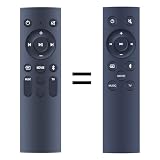
- 【Compatibility】 New Replacement Remote Control Applicable for TCL Alto 6 6+ 2.0 Channel Home Theater Sound Bar TS6100-NA TS6100 TS6110 TS6110-NA, Alto 3 TS3100 TS3100-EU TS3100-NA
- 【NO Programming】Just add the batteries and it worked immediately. Batteries are not included( 2 * 1.5V AAA Batteries )
- 【Remote Distance】Infrared technology emits a strong signal at 180 degrees and within 12 meters (40 feet); Without Voice Function
- 【ABS material】This smart remote made of high quality ABS material to make this smart remote more durable. This replacement remote only comes with 0.10kg (0.22lb.),wear-resistant and durable.
- 【Lifetime Warranty & Exceptional Service】Doesn't match your equipment? Quality problem? Don't worry!! We offer 6-MONTH warranty, free exchange or refund))
Check pairing and power
- Confirm the subwoofer and soundbar are powered and connected to working outlets. Allow automatic pairing to complete.
- If the indicator keeps blinking or the subwoofer remains silent, follow the pairing procedure in the manual for your exact soundbar model. TCL’s S Series procedure uses the subwoofer’s Pair button and then powers on the soundbar; do not assume that sequence applies to every model.
- If pairing does not complete, turn off and unplug both units for at least 60 seconds. Reconnect them and allow automatic pairing another attempt.
- For a test, place the subwoofer within about 10 feet of the soundbar, with as few obstructions as practical. Move nearby wireless equipment—such as a Wi-Fi router, cordless phone, or microwave—farther away temporarily.
On supported S Series models, a solid indicator means the connection succeeded, but indicator colors and meanings vary. TCL’s S Series pairing guide explains its model-specific automatic and manual steps.
Free tools Windows power users keep installed
One-click scans. No signup required.
Check compatibility before replacing a subwoofer
Use the subwoofer supplied with the soundbar or a replacement specifically listed as compatible with that model. A different TCL subwoofer is not necessarily interchangeable. Contact TCL Support if the subwoofer has no indicator despite a working outlet, pairing never completes, the units pair but produce no subwoofer audio, or the connection repeatedly drops.
Rank #3
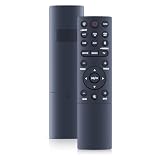
- 【Compatibility】 New Soundbar Remote Control Replacement for TCL TS8132 Alto 8+ 3.1.2 Channel TS8212 TS8212-NA Alto 8+ 2.1.2 Channel Dolby Atmos Sound Bar and TS8111 TS8111-NA Alto 8i 2.1 Channel Dolby Atmos Sound Bar
- 【NO Programming】Just add the batteries and it worked immediately. Batteries are not included( 2 * 1.5V AAA Batteries )
- 【Remote Distance】Infrared technology emits a strong signal at 180 degrees and within 12 meters (40 feet); Without Voice Function
- 【ABS material】This smart remote made of high quality ABS material to make this smart remote more durable. This replacement remote only comes with 0.10kg (0.22lb.),wear-resistant and durable.
- 【Lifetime Warranty & Exceptional Service】Doesn't match your equipment? Quality problem? Don't worry!! We offer 6-MONTH warranty, free exchange or refund))
3. TV remote, power sync, or audio behavior is inconsistent
TV remote or automatic power does not control the soundbar
TV remote volume and power synchronization over HDMI depend on ARC and HDMI-CEC working together. Check these settings in one pass:
- The TV and soundbar are connected through the labeled ARC ports.
- The soundbar input is ARC, and the TV audio output is set to ARC or Receiver.
- ARC and CEC are enabled on the TV. CEC may have a brand-specific name in its settings.
Then power-cycle both devices and check the settings again. Some TCL soundbars have a model-specific Auto Power On option; consult the manual for its location and behavior. On some models, Bluetooth or another selected input can take priority over the TV connection.
Rank #4

- 【Compatibility】WDZP New Soundbar Remote Control fit for TCL S45H S Class 2.0 Channel S55H S Class 2.1 Channel Sound Bar with Dolby Atmos
- 【NO Programming】Just add the batteries and it worked immediately. Batteries are not included
- 【Remote Distance】Infrared technology emits a strong signal at 180 degrees and within 12 meters (40 feet);
- 【ABS material】This smart remote made of high quality ABS material to make this smart remote more durable. This replacement remote only comes with 0.10kg (0.22lb.),wear-resistant and durable.
- 【Lifetime Warranty & Exceptional Service】Doesn't match your equipment? Quality problem? Don't worry!! We offer 6-MONTH warranty, free exchange or refund))
Delay, echo, static, hissing, or other sound problems
These symptoms do not point to one reliable cause across all TCL soundbar models. Look up the exact model in TCL’s soundbar troubleshooting index and use the article or manual for the symptom you have. Change one connection or setting at a time so you can tell whether it affected the result.
Quick wins for a faster PC:
Clear out junk files and repair common Windows errorsFree Scan →Fix the driver behind crashes, sound loss and screen glitchesFind Drivers →When to contact TCL Support
Escalate the issue if the basic connection and model-specific steps do not resolve it, especially if the soundbar has no power indicator, subwoofer pairing repeatedly fails, or the subwoofer pairs but remains silent. Have the soundbar model and serial number available when contacting TCL. For model-specific PCM troubleshooting, the TCL S522W-NA user manual, Version 1.4 is dated May 7, 2022; its instructions should not be assumed to apply to other models.
Quick Recap
Best Value

- ✅【Compatible Models】TS6110 TS6110-NA TS3100 TS3100-NA TS6100-NA TS6100
- ✅【Out of Box】Don't need any programming or pairing. Just put in batteries and it's good to go.
- ✅【High Performance】Engineered with next-gen smart chip, this remote delivers instant button response and reliable 8m/26ft range coverage.
- ✅【Durable Construction】Manufactured from premium materials to guarantee long-lasting performance and withstand daily usage.
- ✅【Quality Assurance & Support】Package Contains: 1x Remote Control (2xAAA batteries are not included). Enjoy peace of mind with our comprehensive after-sales service. Contact us via email for any assistance, we'll get back to you within 12 hours on weekdays.
Product prices and availability are accurate as of the date/time indicated and are subject to change. Any price and availability information displayed on Amazon at the time of purchase will apply.

