
Seq24 is a real-time, loop-based MIDI sequencer for making, editing, and playing musical patterns. Its grid-and-piano-roll workflow is built around triggering MIDI sequences, not arranging a complete song or producing audio in an all-in-one DAW. It may suit a focused live MIDI setup; check the release and compatibility for your operating system before installing.
What Seq24 does
Seq24’s author, Rob C. Buse, describes its design as a deliberately small set of features for performance: “I set out to create a very minimal sequencer that excludes the bloated features of the large software sequencers, and includes a small subset of features that I have found usable in performing.” The project page frames the software as a tool for editing and playing MIDI loops.
That focus makes Seq24 a pattern-oriented sequencer: you work with musical loops and trigger them in real time, rather than relying on a traditional linear song timeline as the central workflow. The available project materials do not establish a controlled comparison with other sequencers, so treat this as a description of Seq24’s intended use, not a ranking against named alternatives.
How patterns are created and played
The user guide describes a main window made up of cells that hold MIDI patterns. A cell can contain a sequence; opening it brings up a piano-roll-style editor for creating or changing musical events. The guide also describes selecting the MIDI channel used for output.
#1 Best Overall

- VERSATILE MIDI CONTROLLER AND SEQUENCER: BeatStep is a chameleon controller and sequencer that provides nearly endless possibilities! Highly versatile, it allows you to trigger clips in apps like Ableton Live, finger-drum or make beats effortlessly, tweak your sound in real-time - or all at once! In addition, its compact format makes it the perfect companion on the road or in the studio.
- TWO IN ONE…: With MIDI Controller mode, the 16 velocity- and pressure-sensitive pads make it the perfect compact solution for playing percussion, while sequencer mode turns it into an easy step sequencer. The 16 encoders will adjust pitch for the associated step. 16 memories allow for instant recall of your patterns while the pad scale modes, sequence playback modes and time division functions allow for real time performance changes.
- …BOTH AT ONCE: This MIDI keyboard is both a pad/knob controller AND a step sequencer. But the best part is that you can run them both at the same time! You can have the step sequencer play your sound through the CV/Gate output, while you switch to CONTROL mode and trigger clips on Ableton Live and use the encoders to manipulate your VST version of SEM V. All at once!
- ALL THE CONNECTIONS YOU NEED: BeatStep has MIDI, USB and CV connectivity, giving you a sequencer that will work with all types of gear, including analog synths, software instruments, and MIDI hardware. The BeatStep pads can be configured to send MIDI note on/off messages, MMC commands, Program and Bank changes, or serve as MIDI CC buttons.
- CREATIVE SOFTWARE INCLUDED: BeatStep comes with all the creative software you need. Make great-sounding tracks in full (Ableton Live Lite), get hundreds of pro-grade synth and key sounds (Analog Lab Intro) and easily edit your MIDI setups and sequences (MIDI Control Center). You can use the encoders to adjust the effects in your favorite DJ app. The transport buttons can be MMC controls or send MIDI CCs to start and stop your DAW. It can be the MIDI Clock master or slave to an external clock.
- Create or select a pattern cell in the grid.
- Open its sequence in the piano-roll editor and enter or edit MIDI events.
- Choose the output MIDI channel described in the guide.
- Trigger patterns from the grid as part of a loop-based performance.
The guide establishes this basic workflow, but it does not provide a current, OS-by-OS setup walkthrough. Exact menu labels and device setup may differ with the installed build and MIDI environment.
What Seq24 is—and is not
Seq24 is MIDI-focused. The guide characterizes it as a sequencer intended to integrate with a modular JACK-based studio, rather than a DAW with a plugin structure. That distinction matters if you expect built-in audio recording, virtual instruments, or a complete plugin-hosting environment: the cited documentation does not describe Seq24 as an all-in-one audio workstation.
Rank #2

- THE ULTIMATE SEQUENCING POWERHOUSE: BeatStep Pro is a controller and a sequencer that provides nearly endless possibilities! It features 3 modes of operation - 2 melodic Step Sequencers and a 16-track Drum Sequencer - and all the controls you need - Transport, Tran LNK/PRST, SWING & Randomizer, Display, Sync Mode, Sequence control, Project/Control mode, 16 sensitive knobs, 16 Step buttons, 16 pressure sensitive pads.
- MASTER YOUR PERFORMANCES: Make your MIDI devices and VST instruments do exactly what you want them to! BeatStep Pro brings together the most sought-after performance effects available: a looper with a touch strip, a randomizer, swing settings and a slew of hands-on controls that will make your performances the stuff of legend. In addition, Control mode lets you trigger clips in your favorite DAW, play sounds from an external device or make magic with your plug-in of choice.
- EASY TO USE: Setup is a breeze with color-coded connections on the back panel that help you know what to plug where. And the color of the backlit Step buttons will always match the current sequencer, so you’ll always know which sequence is being edited.
- ALL THE CONNECTIONS YOU NEED: With BeatStep Pro you can connect to virtually any musical device within reach: computers, virtual instruments, modular synths, drum machines… It includes CV/GATE outputs (1 volt per octave CV, 10 volt gates), 8 drum gate outputs, a Clock sync with multiple standards, a MIDI In/Out with supplied MIDI adaptors and a USB class compliant.
- CREATIVE SOFTWARE INCLUDED: BeatStep Pro comes with all the creative software you need to get your musical ideas flowing and start exploring right out the box. Make great-sounding tracks in full (Ableton Live Lite), get hundreds of pro-grade synth and key sounds (Analog Lab Intro) and easily edit your MIDI setups and sequences (MIDI Control Center).
- Consider Seq24 if your priority is editing MIDI patterns and triggering loops in a performance-oriented workflow.
- Look elsewhere or plan a modular setup if you need integrated audio production, plugin hosting, or a conventional song-arrangement workflow as the main interface.
MIDI, ALSA, and JACK controls
The Ubuntu Focal man page documents controls for loading a MIDI file at startup with --file, displaying incoming MIDI with --showmidi, and ignoring an ALSA device with --ignore. It also documents JACK transport synchronization and master options, including --jack_transport and --jack_master, and identifies ~/.seq24rc as the settings file.
These are controls recorded in that manual-page version, not a guarantee that every current operating system, MIDI interface, or device will work. If you use external hardware or a JACK/ALSA setup, verify that the build you install can see and route to the devices in your particular environment. The documentation does not establish that a separate USB MIDI interface is always required.
Free tools Windows power users keep installed
One-click scans. No signup required.
Rank #3

- Full Creative Control - A dynamic 37-Key MPK Mini keybed for 3 full octaves of melodic and harmonic performance; Easily connect to your DAW or studio equipment with the USB-powered MIDI Controller
- Advanced Connectivity - Connect to different sound sources with CV/Gate and MIDI I/O; Control modular gear, sound modules, synthesizers, and more to bring new sound sources into your music production
- Native Kontrol Standard (NKS) Integration - Akai Professional and Native Instruments have partnered to bring NKS support to the MPK Controller series, get ready to Kontrol straight from your MPK
- Choose Your Exclusive Complimentary NKS Bundle - Browse and control Native Instruments presets and sound libraries; select one of three curated Komplete 15 Select bundles: Beats, Band, or Electronic
- Record and Compose Without a Computer - Connect to your production station and use the built-in 64-step sequencer featuring one track for drums and one for melodies or chords, with up to 8 notes each
Release and compatibility status
Seq24’s release information is historical and differs by source. The project page lists a 0.8.7 source archive and a 0.8.8 Windows installer; its news section dates the Windows 0.8.8 release to March 4, 2010. The page’s Windows note mentions a revised installer and GTK libraries, as well as a fix for a Windows-specific MIDI input failure.
Distribution package records show different version identifiers: Ubuntu Focal’s man page identifies package version 0.9.3-2build1, while Debian Bullseye lists 0.9.3-2. These are distribution package records and should not be mistaken for the upstream project’s latest release listing. The available sources do not establish a current upstream release or a current compatibility matrix, so check the package or installer offered for your intended system before relying on it.
Rank #4
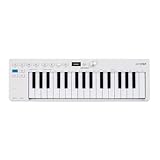
- Playability: KeyStep mk2 features a velocity-sensitive 32-note Slimkey keyboard with aftertouch for expressive control in a small footprint. Pitch and mod strips provide intuitive realtime shaping, while built-in chord and scale modes make new musical phrases effortlessly explorable.
- Ideas machine: KeyStep mk2 is a generative ideas machine as much as a controller, with its polyphonic step sequencer, 16-mode arpeggiator, pattern chaining, and creative tools like mutate all working in symbiosis. Build a riff with the arpeggiator, convert it into a sequence then transform it! Use Mutate to hear new variations on the fly, try a different octave, adjust note lengths, add silences, overdub additional notes, record Bend and Wheel automations - keep ideas evolving with immediacy.
- Compact design: Ultra-slim, travel-ready, and built to fit anywhere - KeyStep mk2 delivers studio-grade features without the bulk. Its shallow profile keeps you close to the instruments you’re controlling, while its intuitive layout enhances playability and seamless integration on stage, in the studio, or at the heart of a hardware rig.
- Hardware connectivity: Hook up to virtually anything. Alongside USB-C MIDI, MIDI DIN, sync I/O, and pedal input, KeyStep mk2 features 4 CV outputs - Pitch, Gate, Mod 1, and the new Mod 2 - now configurable as velocity, aftertouch, mod wheel, and more, ready to control modular’ hardware gear with expressive precision.
Is Seq24 a good fit?
Seq24 is most relevant to musicians who want a compact, MIDI-centered way to build patterns and play them as loops. Its grid and piano-roll model maps directly to that use. It is a less natural fit for someone seeking a single application for recording and mixing audio, hosting plugins, and arranging a full song. For a live rig, also account for the MIDI routing and JACK/ALSA environment your setup needs; the documented options are useful clues, not a promise of plug-and-play compatibility on every modern machine.
Quick Recap
Best Value

- 【16 RGB Velocity‑Sensitive Pads With Aftertouch & Note Repeat】The M-VAVE SMC-PAD features 16 RGB backlit pads that respond to velocity sensitive pads and aftertouch – your dynamics control expression. Activate Note Repeat for instant roll‑off, hi‑hat flams, and rhythmic patterns. This midi pad controller doubles as a midi drum pad for finger drumming. Whether you need a beat maker for hip‑hop or a midi pad for electronic music, the M-VAVE SMC-PAD delivers. It’s a wireless midi controller pads unit that feels like an instrument.
- 【Bluetooth MIDI Connection & 16‑Hour Rechargeable Battery】Go completely wireless with built‑in bluetooth midi controller technology – ultra‑low latency, no cables. The M-VAVE SMC-PAD packs a rechargeable battery that lasts 16 hours, supporting charge‑while‑use. This midi controller and wireless midi controller pads device connects instantly to your tablet or laptop. As a bluetooth midi controller, it’s perfect for on‑the‑go beat maker sessions. The M-VAVE SMC-PAD keeps your creativity untethered.
- 【8 Customizable Rotary Encoders With LED Indicators & 3.5mm MIDI Out】Eight 360‑degree midi controller knobs can be freely mapped to effect parameters or mixer channels, each with an LED ring for visual feedback. The M-VAVE SMC-PAD also includes a 3.5mm MIDI output port to connect external synths or sequencers. This midi controller pad expands beyond your DAW. With midi controller knobs and hardware MIDI out, the M-VAVE SMC-PAD is a complete midi pad controller for studio and stage.
- 【DAW Compatible & Multi‑Platform Plug‑And‑Play】The M-VAVE SMC-PAD works seamlessly with Ableton Live, FL Studio, Logic Pro, and more – no complex mapping needed. It’s daw compatible across Windows, macOS, iOS, and Android. This midi controller and midi pad is truly plug‑and‑play. As a portable midi controller, it connects via Bluetooth or USB. The M-VAVE SMC-PAD is the midi controller pad that respects your workflow, whether you’re a beat maker or a live performer.
- 【Silent Silicone Pads & Compact Portable Design】Soft, backlit silicone buttons operate silently – ideal for late‑night production. The M-VAVE SMC-PAD is ultra‑compact and lightweight, fitting easily into a backpack. This portable midi controller is also a midi drum pad and beat pad for on‑the‑go inspiration. For musicians seeking a wireless midi controller pads solution that travels well, the M-VAVE SMC-PAD delivers. It’s your go‑to midi pad controller and beat pad anywhere.
Product prices and availability are accurate as of the date/time indicated and are subject to change. Any price and availability information displayed on Amazon at the time of purchase will apply.

