
ZD Meeting Recorder
ZD Meeting Recorder: A capable Windows recorder for local transcription, search and editing. Ranked #25 of 34 in Meeting Recording Software by our editors (6.9/10); pricing: 30-day trial; best for windows users needing local screen recording.
At a glance
- Editor score6.9 / 10
- Pricing30-day trial
- Best forWindows users needing local screen recording
- Free planNo
- Paid from$39/device/yr
- Recording scopeAudio and video
- Founded2005
- Facts checked21 Sep 2026
Where it wins
- Local AI transcription with unlimited length on paid plans
- Searchable transcripts with speaker labels and timeline navigation
- Editing, chapters, subtitles and watermark-free paid exports
Where it doesn't
- Windows desktop only
- No free plan; annual pricing starts at $39 per computer
- Trial recordings include watermarks and a 10-minute transcription limit
Our verdict on ZD Meeting Recorder
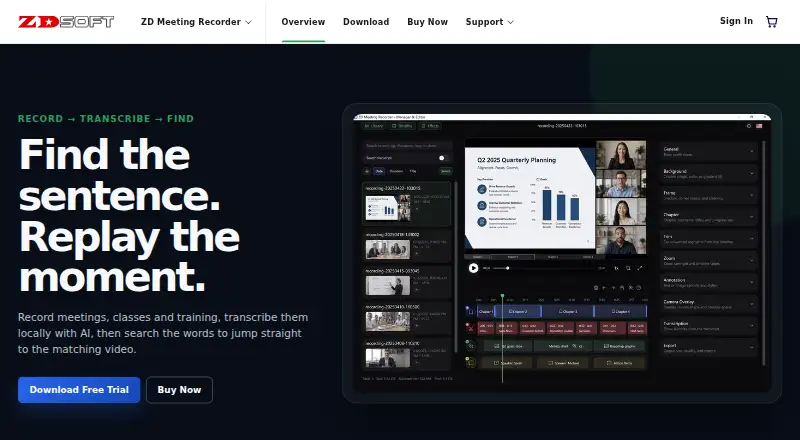
ZD Meeting Recorder is Windows desktop software for recording meetings, classes, training sessions and other screen-based activities. It captures screen content and audio, processes transcription locally with AI, and connects transcript text to the recording timeline. Students, educators, knowledge workers, project teams, trainers, support teams and online collaboration teams can use it for searchable records of screen-based sessions. Its desktop deployment and local processing make it a focused option for people who want recording and transcription on a Windows computer.
Its strongest feature is the connection between recording, transcript search and editing. Users can search transcript text to jump to matching moments, work with speaker-aware transcripts, and organize recordings in a searchable library. Trim, split and merge tools support cleanup, while chapters, subtitles, annotations and camera overlays add structure to finished recordings. Paid plans provide unlimited local AI transcription length plus watermark-free replay and export, making the product more suitable for keeping or sharing completed recordings than the trial experience.
Pricing is subscription-based and billed annually. The 1 PC plan costs $39 per computer and includes unlimited local AI transcription length, watermark-free replay and export, and free technical support. Plans cover 2, 5, 10, 20, 50 and 100 PCs, with the published plan structure identifying annual subscriptions for multiple computers. A 30-day trial is available, with watermarking and a 10-minute local transcription limit per recording. Support channels include email, tickets and documentation, and a 15-day refund period is provided. Choose ZD Meeting Recorder for Windows-based local recording and transcript search; choose an alternative if you need a non-Windows platform or a broader multi-platform workflow.
Your product? Our editors can test ZD Meeting Recorder in depth and publish a review, labelled as paid · from $149/mo →
ZD Meeting Recorder pricing
All 7 ZD Meeting Recorder plans and prices →
ZD Meeting Recorder fact sheet
| Free plan | No |
|---|---|
| Paid from | $39/device/yr |
| Recording scope | Audio and video |
| Transcript search | Yes |
| Recording retention | Not verified |
| Meeting platforms | Windows |
| Sharing controls | Not verified |
| Recording limit | Not verified |
| Free trial | 30 days |
| Money-back guarantee | 15 days |
| Deployment | Desktop |
| Platforms | Windows |
| Support | Email, Tickets, Docs |
| Built for | Solo, Small business, Mid-market (editorial estimate) |
| Pricing | 30-day trial (source) |
| Website | zdsoft.com |
| Facts checked | 21 Sep 2026 |
Alternatives to ZD Meeting Recorder
- MeetGeekA broad meeting capture and follow-up suite with a useful free plan and wide integrations.9.3
- Fireflies.aiA broad meeting intelligence platform with strong integrations and flexible plans.9.2
- NottaA budget-friendly meeting notetaker with broad transcription, translation, and export tools.9.1


See all ZD Meeting Recorder alternatives →
Used ZD Meeting Recorder? Be the first to review it
The editor score above is our own research. What this page doesn't have yet is a reader's view — what you used ZD Meeting Recorder for, what worked and what didn't. No stars are seeded and no review is paid for; an editor reads every one before it appears.
Write a reviewTwo minutes · verified accounts only · read by an editor before it appears
Featured on iTechGuides

ZD Meeting Recorder is listed in our Meeting Recording Software directory. Add the badge to your site — it links back to this page.
<a href="https://www.itechguides.com/products/zd-meeting-recorder/"><img src="https://www.itechguides.com/best/badge/zd-meeting-recorder.svg" alt="Featured on iTechGuides" width="230" height="46"></a>
Reviewed by iTechGuides Editors · Editorial team · Updated Oct 2026
Advertiser disclosure: iTechGuides is reader-supported. Vendors can pay for top positions in our rankings and for a place on other products' pages, and we may earn a commission when you click some links. Bought places stand at the number bought; this page and our disclosure say so. Paying vendors may get a fuller, more detailed review from our editors, and that review can change their score. How we rank.
Last updated · How we research and update