Zapp
Zapp: A gamified iOS parental-control app with budgets, alerts, location tools and reports. Ranked #77 of 106 in Parental Control Apps by our editors (3.0/10); pricing: Free plan; best for iPhone families wanting gamified screen-time control.
At a glance
- Editor score3.0 / 10
- PricingFree plan
- Best foriPhone families wanting gamified screen-time control
- Free planYes
- Facts checked22 Sep 2026
Where it wins
- Energy budgets combine limits, schedules and per-app rules.
- AI safety flags, smart alerts and SOS location sharing support safety.
- Family chat, mood check-ins and weekly reports add family context.
Where it doesn't
- Available only on iOS.
- The Free plan supports one child.
- No verified content-filtering feature is included.
Our verdict on Zapp
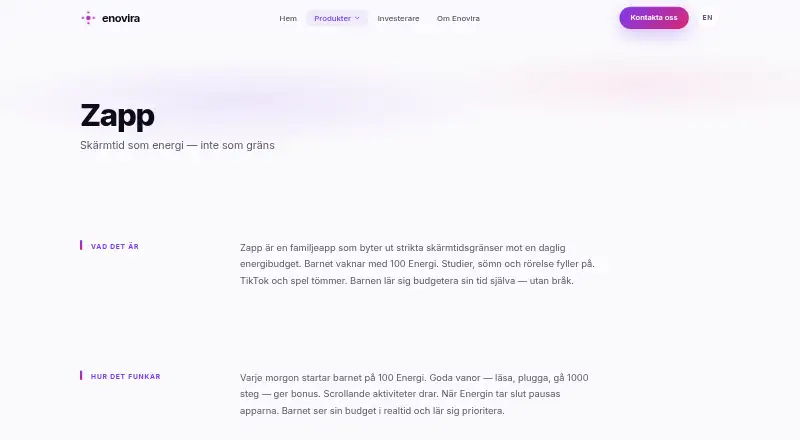
Zapp is a parental-control app for families using iPhones and iPads. Its central idea is a daily energy budget rather than a fixed screen-time allowance: children gain or spend energy through activities such as studying, exercising, gaming and scrolling. Parents can set daily limits, schedules and per-app rules, while selected apps can be blocked when the budget reaches zero. Location-based profiles, SOS location sharing, bedtime mode and family safety tools extend its scope beyond basic app blocking.
Zapp uses a freemium structure. The Free plan supports one child and includes screen-time controls, SOS, push notifications and a Family PIN. Zapp+ monthly and Zapp+ yearly add the AI Companion, Trust Score, Smart Alerts, Family Chat, mood tracking and weekly reports. That makes the paid tiers relevant for families seeking interpretation, communication and ongoing reporting rather than only restrictions. The energy-budget model is the standout feature: it offers a more activity-based approach to managing screen use, though families wanting straightforward fixed limits may prefer a simpler tool.
The app connects with Apple Screen Time APIs, FamilyControls and ManagedSettings, and is delivered as a mobile iOS product. Its feature set covers screen-time scheduling, app blocking, location sharing, safety alerts and family communication in one place. However, the iOS-only scope excludes Android households, and the Free plan is limited to one child. Zapp also does not provide verified content filtering, so parents prioritizing web or content controls should choose an alternative with that focus. Zapp fits iPhone families that want gamified time management plus safety and wellbeing features.
Your product? Our editors can test Zapp in depth and publish a review, labelled as paid · from $149/mo →
Zapp pricing
Zapp fact sheet
| Free plan | Yes |
|---|---|
| Paid from | Not verified |
| Device platforms | Ios |
| Content filtering | Not verified |
| Screen-time schedules | Yes |
| App blocking | Yes |
| Activity reports | Yes |
| Location tracking | Yes |
| Device limit | Not verified |
| Deployment | Mobile |
| Platforms | iOS |
| Compliance & security | GDPR |
| Support | |
| Built for | Solo, Small business (editorial estimate) |
| Integrations | 3 integrations: Apple Screen Time APIs, FamilyControls, ManagedSettings |
| Pricing | Free plan (source) |
| Website | enovira.com |
| Facts checked | 22 Sep 2026 |
Zapp integrations
Zapp lists 3 integrations on its own site.
- Apple Screen Time APIs
- FamilyControls
- ManagedSettings
Alternatives to Zapp
- BarkA broad cross-platform monitor with schedules, blocking, alerts, and location tools.9.2
- QustodioA broad parental-control suite with AI safety alerts and five-platform coverage.9.0
- OurPactA broad parental-control toolkit for families managing up to 20 child devices.8.9



Used Zapp? Be the first to review it
The editor score above is our own research. What this page doesn't have yet is a reader's view — what you used Zapp for, what worked and what didn't. No stars are seeded and no review is paid for; an editor reads every one before it appears.
Write a reviewTwo minutes · verified accounts only · read by an editor before it appears
Featured on iTechGuides

Zapp is listed in our Parental Control Apps directory. Add the badge to your site — it links back to this page.
<a href="https://www.itechguides.com/products/zapp/"><img src="https://www.itechguides.com/best/badge/zapp.svg" alt="Featured on iTechGuides" width="230" height="46"></a>
Reviewed by iTechGuides Editors · Editorial team · Updated Oct 2026
Advertiser disclosure: iTechGuides is reader-supported. Vendors can pay for top positions in our rankings and for a place on other products' pages, and we may earn a commission when you click some links. Bought places stand at the number bought; this page and our disclosure say so. Paying vendors may get a fuller, more detailed review from our editors, and that review can change their score. How we rank.
Last updated · How we research and update