Yoink
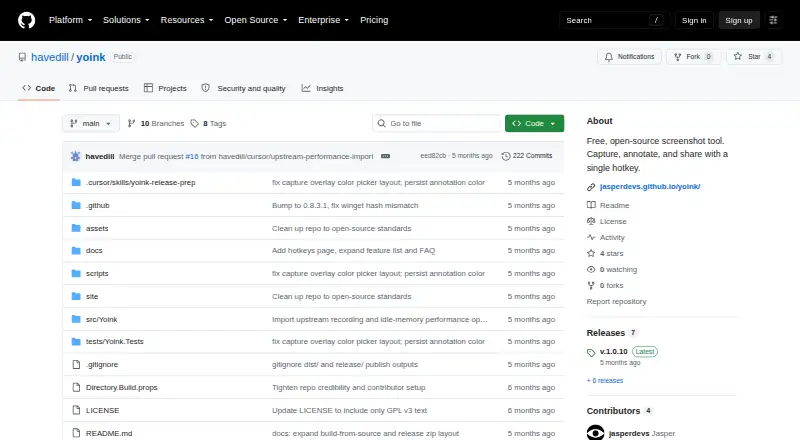
Yoink: A feature-rich Windows screenshot utility with OCR, recording, search, and broad uploads. Ranked #18 of 75 in Screenshot Annotation Software by our editors (7.4/10); pricing: Free plan; best for windows users needing broad free integrations.
At a glance
- Editor score7.4 / 10
- PricingFree plan
- Best forWindows users needing broad free integrations
- Free planYes
- Paid fromFree
- Redaction toolsYes
- Facts checked20 Sep 2026
Where it wins
- Captures regions, windows, fullscreen, and scrolling pages
- Combines annotation, OCR, measurement, scanning, and recording
- Supports public, cloud, self-hosted, and storage uploads
Where it doesn't
- Windows-only availability limits cross-platform workflows
- Its broad feature set may exceed simple capture needs
- External uploads depend on the selected destination
Our verdict on Yoink
Yoink is a free, open-source Windows desktop tool for capturing and annotating screen content. It suits users who need more than basic screenshots, including region, fullscreen, active-window, and scrolling capture; arrows, text, shapes, blur, and freehand drawing; and tools for measurement, color picking, QR-code scanning, and barcode scanning. It also supports screen recording and local screenshot history, making it relevant for documentation, troubleshooting, tutorials, and visual reference work.
Its strongest differentiator is the breadth of its built-in workflow. OCR can extract text, with offline and online translation options, while semantic image search helps locate screenshots in local history. Screen recordings can be saved as GIF, MP4, WebM, or MKV, and sticker creation includes background removal. Redaction through blur and the ruler provide practical support for preparing screenshots, while the combination of OCR and search is useful for users managing a larger archive of captured content.
Yoink is also positioned for flexible file sharing rather than a single-service workflow. Optional uploads can target Imgur, ImgBB, Catbox, Litterbox, Gyazo, file.io, Uguu, Dropbox, Google Drive, OneDrive, Azure Blob, S3-compatible storage, GitHub, Immich, or FTP. That range covers public hosts, cloud storage, self-hosted environments, and developer-oriented destinations. The trade-off is platform scope: Yoink is available for Windows, so teams working across other desktop platforms should choose a cross-platform alternative. Users seeking a focused screenshot utility may also find its recording, search, scanning, and upload options broader than necessary; users who want an open-source Windows tool with extensive capture and sharing capabilities should pick Yoink.
Your product? Our editors can test Yoink in depth and publish a review, labelled as paid · from $149/mo →
Yoink pricing
Yoink fact sheet
| Free plan | Yes |
|---|---|
| Paid from | Free |
| Redaction tools | Yes |
| Measurement tools | Yes |
| Team collaboration | Not verified |
| Browser extension | Not verified |
| Export formats | Not verified |
| Maximum file size | Not verified |
| Deployment | Desktop |
| Platforms | Windows |
| Built for | Solo, Small business (editorial estimate) |
| Integrations | 18 integrations: Imgur, ImgBB, Catbox, Litterbox, Gyazo, file.io … |
| Pricing | Free plan |
| Website | github.com |
| Facts checked | 20 Sep 2026 |
Yoink integrations
Yoink lists 18 integrations on its own site.
- Imgur
- ImgBB
- Catbox
- Litterbox
- Gyazo
- file.io
- Uguu
- Dropbox
- Google Drive
- OneDrive
- Azure Blob
- S3-compatible storage
- GitHub
- Immich
- FTP
- SFTP
- WebDAV
- Custom HTTP
Alternatives to Yoink
- SnagitA paid desktop suite for detailed screenshot capture, annotation, OCR, and short video creation.9.3
- ShareXA highly configurable Windows capture tool for annotation, OCR, recording, and automated sharing.9.1
- ScreenpressoA broad Windows capture toolkit with strong annotation, OCR, document, and sharing features.8.9



Also Ranked In
Yoink is ranked in 2 of our directories.
Used Yoink? Be the first to review it
The editor score above is our own research. What this page doesn't have yet is a reader's view — what you used Yoink for, what worked and what didn't. No stars are seeded and no review is paid for; an editor reads every one before it appears.
Write a reviewTwo minutes · verified accounts only · read by an editor before it appears
Featured on iTechGuides

Yoink is listed in our Screenshot Annotation Software directory. Add the badge to your site — it links back to this page.
<a href="https://www.itechguides.com/products/yoink/"><img src="https://www.itechguides.com/best/badge/yoink.svg" alt="Featured on iTechGuides" width="230" height="46"></a>
Reviewed by iTechGuides Editors · Editorial team · Updated Oct 2026
Advertiser disclosure: iTechGuides is reader-supported. Vendors can pay for top positions in our rankings and for a place on other products' pages, and we may earn a commission when you click some links. Bought places stand at the number bought; this page and our disclosure say so. Paying vendors may get a fuller, more detailed review from our editors, and that review can change their score. How we rank.
Last updated · How we research and update