Yodot Video Repair
Yodot Video Repair: A focused desktop repair tool with previews and original-file preservation. Ranked #17 of 26 in Video Repair Software by our editors (7.7/10); pricing: Paid; best for simple desktop repair.
At a glance
- Editor score7.7 / 10
- PricingPaid
- Best forSimple desktop repair
- Free planNo
- Repair modeAutomatic
- Facts checked20 Sep 2026
Where it wins
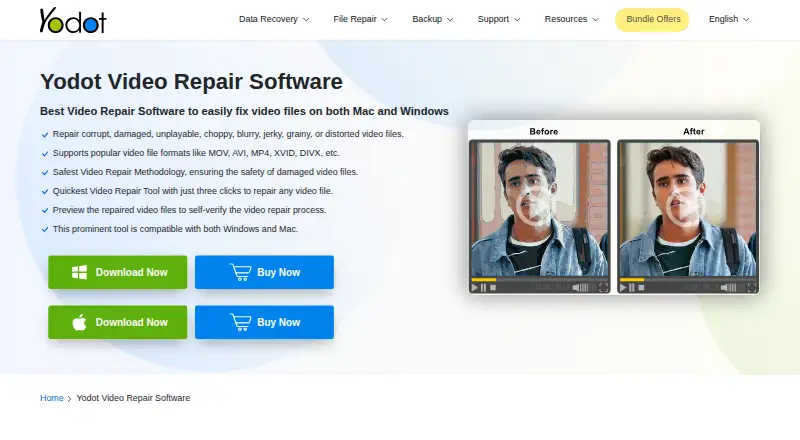
- Automated repair for corrupted, damaged, truncated, or unplayable videos
- Previews repaired footage and saves a separate copy
- Supports Windows and macOS with MOV, MP4, M4V, AVI, XVID, and DIVX
Where it doesn't
- Supports only six listed video formats
- Some MOV repairs require a healthy reference file
- Paid software with no free plan
Our verdict on Yodot Video Repair
Yodot Video Repair is desktop software for repairing corrupted, damaged, truncated, or unplayable video files. It is aimed at consumers and professionals working with recordings from cameras, phones, drones, and other devices. The software runs on Windows and macOS and uses an automated repair workflow. Its supported formats are MOV, MP4, M4V, AVI, XVID, and DIVX, giving it a focused scope for common video-file repair tasks rather than broad media-format coverage.
The product is offered as two paid editions: Yodot Video Repair for Windows and Yodot Video Repair for Mac. Both listed plans repair MOV and MP4 files, support AVI, DIVX, and XVID files, and include premium technical support. There is no free plan. This plan structure makes the main buying decision platform-based, with the same listed format coverage and support positioning across the Windows and Mac editions.
Its most useful workflow details are designed to reduce risk during repair. For some MOV repairs, the software can use a healthy reference file. It also lets users preview the repaired video before saving and creates a repaired copy without modifying the original file. Audio and video frames can be separated and recombined as part of the repair process. Yodot Video Repair fits buyers who want a focused desktop tool for supported formats and value previewing and preserving the source file. Buyers working with other formats, or without a suitable reference file for a relevant MOV repair, should consider a tool with broader format coverage or a different repair method.
Your product? Our editors can test Yodot Video Repair in depth and publish a review, labelled as paid · from $149/mo →
Yodot Video Repair pricing
All 2 Yodot Video Repair plans and prices →
Yodot Video Repair fact sheet
| Free plan | No |
|---|---|
| Paid from | Not verified |
| Repair mode | Automatic |
| Supported formats | MOV, MP4, M4V, AVI, XVID, DIVX |
| Maximum file size | Not verified |
| Reference file needed | Yes |
| Batch repair | Not verified |
| Preview before saving | Yes |
| Deployment | Desktop |
| Platforms | Windows, macOS |
| Support | Email, Live chat, Tickets · 24/7 |
| Built for | Solo, Small business (editorial estimate) |
| Pricing | Paid (source) |
| Website | yodot.com |
| Facts checked | 20 Sep 2026 |
Alternatives to Yodot Video Repair
- VidRepairA free, open-source Windows repair tool with automatic recovery and validation.9.3
- Bitwar Video RepairA broad-format desktop repair tool with batch processing, previews, and 4K support.9.2
- RepairMyVideoA free web service for repairing large, damaged video files with playability checks.9.1



See all Yodot Video Repair alternatives →
Used Yodot Video Repair? Be the first to review it
The editor score above is our own research. What this page doesn't have yet is a reader's view — what you used Yodot Video Repair for, what worked and what didn't. No stars are seeded and no review is paid for; an editor reads every one before it appears.
Write a reviewTwo minutes · verified accounts only · read by an editor before it appears
Featured on iTechGuides

Yodot Video Repair is listed in our Video Repair Software directory. Add the badge to your site — it links back to this page.
<a href="https://www.itechguides.com/products/yodot-video-repair/"><img src="https://www.itechguides.com/best/badge/yodot-video-repair.svg" alt="Featured on iTechGuides" width="230" height="46"></a>
Reviewed by iTechGuides Editors · Editorial team · Updated Oct 2026
Advertiser disclosure: iTechGuides is reader-supported. Vendors can pay for top positions in our rankings and for a place on other products' pages, and we may earn a commission when you click some links. Bought places stand at the number bought; this page and our disclosure say so. Paying vendors may get a fuller, more detailed review from our editors, and that review can change their score. How we rank.
Last updated · How we research and update