
RepairMyVideo
RepairMyVideo: A free web service for repairing large, damaged video files with playability checks. Ranked #3 of 26 in Video Repair Software by our editors (9.1/10); pricing: Free plan; best for large web-based repairs.
At a glance
- Editor score9.1 / 10
- PricingFree plan
- Best forLarge web-based repairs
- Free planYes
- Paid fromFree
- Repair modeAutomatic
- Facts checked20 Sep 2026
Where it wins
- Direct uploads support files up to 25 GB
- Optional reference clips can guide camera-specific recovery
- Automated playability verification and watermarked previews
Where it doesn't
- Available through the web rather than a desktop app
- Codec support is limited to listed formats and camera types
- Google Drive uploads have no stated maximum size
Our verdict on RepairMyVideo
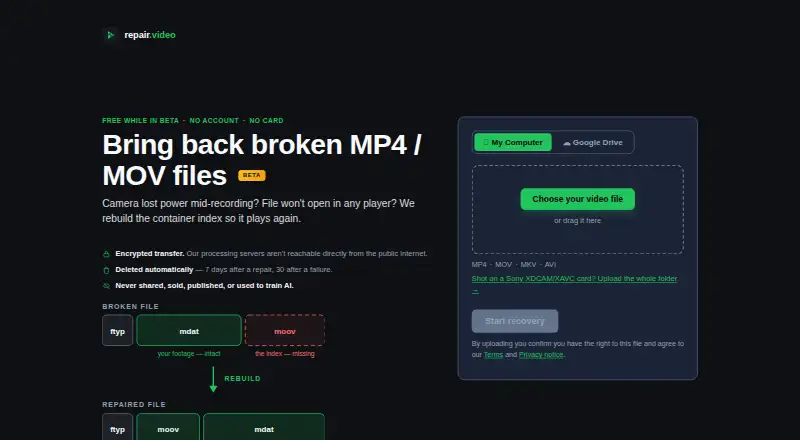
RepairMyVideo is a browser-based service for recovering damaged or unplayable video files. It rebuilds damaged container indexes and file structures, then provides a recovered download after checking whether the result plays. Supported containers include MP4, MOV, MKV, and AVI, with additional support for H.264, HEVC, MPEG-4, Canon Cinema MJPEG, and AverMedia c285 captures. It is suited to people who need an online repair workflow for large recordings, including Sony XDCAM/XAVC camera-card folders that can be processed and concatenated into an MP4.
The published service details show a free product while in beta, with automatic repair and batch processing. Direct uploads support files up to 25 GB, while larger files can be submitted through Google Drive links. An optional healthy clip from the same camera can provide a reference for the repair, so the reference file is not required. The workflow also includes automated playability verification before results are provided, followed by a watermarked preview before downloading the recovered file. Google Drive is the listed integration, and the service runs on the web.
RepairMyVideo is a practical choice for users whose files match its supported containers, codecs, or camera workflows and who prefer not to install software. Its focus is recovery rather than broader video editing or media management. Users working with unsupported formats, needing a desktop application, or requiring a stated size limit for Google Drive submissions should consider whether the listed compatibility and workflow meet their needs before proceeding. The optional reference clip and Sony camera-card handling make it more suitable for certain recording scenarios than a basic single-file repair page, while automatic processing keeps the repair mode straightforward.
Your product? Our editors can test RepairMyVideo in depth and publish a review, labelled as paid · from $149/mo →
RepairMyVideo pricing
RepairMyVideo fact sheet
| Free plan | Yes |
|---|---|
| Paid from | Free |
| Repair mode | Automatic |
| Supported formats | MP4, MOV, MKV, AVI |
| Maximum file size | Not verified |
| Reference file needed | No |
| Batch repair | Yes |
| Preview before saving | Yes |
| Deployment | Cloud |
| Platforms | Web |
| Support | |
| Built for | Solo, Small business (editorial estimate) |
| Integrations | 1 integrations: Google Drive |
| Pricing | Free plan |
| Website | repairmyvideo.com |
| Facts checked | 20 Sep 2026 |
RepairMyVideo integrations
RepairMyVideo lists 1 integrations on its own site.
- Google Drive
Alternatives to RepairMyVideo
- VidRepairA free, open-source Windows repair tool with automatic recovery and validation.9.3
- Bitwar Video RepairA broad-format desktop repair tool with batch processing, previews, and 4K support.9.2
- UntruncA focused local repair tool for technical users with a healthy reference video.9.0



See all RepairMyVideo alternatives →
RepairMyVideo vs the competition
- RepairMyVideo vs VidRepair
- RepairMyVideo vs Bitwar Video Repair
- RepairMyVideo vs Untrunc
- RepairMyVideo vs EaseUS Video Repair
- RepairMyVideo vs 4DDiG Video Repair
- RepairMyVideo vs TunesKit Video Repair



Compare RepairMyVideo with any tool side by side →
Used RepairMyVideo? Be the first to review it
The editor score above is our own research. What this page doesn't have yet is a reader's view — what you used RepairMyVideo for, what worked and what didn't. No stars are seeded and no review is paid for; an editor reads every one before it appears.
Write a reviewTwo minutes · verified accounts only · read by an editor before it appears
Featured on iTechGuides

RepairMyVideo is listed in our Video Repair Software directory. Add the badge to your site — it links back to this page.
<a href="https://www.itechguides.com/products/repairmyvideo/"><img src="https://www.itechguides.com/best/badge/repairmyvideo.svg" alt="Featured on iTechGuides" width="230" height="46"></a>
Reviewed by iTechGuides Editors · Editorial team · Updated Oct 2026
Advertiser disclosure: iTechGuides is reader-supported. Vendors can pay for top positions in our rankings and for a place on other products' pages, and we may earn a commission when you click some links. Bought places stand at the number bought; this page and our disclosure say so. Paying vendors may get a fuller, more detailed review from our editors, and that review can change their score. How we rank.
Last updated · How we research and update