
WriteAlt
WriteAlt: A multilingual alt-text workspace with bulk tools, exports, scanning, and API access. Ranked #6 of 27 in AI Alt Text Generators by our editors (7.5/10); pricing: From $3.17/mo (annual); best for desktop and multilingual production teams.
At a glance
- Editor score7.5 / 10
- PricingFrom $3.17/mo (annual)
- Best forDesktop and multilingual production teams
- Free planNo
- Paid from$3.17/mo
- Bulk processingYes
- Facts checked21 Sep 2026
Where it wins
- Generates alt text in 130+ languages with multiple writing styles.
- Processes image collections in bulk across broad image-format support.
- Offers exports, website scanning, WordPress workflows, and REST API access.
Where it doesn't
- No unlimited free plan is listed.
- Integration coverage is narrower than its broader desktop and API support.
- Annual pricing is listed for only Bronze, Silver, and Gold tiers.
Our verdict on WriteAlt
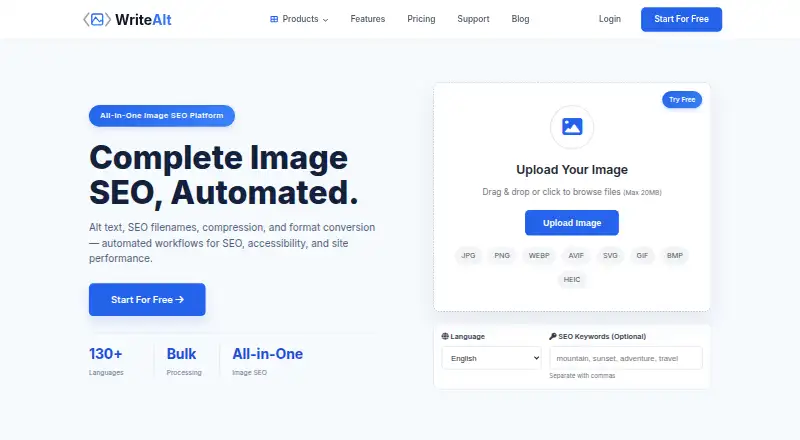
WriteAlt is a paid AI alt text generator for creators, developers, websites, e-commerce stores, and production teams. It combines multilingual generation, image SEO inputs, bulk processing, exports, website scanning, CMS workflows, desktop apps, a Chrome extension, and a REST API. Its platform coverage includes web, Windows, Linux, and programmatic use, making it suited to teams working across local image collections and publishing systems.
Pricing covers several working profiles. According to the vendor’s pricing page, Bronze costs $4 per month on monthly billing for personal blogs and portfolios, while Silver costs $15 per month for small businesses. Gold is $39 per month for e-commerce and teams, Titanium is $79 per month for agencies and multi-client work, and Platinum is $149 per month for enterprise and platforms. Annual pricing is listed at $3.17 per month for Bronze, $12 for Silver, and $31.17 for Gold. The published plans show a low annual entry point, but the product does not have an unlimited free plan.
WriteAlt’s standout advantage is breadth in production workflows. It supports JPG, PNG, WebP, GIF, SVG, AVIF, HEIC, and BMP files, with JSON, XML, CSV, and ZIP exports. WordPress users can generate and review descriptions in the media library, while website scanning helps identify missing alt text. Integrations include WordPress, WooCommerce, Shopify, Dropbox, Google Drive, and Pinterest. Choose WriteAlt if multilingual output, desktop coverage, bulk processing, or API access matters more than a large integration ecosystem. Teams seeking wider integrations should consider an alternative.
WriteAlt pricing
All 6 WriteAlt plans and prices →
WriteAlt fact sheet
| Free plan | No |
|---|---|
| Paid from | $3.17/mo |
| Bulk processing | Yes |
| API access | Yes |
| CMS plugins | Yes |
| Supported languages | 130 languages |
| Image formats | JPG, PNG, WebP, GIF, SVG, AVIF, HEIC, BMP |
| Custom generation rules | Not verified |
| Publishing workflows | Yes |
| Deployment | Cloud, Desktop, Browser extension |
| Platforms | Web, Windows, Linux, Chrome extension |
| Built for | Solo, Small business, Mid-market, Enterprise (editorial estimate) |
| Integrations | 10+ integrations: WordPress, WooCommerce, Shopify, Dropbox, Google Drive, Pinterest See all → |
| Pricing | From $3.17/mo (annual) (source) |
| Website | writealt.com |
| Facts checked | 21 Sep 2026 |
WriteAlt integrations
WriteAlt lists 10+ integrations on its own site — the 6 named here are the ones its pages call out.
- WordPress
- WooCommerce
- Shopify
- Dropbox
- Google Drive
See all WriteAlt integrations →
Alternatives to WriteAlt
- AltTextLabA multilingual alt-text generator with broad CMS, commerce, browser, and API coverage.9.8
- Alt Text StudioA multilingual alt-text workflow with bulk tools, SEO controls, and CMS integrations.8.8
- AltText.aiA capable choice for multilingual teams managing alt text across many content systems.8.3



See all WriteAlt alternatives →
WriteAlt vs the competition
- WriteAlt vs AltTextLab
- WriteAlt vs Alt Text Studio
- WriteAlt vs AltText.ai
- WriteAlt vs AutoAlt.ai
- WriteAlt vs AI Alt Text Generator
- WriteAlt vs AltTextAPI


Compare WriteAlt with any tool side by side →
Used WriteAlt? Be the first to review it
The editor score above is our own research. What this page doesn't have yet is a reader's view — what you used WriteAlt for, what worked and what didn't. No stars are seeded and no review is paid for; an editor reads every one before it appears.
Write a reviewTwo minutes · verified accounts only · read by an editor before it appears
Featured on iTechGuides

WriteAlt is listed in our AI Alt Text Generators directory. Add the badge to your site — it links back to this page.
<a href="https://www.itechguides.com/products/writealt/"><img src="https://www.itechguides.com/best/badge/writealt.svg" alt="Featured on iTechGuides" width="230" height="46"></a>
Reviewed by iTechGuides Editors · Editorial team · Updated Sep 2026
Advertiser disclosure: iTechGuides is reader-supported. We may earn a commission when you click some links. It never changes a score or a verdict. How we rank.
Last updated · How we research and update