World Repair Studio
World Repair Studio: A focused, free editor for safe Java chunk inspection, cleanup, transfers, and exports. Ranked #8 of 34 in Minecraft World Editors by our editors (7.9/10); pricing: Free plan; best for safe Java chunk cleanup and transfers.
At a glance
- Editor score7.9 / 10
- PricingFree plan
- Best forSafe Java chunk cleanup and transfers
- Free planYes
- Paid fromFree
- Minecraft editionsJava
- Facts checked22 Sep 2026
Where it wins
- Free and open-source across Windows, macOS, and Linux
- Filters chunks by age, biome, entities, structures, status, and coordinates
- Copies selected areas between compatible Java Edition saves
Where it doesn't
- Supports Minecraft Java Edition saves rather than other editions
- Editing is focused primarily on chunks and regions
- Email is the listed support channel
Our verdict on World Repair Studio
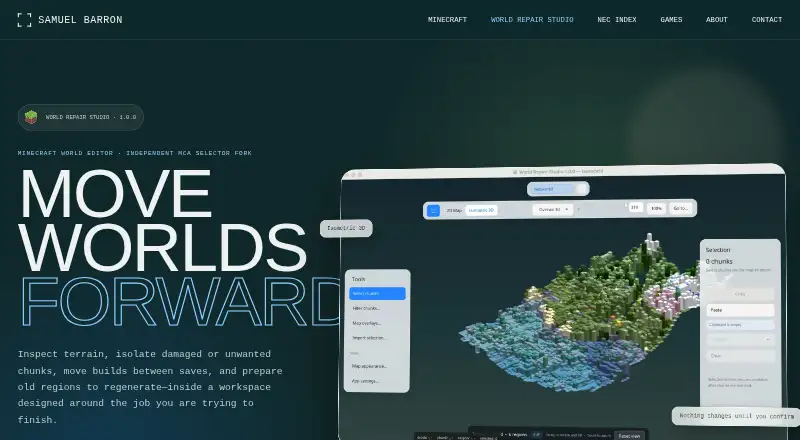
World Repair Studio is a free, open-source desktop editor for Minecraft Java Edition world saves. It is designed for solo players and small teams that need to inspect regions, review chunks, move selected areas between compatible saves, export content, or prepare terrain for regeneration. Windows, macOS, and Linux installers are available, along with a universal Java archive. Its verified scope centers on chunk and region management rather than broad, object-level world editing.
The standout feature is its inspection and filtering workflow. A 2D region and chunk map provides a navigable view of a save, while isometric terrain visualization uses surface colors and height data to make terrain structure easier to review. Chunk filters can narrow selections by age, status, biome, entities, structures, and coordinates. World tabs support moving selections between open saves, and selected areas can be copied and pasted between compatible Java Edition worlds. Chunk and image export add practical options for archiving or sharing review results.
For repair work, World Repair Studio supports selective chunk deletion so terrain can regenerate, with explicit confirmation for destructive edits. That combination suits cleanup and controlled transfers where chunk-level decisions matter. The product is less suitable for users seeking broad editing across Minecraft editions or fine-grained manipulation of every world element. Choose it for Java save inspection, region visualization, chunk filtering, cross-save copying, and regeneration preparation; choose another editor when the required workflow extends beyond its verified chunk- and region-focused scope.
Your product? Our editors can test World Repair Studio in depth and publish a review, labelled as paid · from $149/mo →
World Repair Studio pricing
World Repair Studio fact sheet
| Free plan | Yes |
|---|---|
| Paid from | Free |
| Minecraft editions | Java |
| Supported platforms | Windows, macOS, Linux |
| Region editing | Yes |
| Terrain editing | Yes |
| Entity editing | Not verified |
| Batch operations | Not verified |
| Supported world formats | Minecraft Java Edition world saves; region files |
| Deployment | Desktop |
| Platforms | Windows, macOS, Linux |
| Support | |
| Built for | Solo, Small business (editorial estimate) |
| Pricing | Free plan |
| Website | barrondesign.org |
| Facts checked | 22 Sep 2026 |
Alternatives to World Repair Studio
- Universal Minecraft ToolA broad Windows toolkit for editing, converting, and pruning Java and Bedrock worlds.9.4
- VoxelierA free, feature-rich Java world editor for detailed terrain and generation work.9.2
- Bedrock ToolchestA broad, free Bedrock editor for Windows, with strong world-data and backup tools.9.0



See all World Repair Studio alternatives →
World Repair Studio vs the competition
- World Repair Studio vs Universal Minecraft Tool
- World Repair Studio vs Voxelier
- World Repair Studio vs Bedrock Toolchest
- World Repair Studio vs Amulet Map Editor
- World Repair Studio vs WorldPainter
- World Repair Studio vs MCA Selector

Compare World Repair Studio with any tool side by side →
Used World Repair Studio? Be the first to review it
The editor score above is our own research. What this page doesn't have yet is a reader's view — what you used World Repair Studio for, what worked and what didn't. No stars are seeded and no review is paid for; an editor reads every one before it appears.
Write a reviewTwo minutes · verified accounts only · read by an editor before it appears
Featured on iTechGuides

World Repair Studio is listed in our Minecraft World Editors directory. Add the badge to your site — it links back to this page.
<a href="https://www.itechguides.com/products/world-repair-studio/"><img src="https://www.itechguides.com/best/badge/world-repair-studio.svg" alt="Featured on iTechGuides" width="230" height="46"></a>
Reviewed by iTechGuides Editors · Editorial team · Updated Oct 2026
Advertiser disclosure: iTechGuides is reader-supported. Vendors can pay for top positions in our rankings and for a place on other products' pages, and we may earn a commission when you click some links. Bought places stand at the number bought; this page and our disclosure say so. Paying vendors may get a fuller, more detailed review from our editors, and that review can change their score. How we rank.
Last updated · How we research and update