
Workday Help
Workday Help: A Workday-centered HR case system with self-service, routing, SLAs, and omnichannel intake. Ranked #2 of 47 in HR Case Management Software by our editors (9.3/10); pricing: Pricing on request; best for workday HCM customers.
At a glance
- Editor score9.3 / 10
- PricingPricing on request
- Best forWorkday HCM customers
- Workflow automationYes
- Founded2005 · Pleasanton, California, United States
- Facts checked20 Sep 2026
Where it wins
- Contextual Workday HCM employee data in case views
- Omnichannel intake through email, Slack, and Microsoft Teams
- Routing rules, SLAs, confidential access, and dashboards
Where it doesn't
- Pricing is sales-led rather than publicly listed
- Its strongest fit is organizations using Workday HCM
- Platform details center on web, mobile access, and REST APIs
Our verdict on Workday Help
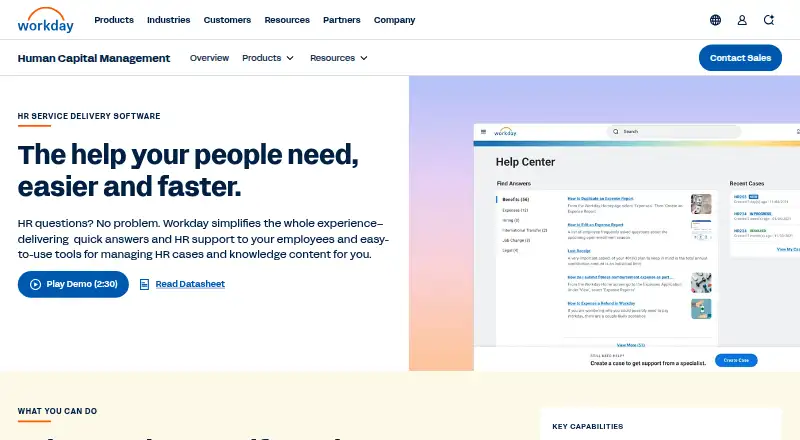
Workday Help is an HR service-delivery product for organizations using Workday HCM. It brings employee self-service knowledge search together with HR case creation, tracking, status updates, and communication. Employees can open cases through Workday, email, Slack, Microsoft Teams, business processes, and mobile experiences, while HR teams manage work in a dedicated workspace. The product is designed for teams that want case handling and employee context within the Workday environment.
Pricing is sales-led, with access handled through contact with Workday rather than a public price list. Its ecosystem fit is a central strength: Workday HCM supplies contextual employee data in case views, while Slack, Microsoft Teams, and Workday Assistant extend intake and interaction. Workday Help also offers REST APIs, knowledge article workflows, version control, usage tracking, and business-process-based case creation. Organizations already operating Workday HCM can keep employee service workflows close to their existing HR system, while teams outside that ecosystem may find the product less aligned with their requirements.
The case-management feature set covers automated routing and rules, configurable service-level agreements, reporting, dashboards, internal notes, attachments, message templates, and confidential case access controls. Employees can search knowledge before opening a case and follow case status afterward, giving HR teams a way to combine self-service with managed support. Workday Help should suit HR departments that need structured case lifecycles, controlled access, knowledge governance, and omnichannel intake around Workday data. Organizations seeking a standalone HR case tool without a Workday HCM foundation should consider alternatives with a broader platform focus.
Your product? Our editors can test Workday Help in depth and publish a review, labelled as paid · from $149/mo →
Workday Help pricing
Workday Help fact sheet
| Free plan | Not verified |
|---|---|
| Paid from | Not verified |
| Case intake options | Omnichannel |
| Workflow automation | Yes |
| SLA tracking | Yes |
| HR knowledge base | Yes |
| Request catalog | Yes |
| HRIS synchronization | Yes |
| Deployment | Cloud, Mobile |
| Platforms | Web |
| Compliance & security | SOC 2, ISO 27001, GDPR |
| Support | Tickets, Community, Docs |
| Built for | Enterprise, Mid-market (editorial estimate) |
| Integrations | 4 integrations: Workday HCM, Slack, Microsoft Teams, Workday Assistant |
| Pricing | Pricing on request |
| Website | workday.com |
| Facts checked | 20 Sep 2026 |
Workday Help integrations
Workday Help lists 4 integrations on its own site.
- Workday HCM
- Slack
- Microsoft Teams
- Workday Assistant
Alternatives to Workday Help
- ServiceNow HR Service DeliveryA broad enterprise HR service delivery suite with strong intake, workflow, AI, and integration coverage.9.4
- Oracle HR Help DeskA capable HR help desk for organizations already invested in Oracle Fusion Cloud HCM.9.2
- Ivanti HR Service ManagementA broad HR service platform for coordinated employee support across business teams.9.1



See all Workday Help alternatives →
Workday Help vs the competition
- Workday Help vs ServiceNow HR Service Delivery
- Workday Help vs Oracle HR Help Desk
- Workday Help vs Ivanti HR Service Management
- Workday Help vs Infor HR Service Delivery
- Workday Help vs Neocase HR Case Management
- Workday Help vs Dovetail HR Case Management


Compare Workday Help with any tool side by side →
Used Workday Help? Be the first to review it
The editor score above is our own research. What this page doesn't have yet is a reader's view — what you used Workday Help for, what worked and what didn't. No stars are seeded and no review is paid for; an editor reads every one before it appears.
Write a reviewTwo minutes · verified accounts only · read by an editor before it appears
Featured on iTechGuides

Workday Help is listed in our HR Case Management Software directory. Add the badge to your site — it links back to this page.
<a href="https://www.itechguides.com/products/workday-help/"><img src="https://www.itechguides.com/best/badge/workday-help.svg" alt="Featured on iTechGuides" width="230" height="46"></a>
Reviewed by iTechGuides Editors · Editorial team · Updated Oct 2026
Advertiser disclosure: iTechGuides is reader-supported. Vendors can pay for top positions in our rankings and for a place on other products' pages, and we may earn a commission when you click some links. Bought places stand at the number bought; this page and our disclosure say so. Paying vendors may get a fuller, more detailed review from our editors, and that review can change their score. How we rank.
Last updated · How we research and update