
Workativ Assistant
Workativ Assistant: A focused HR and IT assistant builder with broad integrations and a $349 monthly entry plan. Ranked #94 of 257 in Chatbot Builders by our editors (3.0/10); pricing: Paid; best for HR and IT service-desk assistants.
At a glance
- Editor score3.0 / 10
- PricingPaid
- Best forHR and IT service-desk assistants
- Free planNo
- Paid from$349/mo
- Deployment channelsMultichannel
- Facts checked21 Sep 2026
Where it wins
- Visual builder, templates, workflow automation, testing, and analytics
- Deploys through Slack, Microsoft Teams, and a web portal
- Connects with HRIS, IT service, identity, and knowledge apps
Where it doesn't
- Business starts at $349 per month with no free plan
- Business includes 500 AI chat sessions per month
- Business limits usage to 2 AI agents and 5 actions
Our verdict on Workativ Assistant
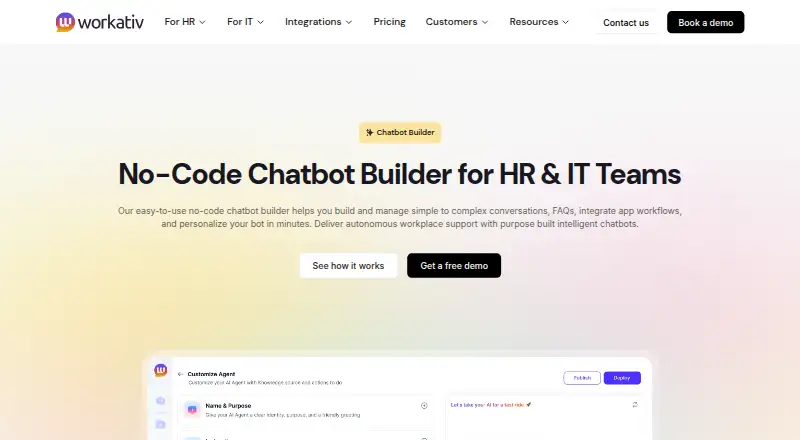
Workativ Assistant is a no-code conversational AI platform for HR and IT teams. It helps organizations build chatbot dialogs, automate workflows, answer employee questions from HR documents and connected sources, and support self-service tasks such as leave requests, onboarding, access provisioning, and ticket creation. Chatbots can be deployed through Slack, Microsoft Teams, and a web portal, with live-agent escalation through a shared inbox.
The published Business plan costs $349 per month and includes 500 AI chat sessions, training on up to 10 million characters, 2 AI agents, 5 actions, 3 admins or live agents, and 60 days of data retention. There is no free plan. Enterprise includes everything in Business, plus more AI sessions and apps, custom app integrations, a higher training limit, more live agents, and training on images and advanced documents. This structure suits teams that need a defined set of employee-assistance workflows, but the Business limits should be checked against expected usage before purchase.
Workativ Assistant’s strongest fit is its HR and IT ecosystem coverage. Integrations include Workday, ADP, UKG, Oracle HR, BambooHR, ServiceNow, Freshservice, Jira Service Management, Okta, Azure AD, SharePoint, Confluence, Google Drive, Notion, and Slack. Knowledge ingestion, workflow automation, built-in testing, analytics, and human handoff support a service-desk operating model rather than a chatbot limited to static answers. Choose it for HR or IT teams that need multichannel employee self-service and connected business applications. Organizations seeking a free starting point or higher included conversation volume should consider alternatives.
Your product? Our editors can test Workativ Assistant in depth and publish a review, labelled as paid · from $149/mo →
Workativ Assistant pricing
All 2 Workativ Assistant plans and prices →
Workativ Assistant fact sheet
| Free plan | No |
|---|---|
| Paid from | $349/mo |
| Deployment channels | Multichannel |
| Visual flow builder | Yes |
| AI bot generation | Not verified |
| Knowledge-base answers | Yes |
| Human handoff | Yes |
| Included conversations | 500 /mo |
| Deployment | Cloud |
| Platforms | Web |
| Compliance & security | SOC 2, ISO 27001, GDPR, HIPAA, SSO/SAML, 2FA |
| Built for | Small business, Mid-market, Enterprise (editorial estimate) |
| Integrations | 100+ integrations: Workday, ADP, UKG, Oracle HR, BambooHR, ServiceNow … See all → |
| Pricing | Paid (source) |
| Website | workativ.com |
| Facts checked | 21 Sep 2026 |
Workativ Assistant integrations
Workativ Assistant lists 100+ integrations on its own site — the 20 named here are the ones its pages call out.
- Workday
- ADP
- UKG
- Oracle HR
- BambooHR
- ServiceNow
- Freshservice
- Jira Service Management
- Okta
- Azure AD
- SharePoint
- Confluence
- Google Drive
- Notion
- Slack
- Microsoft Teams
- Office 365
- Outlook
- Gmail
- Dropbox
See all Workativ Assistant integrations →
Alternatives to Workativ Assistant
- IBM watsonx AssistantA multichannel IBM chatbot platform with visual flows, AI search and human escalation.9.4
- LivePerson Conversational CloudA mature platform for brands combining AI agents, messaging, voice, and human support.9.3
- Oracle Digital AssistantA broad enterprise assistant platform for Oracle-centered teams.9.2


See all Workativ Assistant alternatives →
Used Workativ Assistant? Be the first to review it
The editor score above is our own research. What this page doesn't have yet is a reader's view — what you used Workativ Assistant for, what worked and what didn't. No stars are seeded and no review is paid for; an editor reads every one before it appears.
Write a reviewTwo minutes · verified accounts only · read by an editor before it appears
Featured on iTechGuides

Workativ Assistant is listed in our Chatbot Builders directory. Add the badge to your site — it links back to this page.
<a href="https://www.itechguides.com/products/workativ-assistant/"><img src="https://www.itechguides.com/best/badge/workativ-assistant.svg" alt="Featured on iTechGuides" width="230" height="46"></a>
Reviewed by iTechGuides Editors · Editorial team · Updated Oct 2026
Advertiser disclosure: iTechGuides is reader-supported. Vendors can pay for top positions in our rankings and for a place on other products' pages, and we may earn a commission when you click some links. Bought places stand at the number bought; this page and our disclosure say so. Paying vendors may get a fuller, more detailed review from our editors, and that review can change their score. How we rank.
Last updated · How we research and update