
Wonder Workshop Blockly
Wonder Workshop Blockly: A focused Blockly learning environment for Dash and Dot classrooms. Ranked #10 of 26 in Robotics Education Software by our editors (8.3/10); pricing: Free plan; best for young learners using Dash and Dot.
At a glance
- Editor score8.3 / 10
- PricingFree plan
- Best forYoung learners using Dash and Dot
- Free planYes
- Robot simulatorYes
- Facts checked21 Sep 2026
Where it wins
- Free tier includes Blockly puzzles and tracking for up to 35 students
- Virtual Dash simulation supports coding without a physical robot on paid tiers
- Assignments, pathways, saving, sharing, and progress tracking support teaching
Where it doesn't
- The Free Tier requires a physical Dash robot
- Robot support is limited to Dash and Dot
- District access is handled through a custom solution
Our verdict on Wonder Workshop Blockly
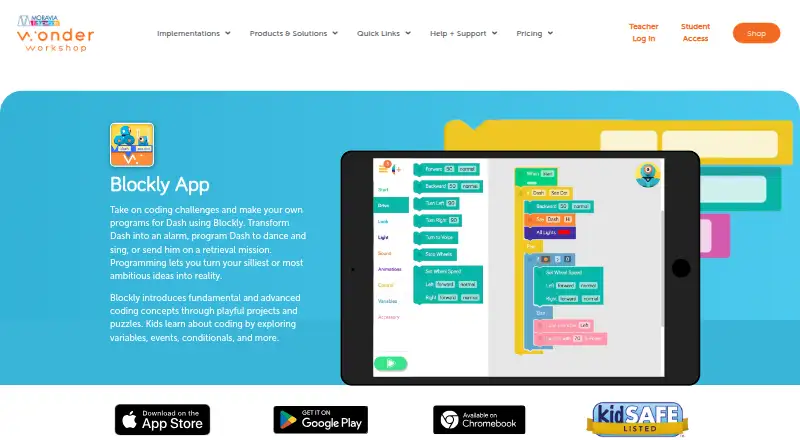
Wonder Workshop Blockly is a drag-and-drop coding app for children learning robotics with Dash and Dot. It introduces sequencing, loops, sensors, events, functions, variables, and conditionals through Blockly puzzles and creative projects. Teachers can use it for classroom instruction, while homeschool families and individual learners can use the STEM Homeschool plan. The product is available on web, iOS, and Android, with support for Chrome on Mac, PC, and Chromebook, iOS 12+, and Android 6+ with Bluetooth LE.
The plan structure separates basic robot access from broader teaching tools. The Free Tier supports up to 35 students, one teacher, and one classroom, with Blockly Puzzle Tracking and Legacy Curriculum; it requires a physical Dash robot. STEM Homeschool supports up to five students, while STEM Classroom supports up to 35 students. Both add Virtual Dash in Blockly, Coding Pathways Lessons, and 72 Challenge Cards. STEM Center expands coverage to up to 300 students and three teachers across all classrooms. School covers all students, five teachers, and classroom sharing at one school, while District provides a custom district solution.
Its strongest fit is for learning environments already centered on Wonder Workshop robots and block coding. Make Wonder accounts add teacher progress tracking, assignments, curriculum pathways, and student project saving and sharing. The Virtual Dash 3D simulation is particularly useful for paid accounts that need a software-based practice environment. The trade-off is a focused ecosystem: support is centered on Dash and Dot, and the free experience depends on physical Dash hardware. Choose Wonder Workshop Blockly for structured introductory robotics lessons, classroom progress visibility, and Dash-based projects. Consider another platform if learners need broader robot support or coding modes beyond block programming.
Your product? Our editors can test Wonder Workshop Blockly in depth and publish a review, labelled as paid · from $149/mo →
Wonder Workshop Blockly pricing
All 6 Wonder Workshop Blockly plans and prices →
Wonder Workshop Blockly fact sheet
| Free plan | Yes |
|---|---|
| Paid from | Not verified |
| Robot simulator | Yes |
| Coding modes | Block |
| Classroom tools | Yes |
| Curriculum library | Yes |
| Supported robots | Dash, Dot |
| Learner level | Mixed |
| Supported platforms | iOS 12+, Android 6+ with Bluetooth LE, Chrome browser on Mac, PC, and Chromebook |
| Deployment | Cloud, Mobile |
| Platforms | Web, iOS, Android |
| Compliance & security | GDPR |
| Support | Email, Tickets, Docs |
| Built for | Small business, Mid-market, Enterprise (editorial estimate) |
| Pricing | Free plan (source) |
| Website | makewonder.com |
| Facts checked | 21 Sep 2026 |
Alternatives to Wonder Workshop Blockly
- PictoBloxA broad learning environment for mixed-level AI, robotics and STEM projects.9.3
- Open Roberta LabA free browser-based robotics classroom with simulation, curriculum tools, and broad robot support.9.2
- VEXcodeA flexible VEX coding environment with simulation, classroom tools, and text-based programming.9.1


See all Wonder Workshop Blockly alternatives →
Used Wonder Workshop Blockly? Be the first to review it
The editor score above is our own research. What this page doesn't have yet is a reader's view — what you used Wonder Workshop Blockly for, what worked and what didn't. No stars are seeded and no review is paid for; an editor reads every one before it appears.
Write a reviewTwo minutes · verified accounts only · read by an editor before it appears
Featured on iTechGuides

Wonder Workshop Blockly is listed in our Robotics Education Software directory. Add the badge to your site — it links back to this page.
<a href="https://www.itechguides.com/products/wonder-workshop-blockly/"><img src="https://www.itechguides.com/best/badge/wonder-workshop-blockly.svg" alt="Featured on iTechGuides" width="230" height="46"></a>
Reviewed by iTechGuides Editors · Editorial team · Updated Oct 2026
Advertiser disclosure: iTechGuides is reader-supported. Vendors can pay for top positions in our rankings and for a place on other products' pages, and we may earn a commission when you click some links. Bought places stand at the number bought; this page and our disclosure say so. Paying vendors may get a fuller, more detailed review from our editors, and that review can change their score. How we rank.
Last updated · How we research and update