
PictoBlox
PictoBlox: A broad learning environment for mixed-level AI, robotics and STEM projects. Ranked #1 of 26 in Robotics Education Software by our editors (9.3/10); pricing: Free plan; best for mixed-level AI and robotics project learning.
At a glance
- Editor score9.3 / 10
- PricingFree plan
- Best forMixed-level AI and robotics project learning
- Free planYes
- Robot simulatorYes
- Founded2017 · Ahmedabad, Gujarat, India
- Facts checked20 Sep 2026
Where it wins
- Combines block coding, Python, debugging and code completion
- Supports AI, machine learning, robotics, IoT and 3D/XR projects
- Works with varied hardware, classroom resources and multiple platforms
Where it doesn't
- Its broad feature set may feel complex for narrowly focused beginners
- School and bulk deployments require contacting STEMpedia
- Hardware projects depend on compatible robots, boards and sensors
Our verdict on PictoBlox
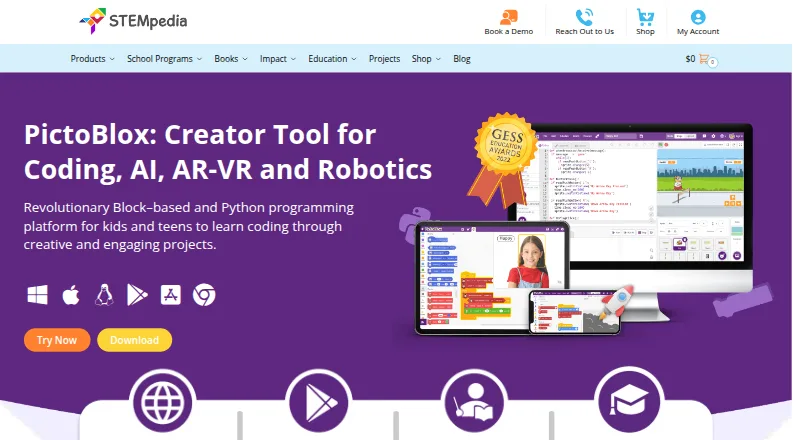
PictoBlox is educational programming software for children, teens, teachers and schools. It brings block-based visual programming and Python into one environment, with tools for artificial intelligence, machine learning, robotics, IoT, games, animation and 3D, AR and VR projects. Learners can create projects in a browser, desktop software or mobile apps, while educators can use tutorials, curriculum resources and classroom-oriented deployments. Its mixed-level positioning makes it suitable for programs that need a path from introductory coding to more advanced project work.
The strongest part of PictoBlox is its range of learning modes and project types. Beginners can start with visual blocks, while more advanced learners can move into Python, debugging, code completion and a Python Notebook environment. AI extensions support vision, speech and language projects, and users can create or import machine-learning models. The software also supports programming and control of Quarky, evive, Arduino, LEGO, micro:bit, ESP32 and Wizbot hardware, alongside simulation and sensor-based work. That breadth suits schools and educators building varied STEM activities, though a focused robotics course may find the wider creative and AI toolkit more extensive than necessary.
PictoBlox is free for individuals and non-commercial use. Schools and bulk educational deployments are directed to contact STEMpedia, making the product suitable for individual learners and organizations planning a broader rollout through a vendor conversation. Platform coverage includes Windows, macOS, Linux, Chromebook, Android, iOS and the web browser, which can help mixed-device classrooms. Choose PictoBlox when one environment needs to span block coding, Python, AI and physical computing. Choose a narrower alternative when the priority is only one hardware ecosystem, one coding mode or a tightly bounded robotics curriculum.
Your product? Our editors can test PictoBlox in depth and publish a review, labelled as paid · from $149/mo →
PictoBlox pricing
PictoBlox fact sheet
| Free plan | Yes |
|---|---|
| Paid from | Not verified |
| Robot simulator | Yes |
| Coding modes | Block_and_text |
| Classroom tools | Yes |
| Curriculum library | Yes |
| Supported robots | Quarky, evive, Arduino, LEGO, micro:bit, Wizbot |
| Learner level | Mixed |
| Supported platforms | Windows, macOS, Linux, Chromebook, Android, iOS and web browser |
| Deployment | Cloud, Desktop, Mobile |
| Platforms | Web, Windows, macOS, Linux, iOS, Android |
| Support | Email, Docs |
| Built for | Solo, Small business, Mid-market, Enterprise (editorial estimate) |
| Integrations | 7 integrations: Quarky, evive, Arduino, LEGO, micro:bit, ESP32 … |
| Pricing | Free plan |
| Website | thestempedia.com |
| Facts checked | 20 Sep 2026 |
PictoBlox integrations
PictoBlox lists 7 integrations on its own site.
- Quarky
- evive
- Arduino
- LEGO
- micro:bit
- ESP32
- Wizbot
Alternatives to PictoBlox
- Open Roberta LabA free browser-based robotics classroom with simulation, curriculum tools, and broad robot support.9.2
- VEXcodeA flexible VEX coding environment with simulation, classroom tools, and text-based programming.9.1
- Sphero EduA free, multi-platform classroom hub for teaching coding with Sphero robots.9.0


See all PictoBlox alternatives →
PictoBlox vs the competition
- PictoBlox vs Open Roberta Lab
- PictoBlox vs VEXcode
- PictoBlox vs Sphero Edu
- PictoBlox vs mBlock
- PictoBlox vs BugBotLab
- PictoBlox vs Micromelon Robotics Platform



Compare PictoBlox with any tool side by side →
Used PictoBlox? Be the first to review it
The editor score above is our own research. What this page doesn't have yet is a reader's view — what you used PictoBlox for, what worked and what didn't. No stars are seeded and no review is paid for; an editor reads every one before it appears.
Write a reviewTwo minutes · verified accounts only · read by an editor before it appears
Featured on iTechGuides

PictoBlox is listed in our Robotics Education Software directory. Add the badge to your site — it links back to this page.
<a href="https://www.itechguides.com/products/pictoblox/"><img src="https://www.itechguides.com/best/badge/pictoblox.svg" alt="Featured on iTechGuides" width="230" height="46"></a>
Reviewed by iTechGuides Editors · Editorial team · Updated Oct 2026
Advertiser disclosure: iTechGuides is reader-supported. Vendors can pay for top positions in our rankings and for a place on other products' pages, and we may earn a commission when you click some links. Bought places stand at the number bought; this page and our disclosure say so. Paying vendors may get a fuller, more detailed review from our editors, and that review can change their score. How we rank.
Last updated · How we research and update