
Wisecut
Wisecut: A browser-based repurposing editor with strong silence removal and audio tools. Ranked #7 of 50 in AI Video Repurposing Tools by our editors (7.7/10); pricing: Free plan; best for creators focused on silence removal and audio polish.
At a glance
- Editor score7.7 / 10
- PricingFree plan
- Best forCreators focused on silence removal and audio polish
- Free planYes
- Paid from$23.25/mo
- AI highlight detectionYes
- Founded2019 · Miami, United States
- Facts checked24 Sep 2026
Where it wins
- Automatic silence removal, audio ducking, and background music
- Highlight detection, captions, translations, and transcript editing
- Reframing, scheduling, and publishing across major social networks
Where it doesn't
- Free exports are limited to 360p resolution
- Starter+ is priced at $23.25 per month with annual billing
- Professional+ is required for 4K video and three social accounts per network
Our verdict on Wisecut
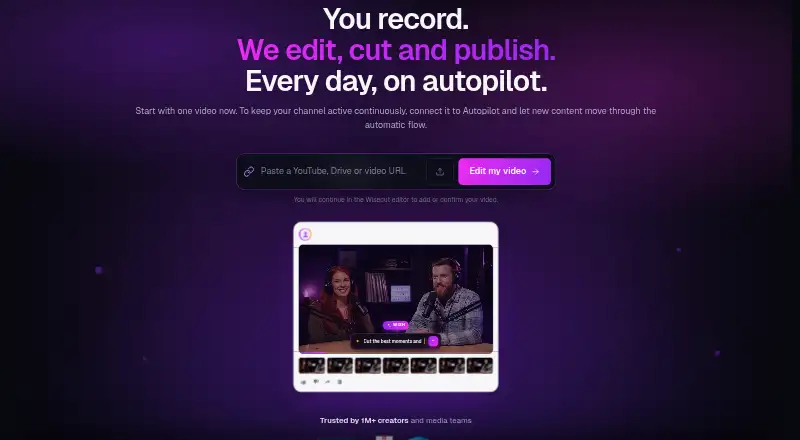
Wisecut is a browser-based AI video editor for creators, podcasters, YouTubers, educators, and media teams. It analyzes long-form recordings to identify highlights, remove silences, generate captions and translations, and create clips for vertical, square, or widescreen formats. Storyboard-based transcript editing, speaker-focused framing, background music, audio ducking, and audio cleanup support a workflow centered on turning longer recordings into social-ready videos.
The plan structure covers both occasional and higher-volume production. Free is always available and includes 60 minutes per month, 360p resolution, and a 4 GB maximum file size. Starter+ costs $23.25 per month with annual billing and adds 1080p Full HD, up to 60 minutes per export, 300 credits per month, plus social scheduling and auto-publishing. Professional+ costs $83.25 per month with annual billing and raises exports to 90 minutes, adds 4K Ultra HD and 1,200 credits per month, and supports up to three accounts from each social network.
Wisecut’s strongest focus is editing friction around pauses, audio, and format changes. AI highlight detection can identify suitable moments, while transcript editing, captions, translations, and automatic reframing connect selection and finishing in one web workflow. Its Social Hub supports publishing and scheduling for YouTube, Instagram Business, TikTok, X, Facebook, LinkedIn, Threads, and Bluesky. Creators who want silence removal, audio polish, and multi-platform distribution should find the feature mix well aligned. Those who only need low-resolution occasional exports can stay on Free; teams requiring 4K output or multiple accounts need Professional+.
Your product? Our editors can test Wisecut in depth and publish a review, labelled as paid · from $149/mo →
Wisecut pricing
All 3 Wisecut plans and prices →
Wisecut fact sheet
| Free plan | Yes |
|---|---|
| Paid from | $23.25/mo |
| Max source length | 60 min |
| AI highlight detection | Yes |
| Automatic reframing | Yes |
| Social platform presets | Yes |
| Transcript-to-post output | Not verified |
| Brand templates | Yes |
| Monthly clip limit | Not verified |
| Deployment | Cloud |
| Platforms | Web |
| Support | Email, Community, Docs |
| Built for | Solo, Small business, Mid-market, Enterprise (editorial estimate) |
| Integrations | 4 integrations: YouTube, TikTok, Instagram, Facebook |
| Pricing | Free plan (source) |
| Website | wisecut.ai |
| Facts checked | 24 Sep 2026 |
Wisecut integrations
Wisecut lists 4 integrations on its own site.
- YouTube
- TikTok
Alternatives to Wisecut
- OpusClipA broad AI workflow for turning long videos into branded, social-ready clips.9.9
- HeadlinerA broad, affordable toolkit for turning long-form media into social-ready clips.8.9
- quso.aiA broad AI repurposing suite with scheduling and analytics, though paid access starts at $29 monthly.8.7



See all Wisecut alternatives →
Wisecut vs the competition
- Wisecut vs OpusClip
- Wisecut vs Headliner
- Wisecut vs quso.ai
- Wisecut vs Vizard
- Wisecut vs ngram
- Wisecut vs Exemplary AI



Compare Wisecut with any tool side by side →
Also Ranked In
Wisecut is ranked in 3 of our directories.
Used Wisecut? Be the first to review it
The editor score above is our own research. What this page doesn't have yet is a reader's view — what you used Wisecut for, what worked and what didn't. No stars are seeded and no review is paid for; an editor reads every one before it appears.
Write a reviewTwo minutes · verified accounts only · read by an editor before it appears
Featured on iTechGuides

Wisecut is listed in our AI Video Repurposing Tools directory. Add the badge to your site — it links back to this page.
<a href="https://www.itechguides.com/products/wisecut/"><img src="https://www.itechguides.com/best/badge/wisecut.svg" alt="Featured on iTechGuides" width="230" height="46"></a>
Reviewed by iTechGuides Editors · Editorial team · Updated Oct 2026
Advertiser disclosure: iTechGuides is reader-supported. Vendors can pay for top positions in our rankings and for a place on other products' pages, and we may earn a commission when you click some links. Bought places stand at the number bought; this page and our disclosure say so. Paying vendors may get a fuller, more detailed review from our editors, and that review can change their score. How we rank.
Last updated · How we research and update