
WinCross
WinCross: A detailed Windows analysis tool with a substantial one-time license cost. Ranked #10 of 13 in Survey Analysis Software by our editors (7.0/10); pricing: 7-day trial; best for windows users needing detailed tables and statistical tests.
At a glance
- Editor score7.0 / 10
- Pricing7-day trial
- Best forWindows users needing detailed tables and statistical tests
- Free planNo
- Paid from$2,995/user one-time
- Cross-tabulationYes
- Facts checked23 Sep 2026
Where it wins
- Combines data cleaning, weighting, crosstabs, and statistical tests
- Exports reports to Excel, Word/RTF, PowerPoint, PDF, and more
- Supports tables up to 6,000 rows and banners up to 500 columns
Where it doesn't
- Runs on Windows desktop only
- First-user license costs $3,595 one time
- Seven-day evaluation is limited to 100 respondents and 25 tables
Our verdict on WinCross
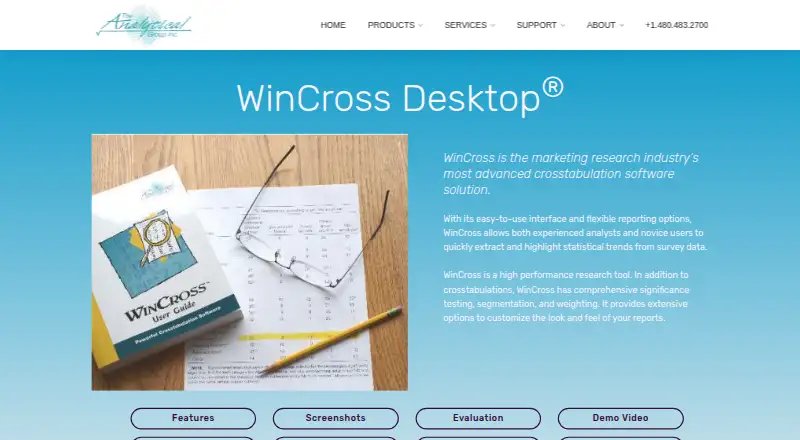
WinCross is desktop survey crosstabulation and statistical analysis software for marketing research analysts who need to prepare and examine survey data on Windows. It imports SPSS, Excel, and CSV files, then supports frequency tables, crosstabs, significance tests, weighting, sample balancing, factor analysis, regression, and outlier calculation. Data can also be edited, cleaned, and recoded within the software, making it suited to analysts who want preparation and tabulation in one desktop workflow.
Its breadth is a practical fit for detailed reporting: significance options include t-tests, z-tests, and ANOVA, while reports can be exported to ASCII, Enhanced Text, Word/RTF, Excel, PowerPoint, and PDF. The stated capacity of up to 6,000 table rows and 500 banner columns points to use with extensive tables. WinCross also lists SPSS, Microsoft Office apps, and OneDrive among its integrations. The Windows-only desktop deployment makes it a poor fit for teams seeking a browser-based or cross-platform workflow.
Pricing is a one-time perpetual license: the Desktop Edition for the first user is $3,595, and each additional user is $2,995. Both include support and upgrades for one year; the vendor also offers a seven-day evaluation, limited to 100 respondents and 25 tables. This is a significant upfront commitment compared with a subscription-style entry point, so WinCross makes most sense when detailed tabulation, statistical options, and export flexibility justify that purchase. Analysts who need Windows desktop work and substantial table capacity should consider it; those seeking lower initial cost or non-Windows access should look elsewhere.
Your product? Our editors can test WinCross in depth and publish a review, labelled as paid · from $149/mo →
WinCross pricing
All 2 WinCross plans and prices →
WinCross fact sheet
| Free plan | No |
|---|---|
| Paid from | $2,995/user one-time |
| Data cleaning tools | Yes |
| Cross-tabulation | Yes |
| Significance testing | Yes |
| Response weighting | Yes |
| Report export formats | ASCII, Enhanced Text, Word/RTF, Excel, PowerPoint, PDF |
| Response limit | Not verified |
| Free trial | 7 days |
| Deployment | Desktop |
| Platforms | Windows |
| Support | Email, Phone, Docs, Community |
| Built for | Small business, Mid-market, Enterprise (editorial estimate) |
| Integrations | 5 integrations: SPSS, Microsoft Excel, Microsoft Word, Microsoft PowerPoint, OneDrive |
| Pricing | 7-day trial (source) |
| Website | analyticalgroup.com |
| Facts checked | 23 Sep 2026 |
WinCross integrations
WinCross lists 5 integrations on its own site.
- SPSS
- Microsoft Excel
- Microsoft Word
- Microsoft PowerPoint
- OneDrive
Alternatives to WinCross
- SurveyMonkeyFlexible survey creation and analysis, with plan limits that shape the value.9.2
- QualtricsEnd-to-end survey analysis with a free entry plan and paid research tiers.9.0
- Zoho SurveyA survey tool with a free tier and reporting options for teams on a budget.8.5



See all WinCross alternatives →
Also Ranked In
WinCross is ranked in 2 of our directories.
Used WinCross? Be the first to review it
The editor score above is our own research. What this page doesn't have yet is a reader's view — what you used WinCross for, what worked and what didn't. No stars are seeded and no review is paid for; an editor reads every one before it appears.
Write a reviewTwo minutes · verified accounts only · read by an editor before it appears
Featured on iTechGuides

WinCross is listed in our Survey Analysis Software directory. Add the badge to your site — it links back to this page.
<a href="https://www.itechguides.com/products/wincross/"><img src="https://www.itechguides.com/best/badge/wincross.svg" alt="Featured on iTechGuides" width="230" height="46"></a>
Reviewed by iTechGuides Editors · Editorial team · Updated Oct 2026
Advertiser disclosure: iTechGuides is reader-supported. Vendors can pay for top positions in our rankings and for a place on other products' pages, and we may earn a commission when you click some links. Bought places stand at the number bought; this page and our disclosure say so. Paying vendors may get a fuller, more detailed review from our editors, and that review can change their score. How we rank.
Last updated · How we research and update