
VR Sketch
VR Sketch: A focused SketchUp-to-VR workflow with strong collaboration and limited ecosystem breadth. Ranked #42 of 52 in 3D Visualization Software by our editors (5.0/10); pricing: Free plan; best for sketchUp models inside collaborative VR.
At a glance
- Editor score5.0 / 10
- PricingFree plan
- Best forSketchUp models inside collaborative VR
- Free planYes
- Primary platformHybrid
- Facts checked22 Sep 2026
Where it wins
- Two-way real-time synchronization between SketchUp and VR
- Collaborative multi-user viewing and editing in VR
- Measurement, section cuts, capture, and modeling tools
Where it doesn't
- SketchUp is the only listed integration
- Commercial access starts at €45 per month
- Desktop integration depends on SketchUp
Our verdict on VR Sketch
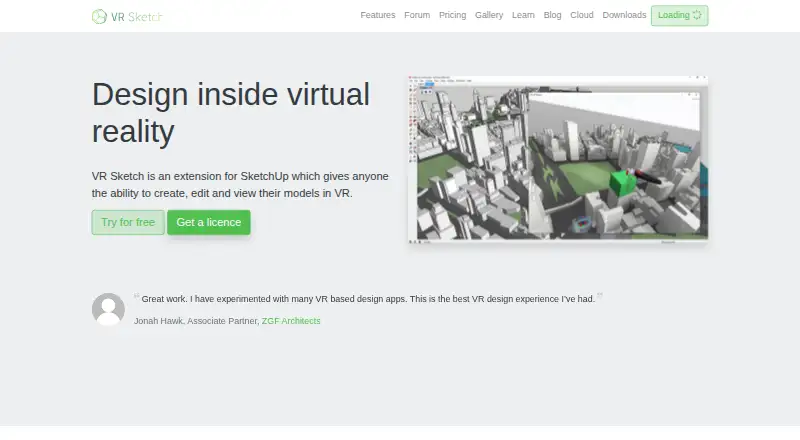
VR Sketch is a SketchUp extension for architects, designers, students, and other users who need to create, edit, view, and present 3D models in virtual reality. It works with SketchUp on Windows and macOS, supports cloud model viewing on standalone headsets, and supports standalone or tethered Meta Quest and Pico Neo 3 headsets. Its core appeal is keeping SketchUp models connected to an interactive VR workspace rather than treating VR as a separate presentation step.
The workflow centers on two-way, real-time synchronization between SketchUp and VR. Users can create and edit SketchUp models inside VR, collaborate on model viewing and editing, and use VR tools such as push-pull, move, copy, and scale. Navigation features include teleportation, model scaling, and rotation, while measurement and section cuts support spatial review. Photo and video capture from inside VR adds a way to record project views. This makes VR Sketch a good fit for teams that already work in SketchUp and want shared model review or direct VR editing without changing their primary modeling environment.
Pricing separates education, non-commercial, commercial, and enterprise use. The Student plan is for students and educators. Hobbyist costs €9 per month for non-commercial use, while Standard costs €45 per month or €500 per year for commercial use. Enterprise costs €100 per month or €1,100 per year and adds priority support, custom 3D environments, and a custom branded splash screen. Email, community, and documentation support are available. Choose VR Sketch when SketchUp compatibility and collaborative VR matter most; consider another tool if you need a broader integration ecosystem or a workflow independent of SketchUp.
Your product? Our editors can test VR Sketch in depth and publish a review, labelled as paid · from $149/mo →
VR Sketch pricing
All 4 VR Sketch plans and prices →
VR Sketch fact sheet
| Free plan | Yes |
|---|---|
| Paid from | Not verified |
| Real-time scenes | Yes |
| 360° tours | Not verified |
| VR/AR support | Yes |
| AI visualization tools | Not verified |
| Video export | Yes |
| Primary platform | Hybrid |
| Mobile viewing | Not verified |
| Deployment | Cloud, Desktop |
| Platforms | Windows, macOS |
| Support | Email, Community, Docs |
| Built for | Solo, Small business, Mid-market, Enterprise (editorial estimate) |
| Integrations | 1 integrations: SketchUp |
| Pricing | Free plan (source) |
| Website | vrsketch.eu |
| Facts checked | 22 Sep 2026 |
VR Sketch integrations
VR Sketch lists 1 integrations on its own site.
- SketchUp
Alternatives to VR Sketch
- Autodesk VREDA deep visualization suite for automotive and industrial virtual prototyping.9.4
- EnscapeLive CAD/BIM visualization with walkthroughs, VR, panoramas and video exports.9.3
- KeyShotA deep product-rendering toolkit for CAD workflows, interactive experiences, and automation.8.9

See all VR Sketch alternatives →
Used VR Sketch? Be the first to review it
The editor score above is our own research. What this page doesn't have yet is a reader's view — what you used VR Sketch for, what worked and what didn't. No stars are seeded and no review is paid for; an editor reads every one before it appears.
Write a reviewTwo minutes · verified accounts only · read by an editor before it appears
Featured on iTechGuides

VR Sketch is listed in our 3D Visualization Software directory. Add the badge to your site — it links back to this page.
<a href="https://www.itechguides.com/products/vr-sketch/"><img src="https://www.itechguides.com/best/badge/vr-sketch.svg" alt="Featured on iTechGuides" width="230" height="46"></a>
Reviewed by iTechGuides Editors · Editorial team · Updated Oct 2026
Advertiser disclosure: iTechGuides is reader-supported. Vendors can pay for top positions in our rankings and for a place on other products' pages, and we may earn a commission when you click some links. Bought places stand at the number bought; this page and our disclosure say so. Paying vendors may get a fuller, more detailed review from our editors, and that review can change their score. How we rank.
Last updated · How we research and update