
Visual Flow
Visual Flow: A focused preset library for photographers who need lighting-specific Lightroom workflows. Ranked #4 of 35 in Photo Preset Libraries by our editors (8.8/10); pricing: Paid; best for photographers organizing presets by lighting condition.
At a glance
- Editor score8.8 / 10
- PricingPaid
- Best forPhotographers organizing presets by lighting condition
- Free planNo
- Paid from$35 one-time
- Founded2019
- Facts checked20 Sep 2026
Where it wins
- Presets are organized around practical lighting scenarios.
- Supports Lightroom Classic, CC, Mobile, and Adobe Camera Raw.
- Includes AI retouching presets, brushes, and scene tools.
Where it doesn't
- There is no free plan to preview the library.
- All sales are final, with no refunds, returns, or exchanges.
- The library is focused on Adobe-compatible workflows.
Our verdict on Visual Flow
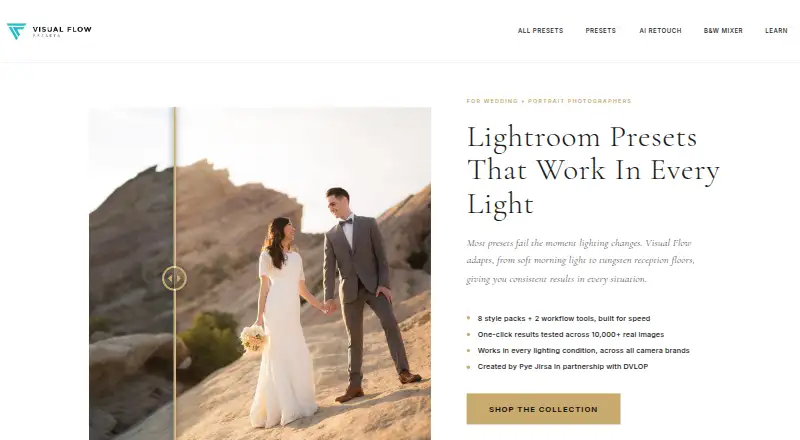
Visual Flow is a downloadable preset library for photographers working across changing lighting conditions, including wedding, portrait, family, and fashion work. Its catalog is organized around scenarios such as soft light, hard light, backlighting, tungsten, HDR, and black-and-white conversion. The approach suits photographers who want to choose a starting point based on the light in a scene rather than browse an undifferentiated preset collection.
Pricing is structured as two one-time purchases. Mobile Only costs $35 and includes 5 mobile presets, 10 desktop presets, and free pack updates. Mobile & Desktop costs $95 and includes the same 5 mobile presets, 10 desktop presets, and free pack updates. Both plans include 15 presets in total, while the combined option is intended for photographers who need access across mobile and desktop formats. Free pack or lifetime updates add ongoing access to updates without a recurring charge.
The strongest fit is for Adobe users who want broad device compatibility and a workflow centered on lighting decisions. Visual Flow supports Lightroom Classic, Lightroom CC/Desktop, Lightroom Mobile, and Adobe Camera Raw across Windows, macOS, iOS, and Android. Beyond its core presets, the library includes a black-and-white mixer and an AI retouching toolkit with presets, brushes, and scene tools. Photographers seeking lighting-specific organization and mobile support should consider it; those wanting a free entry point, refunds after purchase, or a workflow outside Adobe applications should choose an alternative.
Your product? Our editors can test Visual Flow in depth and publish a review, labelled as paid · from $149/mo →
Visual Flow pricing
All 2 Visual Flow plans and prices →
Visual Flow fact sheet
| Free plan | No |
|---|---|
| Paid from | $35 one-time |
| Delivery type | Download |
| Included presets | 15 presets |
| Software support | Adobe Lightroom Classic, Lightroom CC/Desktop/Mobile, and Adobe Camera Raw |
| Video presets | Not verified |
| Mobile support | Yes |
| Commercial license | Yes |
| Deployment | Desktop, Mobile |
| Platforms | Windows, macOS, iOS, Android |
| Support | Email, Docs |
| Built for | Solo, Small business, Mid-market (editorial estimate) |
| Pricing | Paid (source) |
| Website | vfpresets.com |
| Facts checked | 20 Sep 2026 |
Alternatives to Visual Flow
- Greater Than GatsbyA broad preset library with free samples, mobile support, and bundles up to $249.9.4
- Lightroom Presets by peva3A broad free preset library for Lightroom users who want maximum variety.9.2
- 123PresetsA $15 one-time pack for Lightroom workflows, mobile editing, and video LUTs.9.0


See all Visual Flow alternatives →
Visual Flow vs the competition
- Visual Flow vs Greater Than Gatsby
- Visual Flow vs Lightroom Presets by peva3
- Visual Flow vs 123Presets
- Visual Flow vs VSCO
- Visual Flow vs RNI Films
- Visual Flow vs Contrastly Lightroom Presets



Compare Visual Flow with any tool side by side →
Used Visual Flow? Be the first to review it
The editor score above is our own research. What this page doesn't have yet is a reader's view — what you used Visual Flow for, what worked and what didn't. No stars are seeded and no review is paid for; an editor reads every one before it appears.
Write a reviewTwo minutes · verified accounts only · read by an editor before it appears
Featured on iTechGuides

Visual Flow is listed in our Photo Preset Libraries directory. Add the badge to your site — it links back to this page.
<a href="https://www.itechguides.com/products/visual-flow/"><img src="https://www.itechguides.com/best/badge/visual-flow.svg" alt="Featured on iTechGuides" width="230" height="46"></a>
Reviewed by iTechGuides Editors · Editorial team · Updated Oct 2026
Advertiser disclosure: iTechGuides is reader-supported. Vendors can pay for top positions in our rankings and for a place on other products' pages, and we may earn a commission when you click some links. Bought places stand at the number bought; this page and our disclosure say so. Paying vendors may get a fuller, more detailed review from our editors, and that review can change their score. How we rank.
Last updated · How we research and update