VisoMaster
VisoMaster: A capable free desktop tool for live and multi-face swapping on Windows and Linux. Ranked #8 of 57 in AI Face Swap Tools by our editors (8.7/10); pricing: Free plan; best for windows/Linux live face swapping.
At a glance
- Editor score8.7 / 10
- PricingFree plan
- Best forWindows/Linux live face swapping
- Free planYes
- Paid fromFree
- Video face swapYes
- Facts checked22 Sep 2026
Where it wins
- Supports multi-face swaps with facial-part masking
- Offers live webcam swapping through a virtual camera
- Includes multiple models, restoration, and TensorRT acceleration
Where it doesn't
- Limited to Windows and Linux desktop environments
- Community support may require self-directed troubleshooting
- Manual installation instructions are part of the Linux setup path
Our verdict on VisoMaster
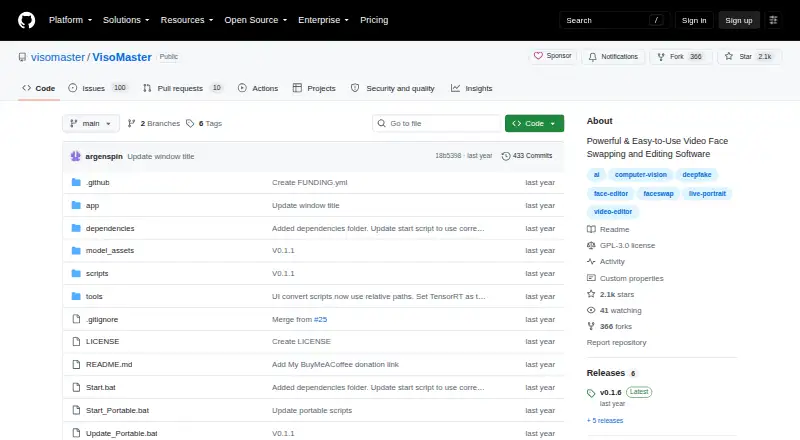
VisoMaster is an open-source desktop application for AI-powered face swapping and editing in images and videos. It is aimed at solo users and small teams working on Windows or Linux, with support for live playback, webcam-based swapping, multi-face processing, and edited video workflows. The project includes an automatic Windows installer for Nvidia GPUs, alongside manual installation instructions for Windows and Linux users.
Its strongest area is feature depth within face-swapping workflows. VisoMaster supports multiple face-swapper models, DeepFaceLab DFM model compatibility, facial-part masking, and face embeddings using multiple source faces. Expression restoration, face restoration, and enhancement extend the tool beyond a basic face replacement workflow. Per-frame video markers add control for video editing, while TensorRT acceleration is available for supported performance-focused setups. For live use, webcam swapping can output to a virtual camera, with integrations for OBS Virtual Camera and Unity Capture.
VisoMaster suits users who want a free, self-hosted desktop application with broad control over models, faces, restoration, and live output. Its Windows and Linux focus makes it a specialized choice rather than a general cross-platform tool, and community support places more responsibility on the user for installation and troubleshooting. Choose it for multi-face projects, live virtual-camera output, or workflows that benefit from model compatibility and local processing. Users seeking a hosted service, a different operating system, or a support channel beyond the community should consider another option.
Your product? Our editors can test VisoMaster in depth and publish a review, labelled as paid · from $149/mo →
VisoMaster pricing
VisoMaster fact sheet
| Free plan | Yes |
|---|---|
| Paid from | Free |
| Video face swap | Yes |
| Max video length | Not verified |
| Multiple faces | Yes |
| Max output resolution | Not verified |
| Watermark-free export | Not verified |
| Commercial use | Not verified |
| Deployment | Self-hosted, Desktop |
| Platforms | Windows, Linux |
| Support | Community |
| Built for | Solo, Small business (editorial estimate) |
| Integrations | 2 integrations: OBS Virtual Camera, Unity Capture |
| Pricing | Free plan |
| Website | github.com |
| Facts checked | 22 Sep 2026 |
VisoMaster integrations
VisoMaster lists 2 integrations on its own site.
- OBS Virtual Camera
- Unity Capture
Alternatives to VisoMaster
- Picsi.AiA broad face-swap toolkit with useful integrations, live modes, and flexible media support.9.4
- Remaker AIA broad face-swapping toolkit with free access, one-time credit packs, and API support.9.3
- AI Face SwapA format-friendly cloud face-swap tool with free access, 4K output, and API support.9.2



See all VisoMaster alternatives →
VisoMaster vs the competition
- VisoMaster vs Picsi.Ai
- VisoMaster vs Remaker AI
- VisoMaster vs AI Face Swap
- VisoMaster vs Morface
- VisoMaster vs FaceFusion
- VisoMaster vs Faceswap



Compare VisoMaster with any tool side by side →
Used VisoMaster? Be the first to review it
The editor score above is our own research. What this page doesn't have yet is a reader's view — what you used VisoMaster for, what worked and what didn't. No stars are seeded and no review is paid for; an editor reads every one before it appears.
Write a reviewTwo minutes · verified accounts only · read by an editor before it appears
Featured on iTechGuides

VisoMaster is listed in our AI Face Swap Tools directory. Add the badge to your site — it links back to this page.
<a href="https://www.itechguides.com/products/visomaster/"><img src="https://www.itechguides.com/best/badge/visomaster.svg" alt="Featured on iTechGuides" width="230" height="46"></a>
Reviewed by iTechGuides Editors · Editorial team · Updated Oct 2026
Advertiser disclosure: iTechGuides is reader-supported. Vendors can pay for top positions in our rankings and for a place on other products' pages, and we may earn a commission when you click some links. Bought places stand at the number bought; this page and our disclosure say so. Paying vendors may get a fuller, more detailed review from our editors, and that review can change their score. How we rank.
Last updated · How we research and update