
Vimerse Studio
Vimerse Studio: A $49 desktop workflow for synchronized, multi-shot AI videos. Ranked #167 of 241 in AI Video Generators by our editors (3.0/10); pricing: Paid; best for desktop filmmakers building synchronized scenes.
At a glance
- Editor score3.0 / 10
- PricingPaid
- Best forDesktop filmmakers building synchronized scenes
- Free planNo
- Paid from$49 one-time
- Facts checked21 Sep 2026
Where it wins
- Turns scripts or audio into segmented, timed scenes
- Supports per-character voices, lip sync, and shot prompts
- Queues 100+ shots with concurrent background rendering
Where it doesn't
- Available only on Windows and macOS
- Output is limited to 1080p
- AI generation usage is billed separately by consumption
Our verdict on Vimerse Studio
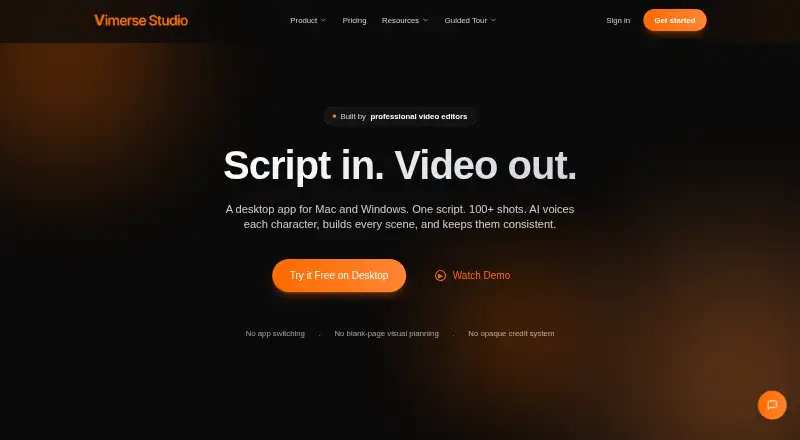
Vimerse Studio is a desktop application for Windows and macOS that turns scripts or imported audio into multi-shot videos. It is designed for filmmakers, marketers, creators, educators, and other teams producing explainers, advertisements, social content, courses, and multi-minute projects. Its workflow covers script generation, transcription, scene segmentation, character voiceovers, shot prompts, visual generation, lip sync, and synchronization to scene timing.
Pricing is centered on the Vimerse Studio Lifetime License, a one-time $49 purchase with all AI models, videos up to 10 minutes, 1080p output, commercial rights, and no subscription. AI generation usage is billed separately based on consumption, so the license cost does not represent unlimited generation. A Free Trial includes the full Studio workflow and does not require a credit card, giving prospective buyers a way to review the production flow before purchasing.
The standout feature is its synchronization-oriented workflow for projects with many shots. Vimerse Studio can import audio, transcribe it, divide it into scenes, generate prompts, create first-to-last-frame sequences, and align audio and visuals to scene timing. Batch rendering supports 100+ shots with concurrent background rendering, while integrations with ElevenLabs, Google, and Fal.ai support its voice and generation ecosystem. The trade-off is a desktop-only, 1080p workflow limited to Windows and macOS, with separate consumption charges for AI generation. It suits filmmakers who need coordinated multi-minute scenes; teams requiring other platforms, higher output resolution, or a different usage model should look elsewhere.
Questions about Vimerse Studio
Does Vimerse Studio have a free plan? Yes: the Free Trial plan is free.
What does Vimerse Studio run on? Windows and macOS. It runs as a desktop app.
What does Vimerse Studio integrate with? 3 integrations: ElevenLabs, Google and Fal.ai.
Does Vimerse Studio offer a money-back guarantee? Yes: 30 days.
Who is Vimerse Studio built for? Solo users, small businesses and mid-market companies (our editorial estimate).
Your product? Our editors can test Vimerse Studio in depth and publish a review, labelled as paid · from $149/mo →
Vimerse Studio pricing
All 2 Vimerse Studio plans and prices →
Vimerse Studio fact sheet
| Free plan | No |
|---|---|
| Paid from | $49 one-time |
| Text-to-video | Yes |
| Image-to-video | Not verified |
| AI avatars | Not verified |
| Maximum video length | 10 min |
| Maximum resolution | 1080p |
| API access | Not verified |
| Commercial use | Yes |
| Money-back guarantee | 30 days |
| Deployment | Desktop |
| Platforms | Windows, macOS |
| Compliance & security | GDPR |
| Support | Docs |
| Built for | Solo, Small business, Mid-market (editorial estimate) |
| Integrations | 3 integrations: ElevenLabs, Google, Fal.ai |
| Pricing | Paid (source) |
| Website | vimerse.app |
| Facts checked | 21 Sep 2026 |
Vimerse Studio integrations
Vimerse Studio lists 3 integrations on its own site.
- ElevenLabs
- Fal.ai
Alternatives to Vimerse Studio
- Google VeoText, image, and audio generation with camera controls and Google platform access.9.4
- RunwayA broad generative media platform with professional workflows, APIs, and mobile apps.9.3
- TikTok Symphony Creative StudioA free, TikTok-focused AI studio for creating, editing, and exporting social videos.9.2



See all Vimerse Studio alternatives →
Used Vimerse Studio? Be the first to review it
The editor score above is our own research. What this page doesn't have yet is a reader's view — what you used Vimerse Studio for, what worked and what didn't. No stars are seeded and no review is paid for; an editor reads every one before it appears.
Write a reviewTwo minutes · verified accounts only · read by an editor before it appears
Featured on iTechGuides

Vimerse Studio is listed in our AI Video Generators directory. Add the badge to your site — it links back to this page.
<a href="https://www.itechguides.com/products/vimerse-studio/"><img src="https://www.itechguides.com/best/badge/vimerse-studio.svg" alt="Featured on iTechGuides" width="230" height="46"></a>
Reviewed by iTechGuides Editors · Editorial team · Updated Nov 2026
Advertiser disclosure: iTechGuides is reader-supported. Vendors can pay for top positions in our rankings and for a place on other products' pages, and we may earn a commission when you click some links. Bought places stand at the number bought; this page and our disclosure say so. Paying vendors may get a fuller, more detailed review from our editors, and that review can change their score. How we rank.
Last updated · How we research and update