
VideoBGNinja
VideoBGNinja: A browser-based remover for short people-focused clips and editing workflows. Ranked #8 of 24 in Video Background Removal Software by our editors (8.5/10); pricing: Free plan; best for short clips with editing-software integrations.
At a glance
- Editor score8.5 / 10
- PricingFree plan
- Best forShort clips with editing-software integrations
- Free planYes
- Paid from€3 one-time
- Maximum resolution4k
- Facts checked20 Sep 2026
Where it wins
- Free exports include transparent WebM, GIF, and green-screen MP4
- Supports MP4, MOV, WebM, MKV, AVI, and other common formats
- Works with OBS, DaVinci Resolve, Adobe tools, and CapCut
Where it doesn't
- Free clips are limited to 90 seconds and up to 1920 pixels
- Paid passes are required for 4K, four-minute clips, and ProRes alpha
- No batch processing is available
Our verdict on VideoBGNinja
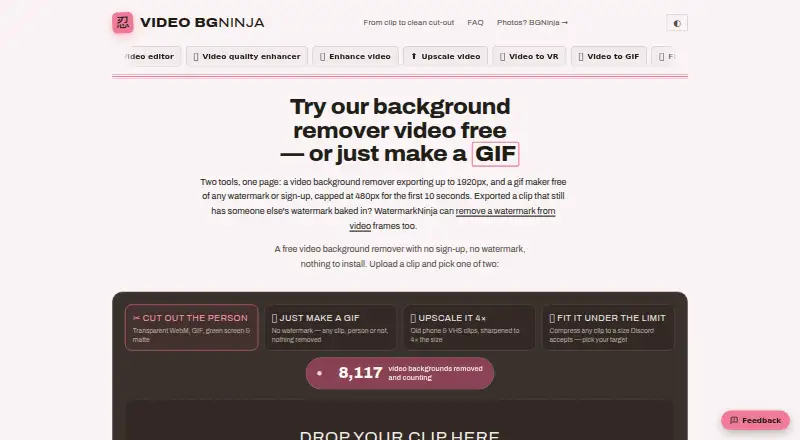
VideoBGNinja is a browser-based tool for removing people from video backgrounds without a green screen, account, installation, or watermark. It is aimed at creators, presenters, streamers, editors, and short-form video workflows. Its AI frame-by-frame person segmentation accepts common formats including MP4, MOV, WebM, MKV, AVI, M4V, MPG, MPEG, WMV, and 3GP. Outputs include transparent WebM with VP9 alpha, transparent GIF, green-screen MP4, black-and-white alpha matte MP4, and video outputs that preserve original audio.
The free plan is useful for short projects: it includes background removal for videos of people, no-account and no-watermark exports, and transparent WebM, GIF, and green-screen MP4 files. The published specifications set the free limit at 90 seconds, 2 GB, and up to 1920 pixels. Paid access is offered as time-limited passes rather than a recurring plan. The 24-hour pass costs €3, while the 30-day pass costs €5; both add four-minute clips, up to 3840 pixels (4K), ProRes 4444 MOV with alpha, and priority queue processing.
Platform fit is a central strength. VideoBGNinja runs on the web and connects with OBS, DaVinci Resolve, Adobe Premiere Pro, Adobe After Effects, and CapCut through its export formats and workflow compatibility. Background replacement can produce white or green output, giving editors additional options beyond transparent files. The narrow focus is also clear: there is no batch processing, and the free tier is designed for shorter, lower-resolution work. Choose VideoBGNinja for individual clips, transparent exports, and editing-software integrations; choose an alternative if batch workflows or broader production management are essential.
Your product? Our editors can test VideoBGNinja in depth and publish a review, labelled as paid · from $149/mo →
VideoBGNinja pricing
All 3 VideoBGNinja plans and prices →
VideoBGNinja fact sheet
| Free plan | Yes |
|---|---|
| Paid from | €3 one-time |
| Background replacement | Yes |
| Background blur | Not verified |
| Transparent video export | Yes |
| Maximum resolution | 4k |
| Maximum clip length | 4 min |
| Supported input formats | MP4, MOV, WebM, MKV, AVI, M4V, MPG, MPEG, WMV, 3GP |
| Batch processing | No |
| Money-back guarantee | 14 days |
| Deployment | Cloud |
| Platforms | Web |
| Compliance & security | GDPR |
| Support | |
| Built for | Solo, Small business (editorial estimate) |
| Integrations | 5 integrations: OBS, DaVinci Resolve, Adobe Premiere Pro, Adobe After Effects, CapCut |
| Pricing | Free plan (source) |
| Website | videobgninja.com |
| Facts checked | 20 Sep 2026 |
VideoBGNinja integrations
VideoBGNinja lists 5 integrations on its own site.
- OBS
- DaVinci Resolve
- Adobe Premiere Pro
- Adobe After Effects
- CapCut
Alternatives to VideoBGNinja
- AlphaCutA capable open-source choice for local, batch, and command-line background removal.9.4
- BGRemove.videoA free browser tool for removing video backgrounds and exporting transparent WebM clips.9.2
- EZ-CorridorKeyA free local matte-generation tool for filmmakers, editors, and visual-effects artists.9.0


See all VideoBGNinja alternatives →
VideoBGNinja vs the competition
- VideoBGNinja vs AlphaCut
- VideoBGNinja vs BGRemove.video
- VideoBGNinja vs EZ-CorridorKey
- VideoBGNinja vs FuzzPuppy Video Background Remover
- VideoBGNinja vs BackgroundRemover.video
- VideoBGNinja vs Bria Video Background Removal



Compare VideoBGNinja with any tool side by side →
Used VideoBGNinja? Be the first to review it
The editor score above is our own research. What this page doesn't have yet is a reader's view — what you used VideoBGNinja for, what worked and what didn't. No stars are seeded and no review is paid for; an editor reads every one before it appears.
Write a reviewTwo minutes · verified accounts only · read by an editor before it appears
Featured on iTechGuides

VideoBGNinja is listed in our Video Background Removal Software directory. Add the badge to your site — it links back to this page.
<a href="https://www.itechguides.com/products/videobgninja/"><img src="https://www.itechguides.com/best/badge/videobgninja.svg" alt="Featured on iTechGuides" width="230" height="46"></a>
Reviewed by iTechGuides Editors · Editorial team · Updated Oct 2026
Advertiser disclosure: iTechGuides is reader-supported. Vendors can pay for top positions in our rankings and for a place on other products' pages, and we may earn a commission when you click some links. Bought places stand at the number bought; this page and our disclosure say so. Paying vendors may get a fuller, more detailed review from our editors, and that review can change their score. How we rank.
Last updated · How we research and update