
Video Highlight
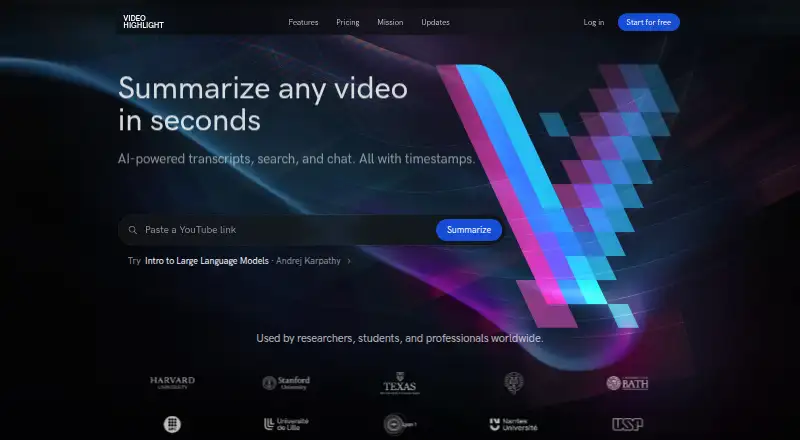
Video Highlight: A broad video research workspace for summarizing, searching, and discussing content. Ranked #4 of 25 in AI Video Summarizers by our editors (7.9/10); pricing: Free plan; best for teams organizing searchable video knowledge.
At a glance
- Editor score7.9 / 10
- PricingFree plan
- Best forTeams organizing searchable video knowledge
- Free planYes
- YouTube supportYes
- Facts checked21 Sep 2026
Where it wins
- Timestamped summaries, key points, and searchable transcripts
- Cross-video search and Q&A across shared collections
- Imports, exports, annotations, and team workspaces in one workflow
Where it doesn't
- Private video and audio uploads are capped at 1 GB
- API access is limited to Pro and Business plans
- The product is centered on web and Chrome workflows
Our verdict on Video Highlight
Video Highlight is a web-based AI video summarization and transcription tool for researchers, students, professionals, and creators. It handles YouTube videos, private video and audio uploads, browser recordings, Google Drive imports, and content from Vimeo and Dailymotion. Users can generate timestamped summaries and key points, search transcripts in 37 languages, ask questions with timestamped answers, and annotate important passages with highlights and notes. The Chrome extension adds a browser-based way to bring video research into the workflow.
Its strongest differentiator is the combination of single-video analysis and collection-level research. YouTube playlist and channel imports help organize related material, while cross-video search and Q&A let teams work across collections rather than treating every video as an isolated item. Team workspaces support shared collections, and exports to Notion, Readwise, and document formats make the resulting notes easier to carry into other workflows. Google Drive imports add another path for working with existing media.
The freemium structure provides free access, with Plus, Pro, and Business tiers available for expanded use. API access is included with Pro and Business, making those plans more relevant for teams that want to connect video knowledge to other systems. Private uploads support video and audio files up to 1 GB, while searchable transcripts, timestamped answers, and chapter generation support detailed review. Video Highlight fits teams building a searchable body of video knowledge and sharing research across workspaces. It is less suitable for workflows that require a native mobile or desktop application, or for private media files above the stated upload limit.
Your product? Our editors can test Video Highlight in depth and publish a review, labelled as paid · from $149/mo →
Video Highlight pricing
All 3 Video Highlight plans and prices →
Video Highlight fact sheet
| Free plan | Yes |
|---|---|
| Paid from | Not verified |
| YouTube support | Yes |
| Video uploads | Yes |
| Transcript output | Yes |
| Chapter generation | Yes |
| Maximum video length | Not verified |
| Input sources | YouTube, Vimeo, Dailymotion, uploaded video files, browser recordings, Google Drive imports |
| Deployment | Cloud, Browser extension |
| Platforms | Web, Chrome extension |
| Support | |
| Built for | Solo, Small business, Mid-market (editorial estimate) |
| Integrations | 3 integrations: Notion, Readwise, Google Drive See all → |
| Pricing | Free plan (source) |
| Website | videohighlight.com |
| Facts checked | 21 Sep 2026 |
Video Highlight integrations
Video Highlight lists 3 integrations on its own site.
- Notion
- Readwise
- Google Drive
See all Video Highlight integrations →
Alternatives to Video Highlight
- GlaspA flexible summarizer for YouTube, audio files, PDFs, transcripts, and saved research.8.9
- NoteGPTA flexible video summarizer for heavy YouTube use, batch work, and varied input sources.8.6
- MindgraspA broad AI study workspace that turns videos, lectures, and documents into study aids.8.0


See all Video Highlight alternatives →
Video Highlight vs the competition
- Video Highlight vs Glasp
- Video Highlight vs NoteGPT
- Video Highlight vs Mindgrasp
- Video Highlight vs SonicScribe
- Video Highlight vs Summarize Video to Text
- Video Highlight vs Synop


Compare Video Highlight with any tool side by side →
Used Video Highlight? Be the first to review it
The editor score above is our own research. What this page doesn't have yet is a reader's view — what you used Video Highlight for, what worked and what didn't. No stars are seeded and no review is paid for; an editor reads every one before it appears.
Write a reviewTwo minutes · verified accounts only · read by an editor before it appears
Featured on iTechGuides

Video Highlight is listed in our AI Video Summarizers directory. Add the badge to your site — it links back to this page.
<a href="https://www.itechguides.com/products/video-highlight/"><img src="https://www.itechguides.com/best/badge/video-highlight.svg" alt="Featured on iTechGuides" width="230" height="46"></a>
Reviewed by iTechGuides Editors · Editorial team · Updated Oct 2026
Advertiser disclosure: iTechGuides is reader-supported. Vendors can pay for top positions in our rankings and for a place on other products' pages, and we may earn a commission when you click some links. Bought places stand at the number bought; this page and our disclosure say so. Paying vendors may get a fuller, more detailed review from our editors, and that review can change their score. How we rank.
Last updated · How we research and update