Verdesk
Verdesk: A focused Windows automation server with recording, replay, vision, and MCP. Ranked #18 of 24 in AI Computer Use Agents by our editors (7.5/10); pricing: Free plan; best for windows automation with recording and replay.
At a glance
- Editor score7.5 / 10
- PricingFree plan
- Best forWindows automation with recording and replay
- Free planYes
- Paid from$49/yr
- Desktop app controlYes
- Facts checked22 Sep 2026
Where it wins
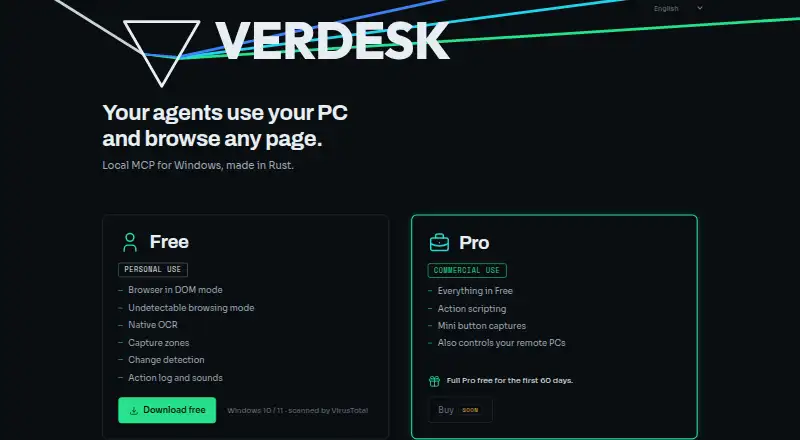
- Controls Win32, WPF, UWP, Electron, browser, game, and canvas interfaces
- Combines semantic, text-based, rectangular, and pixel-level actions
- Adds recording, replay, visual learning, MCP, and encrypted remote access
Where it doesn't
- Runs on Windows 10 and 11 rather than macOS or Linux
- Free use is limited to personal and non-commercial work
- Team features are listed as coming soon
Our verdict on Verdesk
Verdesk is a local MCP server for AI agents that can observe and operate browser tabs and Windows applications. It represents screen changes as text and layout, reads on-screen text, and supports both semantic and coordinate-based actions. Its audience is developers and teams automating Windows workflows, browser tasks, desktop interfaces, and visual applications through Claude Code or GPT.
The published plans show a clear progression. Free costs $0 one-time and includes the full modulated vision pipeline, a local-mode MCP server, base capture, buffer, history, and UIA tools, modulation profiles, and an offline installer with no account or telemetry. It covers personal and non-commercial use. Pro costs $49 per year on annual billing and adds LAN/WAN remote access, action trains for recording and replay, mapped and editable screen objects, a commercial-use license for 1 developer, up to 3 device activations, and updates while subscribed. Team costs $199 per year on annual billing and adds everything in Pro, shared license keys, centralized billing, and priority email support.
Its standout capability is the combination of broad Windows UI coverage and visual automation. Verdesk can navigate browsers, switch tabs, take page snapshots, learn visual buttons, track objects after windows move, and replay recorded tasks with parameter slots. The modulated vision pipeline sends changed regions rather than full screenshots, while encrypted remote access uses SSH port forwarding. That makes it suited to local-first Windows automation where repeatable interaction matters. It is a narrower fit for organizations requiring macOS or Linux support, since the documented installer targets Windows 10 and 11. Teams needing centralized licensing and priority email support can choose Team when available; others should favor Pro for commercial Windows automation or Free for personal, non-commercial work.
Your product? Our editors can test Verdesk in depth and publish a review, labelled as paid · from $149/mo →
Verdesk pricing
All 3 Verdesk plans and prices →
Verdesk fact sheet
| Free plan | Yes |
|---|---|
| Paid from | $49/yr |
| Desktop app control | Yes |
| Supported platforms | Windows 10/11 |
| Browser control | Yes |
| Screen understanding | Yes |
| Deployment | Local |
| Human approval controls | Not verified |
| API access | Yes |
| Deployment | Desktop |
| Platforms | Windows |
| Support | |
| Built for | Solo, Small business (editorial estimate) |
| Integrations | 2 integrations: Claude Code, GPT |
| Pricing | Free plan (source) |
| Website | verdesk.app |
| Facts checked | 22 Sep 2026 |
Verdesk integrations
Verdesk lists 2 integrations on its own site.
- Claude Code
- GPT
Alternatives to Verdesk
- CoastyA programmable computer-use platform with managed machines, workflows, approvals, and APIs.9.2
- Claude CoworkA broad computer-use workspace for business automation, with paid plans starting at $17 annually.9.1
- Clawd CursorA free, open-source local MCP server for controlled desktop automation.9.0



See all Verdesk alternatives →
Used Verdesk? Be the first to review it
The editor score above is our own research. What this page doesn't have yet is a reader's view — what you used Verdesk for, what worked and what didn't. No stars are seeded and no review is paid for; an editor reads every one before it appears.
Write a reviewTwo minutes · verified accounts only · read by an editor before it appears
Featured on iTechGuides

Verdesk is listed in our AI Computer Use Agents directory. Add the badge to your site — it links back to this page.
<a href="https://www.itechguides.com/products/verdesk/"><img src="https://www.itechguides.com/best/badge/verdesk.svg" alt="Featured on iTechGuides" width="230" height="46"></a>
Reviewed by iTechGuides Editors · Editorial team · Updated Oct 2026
Advertiser disclosure: iTechGuides is reader-supported. Vendors can pay for top positions in our rankings and for a place on other products' pages, and we may earn a commission when you click some links. Bought places stand at the number bought; this page and our disclosure say so. Paying vendors may get a fuller, more detailed review from our editors, and that review can change their score. How we rank.
Last updated · How we research and update