
Ventrilo
Ventrilo: A traditional voice-server option with strong channel controls but limited platform coverage. Ranked #16 of 22 in Game Voice Chat Software by our editors (7.2/10); pricing: Free plan; best for traditional desktop voice-server users.
At a glance
- Editor score7.2 / 10
- PricingFree plan
- Best forTraditional desktop voice-server users
- Free planYes
- Hosting modelBoth
- Facts checked20 Sep 2026
Where it wins
- Channels, subchannels, permissions, passwords, and server administration
- Push-to-talk, voice activation, recording, playback, and configurable codecs
- Integrates with Windows Media Player, Winamp, iTunes, and Spotify
Where it doesn't
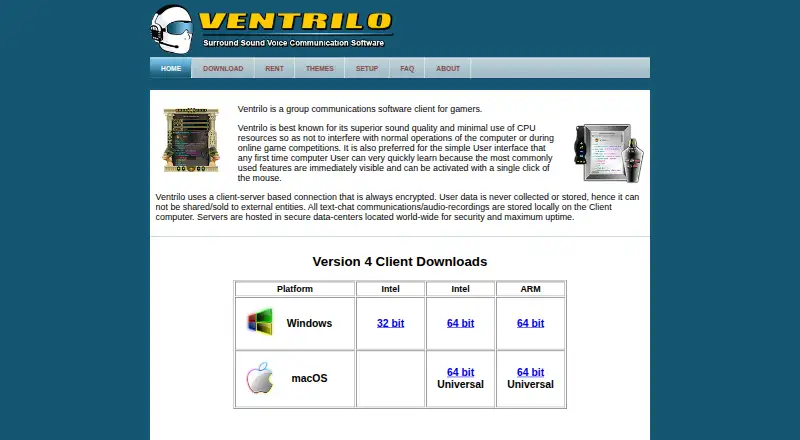
- Client support is limited to Windows and macOS
- No mobile apps or screen sharing
- Self-hosting documentation is written for version 2.x systems
Our verdict on Ventrilo
Ventrilo is a client-server voice communication application for gamers and gaming groups that prefer organized voice servers over broader community platforms. It provides multi-user communication across channels and servers, private voice and text conversations, push-to-talk, voice activation, channel limits, passwords, text-to-speech notifications, and local text and audio storage. The client runs on Windows and macOS, while servers can be hosted through the vendor’s licensed hosting service or run with server software. Its free client and traditional server structure make it a fit for gaming groups that want direct control over voice channels and administration.
Channel management is the product’s clearest strength. Administrators can create dynamic channels and subchannels, apply server and channel passwords, manage access remotely, and use a built-in server browser. Voice recording and playback, configurable codecs, event notifications, and text-to-speech add control beyond basic group calling. Local storage for text chat and audio recordings can also suit groups that want conversations kept within the desktop application. Media-player integrations with Windows Media Player, Winamp, iTunes, and Spotify add compatibility for users who coordinate voice communication with desktop audio tools.
The main trade-off is its narrow platform and feature scope. Ventrilo supports Windows and macOS, but there are no mobile apps or screen-sharing features. Hosting is priced separately by concurrent user capacity and billing period, with published hosting options ranging from 15 to 400 slots; the listed 15-slot plan supports up to 15 concurrent users, while the 25-slot plan supports up to 25. Groups wanting server administration, configurable voice behavior, and a desktop-first experience should consider Ventrilo. Teams that need mobile access, screen sharing, or a wider modern collaboration environment should choose an alternative.
Your product? Our editors can test Ventrilo in depth and publish a review, labelled as paid · from $149/mo →
Ventrilo pricing
All 3 Ventrilo plans and prices →
Ventrilo fact sheet
| Free plan | Yes |
|---|---|
| Paid from | Not verified |
| Maximum users | 15 users |
| Hosting model | Both |
| Mobile apps | No |
| Screen sharing | Not verified |
| Noise suppression | Not verified |
| Supported platforms | windows, macos |
| Money-back guarantee | 30 days |
| Deployment | Cloud, Self-hosted, Desktop |
| Platforms | Windows, macOS |
| Support | Community, Docs |
| Built for | Small business, Mid-market, Enterprise (editorial estimate) |
| Integrations | 4 integrations: Windows Media Player, Winamp, iTunes, Spotify |
| Pricing | Free plan (source) |
| Website | ventrilo.com |
| Facts checked | 20 Sep 2026 |
Ventrilo integrations
Ventrilo lists 4 integrations on its own site.
- Windows Media Player
- Winamp
- iTunes
- Spotify
Alternatives to Ventrilo
- DiscordA broad, free game-chat platform with optional Nitro upgrades for larger limits.9.4
- MumbleA free, self-hosted gaming voice platform with positional audio and strong controls.8.9
- TeamSpeakA long-running voice platform for communities that need control over server structure and access.8.7



See all Ventrilo alternatives →
Used Ventrilo? Be the first to review it
The editor score above is our own research. What this page doesn't have yet is a reader's view — what you used Ventrilo for, what worked and what didn't. No stars are seeded and no review is paid for; an editor reads every one before it appears.
Write a reviewTwo minutes · verified accounts only · read by an editor before it appears
Featured on iTechGuides

Ventrilo is listed in our Game Voice Chat Software directory. Add the badge to your site — it links back to this page.
<a href="https://www.itechguides.com/products/ventrilo/"><img src="https://www.itechguides.com/best/badge/ventrilo.svg" alt="Featured on iTechGuides" width="230" height="46"></a>
Reviewed by iTechGuides Editors · Editorial team · Updated Oct 2026
Advertiser disclosure: iTechGuides is reader-supported. Vendors can pay for top positions in our rankings and for a place on other products' pages, and we may earn a commission when you click some links. Bought places stand at the number bought; this page and our disclosure say so. Paying vendors may get a fuller, more detailed review from our editors, and that review can change their score. How we rank.
Last updated · How we research and update