
Vecto
Vecto: A precise, cross-platform vectorizer with strong full-color and CLI tools. Ranked #5 of 26 in Image Vectorization Software by our editors (8.8/10); pricing: Free plan; best for cross-platform users wanting precise tracing.
At a glance
- Editor score8.8 / 10
- PricingFree plan
- Best forCross-platform users wanting precise tracing
- Free planYes
- Paid from$7.99 one-time
- Batch conversionYes
- Facts checked20 Sep 2026
Where it wins
- Free and open source on Windows, macOS and Linux
- Full-color tracing with sub-pixel edge placement
- CLI batch tracing supports wildcards and output directories
Where it doesn't
- No AI-assisted vectorization features
- The Microsoft Store option costs $7.99 one-time
- Focused on desktop and CLI workflows rather than web editing
Our verdict on Vecto
Vecto is a local bitmap-to-vector tracing application for turning raster artwork into editable SVG files. It is suited to designers, illustrators, developers and technical users working with logos, icons, illustrations, pixel art or scans. The software supports PNG, JPG, BMP and GIF input, with SVG export and clipboard copying. Windows users can choose a desktop application, while Linux and macOS access is available through CLI binaries in releases.
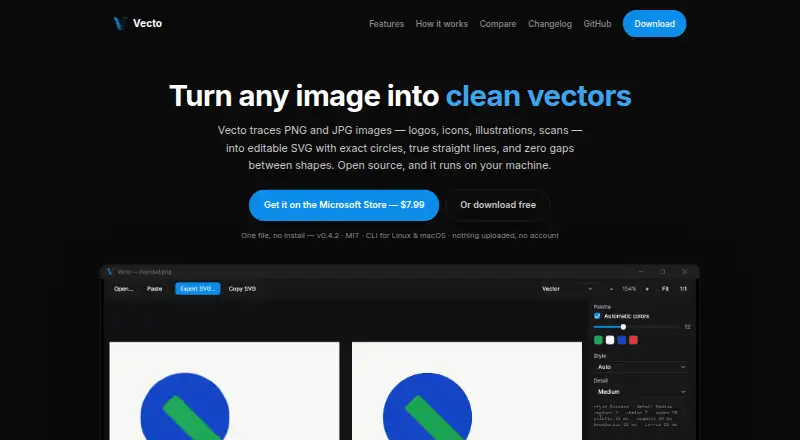
Its strongest area is tracing control. Vecto provides full-color planar vectorization with shared boundaries, sub-pixel edge placement, and exact straight-line and circular-arc fitting. Segmentation views and palette swatches help users inspect how an image is being interpreted, while side-by-side comparison includes synchronized zoom and pan. These features make it a strong fit when preserving shapes, edges and color regions matters more than a quick, simplified conversion.
Vecto also extends beyond an interactive desktop workflow through headless command-line tracing and batch conversion with wildcards and output directories. The free and open-source distribution includes PNG and JPG tracing and editable SVG output. A Microsoft Store option costs $7.99 one-time and adds one-click installation plus an auto-updating signed install. Choose Vecto for cross-platform access, precise full-color conversion and repeatable CLI processing. Consider another tool if AI-assisted features, browser-based editing or a broader collaborative workspace are central to the workflow.
Your product? Our editors can test Vecto in depth and publish a review, labelled as paid · from $149/mo →
Vecto pricing
All 2 Vecto plans and prices →
Vecto fact sheet
| Free plan | Yes |
|---|---|
| Paid from | $7.99 one-time |
| Batch conversion | Yes |
| Tracing modes | Full-color |
| Available platforms | Desktop |
| Vector output formats | SVG |
| Batch file limit | Not verified |
| Maximum color count | Not verified |
| Deployment | Desktop |
| Platforms | Windows, macOS, Linux |
| Support | Docs, Community |
| Built for | Solo, Small business (editorial estimate) |
| Pricing | Free plan (source) |
| Website | danielmevit.github.io |
| Facts checked | 20 Sep 2026 |
Alternatives to Vecto
- VectorItA free offline vectorizer with detailed tracing controls and broad desktop export options.9.4
- EdgeSVGA developer-focused engine for automated, measurable raster-to-SVG conversion.9.3
- Adobe CaptureA free mobile vectorization tool for Creative Cloud workflows, with broad Adobe integrations.9.2



Vecto vs the competition
- Vecto vs VectorIt
- Vecto vs EdgeSVG
- Vecto vs Adobe Capture
- Vecto vs Vectorizer.AI
- Vecto vs AI Vectorizer
- Vecto vs Vectorization.eu



Compare Vecto with any tool side by side →
Also Ranked In
Vecto is ranked in 2 of our directories.
Used Vecto? Be the first to review it
The editor score above is our own research. What this page doesn't have yet is a reader's view — what you used Vecto for, what worked and what didn't. No stars are seeded and no review is paid for; an editor reads every one before it appears.
Write a reviewTwo minutes · verified accounts only · read by an editor before it appears
Featured on iTechGuides

Vecto is listed in our Image Vectorization Software directory. Add the badge to your site — it links back to this page.
<a href="https://www.itechguides.com/products/vecto/"><img src="https://www.itechguides.com/best/badge/vecto.svg" alt="Featured on iTechGuides" width="230" height="46"></a>
Reviewed by iTechGuides Editors · Editorial team · Updated Oct 2026
Advertiser disclosure: iTechGuides is reader-supported. Vendors can pay for top positions in our rankings and for a place on other products' pages, and we may earn a commission when you click some links. Bought places stand at the number bought; this page and our disclosure say so. Paying vendors may get a fuller, more detailed review from our editors, and that review can change their score. How we rank.
Last updated · How we research and update