UsageOS
UsageOS: A private, open-source Mac tracker for reviewing activity without cloud storage. Ranked #23 of 36 in Screen Time Management Apps by our editors (6.7/10); pricing: Free plan; best for private open-source Mac activity tracking.
At a glance
- Editor score6.7 / 10
- PricingFree plan
- Best forPrivate open-source Mac activity tracking
- Free planYes
- Paid fromFree
- Facts checked20 Sep 2026
Where it wins
- Free macOS app with open-source code and local SQLite storage
- Detailed recaps, weekly views, timelines, categories, and projects
- CSV export plus configurable 30-, 90-, or 365-day history deletion
Where it doesn't
- Available only as a macOS desktop application
- Focused on tracking and review rather than app blocking or time limits
- Categorization depends on user-defined rules for apps, sites, and titles
Our verdict on UsageOS
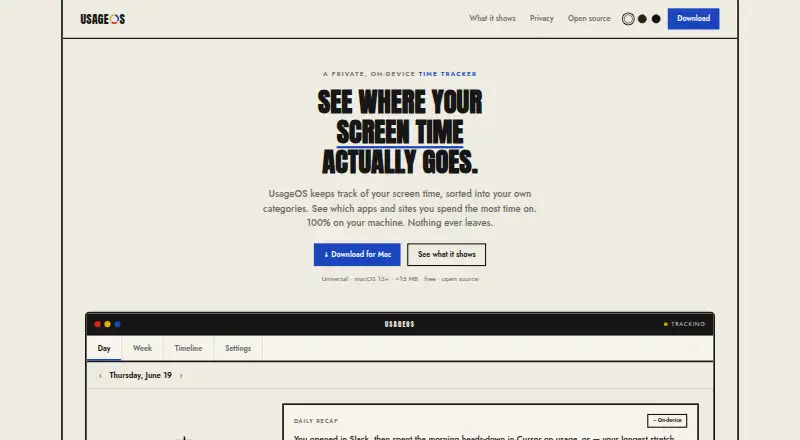
UsageOS is a free, open-source desktop time tracker for people who want a private view of how they spend time on a Mac. It records active applications and window titles, with an option to read the current browser tab address, then organizes activity into categories such as work, browsing, messaging, and entertainment. Data stays on the device in a local SQLite database, with no cloud account or telemetry, making the product a fit for individual users who prioritize local control over shared administration.
Pricing is straightforward: the Free plan includes on-device time tracking, open-source availability, and a macOS desktop application. The published product details also support usage reports, including daily recaps, weekly views, timelines, activity by category, and project-based views. CSV export provides a practical path for taking usage data into another workflow, while automatic history deletion after 30, 90, or 365 days gives users control over retention. Exclusions for apps and sites, along with private-title hiding, add further control over what is recorded or displayed.
UsageOS stands out through the depth of its local activity record and review tools rather than through intervention. User-defined rules can group apps, sites, and window-title words, which suits people who want tailored reports across work and personal activity. Its focus is measurement: people looking for app blocking, scheduled limits, or focus sessions should choose a different type of screen-time product. UsageOS is the better choice for Mac users who want free, private, customizable tracking and are comfortable reviewing patterns instead of enforcing limits.
Your product? Our editors can test UsageOS in depth and publish a review, labelled as paid · from $149/mo →
UsageOS pricing
All 1 UsageOS plans and prices →
UsageOS fact sheet
| Free plan | Yes |
|---|---|
| Paid from | Free |
| Devices included | Not verified |
| Supported platforms | macOS 13+ |
| Usage reports | Yes |
| Application limits | Not verified |
| Scheduled limits | Not verified |
| Focus sessions | Not verified |
| Usage history retention | Not verified |
| Deployment | Desktop |
| Platforms | macOS |
| Support | Docs |
| Built for | Solo, Small business (editorial estimate) |
| Pricing | Free plan (source) |
| Website | usageos.app |
| Facts checked | 20 Sep 2026 |
Alternatives to UsageOS
- FreedomA flexible cross-device blocker with strong scheduling and session controls.9.4
- ScreenZenA free, broad screen-time toolkit for blocking apps and websites across four platforms.9.3
- AppBlockA flexible blocker for scheduled focus, stricter limits, and mobile-first screen-time control.9.2



See all UsageOS alternatives →
Used UsageOS? Be the first to review it
The editor score above is our own research. What this page doesn't have yet is a reader's view — what you used UsageOS for, what worked and what didn't. No stars are seeded and no review is paid for; an editor reads every one before it appears.
Write a reviewTwo minutes · verified accounts only · read by an editor before it appears
Featured on iTechGuides

UsageOS is listed in our Screen Time Management Apps directory. Add the badge to your site — it links back to this page.
<a href="https://www.itechguides.com/products/usageos/"><img src="https://www.itechguides.com/best/badge/usageos.svg" alt="Featured on iTechGuides" width="230" height="46"></a>
Reviewed by iTechGuides Editors · Editorial team · Updated Oct 2026
Advertiser disclosure: iTechGuides is reader-supported. Vendors can pay for top positions in our rankings and for a place on other products' pages, and we may earn a commission when you click some links. Bought places stand at the number bought; this page and our disclosure say so. Paying vendors may get a fuller, more detailed review from our editors, and that review can change their score. How we rank.
Last updated · How we research and update