
Unisic
Unisic: A broad Linux Wayland capture toolkit with strong redaction and measurement features. Ranked #29 of 75 in Screenshot Annotation Software by our editors (6.3/10); pricing: Free plan; best for linux users needing redaction and measurement.
At a glance
- Editor score6.3 / 10
- PricingFree plan
- Best forLinux users needing redaction and measurement
- Free planYes
- Paid fromFree
- Redaction toolsYes
- Facts checked20 Sep 2026
Where it wins
- Supports live and post-capture annotation with several redaction tools
- Adds on-image measurement, OCR, and QR/barcode decoding
- Records GIF, MP4, and WebM and uploads to multiple destinations
Where it doesn't
- Linux-only, with a focus on Wayland desktop environments
- No built-in AI features
- Requires destination configuration for some upload workflows
Our verdict on Unisic
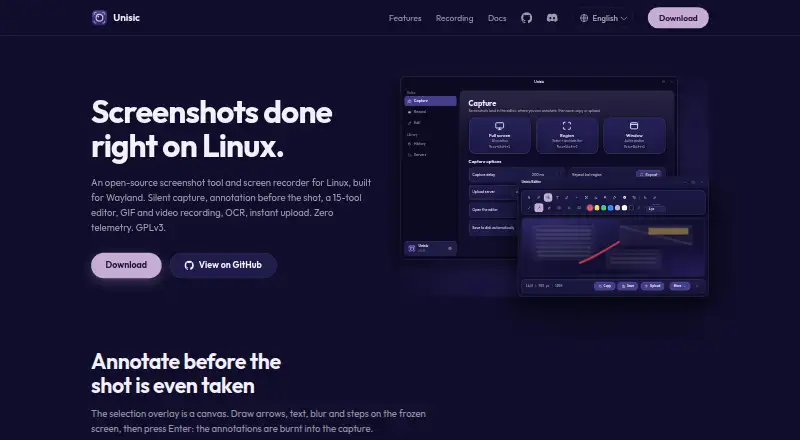
Unisic is an open-source screenshot and screen-recording application for Linux Wayland desktops. It is aimed at users who need more than basic image capture, particularly people who annotate screenshots, redact sensitive content, measure distances on images, extract text, or send captures to configurable upload destinations. Capture modes include full-screen, region, and active-window screenshots, while the application also supports GIF, MP4, and WebM recording. It is distributed under the GNU GPL v3.
Its strongest area is the depth of its capture and annotation workflow. Users can annotate a frozen capture overlay while taking a screenshot, then continue in a post-capture editor. Blur, pixelate, smart eraser, and opaque text redaction cover several common ways to obscure content. On-image distance measurement, OCR text extraction, and QR/barcode decoding extend the tool beyond markup. Capture history with thumbnails also gives the workflow a place to review earlier images.
Unisic’s ecosystem fit is practical but focused. Uploads can use custom HTTP destinations, ShareX uploader import, FTP, and SFTP, with listed services including catbox.moe, uguu.se, litterbox, and tmpfiles.org. The published positioning is free software rather than a tiered paid product, so the main trade-off is platform scope: Unisic is designed for Linux Wayland desktops and uses xdg-desktop-portal and compositor-specific capture backends. Choose it if Linux compatibility, redaction, measurement, recording, and configurable uploads matter together. Choose another tool if you need Windows or macOS support, or if AI features are central to your workflow.
Your product? Our editors can test Unisic in depth and publish a review, labelled as paid · from $149/mo →
Unisic pricing
Unisic fact sheet
| Free plan | Yes |
|---|---|
| Paid from | Free |
| Redaction tools | Yes |
| Measurement tools | Yes |
| Team collaboration | Not verified |
| Browser extension | Not verified |
| Export formats | PNG, JPG, WebP |
| Maximum file size | Not verified |
| Deployment | Desktop |
| Platforms | Linux |
| Support | Community, Docs |
| Built for | Solo, Small business (editorial estimate) |
| Integrations | 8 integrations: Custom HTTP destinations, ShareX uploader import, FTP, SFTP, catbox.moe, uguu.se … See all → |
| Pricing | Free plan |
| Website | unisic.app |
| Facts checked | 20 Sep 2026 |
Unisic integrations
Unisic lists 8 integrations on its own site.
- Custom HTTP destinations
- ShareX uploader import
- FTP
- SFTP
- catbox.moe
- uguu.se
- litterbox
- tmpfiles.org
Alternatives to Unisic
- SnagitA paid desktop suite for detailed screenshot capture, annotation, OCR, and short video creation.9.3
- ShareXA highly configurable Windows capture tool for annotation, OCR, recording, and automated sharing.9.1
- ScreenpressoA broad Windows capture toolkit with strong annotation, OCR, document, and sharing features.8.9



Also Ranked In
Unisic is ranked in 2 of our directories.
Used Unisic? Be the first to review it
The editor score above is our own research. What this page doesn't have yet is a reader's view — what you used Unisic for, what worked and what didn't. No stars are seeded and no review is paid for; an editor reads every one before it appears.
Write a reviewTwo minutes · verified accounts only · read by an editor before it appears
Featured on iTechGuides

Unisic is listed in our Screenshot Annotation Software directory. Add the badge to your site — it links back to this page.
<a href="https://www.itechguides.com/products/unisic/"><img src="https://www.itechguides.com/best/badge/unisic.svg" alt="Featured on iTechGuides" width="230" height="46"></a>
Reviewed by iTechGuides Editors · Editorial team · Updated Oct 2026
Advertiser disclosure: iTechGuides is reader-supported. Vendors can pay for top positions in our rankings and for a place on other products' pages, and we may earn a commission when you click some links. Bought places stand at the number bought; this page and our disclosure say so. Paying vendors may get a fuller, more detailed review from our editors, and that review can change their score. How we rank.
Last updated · How we research and update