
Typesy
Typesy: A flexible family typing tutor with adaptive practice, reporting, and multi-device access. Ranked #7 of 36 in Typing Tutor Software by our editors (8.6/10); pricing: 7-day trial; best for families and multi-device learners.
At a glance
- Editor score8.6 / 10
- Pricing7-day trial
- Best forFamilies and multi-device learners
- Free planNo
- Paid from$6/mo
- Adaptive practiceYes
- Founded2006
- Facts checked20 Sep 2026
Where it wins
- Adaptive lessons adjust practice to learner progress
- Works across web, Windows, macOS, iOS, and Android
- Supports six keyboard layouts and teacher progress reports
Where it doesn't
- No free plan
- Family plans are structured around multiple accounts
- Monthly billing costs more than annual billing
Our verdict on Typesy
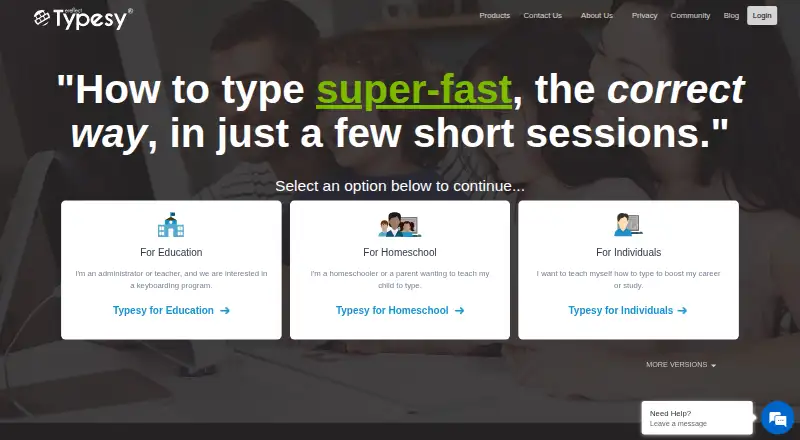
Typesy is typing and keyboarding training software for individuals, families, homeschoolers, schools, and organizations. It combines structured video instruction with interactive exercises, typing games, goals, reports, analytics, adaptive learning, and customizable coursework. Multiple curricula support different ages and skill levels, while cloud synchronization connects learning across web, Windows, macOS, iOS, and Android devices. Families and homeschoolers are the clearest fit for the published plans, although the broader product also includes education and individual offerings.
The homeschool pricing is organized by household or co-op size. Typesy Homeschool Family costs $6 per month with annual billing or $10 per month with monthly billing, including 1 parent-teacher admin account and 2 student accounts. Typesy Homeschool Big Family costs $11 annually billed or $19 monthly, with 2 parent-teacher admin accounts and 5 student accounts. Typesy Homeschool Co-op costs $30 annually billed or $50 monthly, with 5 parent-teacher admin accounts and 15 student accounts. Each listed plan includes the full school curriculum, Typesy kids curriculum, and 4,000 cross-curricular lessons. The individual offer includes a 7-day trial.
Platform coverage and education integrations broaden Typesy's use beyond a single computer. Supported connections include Clever, Microsoft, Google Classroom, ClassLink, Canvas, and Google SSO. Teacher and class progress reports, lesson assignments, and analytics give adults visibility into learner progress, while support for US, UK, Australian, Canadian, Spanish, and Brazilian keyboard layouts helps accommodate different keyboards. Typesy suits families, homeschool groups, and classrooms that want structured instruction with shared reporting across devices. A learner seeking a simple, single-user typing tool may find its family-oriented account structure and wider curriculum more than necessary.
Your product? Our editors can test Typesy in depth and publish a review, labelled as paid · from $149/mo →
Typesy pricing
All 3 Typesy plans and prices →
Typesy fact sheet
| Free plan | No |
|---|---|
| Paid from | $6/mo |
| Guided lessons | Yes |
| Adaptive practice | Yes |
| Skill diagnostics | Not verified |
| Personalized drills | Not verified |
| Offline mode | Not verified |
| Keyboard layouts | 6 |
| Free trial | 7 days |
| Money-back guarantee | 365 days |
| Deployment | Cloud, Desktop, Mobile |
| Platforms | Web, Windows, macOS, iOS, Android |
| Support | Email, Live chat, Phone, Tickets, Community, Docs · 24/7 |
| Built for | Solo, Small business, Mid-market, Enterprise (editorial estimate) |
| Integrations | 6 integrations: Clever, Microsoft, Google Classroom, ClassLink, Canvas, Google SSO |
| Pricing | 7-day trial (source) |
| Website | typesy.com |
| Facts checked | 20 Sep 2026 |
Typesy integrations
Typesy lists 6 integrations on its own site.
- Clever
- Microsoft
- Google Classroom
- ClassLink
- Canvas
- Google SSO
Alternatives to Typesy
- Typing.comA broad, school-ready typing tutor with adaptive practice and a capable free edition.9.4
- TIPP10A capable typing tutor for individual learners and connected school programs.9.3
- Typing AgentA school-focused typing platform with diagnostics, adaptive practice, and accessibility options.9.2



Typesy vs the competition
- Typesy vs Typing.com
- Typesy vs TIPP10
- Typesy vs Typing Agent
- Typesy vs TypingClub
- Typesy vs TypeQuicker
- Typesy vs TypingMaster


Compare Typesy with any tool side by side →
Used Typesy? Be the first to review it
The editor score above is our own research. What this page doesn't have yet is a reader's view — what you used Typesy for, what worked and what didn't. No stars are seeded and no review is paid for; an editor reads every one before it appears.
Write a reviewTwo minutes · verified accounts only · read by an editor before it appears
Featured on iTechGuides

Typesy is listed in our Typing Tutor Software directory. Add the badge to your site — it links back to this page.
<a href="https://www.itechguides.com/products/typesy/"><img src="https://www.itechguides.com/best/badge/typesy.svg" alt="Featured on iTechGuides" width="230" height="46"></a>
Reviewed by iTechGuides Editors · Editorial team · Updated Oct 2026
Advertiser disclosure: iTechGuides is reader-supported. Vendors can pay for top positions in our rankings and for a place on other products' pages, and we may earn a commission when you click some links. Bought places stand at the number bought; this page and our disclosure say so. Paying vendors may get a fuller, more detailed review from our editors, and that review can change their score. How we rank.
Last updated · How we research and update