
Typing.com
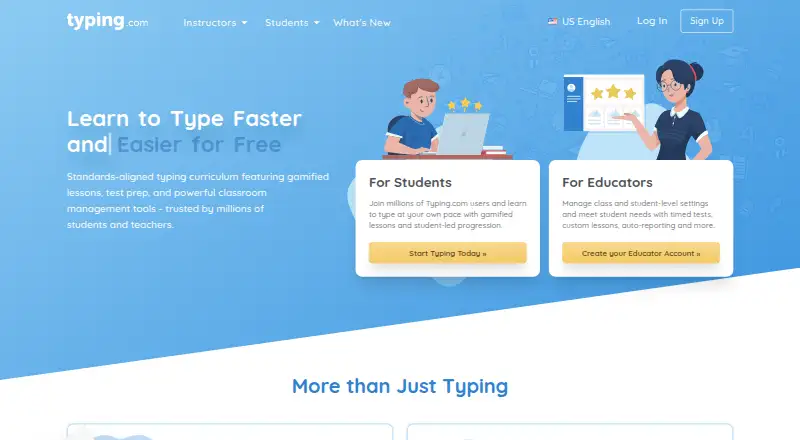
Typing.com: A broad, school-ready typing tutor with adaptive practice and a capable free edition. Ranked #1 of 36 in Typing Tutor Software by our editors (9.4/10); pricing: Free plan · 30-day trial; best for schools and broad curriculum coverage.
At a glance
- Editor score9.4 / 10
- PricingFree plan · 30-day trial
- Best forSchools and broad curriculum coverage
- Free planYes
- Adaptive practiceYes
- Facts checked20 Sep 2026
Where it wins
- Free edition includes lessons, tests, games, and classroom settings
- Adaptive practice and TypeAI target troublesome keys
- Supports 30 keyboard layouts and multiple school integrations
Where it doesn't
- Free edition is ad-supported
- Free data retention lasts 70 days
- PLUS pricing varies by subscription type and duration
Our verdict on Typing.com
Typing.com is a web-based typing tutor and digital literacy platform for students, teachers, homeschool educators, schools, and districts. Its core offering combines step-by-step keyboarding lessons, timed exercises, tests, games, competitions, leaderboards, certificates, and progress tracking. Teachers can create assignments, set grading thresholds, monitor activity, and build custom lessons or tests. The platform also extends beyond typing into digital literacy, computer applications, coding, AI literacy, creative writing, and test preparation, making it suitable for schools that want keyboarding within a wider curriculum.
The freemium structure gives schools and individual learners a substantial starting point. The FREE Edition includes lessons, tests, games, email support, classroom-level settings, and 70-day data retention, with advertising. The PLUS Edition adds an ad-free experience, unlimited data retention, priority phone and email support, expanded curriculum, assignments with auto grading, and real-time student activity and progress. A 30-day PLUS trial is available, while subscription pricing varies by subscription type and duration and is provided through quotes. Buyers should compare the broader paid curriculum and administration features with the needs of their classrooms before upgrading.
For school environments, Typing.com connects with Google SSO, Google Classroom, Microsoft Teams, Clever Secure Sync, Clever Library, ClassLink, and Schoology. These integrations support rostering and sign-on workflows alongside classroom monitoring. Adaptive practice based on problem keys and TypeAI-generated stories add individualized practice, while 30 keyboard layouts support varied instructional needs. The tradeoff is focus: learners seeking only a lightweight typing tool may find the digital literacy and school-management scope broader than necessary, and the web-only delivery does not provide offline mode. Schools, districts, and educators needing curriculum breadth and classroom controls should consider it; users wanting offline study or a narrow typing-only experience should look elsewhere.
Your product? Our editors can test Typing.com in depth and publish a review, labelled as paid · from $149/mo →
Typing.com pricing
All 2 Typing.com plans and prices →
Typing.com fact sheet
| Free plan | Yes |
|---|---|
| Paid from | Not verified |
| Guided lessons | Yes |
| Adaptive practice | Yes |
| Skill diagnostics | Yes |
| Personalized drills | Yes |
| Offline mode | No |
| Keyboard layouts | 30 |
| Free trial | 30 days |
| Deployment | Cloud |
| Platforms | Web |
| Support | Email, Phone, Docs |
| Built for | Small business, Mid-market, Enterprise (editorial estimate) |
| Integrations | 7 integrations: Google SSO, Google Classroom, Microsoft Teams, Clever Secure Sync, Clever Library, ClassLink … See all → |
| Pricing | Free plan · 30-day trial (source) |
| Website | typing.com |
| Facts checked | 20 Sep 2026 |
Typing.com integrations
Typing.com lists 7 integrations on its own site.
- Google SSO
- Google Classroom
- Microsoft Teams
- Clever Secure Sync
- Clever Library
- ClassLink
- Schoology
See all Typing.com integrations →
Alternatives to Typing.com
- TIPP10A capable typing tutor for individual learners and connected school programs.9.3
- Typing AgentA school-focused typing platform with diagnostics, adaptive practice, and accessibility options.9.2
- TypingClubA flexible web typing tutor with adaptive practice, classroom tools, and a free edition.9.0



See all Typing.com alternatives →
Typing.com vs the competition
- Typing.com vs TIPP10
- Typing.com vs Typing Agent
- Typing.com vs TypingClub
- Typing.com vs TypeQuicker
- Typing.com vs TypingMaster
- Typing.com vs Typesy


Compare Typing.com with any tool side by side →
Also Ranked In
Typing.com is ranked in 3 of our directories.
Used Typing.com? Be the first to review it
The editor score above is our own research. What this page doesn't have yet is a reader's view — what you used Typing.com for, what worked and what didn't. No stars are seeded and no review is paid for; an editor reads every one before it appears.
Write a reviewTwo minutes · verified accounts only · read by an editor before it appears
Featured on iTechGuides

Typing.com is listed in our Typing Tutor Software directory. Add the badge to your site — it links back to this page.
<a href="https://www.itechguides.com/products/typing-com/"><img src="https://www.itechguides.com/best/badge/typing-com.svg" alt="Featured on iTechGuides" width="230" height="46"></a>
Reviewed by iTechGuides Editors · Editorial team · Updated Oct 2026
Advertiser disclosure: iTechGuides is reader-supported. Vendors can pay for top positions in our rankings and for a place on other products' pages, and we may earn a commission when you click some links. Bought places stand at the number bought; this page and our disclosure say so. Paying vendors may get a fuller, more detailed review from our editors, and that review can change their score. How we rank.
Last updated · How we research and update