TuxVoice
TuxVoice: A free, open-source Linux voice tool with flexible effects, routing, and soundboard features. Ranked #22 of 29 in Game Voice Changers by our editors (7.3/10); pricing: Free plan; best for linux users wanting effects and soundboard routing.
At a glance
- Editor score7.3 / 10
- PricingFree plan
- Best forLinux users wanting effects and soundboard routing
- Free planYes
- Paid fromFree
- Facts checked20 Sep 2026
Where it wins
- Free, open-source software with no subscription or paid tier
- PipeWire virtual microphone supports system-wide audio routing
- Chainable effects, presets, shortcuts, and an included soundboard
Where it doesn't
- Supports Linux only
- PipeWire audio routing may require system audio configuration
- Flatpak or source-build distribution may not suit every setup
Our verdict on TuxVoice
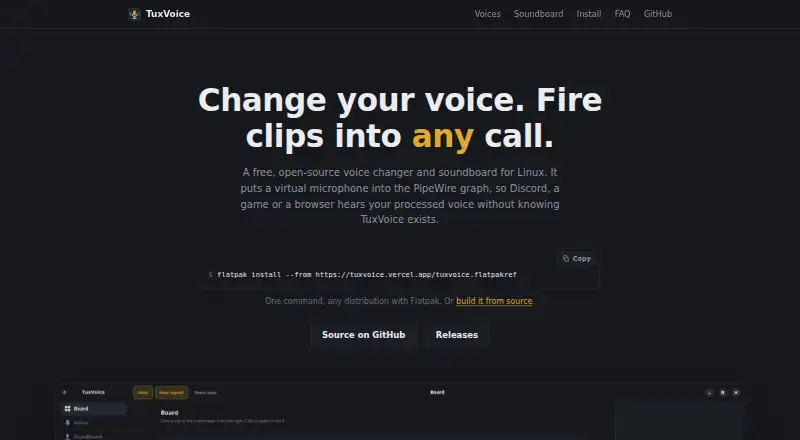
TuxVoice is a free, open-source voice changer and soundboard for Linux users who want processed microphone audio in games, calls, streams, and browser-based tools. It creates a virtual microphone through the PipeWire audio graph, allowing applications to receive voice effects and soundboard clips. The product also supports custom voice chains, system-audio routing, microphone monitoring, local audio files, and an online clip catalogue. Its focus is practical audio routing rather than broad cross-platform coverage.
The platform fit is its clearest strength. TuxVoice lists integrations with Discord, Zoom, OBS, Telegram, TeamSpeak, Mumble, web browsers, and games, so it can serve communication, streaming, and gaming workflows that accept a system microphone. Automatic audio-graph repair is designed to help maintain routing, while shortcuts can make saved voice chains easier to access. Distribution through Flatpak or a source build gives Linux users two installation paths, though the PipeWire-based setup can still require attention to the system audio graph.
Its standout feature set combines twenty voice effects that can be chained in any order with fourteen built-in presets and custom chain saving. That gives users more control than a simple preset-only changer, while the soundboard adds local clips, catalogue access, and routing alongside microphone effects. TuxVoice is a strong choice for Linux users who want free, open-source control over voice effects and sound playback. It is not the right fit for users who need Windows or macOS support, or for anyone seeking a platform-independent voice changer.
Your product? Our editors can test TuxVoice in depth and publish a review, labelled as paid · from $149/mo →
TuxVoice pricing
TuxVoice fact sheet
| Free plan | Yes |
|---|---|
| Paid from | Free |
| Voice effects | Not verified |
| Custom voice creation | Yes |
| Voice cloning | Not verified |
| System-wide mode | Yes |
| Supported platforms | Linux |
| Soundboard included | Yes |
| Deployment | Desktop |
| Platforms | Linux |
| Built for | Solo, Small business (editorial estimate) |
| Integrations | 8 integrations: Discord, Zoom, OBS, Telegram, TeamSpeak, Mumble … |
| Pricing | Free plan |
| Website | tuxvoice.vercel.app |
| Facts checked | 20 Sep 2026 |
TuxVoice integrations
TuxVoice lists 8 integrations on its own site.
- Discord
- Zoom
- OBS
- Telegram
- TeamSpeak
- Mumble
- web browsers
- games
Alternatives to TuxVoice
- BadloVoiceA flexible open-source voice changer for live conversion, models, effects, and offline audio.9.4
- Dubbing AIA broad free voice changer for gamers and creators across desktop, mobile, and major platforms.9.3
- Voice.aiA broad voice library and real-time conversion make Voice.ai a flexible choice for gamers.9.2


See all TuxVoice alternatives →
Also Ranked In
TuxVoice is ranked in 2 of our directories.
Used TuxVoice? Be the first to review it
The editor score above is our own research. What this page doesn't have yet is a reader's view — what you used TuxVoice for, what worked and what didn't. No stars are seeded and no review is paid for; an editor reads every one before it appears.
Write a reviewTwo minutes · verified accounts only · read by an editor before it appears
Featured on iTechGuides

TuxVoice is listed in our Game Voice Changers directory. Add the badge to your site — it links back to this page.
<a href="https://www.itechguides.com/products/tuxvoice/"><img src="https://www.itechguides.com/best/badge/tuxvoice.svg" alt="Featured on iTechGuides" width="230" height="46"></a>
Reviewed by iTechGuides Editors · Editorial team · Updated Oct 2026
Advertiser disclosure: iTechGuides is reader-supported. Vendors can pay for top positions in our rankings and for a place on other products' pages, and we may earn a commission when you click some links. Bought places stand at the number bought; this page and our disclosure say so. Paying vendors may get a fuller, more detailed review from our editors, and that review can change their score. How we rank.
Last updated · How we research and update